


Introduction
The GlassProtect S Jeweller is a wireless indoor glass break detector designed to recognize the sound of shattering glass from a distance of up to 9 meters. It operates within the Ajax system, connecting to a hub via the protected Jeweller protocol, offering a communication range of up to 1,000 meters in open spaces. The device is powered by a pre-installed battery that lasts up to 7 years and includes a socket for connecting a third-party wired detector. It is intended for indoor use only.
This product line is developed for projects, and only accredited Ajax Systems partners can sell, install, and administer Superior products. The Superior, Fibra, and Baseline product lines are mutually compatible, allowing for flexible system configurations.
Functional Elements
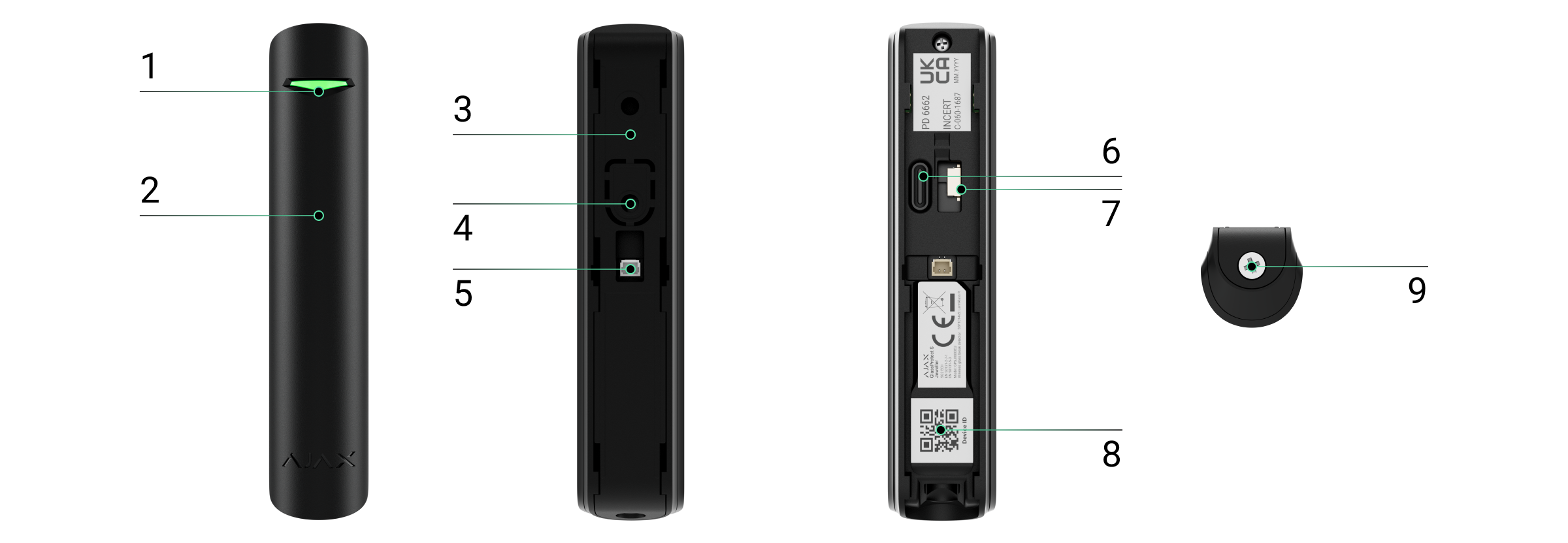
The GlassProtect S Jeweller has the following functional elements:
- LED indicator: Provides visual feedback on the detector's status.
- Microphone hole: Captures the sound of breaking glass.
- SmartBracket mounting panel with holding screw: For secure attachment.
- Perforated part: Activates the tamper mechanism when the detector is dismantled.
- Connector for third-party wired detector: Supports NC (normally closed) contact type.
- Device power button: For turning the device on/off.
- Tamper button: Triggers an alert if the detector is removed from its mounting panel.
- QR code: Contains the device ID for pairing with an Ajax hub.
- Holding screw: Secures the detector to the SmartBracket.
Compatible Hubs and Range Extenders
An Ajax hub with firmware OS Malevich 2.16 or higher is required for the detector to operate. Compatible hubs and range extenders include:
Hubs:
- Hub Plus Jeweller
- Hub 2 (2G) Jeweller
- Hub 2 (4G) Jeweller
- Hub 2 Plus Jeweller
- Hub Hybrid (2G)
- Hub Hybrid (4G)
Radio Signal Range Extenders:
- ReX Jeweller
- ReX 2 Jeweller
Operating Principle
The GlassProtect S Jeweller is a wireless glass break detector that uses a built-in electret microphone. Its DualTone digital algorithm analyzes sound vibrations characteristic of glass breaking, effectively filtering out false alarms. It does not react to glass covered with protective films like shockproof, sunscreen, or decorative films. For such cases, Ajax recommends the DoorProtect S Plus Jeweller, which features shock and tilt sensors.
When the system is armed and a break is detected, the detector instantly sends an alarm signal to the hub. The hub then activates connected sirens, runs pre-configured scenarios, and notifies users and the security company.
Notifications
When an alarm is received, security personnel are informed about what happened and where to dispatch a response team. Notifications include:
- The hub name (name of the protected object).
- The incident time.
- The name of the device.
- The alarm type.
- The virtual room assigned to the device.
Protection from False Alarms
The detector employs a two-stage DualTone algorithm to prevent false alarms. It requires a low-frequency impact sound followed by a high-frequency glass shattering sound within 1.5 seconds. This ensures it does not trigger from common household noises like barking dogs or passing cars.
Sending Events to the Monitoring Station
The Ajax system can transmit alarms to the PRO Desktop monitoring app and central monitoring stations (CMS) using formats such as SurGard (Contact ID), SIA (DC-09), ADEMCO 685, and other protocols. GlassProtect S can transmit the following events:
- Glass break sensor alarm.
- Alarm from a connected third-party detector.
- Tamper alarm/recovery.
- Hub connection loss/restoration.
- Permanent activation/deactivation of the detector.
- Unsuccessful attempt to arm the security system (with system integrity check enabled).
The addressability of Ajax devices allows for detailed event reporting, including device type, name, security group, and virtual room, enabling monitoring stations to respond efficiently.
Adding to the System
Before adding a device:
- Install the Ajax PRO app.
- Log in to a PRO account or create a new one.
- Select or create a space. The space functionality requires specific app versions (e.g., Ajax Security System 3.0 for iOS/Android, Ajax PRO: Tool for Engineers 2.0 for iOS/Android, Ajax PRO Desktop 4.0 for macOS/Windows).
- Add at least one virtual room.
- Add a compatible hub to the space, ensuring it is powered on and connected to the internet (Ethernet, Wi-Fi, or mobile network).
- Verify the space is disarmed and the hub is not undergoing an update.
Connecting to the hub:
- Open the Ajax PRO app and select the hub for adding the detector.
- Navigate to the Devices tab and click 'Add Device'.
- Name the detector, scan or type its QR code, and select a room and group.
- Press 'Add'.
- Switch on the detector.
GlassProtect S works with one hub at a time. Connecting to a new hub will stop event transmission to the old one. For successful pairing, the detector must be within the hub's wireless network coverage area. If pairing fails (LED blinks once per second), switch the detector off for 5 seconds and retry. The detector's status updates depend on Jeweller settings, with a default polling interval of 36 seconds.
Important Note: GlassProtect S is incompatible with Hub, third-party security control panels, and ocBridge Plus and uartBridge integration modules.
The hub and device operating at different radio frequencies are incompatible. Ensure devices are purchased for the same region to avoid compatibility issues.
Malfunctions
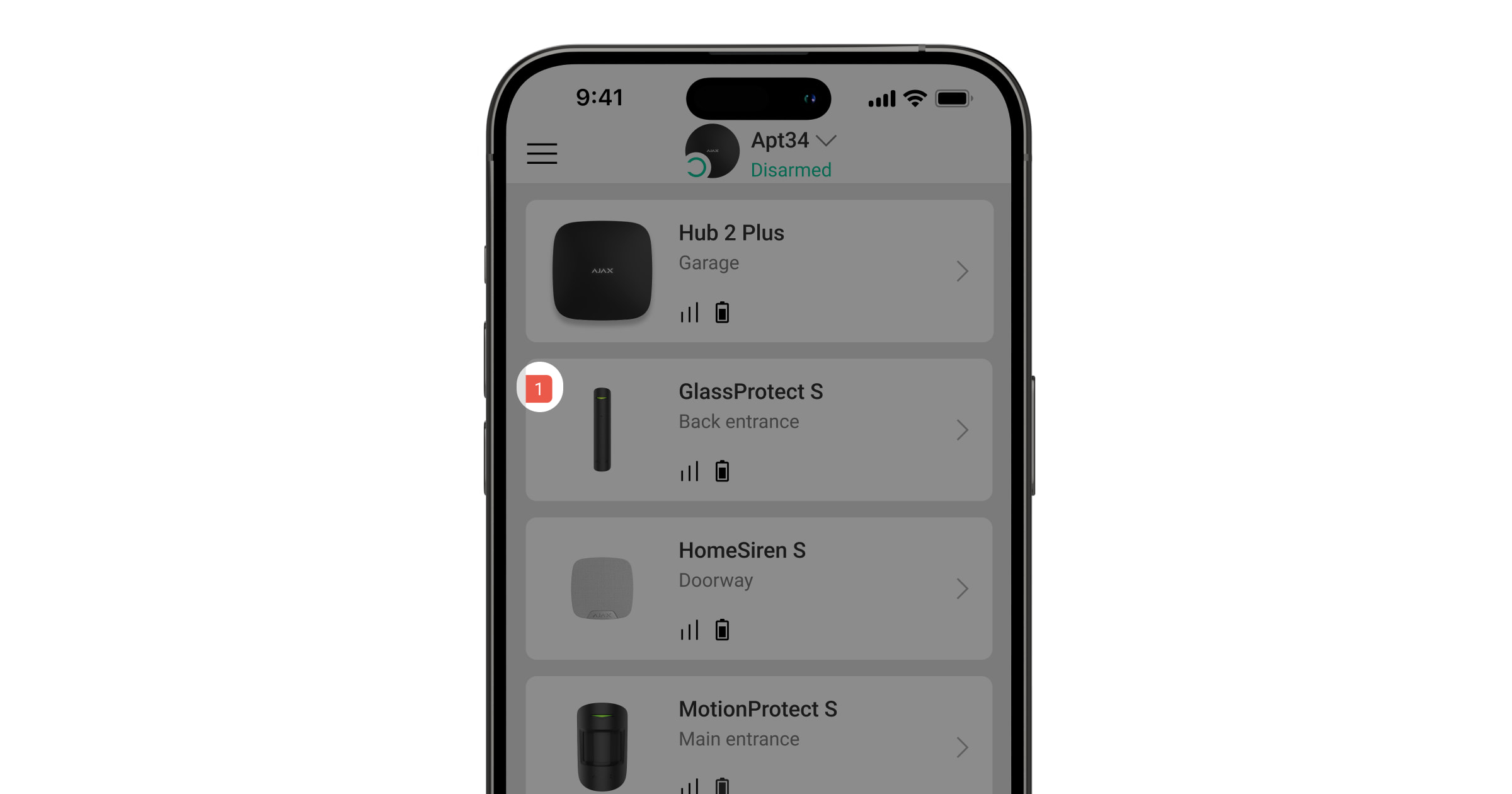
The Ajax app displays a malfunction counter on the device icon when a malfunction is detected. Malfunctions are shown in the detector states and highlighted in red. A malfunction is indicated if:
- The detector temperature is outside acceptable limits.
- The detector enclosure is open (tamper is triggered).
- There is no connection with the hub or radio signal range extender via Jeweller.
- The detector battery is low.
Icons and States
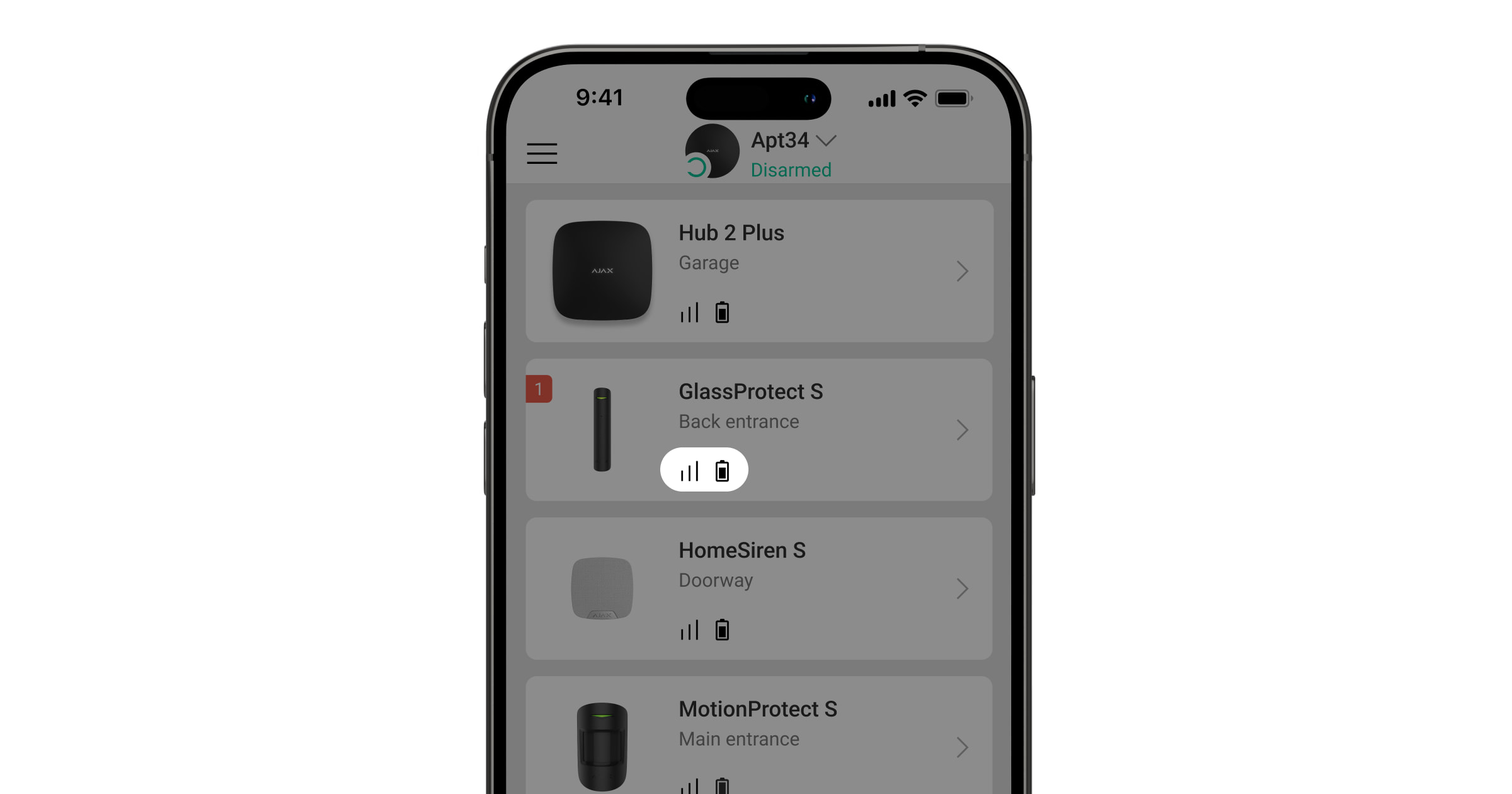
Icons in the Ajax app provide information about the GlassProtect S states. To view them:
- Sign in to the Ajax app.
- Select the hub.
- Go to the Devices tab.
Key states and their meanings include:
- Jeweller signal strength: Displays signal strength between the detector and hub/range extender (recommended: 2-3 bars). ℹ️ Learn more.
- Battery charge level: Shows the detector's battery status as a percentage. ℹ️ Learn more.
- Malfunction: Indicates the detector has a malfunction. ℹ️ Learn more.
- Radio signal range extender: Shows if the detector operates via a range extender.
- Always active mode: Indicates the detector operates in the Always active mode.
- Entry delay enabled: Delays affect only the third-party detector. ℹ️ Learn more.
- Exit delay enabled: Delays affect only the third-party detector. ℹ️ Learn more.
- Arm in Night Mode: GlassProtect S arms in Night Mode. ℹ️ Learn more.
- External contact: The external contact of a third-party wired detector is on.
- Permanent Deactivation: GlassProtect S is permanently deactivated. ℹ️ Learn more.
- Deactivation due to alarms: GlassProtect S deactivated due to exceeding the preset number of alarms. ℹ️ Learn more.
- Tamper events permanently deactivated: GlassProtect S tamper triggering events are permanently deactivated. ℹ️ Learn more.
- Deactivated until first disarm: GlassProtect S is deactivated until the first disarm. ℹ️ Learn more.
- Tamper alarms temporarily deactivated: GlassProtect S has tamper alarms temporarily deactivated. ℹ️ Learn more.
- Device not transferred: Indicates the device was not transferred to the new hub. ℹ️ Learn more.
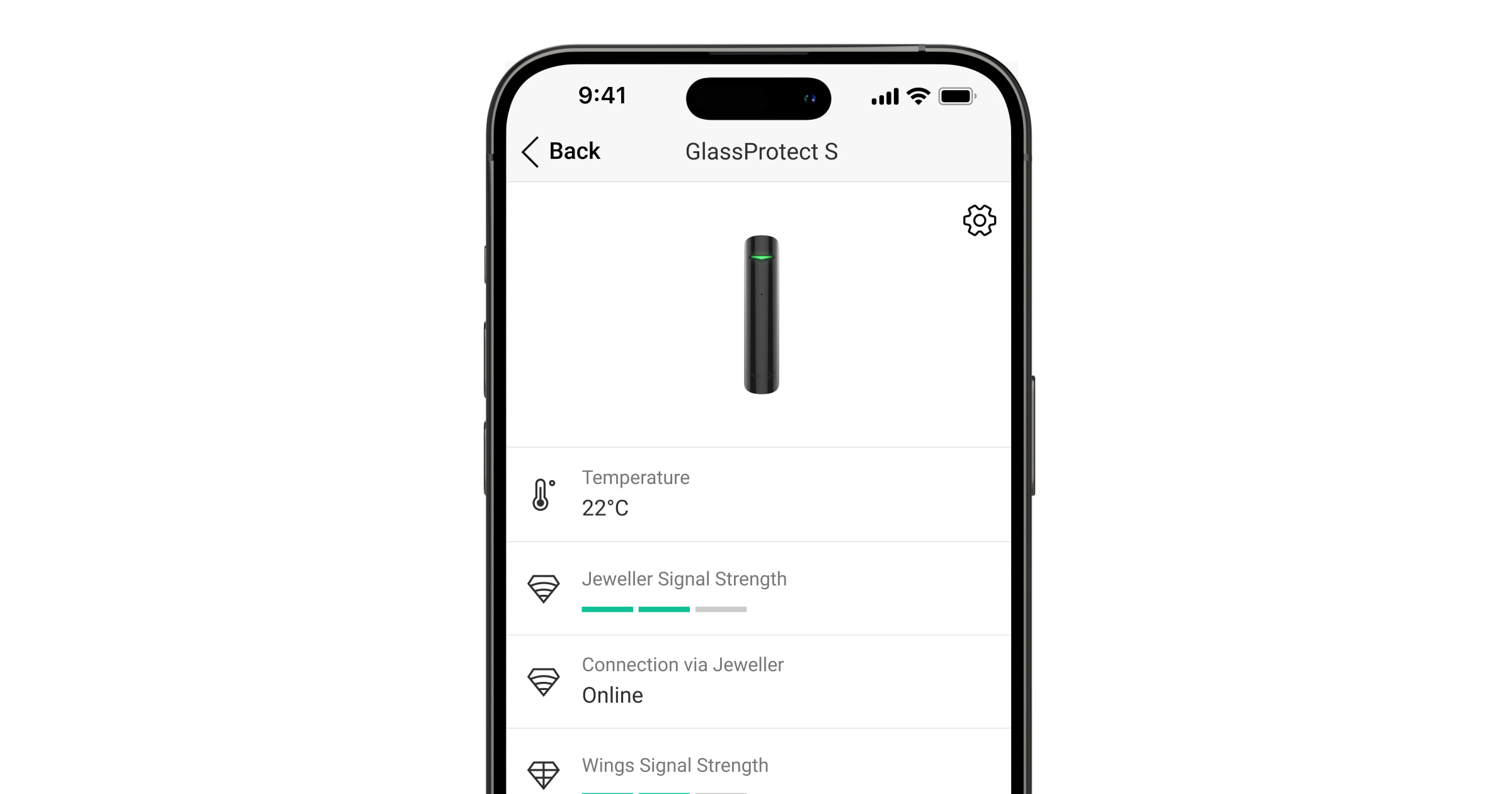
The States screen provides detailed information about the device's current parameters. Access these by going to the Devices tab, selecting GlassProtect S, and viewing its states:
| Parameter | Meaning |
|---|---|
| Malfunction | Clicking on ℹ️ opens the list of detector malfunctions. Displayed only if a malfunction is detected. |
| Temperature | Detector temperature. Acceptable error between the app value and room temperature is -2 °C. The value updates with a 1 °C change. Scenarios can be configured based on temperature. ℹ️ Learn more. |
| Jeweller Signal Strength | Signal strength between the hub/range extender and detector. Recommended: 2-3 bars. |
| Connection via Jeweller | Connection status: Online (connected) or Offline (lost connection). |
| ReX | Displays the status of using a radio signal range extender. |
| Battery Charge | Battery level displayed as a percentage. ℹ️ How battery charge is displayed in Ajax apps. |
| Lid | Tamper status: 'Open' (detector removed from SmartBracket or integrity compromised) or 'Closed' (detector installed correctly, enclosure and panel integrity normal). |
| Sensitivity | Sensitivity level of the detector's microphone. Selected based on detection zone test results. |
| External contact | Status of the external detector connection: Disabled, Open (connected and open state), or Closed (connected and closed state). |
| Always Active | If active, the detector is always in armed mode and notifies about alarms. ℹ️ Learn more. |
| Permanent Deactivation | Shows the status of permanent deactivation: No (normal mode), Lid only (tamper notifications disabled), Entirely (excluded from system operation), or By number of alarms (auto-deactivated after exceeding alarm count). ℹ️ Learn more. |
| One-Time Deactivation | Shows the status of one-time deactivation: No (normal mode), Lid only (tamper notifications disabled until first disarm), or Entirely (excluded from system operation until first disarm). ℹ️ Learn more. |
Settings
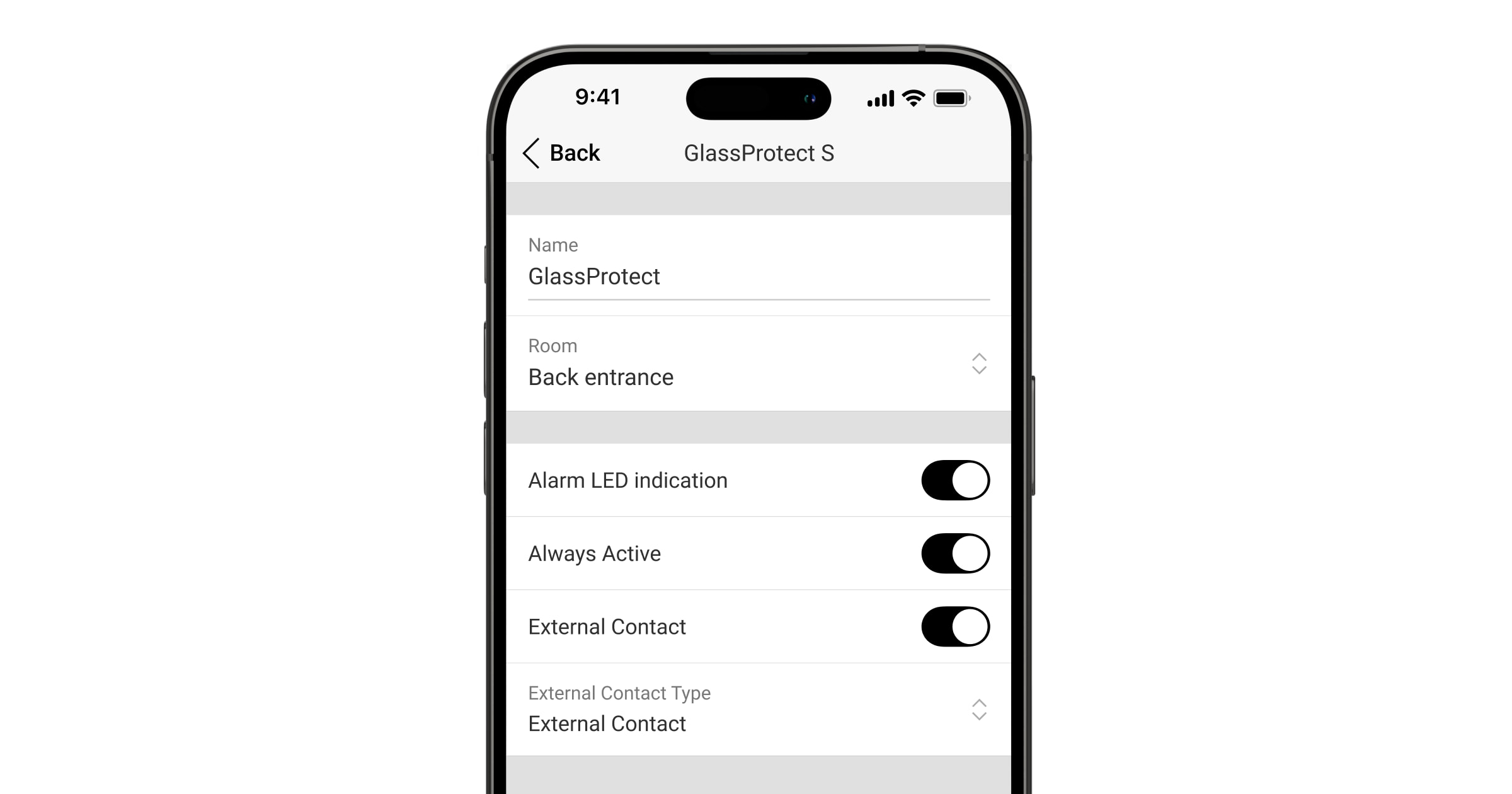
To change GlassProtect S Jeweller settings in the Ajax app:
- Go to the Devices tab.
- Select GlassProtect S.
- Go to Settings (⚙️).
- Set the required parameters.
- Click Back to save changes.
Key settings include:
| Setting | Meaning |
|---|---|
| Name | Detector name, displayed in hub devices, SMS, and notifications. Can contain up to 12 Cyrillic or 24 Latin characters. |
| Room | Virtual room assignment for the detector, displayed in SMS and notifications. |
| Alarm LED indication | Allows disabling the LED indicator during an alarm (firmware v5.55.0.0+). ℹ️ How to find the firmware version or the ID of the detector or device. |
| Sensitivity | Microphone sensitivity level: Low, Normal, or High, based on detection zone test results. |
| External contact | If active, GlassProtect S registers external detector alarms. |
| Always Active | If active, the detector is always in armed mode and notifies about alarms. ℹ️ Learn more. |
| Alert with a siren if an external contact is open | If active, sirens are activated for external detector alarms. |
| Alert with a siren if glass break detected | If active, sirens are activated when glass break is detected. |
| Chime Settings | Opens Chime settings. ℹ️ How to setup Chimes. |
| Operating Mode | Defines how the device reacts to alarms:
|
| Delay When Entering, sec | Sets entry delay (5-120 seconds). Affects only third-party detectors. ℹ️ Learn more. |
| Delay When Leaving, sec | Sets exit delay (5-120 seconds). Affects only third-party detectors. ℹ️ Learn more. |
| Arm in Night Mode | Detector arms in Night Mode if enabled. ℹ️ Learn more. |
| Night Mode Delay When Entering, sec | Entry delay time in Night Mode for connected wired detectors only. ℹ️ Learn more. |
| Night Mode Delay When Leaving, sec | Exit delay time in Night Mode for connected wired detectors only. ℹ️ Learn more. |
| Firmware | Detector firmware version. |
| Device ID | Detector ID, also found on the QR code. |
| Device No. | Number of the device loop (zone). |
Functionality Testing
The Ajax system offers tests to help select the optimal installation place. Tests do not start immediately but are subject to the hub-device polling interval, which can be checked and configured in hub settings (Hub → Settings → Jeweller or Jeweller/Fibra).
To run a test in the Ajax app:
- Select the required hub.
- Go to the Devices tab.
- Select GlassProtect S.
- Go to Settings (⚙️).
- Select a test: Jeweller Signal Strength Test, Signal Attenuation Test, or Detection Zone Test.
- Run the test.
Testing the Detector
To test the detector:
- Simulate a low-frequency sound (e.g., a fist hit) on glass; the LED will light up.
- Then, simulate a high-frequency glass shattering sound for 1.5 seconds using a tool or metal object. The detector should switch off the LED for a second after recognizing the sound.
Note: GlassProtect S does not react to clapping. It requires a low-frequency impact sound first, followed by a high-frequency shattering sound within 1.5 seconds to trigger an alarm.
To ensure accurate detection, switch on/off appliances like generators or air conditioners in the room. If they trigger the detector, adjust sensitivity or relocate the device. Use a sensitivity level that passes both test stages without false triggers from room devices.
Detector Placement
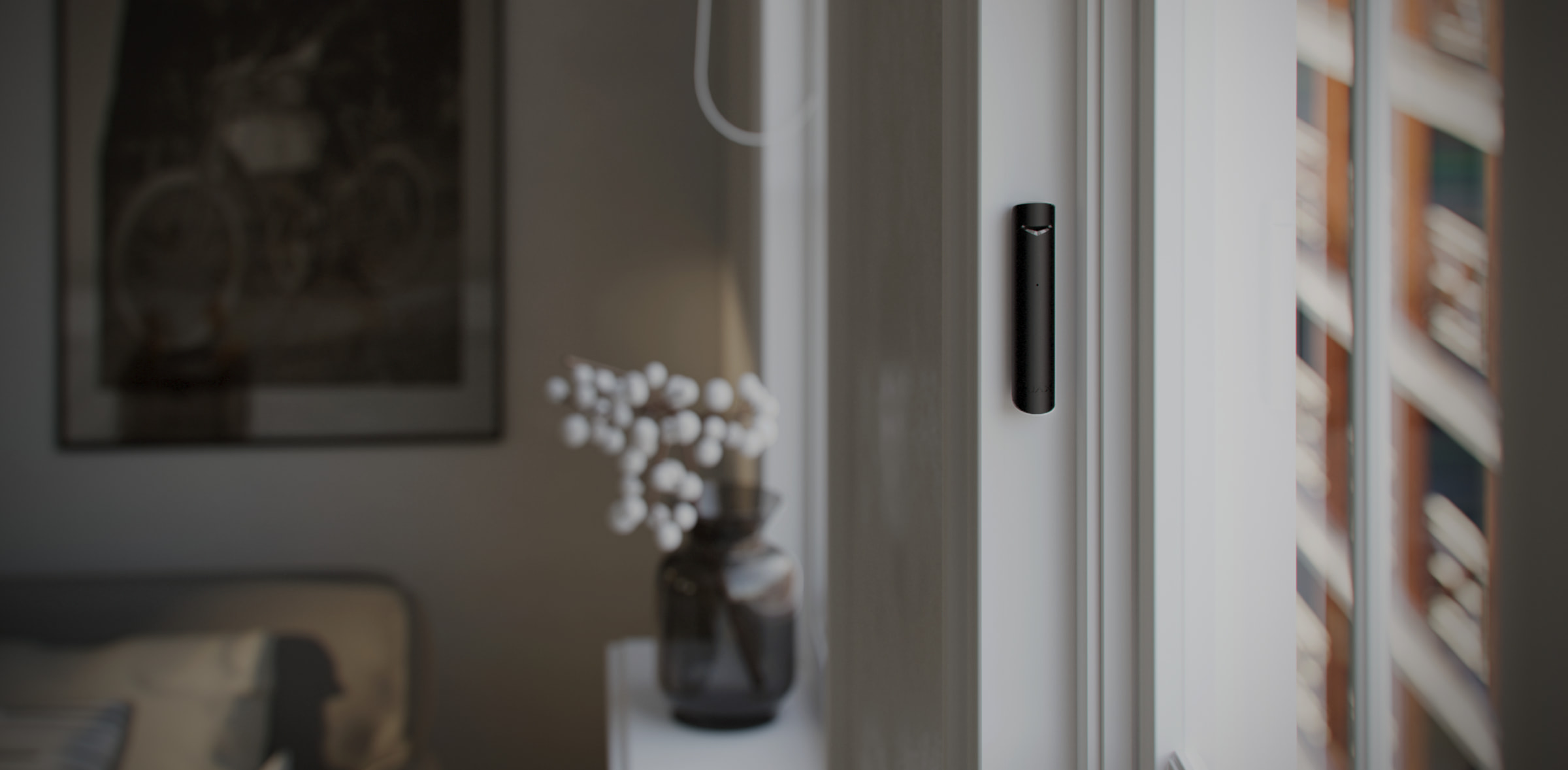
The device is designed for indoor use only.
When choosing a location for GlassProtect S Jeweller, consider:
- Glass break detection zone.
- Jeweller signal strength.
- Distance to the hub and radio signal range extender.
- Obstacles affecting radio signal passage (walls, ceilings, large objects).
It is recommended that security systems be designed and installed by specialists. A list of recommended partners is available here.
Household activity may cause false alarms; in such cases, reduce sensor sensitivity or use it only when arming.
Signal Strength:
Jeweller signal strength is determined by data package integrity. The Devices tab icon indicates strength:
- Three bars: Excellent signal strength.
- Two bars: Good signal strength.
- One bar: Low signal strength; stable operation not guaranteed.
- Crossed out icon: No signal.
Check signal strength before installation. With one or zero bars, stable operation is not guaranteed. Relocating the device, even by 20 cm, can significantly improve signal strength. If signal remains poor, use a radio signal range extender.
Detection Zone:
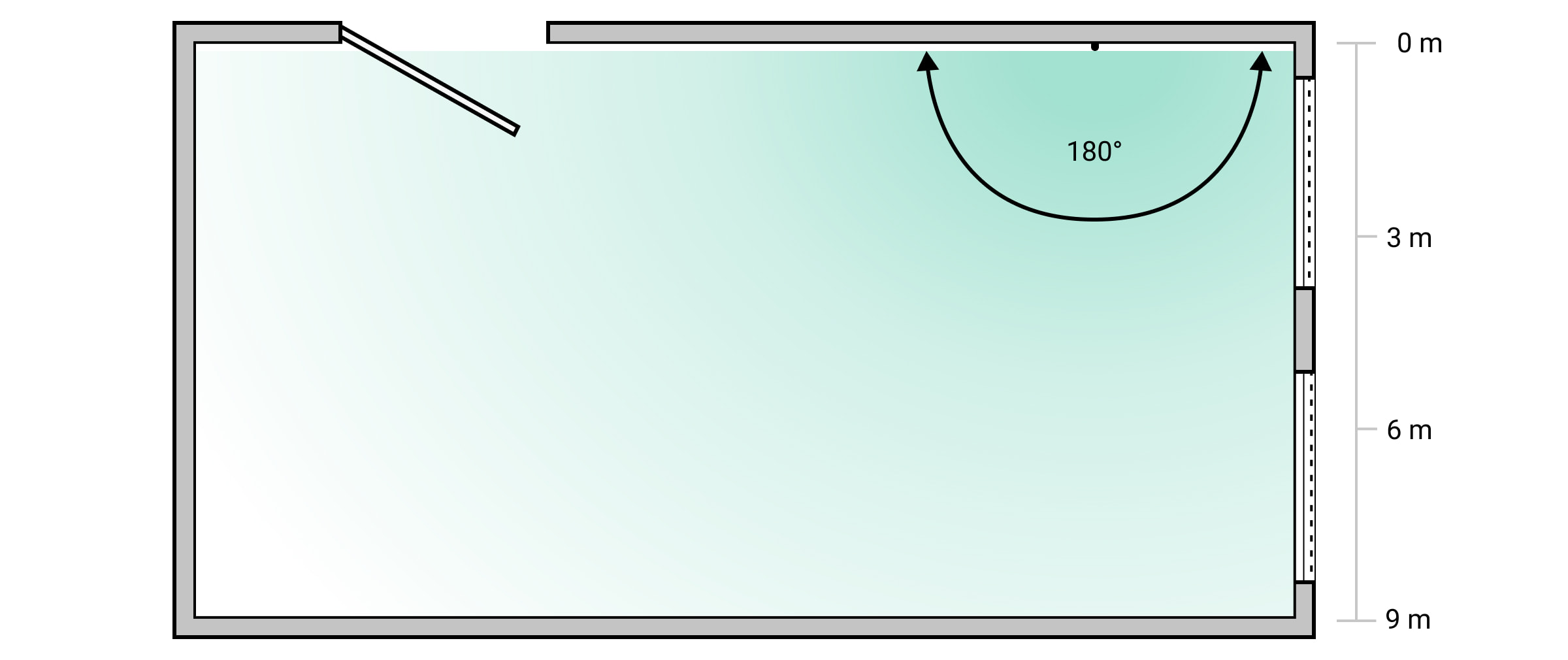
Run a Detection zone test to check operation and determine the detection sector. The detector's location influences monitoring area and system effectiveness. Consider microphone directivity and obstacles. The microphone detects glass breaks up to 9 meters away. Position the detector at an angle of up to 90 degrees to windows.
Diagram: Detection angle of the break detector (showing a 180-degree arc from 0m to 9m)
How not to install the detector:
- Outdoors (can lead to false alarms and failure).
- Close to sirens and speakers (can lead to false alarms).
- In places with fast air circulation (near fans, open windows, doors).
- Where objects or structures (e.g., curtains) can block sound to the detector.
- Near metal objects or mirrors that cause signal attenuation.
- Inside premises with temperature/humidity outside permissible limits (can damage the detector).
- Closer than 1 meter from the hub or radio signal range extender (can lead to communication loss).
- In a place with a low signal level (can result in connection loss).
Installation
Ensure the optimal location is selected according to the manual's guidelines before installing.
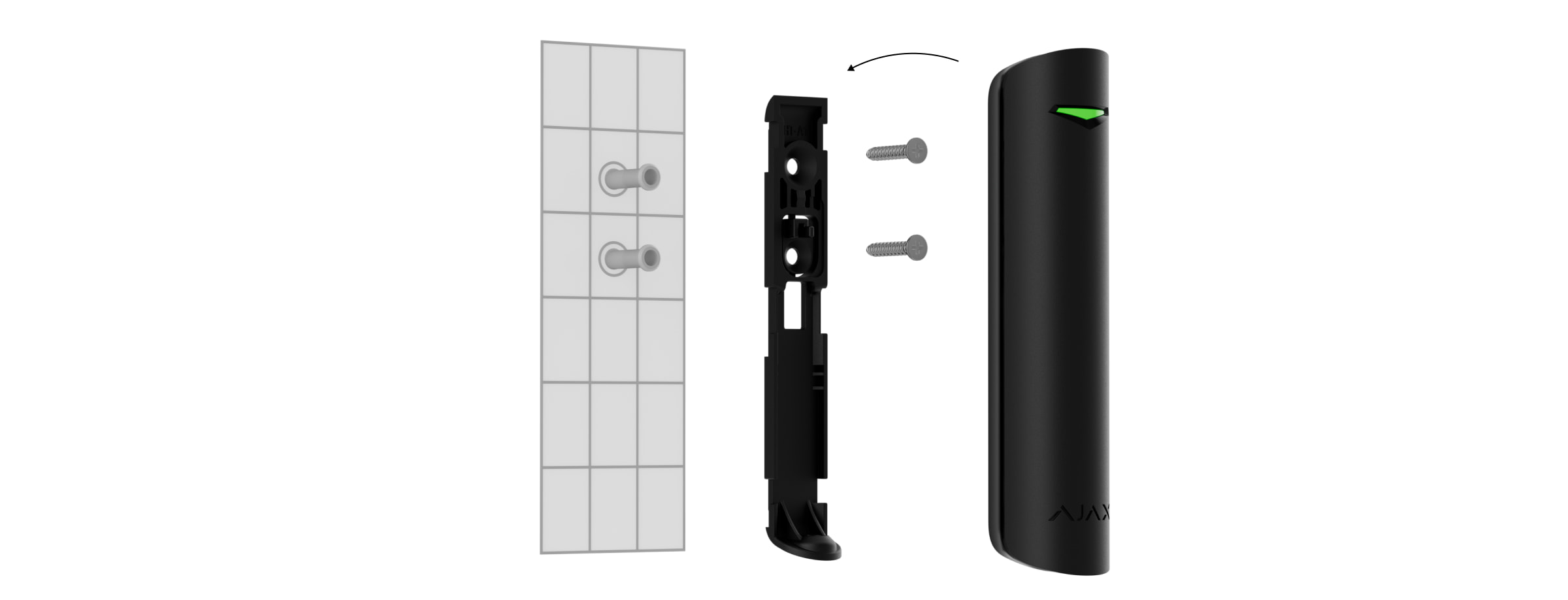
- Loosen the holding screw and slide the SmartBracket mounting panel down to remove it from the detector.
- Fix the SmartBracket panel using double-sided tape or temporary fasteners. Note: Double-sided tape is for temporary installation; the device may detach. Tamper is not triggered if taped.
- Place the detector on SmartBracket. The LED indicator flashing signifies the tamper is closed. If the LED does not light up, check the tamper status, fastening integrity, and tightness in the Ajax app.
- Run the Jeweller signal strength test. Aim for 2-3 bars. If signal is low (1 bar), consider relocating the device. For persistent poor signals, use a ReX 2 radio signal range extender.
- Run the Detection zone test. If the detector fails to respond to simulated breaks in 5 out of 5 cases, choose a different location.
- Run the Signal Attenuation Test to simulate varying conditions. A correctly chosen spot will show a stable 2-3 bar signal.
- Remove the detector from SmartBracket.
- Drill recesses on SmartBracket for screws. Attach the panel using bundled screws, ensuring all fixation points are used (including the perforated part above the tamper). Use compatible fasteners that do not deform the panel.
- Place the detector onto the mounted SmartBracket panel.
- Tighten the holding screw on the detector's enclosure for secure fastening and protection against quick dismantling.
Connecting a Third-Party Wired Detector
A wired detector with an NC (normally closed) contact type can be connected to GlassProtect S using the built-in terminal clamp. It is recommended to install the wired detector no more than 1 meter away from GlassProtect S to prevent damage and maintain communication quality. To route the wire, break out the plug on the detector body.
If the connected wired detector is triggered, a notification will be received.
Maintenance
Regularly check the detector's functionality, ideally every three months. Clean the enclosure of dust, cobwebs, and contaminants using a soft, dry wipe suitable for equipment care. Do not use alcohol, acetone, petrol, or other active solvents for cleaning.
The pre-installed battery provides up to 7 years of operation (with a 5-minute ping interval). If the battery is low, the system will notify the user, and the LED indicator will smoothly light up and go off upon detecting a glass break or tamper event.
For battery replacement, refer to the Battery Replacement guide.
Technical Specifications
Detailed technical specifications are available for GlassProtect S Jeweller. Information on compliance with standards and setup in compliance with EN requirements can also be found.
Warranty
The warranty for Ajax Systems Manufacturing products is valid for 2 years from the purchase date, excluding the pre-installed battery. For issues, contact support; many technical problems can be resolved remotely.
Contact Technical Support:
Manufactured by "AS Manufacturing” LLC.
 mailto:support@ajax.systems
  support.ajax.systems/wp-content/uploads/2023/06/glassprotect-s-detection-area-en.jpg
  support.ajax.systems/wp-content/uploads/2023/06/glassprotect-s-detector-placement.jpg
  support.ajax.systems/wp-content/uploads/2023/06/glassprotect-s-func.png
  support.ajax.systems/wp-content/uploads/2023/06/glassprotect-s-icons-en.jpg
  support.ajax.systems/wp-content/uploads/2023/06/glassprotect-s-install-sensor-1.jpg
  support.ajax.systems/wp-content/uploads/2023/06/glassprotect-s-plus-backplate-sensor.jpg
  support.ajax.systems/wp-content/uploads/2023/06/glassprotect-s-plus-badge-en.jpg
  support.ajax.systems/wp-content/uploads/2023/06/glassprotect-s-plus-button.jpg
  support.ajax.systems/wp-content/uploads/2023/06/glassprotect-s-plus-connector.jpg
  support.ajax.systems/wp-content/uploads/2023/06/glassprotect-s-plus-holes.jpg
  support.ajax.systems/wp-content/uploads/2023/06/glassprotect-s-plus-qr.jpg
  support.ajax.systems/wp-content/uploads/2023/06/glassprotect-s-plus-state-en.jpg
  support.ajax.systems/wp-content/uploads/2023/06/glassprotect-s-settings-en.jpg
  Telegram: Launch @AjaxSystemsSupport_Bot