
1. សេចក្តីផ្តើម
Thank you for choosing the MOES Smart Light Switch. This device allows you to control your lighting remotely via the Tuya Smart Life App, voice commands with Alexa or Google Home, and traditional manual operation. Designed for convenience, it requires no neutral wire or capacitor for installation, making it suitable for a wide range of existing electrical setups. Please read this manual carefully before installation and use to ensure proper function and safety.
លក្ខណៈពិសេសនៃផលិតផល
- មិនត្រូវការខ្សែអព្យាក្រឹតទេ៖ Simplifies installation in homes without neutral wiring at the switch box.
- មិនតម្រូវឱ្យមានកាប៉ាស៊ីទ័រទេ៖ Eliminates the need for an external capacitor, reducing installation complexity and potential noise.
- គ្មាន Hub ទាមទារ៖ ភ្ជាប់ដោយផ្ទាល់ទៅបណ្តាញ Wi-Fi 2.4GHz របស់អ្នក។
- ការគ្រប់គ្រងកម្មវិធី៖ Remote control via Tuya Smart Life App from anywhere.
- ការគ្រប់គ្រងសំឡេង៖ ឆបគ្នាជាមួយ Amazon Alexa និង Google Home សម្រាប់ប្រតិបត្តិការដោយមិនប្រើដៃ។
- កាលវិភាគ និងកម្មវិធីកំណត់ម៉ោង៖ Set schedules and timers for automated lighting control.
- ភាពឆបគ្នាធំទូលាយ៖ Supports incandescent/halogen bulbs up to 1000W and LED bulbs up to 350W. Minimum wattage of 7W required.
- សមាគមត្រួតពិនិត្យច្រើន៖ Allows control from multiple smart switches within the Smart Life App.
3. ព័ត៌មានសុវត្ថិភាព
ការព្រមាន៖ ហានិភ័យនៃការឆក់អគ្គិសនី។ Improper installation can be dangerous or illegal. Consult a qualified electrician if you are unfamiliar or uncomfortable with electrical work. Always turn off power at the circuit breaker before installation or maintenance.
- Ensure the power is OFF at the circuit breaker before wiring.
- ឧបករណ៍នេះគឺសម្រាប់តែការប្រើប្រាស់ក្នុងផ្ទះប៉ុណ្ណោះ។
- កុំលើសកម្រិតផ្ទុកអតិបរមាដែលបានបញ្ជាក់ក្នុងផ្នែកលក្ខណៈបច្ចេកទេស។
- Only supports 2.4GHz Wi-Fi networks. 5GHz networks are not supported.
- Minimum load of 7W is required for proper operation.
4. មាតិកាកញ្ចប់
- MOES Smart Light Switch (2 Pack)
- វីសម៉ោន
- សៀវភៅណែនាំអ្នកប្រើប្រាស់
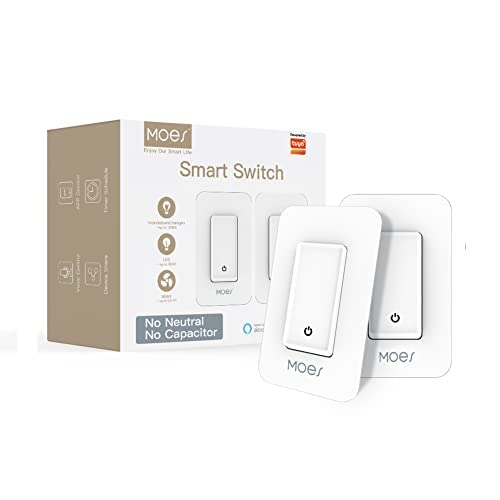
Image: MOES Smart Light Switch packaging and included switches.
5. ផលិតផលលើសview
The MOES Smart Light Switch features a simple push-button design for manual control and integrates seamlessly with smart home ecosystems. Its compact design allows for easy installation in standard wall boxes.

Image: MOES Smart Light Switch in a bedroom setting, highlighting its smart features.

Image: Working Loads diagram, showing compatibility with incandescent/halogen (up to 1000W) and LED (up to 350W) bulbs, with a minimum control of 7W.
6. ការដំឡើង
Follow these steps carefully to install your MOES Smart Light Switch. Ensure power is OFF at the circuit breaker before proceeding.
- បិទថាមពល៖ Locate your circuit breaker and turn off the power to the switch you are replacing. Verify the power is off using a voltagអ្នកសាកល្បង។
- យកកុងតាក់ចាស់ចេញ៖ Unscrew and carefully pull the old switch out of the wall box. Disconnect the wires.
- កំណត់អត្តសញ្ញាណខ្សែ៖ Identify the Line/Hot wire (usually black), Load wire (usually red or black), and Ground wire (usually green or bare copper). This switch does NOT require a neutral wire.
- ភ្ជាប់ខ្សែ Smart Switch៖ Connect the wires from your wall box to the corresponding wires on the MOES Smart Light Switch using wire nuts:
- ភ្ជាប់ បន្ទាត់ / ក្តៅ wire to the switch's L ស្ថានីយ។
- ភ្ជាប់ ផ្ទុក wire to the switch's L1 ស្ថានីយ។
- ភ្ជាប់ ដី wire to the switch's GND ស្ថានីយ។

Image: Single Pole Connection Diagram for the Smart Switch.
- ដំឡើងកុងតាក់៖ Gently push the wired switch back into the wall box. Secure it with the provided screws.
- ដំឡើងបន្ទះជញ្ជាំង៖ ភ្ជាប់បន្ទះជញ្ជាំង។
- ស្តារថាមពលឡើងវិញ៖ បើកភ្លើងឡើងវិញនៅឧបករណ៍បំលែងសៀគ្វី។
- ការបើកថាមពលដំបូង៖ Allow the switch to power on for 5-7 minutes before attempting to use it for the first time. This allows internal components to stabilize.
ចំណាំ៖ This switch is designed for single-pole circuits only. It does not require a neutral wire or capacitor for normal operation, which differentiates it from some traditional smart switches.

Image: Comparison of smart switches, illustrating the MOES switch's no-capacitor design.
7. Setup (App Pairing)
To enable smart features, you need to pair the switch with the Tuya Smart Life App.
- ទាញយកកម្មវិធី៖ Download the "Smart Life" app from the App Store (iOS) or Google Play Store (Android).
- ចុះឈ្មោះ/ចូល៖ បើកកម្មវិធី ហើយចុះឈ្មោះសម្រាប់គណនីថ្មី ឬចូលដោយប្រើគណនីដែលមានស្រាប់។
- ភ្ជាប់ទៅ 2.4GHz Wi-Fi៖ Ensure your smartphone is connected to a 2.4GHz Wi-Fi network. The smart switch does not support 5GHz Wi-Fi.
- បញ្ចូលរបៀបផ្គូផ្គង៖ Press and hold the switch button for approximately 5-10 seconds until the indicator light on the switch starts blinking rapidly. This indicates it's in pairing mode.
- បន្ថែមឧបករណ៍នៅក្នុងកម្មវិធី៖ In the Smart Life app, tap the "+" icon in the top right corner to add a device. Select "Lighting" > "Switch (Wi-Fi)" or allow the app to auto-discover the device.
- បញ្ជាក់ការភ្លឹបភ្លែតៗ៖ Confirm that the indicator light on the switch is blinking rapidly in the app.
- បញ្ចូលព័ត៌មានអត្តសញ្ញាណ Wi-Fi៖ បញ្ចូលពាក្យសម្ងាត់បណ្តាញ Wi-Fi 2.4GHz របស់អ្នក។
- ការផ្គូផ្គង៖ The app will begin the pairing process. Once successful, the indicator light on the switch will stop blinking and remain solid, and the app will confirm the device has been added.
- ប្តូរឈ្មោះឧបករណ៍៖ You can rename the switch in the app for easier identification (e.g., "Living Room Light").
For Voice Control (Alexa/Google Home):
- បើកកម្មវិធី Alexa ឬ Google Home របស់អ្នក។
- Go to "Skills & Games" (Alexa) or "Works with Google" (Google Home).
- ស្វែងរក and enable the "Smart Life" skill/service.
- Link your Smart Life account when prompted.
- Discover devices. Your MOES Smart Light Switch should now be controllable via voice commands.
8. ប្រតិបត្តិការ
The MOES Smart Light Switch offers multiple ways to control your lighting.
8.1 ការគ្រប់គ្រងដោយដៃ
ចុចប៊ូតុងរូបវន្តនៅលើកុងតាក់ ដើម្បីបើក ឬបិទភ្លើងដែលបានភ្ជាប់។
8.2 ការគ្រប់គ្រងកម្មវិធី
Open the Smart Life app, select your switch, and tap the power icon to toggle the light ON/OFF. You can also set schedules, timers, and create smart scenes within the app.
8.3 ការគ្រប់គ្រងសំឡេង
Once integrated with Alexa or Google Home, use voice commands such as:
- "Alexa, turn on [Switch Name]."
- "Hey Google, turn off [Switch Name]."
- "Alexa, set [Switch Name] to 50%" (if dimming is supported by your bulb and switch model).
9. ការថែទាំ
To ensure the longevity and proper functioning of your smart switch, follow these maintenance guidelines:
- ការសម្អាត៖ Wipe the switch and wall plate with a soft, dry cloth. Do not use abrasive cleaners or solvents.
- វដ្តថាមពល៖ If the switch becomes unresponsive, try turning off the power at the circuit breaker for a few minutes, then turn it back on.
- ការធ្វើបច្ចុប្បន្នភាពកម្មវិធីបង្កប់៖ Periodically check the Smart Life app for available firmware updates for your switch to ensure optimal performance and security.
10. ការដោះស្រាយបញ្ហា
If you encounter issues with your MOES Smart Light Switch, refer to the following common problems and solutions:
| បញ្ហា | មូលហេតុ / ដំណោះស្រាយដែលអាចកើតមាន |
|---|---|
| Switch not responding / Light flickering |
|
| មិនអាចផ្គូផ្គងជាមួយកម្មវិធីបានទេ |
|
| ការគ្រប់គ្រងសំឡេងមិនដំណើរការទេ។ |
|
| Switch loses connection frequently |
|
11. លក្ខណៈបច្ចេកទេស
| គុណលក្ខណៈ | តម្លៃ |
|---|---|
| ម៉ាក | ម។ ស |
| លេខម៉ូដែល | MOES_1234 |
| របៀបប្រតិបត្តិការ | Push Button, Smart Switch |
| ប្រភេទទំនាក់ទំនង | បើកជាធម្មតា |
| ប្រភេទឧបករណ៍ភ្ជាប់ | ស្ថានីយវីស |
| ប្រភេទសៀគ្វី | ផ្លូវមួយ (បង្គោលតែមួយ) |
| ប្រភេទម៉ោន | ជញ្ជាំងម៉ោន |
| ប្រភេទឧបករណ៍បំប្លែង | ប៊ូតុងរុញ |
| សម្ភារៈទំនាក់ទំនង | លោហៈ |
| វត្តអប្បបរមាtage | 7W |
| Max Incandescent/Halogen Load | 1000 វ៉ |
| Max LED Load | 350 វ៉ |
| ប្រេកង់ Wi-Fi | 2.4GHz ប៉ុណ្ណោះ។ |
| វិមាត្រ (កញ្ចប់) | 6.06 x 5.28 x 2.91 អ៊ីញ |
| ទំងន់ (ធាតុ) | 0.18 អោន |
12. ការធានា និងការគាំទ្រ
For detailed warranty information, please refer to the product packaging or contact MOES customer support. Additional protection plans may be available for purchase.
សម្រាប់ជំនួយបន្ថែម អ្នកអាចមើលឯកសារ PDF សៀវភៅណែនាំអ្នកប្រើប្រាស់ផ្លូវការ៖ ទាញយកសៀវភៅណែនាំអ្នកប្រើប្រាស់ (PDF)
For technical support or inquiries, please contact the seller or manufacturer directly through your purchase platform.