
1. សេចក្តីផ្តើម
Thank you for choosing the Ctronics RBX-F20 2.5K 4MP Solar WiFi PTZ Outdoor Security Camera. This advanced security camera offers high-resolution surveillance, flexible pan and tilt capabilities, and sustainable solar power. This manual will guide you through the installation, setup, and operation of your camera to ensure optimal performance and security for your property.

Image: The Ctronics RBX-F20 camera with its integrated solar panel, designed for outdoor use.
២.១. លក្ខណៈសំខាន់ៗ
- 2.5K 4MP Resolution & Color Night Vision: Experience clear 2560x1440 resolution. Equipped with 10 built-in spotlights, the camera provides full-color night vision up to 30 meters, illuminating a wider area.
- ឥតខ្សែ ១០០% និងដំណើរការដោយថាមពលព្រះអាទិត្យ៖ Features a 7800mAh rechargeable battery for extended operation. The integrated solar panel continuously recharges the battery, ensuring uninterrupted power and true wireless functionality.
- PIR Sensor & Human Detection: Utilizes a PIR sensor for accurate human shape detection with a rapid 0.2-second wake-up time. Adjustable alarm sensitivity (low, medium, high) sends precise real-time notifications to your smartphone upon human motion detection.
- បង្វិលបាន 355° និងផ្អៀងបាន 95°៖ Control the camera's rotation remotely via your smartphone, covering a wide area with 355° horizontal pan and 95° vertical tilt.
- អូឌីយ៉ូពីរផ្លូវ៖ Built-in microphone and speaker allow for real-time communication with family, visitors, or to deter intruders from anywhere.
- IP66 ធន់នឹងអាកាសធាតុ៖ Designed with a robust IP66-certified weatherproof casing, ensuring reliable operation in various extreme weather conditions.

Image: Comparison of day and color night vision footage from the 2.5K 4MP camera, showing clarity and detail.
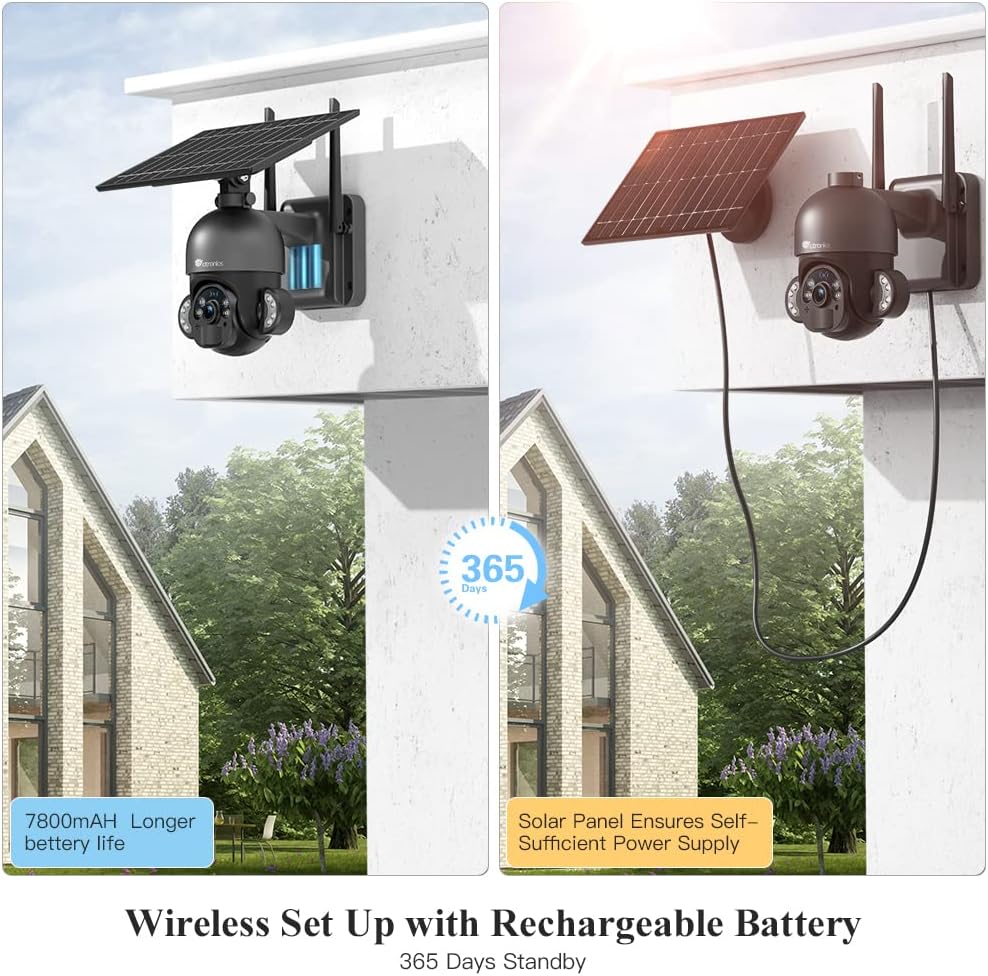
Image: The camera highlighting its 7800mAh battery and the solar panel providing continuous power, indicating 365 days of standby.

Image: A person and a dog in the camera's view, demonstrating the human detection feature distinguishing between human and non-human movement.

Image: The camera mounted on a wall, illustrating its 355-degree pan and 95-degree tilt capabilities for comprehensive coverage.

Image: A person interacting with a delivery driver via the camera's two-way audio feature, shown on a smartphone screen.

Image: The camera mounted outdoors, with rain and clouds indicating its IP66 weatherproof design.
3. មាតិកាកញ្ចប់
សូមពិនិត្យមើលមាតិកាកញ្ចប់នៅពេលទទួលបាន។ ប្រសិនបើមានរបស់របរណាមួយបាត់ ឬខូចខាត សូមទាក់ទងផ្នែកជំនួយអតិថិជន។
- Ctronics RBX-F20 PTZ Camera with Solar Panel
- តង្កៀបម៉ោន
- វីសម៉ោននិងដោតជញ្ជាំង
- ខ្សែសាក USB
- សៀវភៅណែនាំអ្នកប្រើប្រាស់
- មគ្គុទ្ទេសក៍ចាប់ផ្តើមរហ័ស
4. ការដំឡើងនិងការដំឡើង
4.1 ការសាកថ្មដំបូង
Before installation, fully charge the camera's built-in 7800mAh battery using the provided USB cable. Connect the cable to a 5V/2A power adapter (not included) and the camera's charging port. The charging indicator will show the status.
២.២ ការដំឡើងកម្មវិធី និងការបង្កើតគណនី
- Download the "Ctronics" app from the App Store (iOS) or Google Play Store (Android).
- Open the app and register a new account, or log in if you already have one.
4.3 Camera Pairing with App
- Ensure your smartphone is connected to a 2.4GHz Wi-Fi network. (5GHz Wi-Fi is not supported).
- បើកកាមេរ៉ា។
- In the Ctronics app, tap the "+" icon to add a new device.
- Follow the on-screen instructions to scan the QR code on the camera or manually enter the device ID.
- ជ្រើសរើសបណ្តាញ Wi-Fi របស់អ្នក ហើយបញ្ចូលពាក្យសម្ងាត់។
- The camera will attempt to connect. Once connected, you can name your camera and complete the setup.
4.4 ម៉ោនកាមេរ៉ា
The camera offers two installation methods: all-in-one (camera and solar panel together) or separated (solar panel mounted separately for optimal sunlight exposure).
- ជ្រើសរើសទីតាំង៖ Select a location with good Wi-Fi signal and sufficient sunlight exposure for the solar panel. Ensure the camera has a clear view នៃតំបន់ដែលអ្នកចង់តាមដាន។
- Mark Drill Holes៖ ប្រើតង្កៀបម៉ោនជាគំរូដើម្បីសម្គាល់រន្ធខួងនៅលើជញ្ជាំង។
- រន្ធខួង៖ ខួងរន្ធនៅទីតាំងដែលបានសម្គាល់ ហើយបញ្ចូលឌុយជញ្ជាំង។
- ធានាតង្កៀប៖ ភ្ជាប់តង្កៀបម៉ោនទៅនឹងជញ្ជាំងដោយប្រើវីសដែលបានផ្តល់។
- Attach Camera/Solar Panel:
- All-in-one: Attach the camera unit (with the solar panel already connected) to the mounting bracket.
- បំបែក៖ Mount the solar panel in a location with maximum sunlight, then connect it to the camera using the extension cable (if needed, not included). Attach the camera to its mounting bracket.
- លៃតម្រូវមុំ៖ Adjust the camera and solar panel angles for optimal coverage and charging efficiency.

Image: Illustrates two installation methods for the camera: integrated solar panel and separate solar panel for flexible placement.
5. ប្រតិបត្តិការ
5.1 ផ្សាយបន្តផ្ទាល់ View និងការត្រួតពិនិត្យ PTZ
Open the Ctronics app and select your camera to access the live view. Use the on-screen controls to pan (355° horizontally) and tilt (95° vertically) the camera lens to monitor different areas.
5.2 អូឌីយ៉ូពីរផ្លូវ
នៅក្នុងការផ្សាយបន្តផ្ទាល់ view interface, tap the microphone icon to speak through the camera's speaker. Tap the speaker icon to listen to audio from the camera's surroundings.
5.3 ការរកឃើញចលនា និងការជូនដំណឹង
The camera uses a PIR sensor for human detection. You can adjust the sensitivity (low, medium, high) in the app settings. When motion is detected, the camera will record and send a push notification to your smartphone.
5.4 របៀបមើលឃើញពេលយប់
The camera supports color night vision up to 30 meters using its built-in spotlights. You can configure night vision settings (e.g., automatic, black & white, color) within the app.
5.5 ការថត និងចាក់សារឡើងវិញ
The camera supports local storage via a Micro TF card (not included). Recorded footage can be accessed and played back through the Ctronics app. The camera also supports saving to an FTP server.
6. ការថែទាំ
- ការសម្អាត៖ សម្អាតកញ្ចក់កាមេរ៉ា និងបន្ទះសូឡាជាប្រចាំដោយប្រើក្រណាត់ទន់។amp cloth to ensure clear images and efficient solar charging. Do not use harsh chemicals.
- ការថែរក្សាថ្ម៖ While the solar panel provides continuous charging, ensure the camera receives adequate sunlight. If the camera is installed in a shaded area or during prolonged cloudy periods, occasional manual charging via USB may be necessary.
- ការធ្វើបច្ចុប្បន្នភាពកម្មវិធីបង្កប់៖ Check the Ctronics app periodically for firmware updates. Keeping your camera's firmware up-to-date ensures optimal performance and security.
- ការការពារបរិស្ថាន៖ The IP66 rating protects against dust and water jets. Avoid submerging the camera in water or exposing it to extreme physical impact.
7. ការដោះស្រាយបញ្ហា
| បញ្ហា | មូលហេតុដែលអាចកើតមាន | ដំណោះស្រាយ |
|---|---|---|
| កាមេរ៉ាបរាជ័យក្នុងការតភ្ជាប់ទៅ Wi-Fi ។ | Incorrect Wi-Fi password, 5GHz network, weak signal, or MAC address filtering on router. |
|
| False alarms or too many notifications. | High PIR sensitivity, environmental factors (e.g., moving branches, pets). |
|
| Battery not charging or low battery. | Insufficient sunlight, dirty solar panel, faulty connection. |
|
| គុណភាពរូបភាពខ្សោយ។ | Dirty lens, low light conditions, network bandwidth issues. |
|
8. លក្ខណៈបច្ចេកទេស
| ឈ្មោះម៉ូដែល | RBX-F20 |
| ម៉ាក | Ctronics |
| ដំណោះស្រាយ | 2.5K 4MP (2560x1440) |
| បច្ចេកវិទ្យាតភ្ជាប់ | Wireless (Wi-Fi 2.4GHz), Wired (Ethernet, ONVIF, RTSP) |
| ប្រភពថាមពល | Solar Powered / Rechargeable Battery (7800mAh) |
| មុំបង្វិល/លំអៀង | Pan 355° ផ្អៀង 95° |
| ចក្ខុវិស័យពេលយប់ | Color Night Vision up to 30 meters (with 10 spotlights) |
| ការរកឃើញមនុស្ស | PIR Sensor with adjustable sensitivity |
| អូឌីយ៉ូ | អូឌីយ៉ូពីរផ្លូវ (មីក្រូហ្វូន និងឧបករណ៍បំពងសម្លេង) |
| ធន់នឹងអាកាសធាតុ | IP66 បានបញ្ជាក់ |
| ការផ្ទុក | Micro TF Card Slot (up to 128GB, not included), FTP Storage |
| ឧបករណ៍ដែលត្រូវគ្នា។ | ស្មាតហ្វូន (Android/iOS) |
| ការប្រើប្រាស់ដែលបានណែនាំ | សន្តិសុខខាងក្រៅ |
9. ការធានា និងការគាំទ្រ
Ctronics products come with a standard warranty. For detailed warranty information, please refer to the warranty card included in your package or visit the official Ctronics website. If you encounter any issues or have questions regarding your camera, please contact Ctronics customer support. Our team is dedicated to providing prompt and helpful assistance.
ព័ត៌មានទំនាក់ទំនង៖ Please refer to the contact details provided on the Ctronics official webគេហទំព័រ ឬនៅក្នុងការវេចខ្ចប់ផលិតផលរបស់អ្នកសម្រាប់បណ្តាញជំនួយដែលទាន់សម័យបំផុត។