
Кіріспе
Welcome to the HP OmniDesk M03 AI Desktop PC. This manual provides essential information for setting up, operating, maintaining, and troubleshooting your new computer. The HP OmniDesk M03 is designed for performance and efficiency, featuring an Intel Core Ultra 7 265 processor with dedicated AI cores, 16GB DDR5 RAM, and a 2TB NVMe SSD, running on Windows 11 Home.
Қорапта не бар
Қаптамада барлық компоненттер бар екеніне көз жеткізіңіз:
- HP OmniDesk Desktop PC
- Сымсыз пернетақта
- Тінтуір
- Жылдам орнату нұсқаулығы
- Қуат кабелі

Image: The HP OmniDesk M03 desktop PC, wireless keyboard, mouse, and power cable, illustrating the contents of the product box.
Орнату
1. Перифериялық құрылғыларды қосу
Before powering on your PC, connect your monitor, keyboard, and mouse.
- Монитор: Connect your monitor to the PC using an HDMI or DisplayPort cable. The ports are located on the rear of the PC.
- Пернетақта мен тінтуір: The included keyboard and mouse are wireless. Insert batteries (if not pre-installed) and connect their USB receiver to an available USB port on the PC.
- Қуат: Connect the power cable to the PC's power input on the rear and then to a wall outlet.
- Желі (міндетті емес): For a wired internet connection, connect an Ethernet cable from your router to the RJ45 port on the rear of the PC.

Image: Rear panel of the HP OmniDesk M03, highlighting the DisplayPort, HDMI, USB, and Ethernet ports for connecting external devices.

Сурет: жағы view of the HP OmniDesk M03 AI Desktop PC, showing its compact tower design.
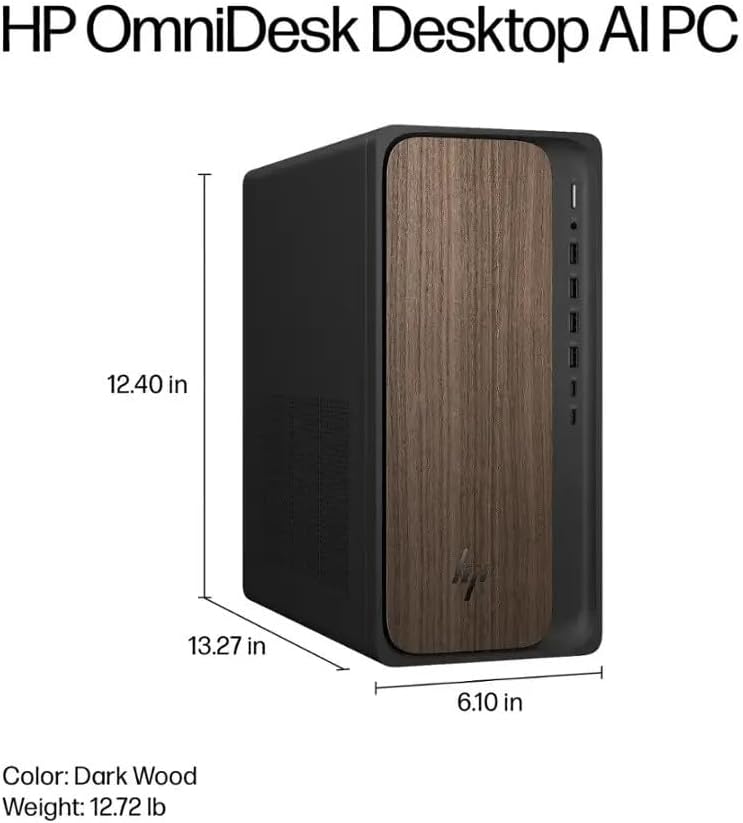
Image: Diagram illustrating the location and type of front and rear ports on the HP OmniDesk M03, including USB-A, USB-C, HDMI, DisplayPort, and audio jacks.
2. Қуатты қосу және бастапқы орнату
Барлық перифериялық құрылғылар қосылғаннан кейін:
- Компьютердің алдыңғы жағында орналасқан қуат түймесін басыңыз.
- Follow the on-screen instructions to complete the Windows 11 Home initial setup, including language selection, network connection (if not wired), account creation, and privacy settings.

Сурет: алдыңғы view of the HP OmniDesk M03, showing the power button at the top right and various USB ports below it.
Компьютеріңізді басқару
Windows 11 Home
Your HP OmniDesk M03 comes pre-installed with Windows 11 Home. Familiarize yourself with the operating system's interface, Start menu, and settings. Microsoft provides extensive online resources for Windows 11 usage.
AI мүмкіндіктері
The Intel Core Ultra 7 265 processor includes dedicated AI cores and Intel AI Boost, enhancing performance for AI-driven applications and features within Windows 11, such as AI Copilot. These features can assist with tasks, content creation, and system optimization.
Қосылу мүмкіндігі
- Wi-Fi 6 (802.11ax): Connect to wireless networks for internet access. Manage Wi-Fi settings through the Windows 11 network settings.
- Bluetooth 5.4: Pair wireless devices such as headphones, speakers, or additional input devices. Access Bluetooth settings via the Windows 11 settings menu.
- Ethernet: For a stable, high-speed wired connection, ensure an Ethernet cable is connected to the RJ45 port.
Техникалық қызмет көрсету
Cleaning Your PC
- Сыртқы: Аздап жұмсақ, түксіз матаны пайдаланыңыз dampened with water or a mild cleaning solution to wipe down the exterior. Avoid harsh chemicals.
- Желдеткіштер: Тиісті ауа ағынын қамтамасыз ету және қызып кетудің алдын алу үшін сығылған ауаны пайдаланып желдету торларының шаңын мерзімді түрде тазалаңыз.
- Порттар: Порттарды шаң мен қоқыстардан тазартыңыз.
Бағдарламалық құрал жаңартулары
Regularly update Windows 11 and device drivers to ensure optimal performance, security, and compatibility. Access Windows Update through the Settings menu.
Деректердің сақтық көшірмесін жасау
Деректердің жоғалуын болдырмау үшін маңызды деректердің сақтық көшірмесін сыртқы дискіге немесе бұлттық жадқа жүйелі түрде жасау ұсынылады.
Ақаулықтарды жою
Бұл бөлім сізде кездесетін жалпы мәселелерді қарастырады.
- Қуат жоқ:
- Қуат кабелінің компьютерге де, қабырға розеткасына да мықтап жалғанғанына көз жеткізіңіз.
- Басқа құрылғыны қосу арқылы қабырға розеткасының жұмыс істеп тұрғанын тексеріңіз.
- Дисплей жоқ:
- Check that the monitor is powered on and correctly connected to the PC via HDMI or DisplayPort.
- Мониторда дұрыс кіріс көзі таңдалғанына көз жеткізіңіз.
- Интернет қосылымы жоқ:
- Wi-Fi үшін Wi-Fi адаптерінің қосылғанын және дұрыс желіге дұрыс құпия сөзбен қосылғаныңызды тексеріңіз.
- For wired connection, ensure the Ethernet cable is properly connected and your router is working.
- Пернетақта/тінтуір жауап бермейді:
- Сымсыз құрылғылардың батарея деңгейлерін тексеріңіз.
- Ensure the USB receiver is plugged into a functional USB port.
- Компьютерді қайта іске қосып көріңіз.
Күрделі мәселелер үшін HP қолдау бөлімін қараңыз webсайтқа немесе тұтынушыларға қызмет көрсетуге хабарласыңыз.
Техникалық сипаттамалар
Detailed technical specifications for the HP OmniDesk M03 AI Desktop PC:
| Құрамдас | Техникалық сипаттама |
| Процессор | Intel Core Ultra 7 265 (20-Core, up to 5.3 GHz, Intel AI Boost) |
| Операциялық жүйе | Windows 11 Home (64-бит) |
| Жад (RAM) | 16 ГБ DDR5 5600 МГц |
| Сақтау | 2 ТБ PCIe NVMe M.2 SSD |
| Графика | Біріктірілген Intel графикасы |
| Бейне шығысы | 1x HDMI 2.1, 1x DisplayPort 1.4a |
| USB порттары (алдыңғы) | 2x USB-A 5Gbps, 2x USB-A 10Gbps, 1x USB-C 5Gbps, 1x USB-C 10Gbps |
| USB порттары (артқы) | 4x USB 2.0 Type-A |
| Аудио порттары | 1x Headphone/Microphone Combo, 1x Line Input, 1x Line Output |
| Желі | Wi-Fi 6 (802.11ax), Bluetooth 5.4, Gigabit Ethernet (RJ45) |
| Өлшемдері (H x W x D) | 13.3" x 6.1" x 12.4" (33.8 см x 15.5 см x 31.5 см) |
| Салмағы | 11.77 фунт (5.34 кг) |

Image: Diagram showing the height (13.27 inches), width (6.10 inches), and depth (12.40 inches) of the HP OmniDesk M03 desktop PC.
Кепілдік және қолдау
Кепілдік туралы ақпарат
Your HP OmniDesk M03 AI Desktop PC comes with a 90 күндік шектеулі кепілдік. This warranty covers defects in materials and workmanship under normal use. For detailed terms and conditions, please refer to the warranty documentation included with your product or visit the official HP support webсайт.
Тұтынушыларды қолдау
For technical assistance, troubleshooting, or warranty claims, please contact HP Customer Support:
- Желідегі қолдау: Ресми тұлғаға барыңыз HP қолдауы Webсайт драйверлерге, нұсқаулықтарға және ақауларды жоюға арналған нұсқаулықтарға арналған.
- Телефонды қолдау: Refer to the Quick Setup Guide or HP's webаймақтық байланыс телефондарына арналған сайт.
When contacting support, please have your product model (M03) and serial number ready.