
შესავალი
The SuntekCam Mini Solar Trail Camera MINI800S is a high-performance device designed for wildlife observation, hunting, and security monitoring. It features 50MP still image capture, 4K video recording, advanced night vision, and a rapid 0.3-second trigger speed. Its compact, waterproof design and multiple power options, including solar, ensure reliable operation in various outdoor conditions.
პაკეტის შიგთავსი
Before setup, please verify that all items are present in your package:
- ბილიკის კამერა
- მომხმარებლის სახელმძღვანელო
- USB კაბელი
- ბატარეის დამტენი
- Mounting Pallet
- სამონტაჟო სამაჯური
- 32 GB SD ბარათი
- 18650 Battery (for solar power unit)

Image: Contents of the SuntekCam Mini Solar Trail Camera MINI800S package, including the camera, user manual, cables, mounting accessories, SD card, and 18650 battery.
დაყენება
1. კვების წყაროს ვარიანტები
The camera supports three power modes: solar, AA batteries, and external charging. For solar operation, an 18650 battery must be installed inside the camera to store solar energy. For extended use without direct sunlight, 4 AA batteries can be used. An external round hole charger can also be used to charge the internal battery.

Image: Illustration of the three power supply methods: solar power (requires 18650 battery), round hole charger, and 4 AA batteries (not included).
2. ბატარეის და SD ბარათის ინსტალაცია
Open the camera housing. Insert the 18650 battery into its designated slot if using solar power. Insert 4 AA batteries into the battery compartment, ensuring correct polarity. Insert the provided 32GB Micro SD card into the card slot until it clicks into place.

სურათი: შიდა view of the camera showing the battery compartments and SD card slot for proper installation.
3. Power Switch Operation
The power switch has three positions: გამორთულია, ტესტი, და ON.
- გამორთულია: Powers down the camera.
- TEST: Activates the camera's display for configuration and settings adjustments. The screen will display "WELCOME" and allow you to navigate menus.
- ON: Initiates working mode. After a brief countdown on the screen, the camera will enter active monitoring, capturing photos or videos based on your settings. Do not switch directly to ON from OFF without configuring settings in TEST mode first.

Image: Diagram illustrating the OFF-TEST-ON switch positions and explaining their functions for proper camera activation and configuration.
4. კამერის დამონტაჟება
Use the provided mounting pallet and strap to secure the camera to a tree or other stable surface. Ensure the camera is positioned to capture the desired area without obstruction. Adjust the angle for optimal coverage.
ოპერაციული ინსტრუქციები
1. Setting Up Recording Modes
In ტესტი mode, use the camera's 2.4-inch color display and navigation buttons to access the menu. You can select from various modes:
- ფოტო რეჟიმი: იღებს უძრავ სურათებს.
- ვიდეო რეჟიმი: Records video clips in 4K resolution with clear audio (H.265 format for efficient storage).
- ფოტო + ვიდეო რეჟიმი: იღებს სტაციონალურ სურათს, რასაც მოჰყვება ვიდეო კლიპი.
- Time-Lapse რეჟიმი: Captures images at set intervals.

Image: Demonstrates the high-quality 50MP picture and 4K video capabilities of the camera.
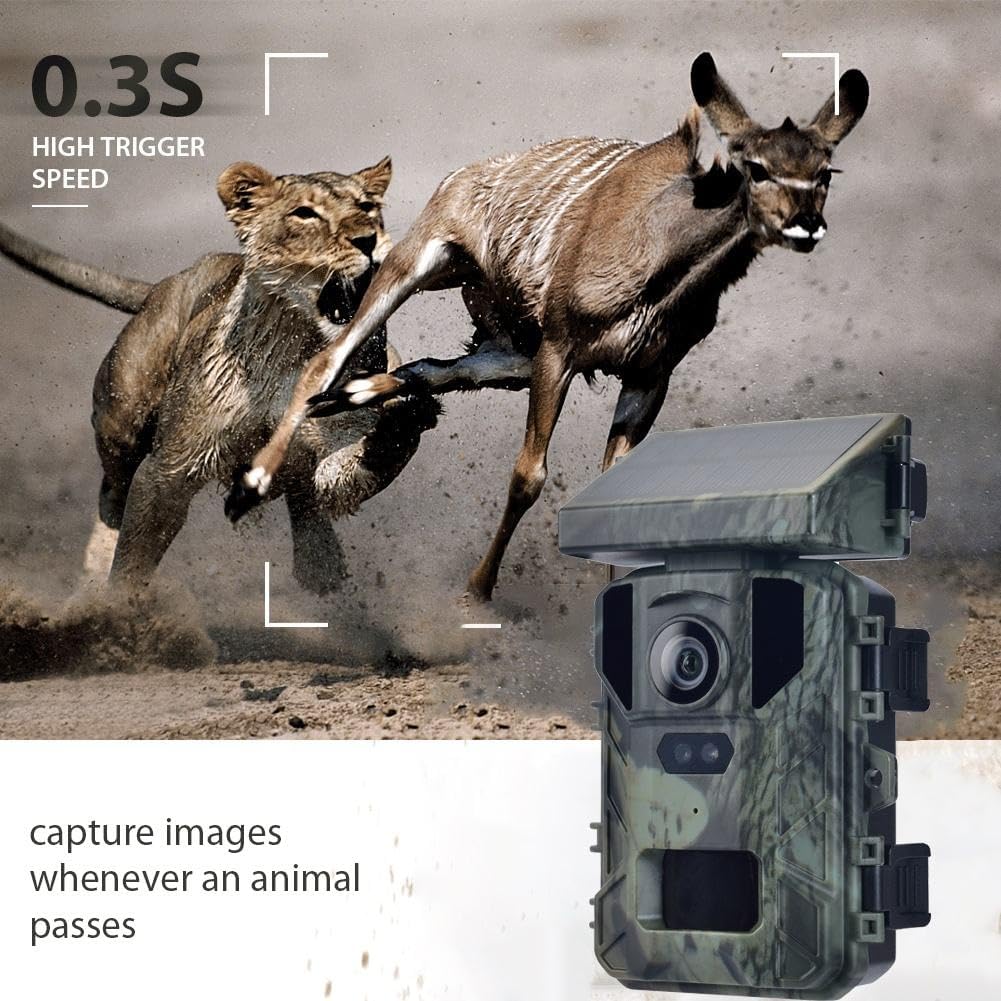
Image: Illustrates the camera's ability to record H.265 HD 4K videos with clear audio, optimizing storage space.
2. მოძრაობის ამოცნობა და ჩართვის სიჩქარე
The camera features a sensitive PIR sensor that detects movement up to 20 meters (65 ft) away. With an ultra-fast 0.3-second trigger speed, it swiftly activates to capture wildlife, minimizing missed moments.

Image: Depicts the camera's 0.3-second high trigger speed, capturing fast-moving subjects like a bird taking flight.
3. ღამის ხედვა
Equipped with invisible infrared LEDs, the camera automatically switches to night vision mode in low-light conditions. This allows for clear black-and-white footage and images in complete darkness without disturbing animals.
4. რეviewფოტოებისა და ვიდეოების გადაღება
შეგიძლიათ ხელახლაview captured photos and videos directly on the camera's 2.4-inch color display while in ტესტი mode. For larger viewing or storage, remove the Micro SD card and connect it to a computer using a card reader.
5. აპლიკაციები
The SuntekCam Mini Solar Trail Camera is versatile and suitable for various applications:
- Hunting and wildlife observation
- ფერმის მონიტორინგი
- სახლის დაცვა
- Construction site surveillance

Image: Shows various applications for the trail camera, including hunting, farm monitoring, wildlife observation, and home security.
მოვლა
1. ამინდისადმი მდგრადობა
The camera features an IP65-rated housing, making it resistant to rain, snow, and dust. This ensures reliable performance in challenging outdoor environments.

Image: Highlights the camera's IP65 waterproof and dustproof design, ensuring reliable performance in various weather conditions.
2. დასუფთავება
Periodically clean the camera lens and solar panel with a soft, dry cloth to ensure optimal performance. Avoid using abrasive cleaners or solvents.
3. ბატარეის მოვლა
If using AA batteries, ensure they are fresh and of good quality. For solar-powered operation, ensure the solar panel receives sufficient sunlight to maintain the internal 18650 battery's charge. If the camera will be stored for an extended period, remove all batteries.
პრობლემების მოგვარება
Camera Not Turning On / Screen Blank
- Ensure batteries (AA and/or 18650) are correctly installed and charged.
- Verify the power switch is in the ტესტი position to access the display and settings. Switching directly to ON will not activate the screen for user interaction.
ცუდი ბატარეის ხანგრძლივობა
- Use high-quality, fresh AA batteries. Rechargeable NiMH AA cells are recommended.
- For solar power, ensure the solar panel is clean and receives adequate direct sunlight. The internal 18650 battery needs sufficient charge.
- Reduce the frequency of recordings or adjust PIR sensitivity if the camera is triggering excessively.
გადაცემა შეუძლებელია Files კომპიუტერზე
- The primary method for data transfer is by removing the Micro SD card and using a card reader to connect it to your computer.
- While the camera has a USB port, it may not be recognized as a mass storage device by all computers for direct file გადაცემა.
Missed Recordings
- Check PIR sensor sensitivity settings; increase if necessary.
- დარწმუნდით, რომ კამერის ველი... view გამჭვირვალეა და არ არის დაბრკოლებული.
- Verify that the camera is in ON mode for active monitoring.
სპეციფიკაციები
| ფუნქცია | სპეციფიკაცია |
|---|---|
| მოდელის სახელი | MINI800S |
| გამოსახულების გარჩევადობა | 50 MP |
| ვიდეო რეზოლუცია | 4K |
| ვიდეო გადაღების ფორმატი | MP4 |
| გამომწვევი სიჩქარე | 0.3 წამი |
| გამოვლენის დიაპაზონი | 20 მეტრამდე (65 ფუტი) |
| სპეციალური ფუნქცია | ღამის ხედვა |
| წყალგაუმტარი რეიტინგი | IP65 |
| დენის წყარო | Solar Powered, AA Batteries (4), External Charging |
| ჩვენება | 2.4 ინჩიანი ფერადი ეკრანი |
| მთის ტიპი | ხის მთა |
| ნივთის ზომები | 5.9 x 3.9 x 7.8 ინჩი |
გარანტია და მხარდაჭერა
For warranty information and technical support, please refer to the specific warranty card included with your product or contact SuntekCam customer service directly. Keep your purchase receipt for any warranty claims.
Manufacturer: SUNTEKCAM