
1. შესავალი
Thank you for choosing the Proscenic P11 Ultra Cordless Vacuum Cleaner. This manual provides essential information for the safe and efficient use, maintenance, and troubleshooting of your new appliance. Please read it thoroughly before first use and retain it for future reference.
The Proscenic P11 Ultra is designed for versatile cleaning across various surfaces, offering powerful suction and convenient features for a cleaner home environment.
2. უსაფრთხოების მნიშვნელოვანი ინსტრუქციები
ელექტრომოწყობილობების გამოყენებისას ყოველთვის დაიცავით უსაფრთხოების ძირითადი ზომები, რათა შეამციროთ ხანძრის, ელექტროშოკის ან დაზიანების რისკი.
- წაიკითხეთ ყველა ინსტრუქცია მოწყობილობის გამოყენებამდე.
- არ გამოიყენოთ გარეთ ან სველ ზედაპირებზე.
- არ დაუშვათ სათამაშოდ გამოყენება. განსაკუთრებული ყურადღებაა საჭირო ბავშვების მიერ ან მის მახლობლად გამოყენებისას.
- გამოიყენეთ მხოლოდ ამ სახელმძღვანელოში აღწერილი წესით. გამოიყენეთ მხოლოდ მწარმოებლის მიერ რეკომენდებული დანართები.
- არ გამოიყენოთ დაზიანებულ სადენთან ან შტეფსელთან ერთად. თუ მოწყობილობა არ მუშაობს ისე, როგორც უნდა, ჩამოვარდა, დაზიანდა, დარჩა გარეთ ან წყალში ჩავარდა, დააბრუნეთ სერვის ცენტრში.
- არ გაჭიმოთ ან არ გადაიტანოთ სადენით, არ გამოიყენოთ კაბელი სახელურად, დახურეთ კაბელის კარი ან არ მიიჭიდოთ კაბელი მკვეთრი კიდეების ან კუთხეების გარშემო. არ გადაიტანოთ მოწყობილობა სადენზე. შეინახეთ კაბელი გახურებული ზედაპირებისგან.
- არ გამორთოთ კაბელის დაჭერით. გამორთვისთვის, დაიჭირეთ შტეფსელი და არა კაბელი.
- არ ატაროთ შტეფსელი ან მოწყობილობა სველი ხელებით.
- არ ჩადოთ რაიმე საგანი ღიობებში. არ გამოიყენოთ ნებისმიერი გახსნის დაბლოკვით; გაათავისუფლეთ მტვრისგან, ღრძილების, თმისა და ყველაფრისგან, რამაც შეიძლება შეამციროს ჰაერის ნაკადი.
- შეინახეთ თმა, თავისუფალი ტანსაცმელი, თითები და სხეულის ყველა ნაწილი ღიობებისა და მოძრავი ნაწილებისგან მოშორებით.
- არ აიღოთ ის, რაც იწვის ან ეწევა, როგორიცაა სიგარეტი, ასანთი ან ცხელი ნაცარი.
- განსაკუთრებული სიფრთხილე გამოიჩინეთ კიბეებზე დასუფთავებისას.
- არ გამოიყენოთ აალებადი ან წვადი სითხეების, როგორიცაა ბენზინი, ან იმ ადგილებში, სადაც ისინი შეიძლება იყოს.
- არ შეაგროვოთ ტოქსიკური მასალა (მაგ., ქლორის მათეთრებელი, ამიაკის გამწმენდი, კანალიზაციის გამწმენდი).
- არ გამოიყენოთ დახურულ სივრცეში, სადაც არის ზეთის ბაზაზე დამზადებული საღებავის, საღებავის გამათხელებლის, ზოგიერთი ჩრჩილის საწინააღმდეგო ნივთიერების, აალებადი მტვრის ან სხვა ასაფეთქებელი ან ტოქსიკური ორთქლის ორთქლი.
- Do not vacuum hard or sharp objects such as glass, nails, screws, or coins.
- ყოველთვის გამორთეთ ეს მოწყობილობა მოტორიზებული საქშენის შეერთებამდე ან გამორთვამდე.
- მოწყობილობა შენობაში შეინახეთ. გამოყენების შემდეგ გადააგდეთ უბედური შემთხვევების თავიდან ასაცილებლად.
- დასატენად გამოიყენეთ მხოლოდ მწარმოებლის მიერ მოწოდებული დამტენი.
- არ დაწვათ მოწყობილობა მაშინაც კი, თუ ის ძლიერ დაზიანებულია. ბატარეები შეიძლება აფეთქდეს ცეცხლში.
- The battery should be fully charged and stored separately if the device is not used for a long time.
3. პაკეტის შიგთავსი
Carefully unpack your Proscenic P11 Ultra and check that all items are present and in good condition. If any items are missing or damaged, please contact customer support.
- მთავარი ვაკუუმის ბლოკი
- Adjustable Telescopic Rod
- Motorized Floor Brush (Anti-Tangle with Green Light)
- მოსახსნელი ბატარეა
- Accessory Kit (includes Crevice Tool, Dusting Brush)
- ადაპტერი (დამტენი)
- Charging Dock / Wall Mount
- მომხმარებლის სახელმძღვანელო (ეს დოკუმენტი)
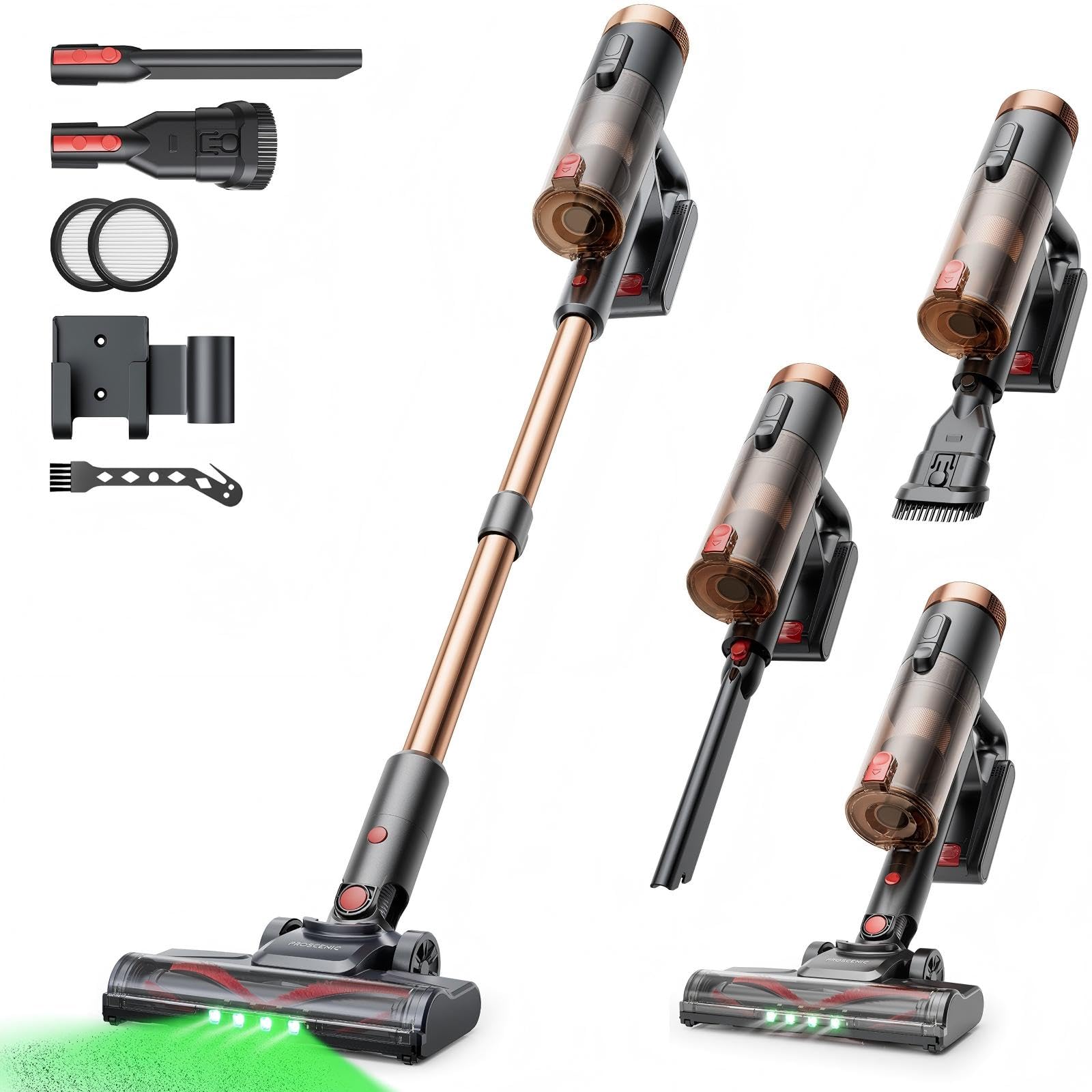
Image 1: Proscenic P11 Ultra main unit and included accessories. This image displays the vacuum cleaner's primary components, including the handheld unit, extension wand, floor brush, and various attachments.
4. პროდუქტი დასრულდაview
Familiarize yourself with the key components and features of your Proscenic P11 Ultra.
ძირითადი მახასიათებლები:
- დამოუკიდებელი დიზაინი: Allows the vacuum to stand upright independently for convenient storage and breaks during cleaning.
- 180° Rotating Floor Brush: Enhances maneuverability, allowing easy access to tight corners and under furniture.
- Adjustable Telescopic Rod: Customize the height for comfortable use by various users.
- Anti-Tangle Brush with Green Detection Light: Prevents hair tangles and illuminates hidden dust particles for thorough cleaning.
- 50 kPa Super Strong Suction Power: Provides powerful cleaning performance for stubborn dirt and debris.
- Intelligent Touchscreen: Displays real-time information on battery life, maintenance status, and suction modes.
- Two Suction Power Modes: Offers versatile cleaning options for different floor types and cleaning needs.
- მოსახსნელი ბატარეა: Allows for extended cleaning time with an optional spare battery and convenient charging.
Image 2: Close-up of the Proscenic P11 Ultra's intelligent touchscreen. The screen provides visual feedback on the vacuum's status.
5. მონტაჟი და აწყობა
Follow these steps to assemble your Proscenic P11 Ultra and prepare it for first use.
5.1 Assembling the Main Unit
- Insert the adjustable telescopic rod into the main handheld vacuum unit until it clicks securely into place.
- Attach the motorized floor brush to the bottom end of the telescopic rod, ensuring it locks firmly.
- Insert the removable battery into the designated slot on the main unit until it clicks.
Image 3: Illustration of assembling the main vacuum unit, showing the connection points for the telescopic rod and floor brush.
5.2 ბატარეის დატენვა
პირველი გამოყენების წინ სრულად დატენეთ აკუმულატორი. აკუმულატორის დატენვა შესაძლებელია მთავარ ბლოკზე მიერთებისას ან ცალკე.
- Connect the adapter to the charging port on the battery or the charging dock.
- შეაერთეთ ადაპტერი დენის განყოფილებაში.
- The touchscreen display will indicate charging status. A full charge typically takes approximately 4-5 hours.
Image 4: The vacuum cleaner connected to its charger, illustrating the charging process. The battery can be charged while installed or removed.
5.3 აქსესუარების მიმაგრება
To use the crevice tool or dusting brush, detach the telescopic rod and floor brush from the main unit. Insert the desired accessory directly into the main unit's nozzle until it clicks.
6. ოპერაცია
Learn how to effectively use your Proscenic P11 Ultra for various cleaning tasks.
6.1 ჩართვა/გამორთვა და შეწოვის რეჟიმები
- Press the power button on the main unit to turn the vacuum cleaner on. It will start in the default suction mode.
- Use the mode selection button on the touchscreen to switch between the two available suction power modes: Standard and Max.
- მტვერსასრუტის გამოსართავად კვლავ დააჭირეთ ჩართვის ღილაკს.
6.2 ზედაპირების გაწმენდა
- Hard Floors & Carpets: Use the motorized floor brush for general cleaning. The green detection light will help identify fine dust.
- Tight Spaces & Corners: Utilize the crevice tool for narrow gaps, edges, and hard-to-reach areas.
- Upholstery & Delicate Surfaces: Attach the dusting brush for cleaning sofas, curtains, and other sensitive items.
- შინაური ცხოველების ბეწვი: The anti-tangle brush is specifically designed to effectively pick up pet hair without tangling.
Image 5: The Proscenic P11 Ultra in use, demonstrating its maneuverability on a hard floor surface. The green light on the brush head is visible.
6.3 Freestanding Function
The P11 Ultra features a freestanding design. When you need to pause cleaning or store the vacuum temporarily, simply ensure it is balanced and stands upright on its own. This allows for convenient breaks without needing to lean the vacuum against a wall or lay it down.
7. მოვლა
რეგულარული მოვლა უზრუნველყოფს ოპტიმალურ მუშაობას და ახანგრძლივებს თქვენი მტვერსასრუტის სიცოცხლის ხანგრძლივობას.
7.1 ნაგვის ურნის დაცლა
ნაგვის ურნა ყოველი გამოყენების შემდეგ ან მაქსიმალური შევსების ხაზამდე მიღწევის შემდეგ დაცალეთ.
- დარწმუნდით, რომ მტვერსასრუტი გამორთულია.
- იპოვეთ ნაგვის ურნის გამშვები ღილაკი, რომელიც, როგორც წესი, სახელურთან ახლოს მდებარეობს.
- Press the button to open the dustbin flap and empty contents into a waste bin.
- მტვრის ურნის თავსახური მჭიდროდ დახურეთ მანამ, სანამ არ დააწკაპუნებს.
Image 6: A user demonstrating how to empty the transparent dustbin of the Proscenic P11 Ultra into a trash receptacle.
7.2 HEPA ფილტრის გაწმენდა
Clean the HEPA filter regularly (e.g., monthly, depending on usage) to maintain suction power.
- ამოიღეთ ნაგვის ურნა მთავარი მოწყობილობიდან.
- Twist and pull out the HEPA filter assembly.
- ნაზად დააკაკუნეთ ფილტრი ნაგვის ურნაზე ფხვიერი მტვრის მოსაშორებლად.
- If necessary, rinse the filter under cold running water. Ensure it is completely dry (for at least 24 hours) before reinserting. Do not use detergents.
- ხელახლა ააწყვეთ ფილტრი და ნაგვის ურნა.
7.3 ფუნჯის რულონის გაწმენდა
პერიოდულად შეამოწმეთ ფუნჯის რულონი ჩახლართული თმის ან ნარჩენების არსებობაზე.
- გამორთეთ მტვერსასრუტი და მოხსენით მოტორიზებული იატაკის ჯაგრისი.
- Locate the brush roll release mechanism (refer to the floor brush diagram).
- ამოიღეთ ფუნჯის რულონი. მაკრატელი ან საწმენდი საშუალება გამოიყენეთ ჩახლართული თმის ან ბოჭკოების დასაჭრელად და მოსაშორებლად.
- ხელახლა ჩადეთ ფუნჯის რულონი და დააფიქსირეთ განმუხტვის მექანიზმი.
8. Დიაგნოსტიკა
If you encounter issues with your Proscenic P11 Ultra, refer to the following common problems and solutions.
| პრობლემა | შესაძლო მიზეზი | გამოსავალი |
|---|---|---|
| ვაკუუმი არ ირთვება | ბატარეა არ არის დატენილი ან სწორად არ არის დამონტაჟებული. | დარწმუნდით, რომ ბატარეა სრულად დატენილია და უსაფრთხოდ არის ჩასმული. |
| დაბალი შეწოვის სიმძლავრე | Dustbin is full; Filter is clogged; Brush roll is blocked. | Empty dustbin. Clean or replace HEPA filter. Remove blockages from brush roll. |
| ფუნჯის რულონი არ ბრუნავს | Brush roll is tangled with hair/debris; Floor brush is not properly attached. | Clean brush roll. Reattach floor brush securely. |
| ბატარეის მოკლე ხანგრძლივობა | Battery not fully charged; Using Max suction mode frequently; Battery degradation. | Ensure full charge. Use Standard mode for longer runtime. Consider replacing battery if significantly degraded. |
| არაჩვეულებრივი ხმაური | Blockage in nozzle or hose; Damaged brush roll. | Check for and remove any blockages. Inspect brush roll for damage. |
If the problem persists after attempting these solutions, please contact Proscenic customer support.
9. სპეციფიკაციები
Technical specifications for the Proscenic P11 Ultra Cordless Vacuum Cleaner.
- მოდელი: P11 Ultra
- დენის წყარო: იკვებება ბატარეით
- ტtage: 22.5 ვოლტი
- შეწოვის სიმძლავრე: 50 კპა-მდე
- ნივთის წონა: 2.68 კგ
- ნაგავსაყრელის ტევადობა: Approximately 1.0 Liter (1000 Microliters as per data, interpreted as 1.0L)
- ფილტრის ტიპი: HEPA ფილტრი
- ფორმის ფაქტორი: Upright (Stick Vacuum)
- უკაბელო: დიახ
- რეკომენდებული ზედაპირები: Carpet, Solid Wood, Upholstery
- განსაკუთრებული მახასიათებლები: Freestanding Design, Touchscreen, Green Detection Light, Anti-Tangle Brush, Adjustable Telescopic Rod, Removable Battery
10. გარანტია და მომხმარებელთა მხარდაჭერა
Proscenic provides a 2 წლიანი გარანტია for the P11 Ultra Cordless Vacuum Cleaner, covering manufacturing defects from the date of purchase.
For any questions, technical assistance, or warranty claims, please contact our customer support team. We offer 7x24 hours customer support რომ დაგეხმაროთ.
ელფოსტა: service-de@proscenic.com
Please have your model number (P11 Ultra) and purchase information ready when contacting support.