
1. შესავალი
This manual provides detailed instructions for the installation, operation, and maintenance of your Ecoviva 800GPD Under Sink Reverse Osmosis (RO) Water Filter Filtration System. Please read this manual thoroughly before installation and use to ensure proper function and longevity of your system. This system is designed to provide high-quality filtered water for household use.
2. უსაფრთხოების ინფორმაცია
- გაჟონვის თავიდან ასაცილებლად, დარწმუნდით, რომ ყველა შეერთება უსაფრთხოა.
- არ დაუშვათ სისტემის გაყინვა.
- Use only genuine Ecoviva replacement filters.
- Turn off the water supply before performing any maintenance.
- Keep the system away from direct sunlight and heat sources.
- თუ რაიმე პრობლემა წარმოიქმნება, მიმართეთ პრობლემების მოგვარების განყოფილებას ან დაუკავშირდით მომხმარებელთა მხარდაჭერას.
3. პროდუქტი დასრულდაview
The Ecoviva 800GPD RO system features an advanced 8-stage filtration process, including PP, GAC, CTO, and RO membranes, to remove impurities and provide mineral-enriched alkaline water. It boasts an ultra-fast flow rate and a smart digital faucet for real-time monitoring.
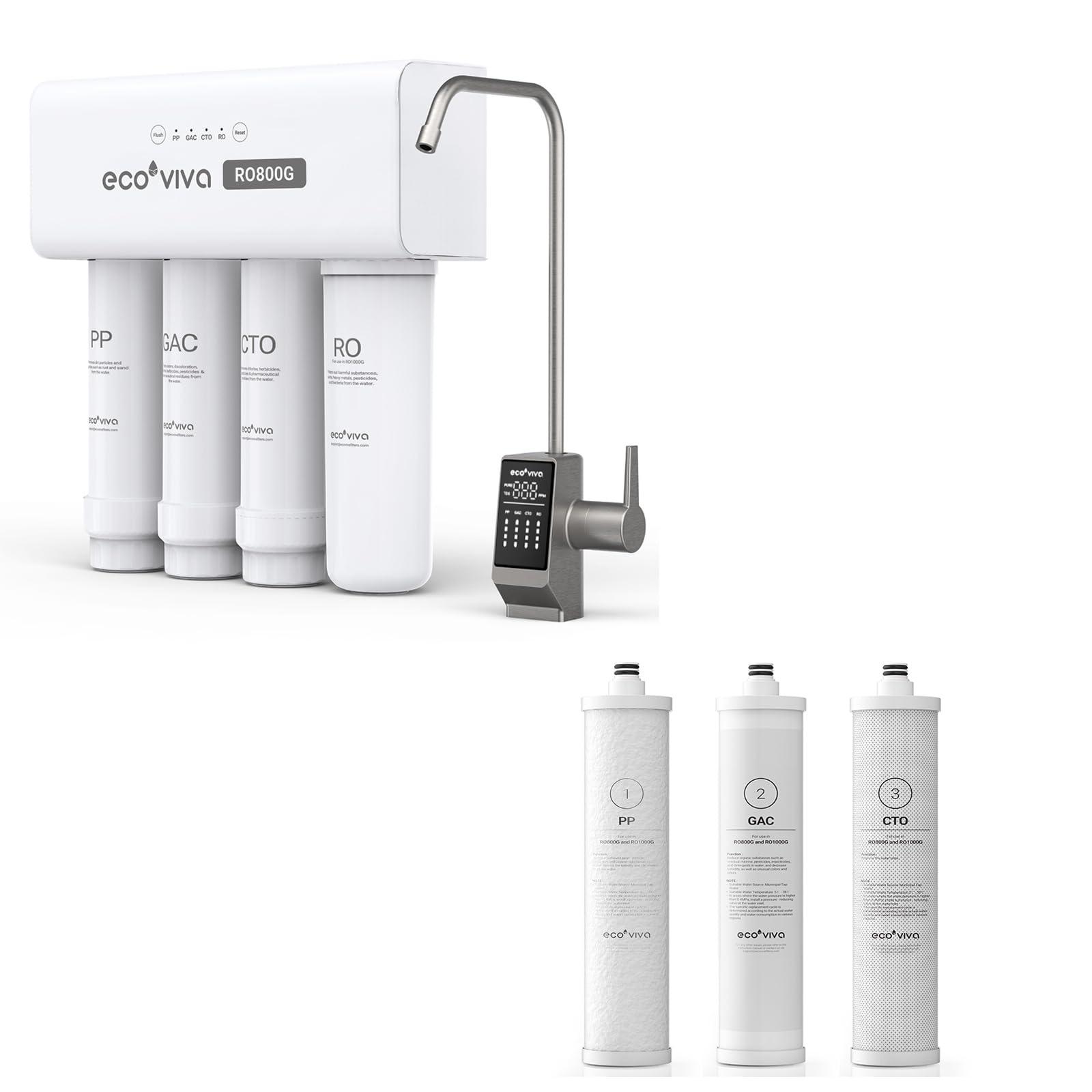
Figure 3.1: Ecoviva 800GPD Under Sink RO Water Filter System. This image displays the complete filtration unit with its four filter cartridges, the main housing, and the accompanying smart digital faucet.
ფილტრაცია სtages
The system utilizes an 8-layer precision filtration process to ensure comprehensive water purification:
- PP (Polypropylene) Filter: Removes sediment, rust, sand, and other large particles.
- GAC (Granular Activated Carbon) Filter: Absorbs chlorine, odors, and organic chemicals.
- CTO (Carbon Block) Filter: Further reduces chlorine, taste, and odor, and removes fine sediments.
- RO (Reverse Osmosis) Membrane: Filters out dissolved solids, heavy metals, bacteria, viruses, and other microscopic impurities down to 0.0001 microns.
- Mineralizer: Enriches water with beneficial minerals and adjusts pH to an alkaline level (pH 7-8).

Figure 3.2: PP Filter. This image shows the white polypropylene sediment filter cartridge, labeled 'PP'.

Figure 3.3: GAC Filter. This image shows the granular activated carbon filter cartridge, labeled 'GAC'.
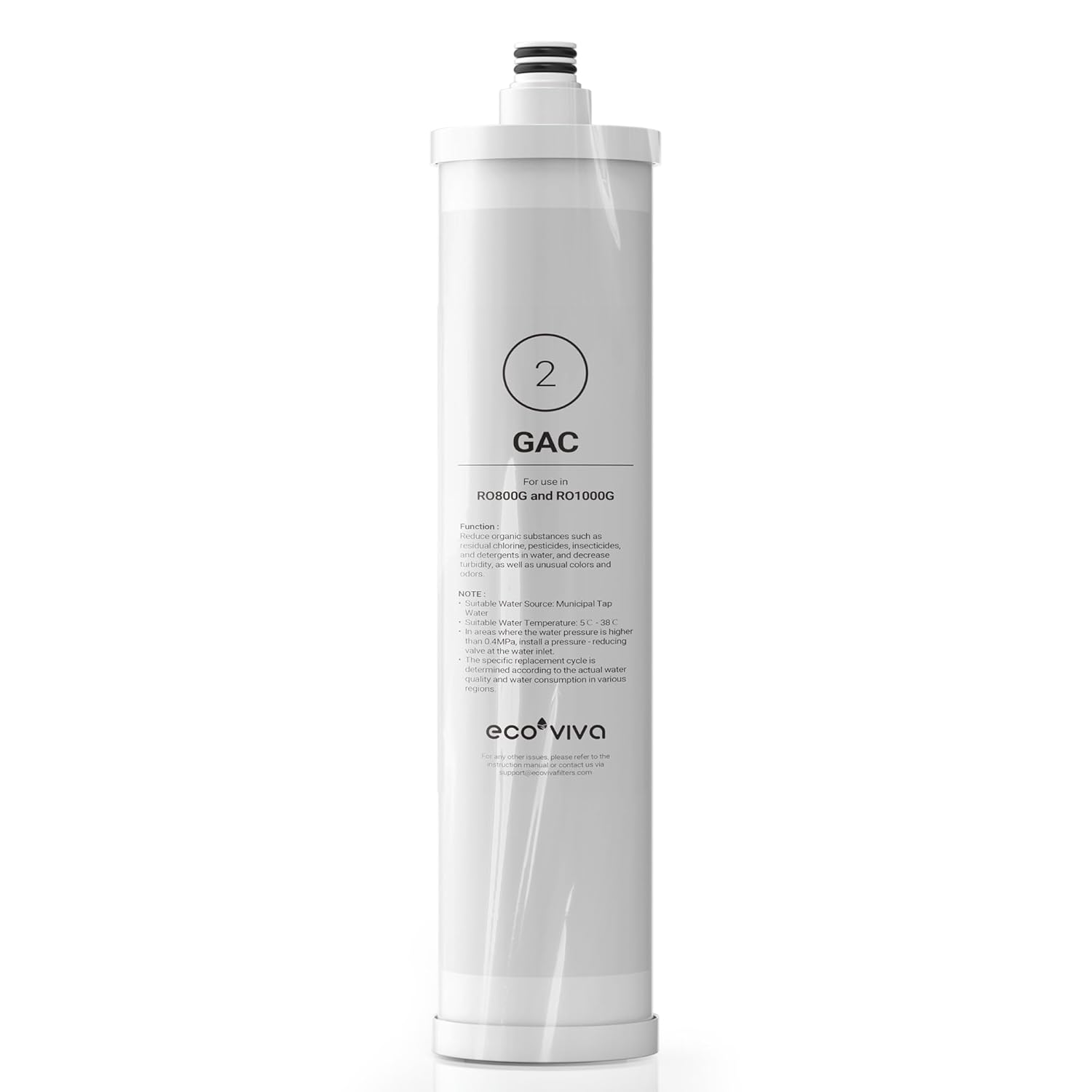
Figure 3.4: CTO Filter. This image shows the carbon block filter cartridge, labeled 'CTO'.
4. დაყენება და ინსტალაცია
The Ecoviva 800GPD system features a tankless design, saving up to 70% of under-sink space, and is designed for DIY-friendly installation, typically completed within 30 minutes. Universal L-shaped adapters (for 3/8" & 1/4" pipes) are included for convenience.
ინსტალაციის ნაბიჯები (ზოგადი სახელმძღვანელო):
- მოამზადეთ ტერიტორია: Clear the under-sink cabinet and ensure you have access to the cold water line and a drain.
- წყალმომარაგების გამორთვა: Locate and turn off the cold water supply valve under your sink.
- დააინსტალირეთ ონკანი: Drill a hole (if necessary) in your countertop or sink for the smart digital faucet. Secure the faucet according to the included hardware.
- წყალმომარაგების დაკავშირება: Use the provided adapters to connect the system to your cold water line.
- შეაერთეთ სანიაღვრე ხაზი: Install the drain saddle valve onto the drain pipe and connect the system's drain line.
- Connect Faucet Line: Connect the purified water line from the system to the smart digital faucet.
- ფილტრების ჩასმა: Ensure all filter cartridges are correctly inserted into their respective housings.
- წყალმომარაგების აღდგენა: Slowly turn on the cold water supply and check for leaks.
- გამორეცხვის სისტემა: Allow the system to flush for approximately 15-30 minutes to remove air and carbon fines before first use.
For detailed visual instructions, please refer to the separate installation guide included with your product packaging.
5. საოპერაციო ინსტრუქციები
Smart Digital Faucet
The system features a smart digital faucet with an integrated LED display that provides real-time information.

Figure 5.1: Smart Digital Faucet. This image shows the faucet with its LED display indicating real-time TDS levels and filter lifespan indicators for PP, GAC, CTO, and RO filters.
- Real-Time TDS Monitoring: The LED display shows the current Total Dissolved Solids (TDS) level of the purified water, allowing you to monitor water quality instantly.
- Filter Life Reminder: The display also indicates the remaining lifespan of each filter (PP, GAC, CTO, RO), alerting you when a filter needs replacement.
წყლის გაცემა
To dispense purified water, simply turn the handle on the smart digital faucet. The 800GPD capacity ensures an ultra-fast flow rate, filling an 8oz cup in approximately 5 seconds.

Figure 5.2: Ultra-Fast Flow. This image illustrates the rapid dispensing of water from the Ecoviva faucet, highlighting its ability to fill a glass in 5 seconds.
Alkaline Water Benefits
The system produces mineral-rich alkaline water with a stable pH level between 7-8 and stable TDS levels between 7-9, ensuring essential minerals are retained for optimal taste and health.

Figure 5.3: Mineral-Rich Alkaline Water. This image shows a TDS meter displaying a reading of '007' in a glass of water, indicating the presence of beneficial minerals.
6. მოვლა
ფილტრის გამოცვლა
Regular filter replacement is crucial for maintaining optimal water quality and system performance. The smart digital faucet will alert you when filters need replacement.
| ფილტრის ტიპი | Recommended Lifespan |
|---|---|
| PP/GAC/CTO Filters | 3,000 Liters or 1 Year |
| RO მემბრანა | 6,000 Liters or 2 Years |
To replace filters, turn off the water supply, depressurize the system, twist out the old cartridges, and insert new ones. Ensure proper sealing before restoring water supply.
Auto-Flush Technology
The system incorporates auto-flush technology, which periodically cleans the RO membrane. This feature helps extend the lifespan of the RO membrane to up to 2 years, ensuring consistent purity and efficiency.
7. Დიაგნოსტიკა
If you encounter any issues with your Ecoviva RO system, please refer to the common problems and solutions below. For problems not listed or if issues persist, contact customer support.
- დაბალი წყლის ნაკადი: Check for clogged filters (replace if necessary), ensure adequate water pressure, and verify all valves are fully open.
- გაჟონვა: Turn off water supply immediately. Check all connections for tightness. Ensure O-rings are properly seated and not damaged.
- Poor Water Taste/Odor: This usually indicates exhausted carbon filters (GAC/CTO). Replace them as per the recommended schedule.
- High TDS Reading: If the TDS reading on the faucet is consistently high after flushing, the RO membrane may need replacement.
- No Water Production: Verify water supply is on, check for kinks in tubing, and ensure the system is powered (if applicable).
8. სპეციფიკაციები
| ფუნქცია | დეტალი |
|---|---|
| მოდელი | 800 გპდ |
| ფილტრაცია სtages | 8-Stage (PP, GAC, CTO, RO membrane, Mineralizer) |
| ყოველდღიური წარმოების მოცულობა | 800 გალონი დღეში (GPD) |
| Pure-to-Waste Ratio | 3:1 (3 cups purified water for 1 cup wastewater) |
| RO Membrane Pore Size | 0.0001 მიკრონი |
| Water pH Level | 7-8 (Alkaline) |
| TDS Levels (Purified) | 7-9 (Stable) |
| ინსტალაციის ტიპი | Under-Sink, Tankless Design |
| ASIN | B0FG28YNXT |
| პირველი ხელმისაწვდომი თარიღი | 21 წლის 2025 აპრილი |
9. გარანტია და მხარდაჭერა
Ecoviva products are designed for reliability and performance. For warranty information, technical support, or to purchase replacement filters, please visit the official Ecoviva webსაიტზე ან დაუკავშირდით ჩვენს მომხმარებელთა მომსახურების ჯგუფს.
- ონლაინ დახმარება: ეწვიეთ Ecoviva Store on Amazon
- მომხმარებელთა მომსახურება: Refer to your product packaging for contact details.