
1. შესავალი
This manual provides detailed instructions for the installation, operation, and maintenance of your Denver IIC-251ED WiFi IP Indoor Camera. Please read this manual thoroughly before using the product to ensure correct usage and to prevent damage. Keep this manual for future reference.
2. უსაფრთხოების ინფორმაცია
- Ensure the camera is installed in a stable location to prevent it from falling.
- Use only the power adapter supplied with the device. Using an incorrect adapter may cause damage or fire.
- Do not expose the camera to water, moisture, or extreme temperatures. This product is designed for indoor use only.
- მოერიდეთ კამერის განთავსებას სითბოს წყაროებთან ახლოს ან მზის პირდაპირ სხივებში.
- არ სცადოთ კამერის დამოუკიდებლად დაშლა ან შეკეთება. ყველა სახის მომსახურება კვალიფიციურ პერსონალს მიმართეთ.
- შეინახეთ კამერა და მისი აქსესუარები ბავშვებისთვის მიუწვდომელ ადგილას.
3. პაკეტის შიგთავსი
გახსნისას, გთხოვთ, შეამოწმოთ შეფუთვის შიგთავსი. თუ რომელიმე ნივთი აკლია ან დაზიანებულია, დაუკავშირდით თქვენს გამყიდველს.
- Denver IIC-251ED WiFi IP Indoor Camera
- დენის ადაპტერი
- სამონტაჟო აქსესუარები (ხრახნები, კედლის შტეფსელები)
- მომხმარებლის სახელმძღვანელო (ეს დოკუმენტი)
4. პროდუქტი დასრულდაview
The Denver IIC-251ED is a WiFi-enabled IP indoor camera designed for home surveillance. It features 1080p Full HD video, two-way audio, infrared night vision, and motion detection capabilities. The camera is TUYA compatible, allowing for easy integration with smart home systems.
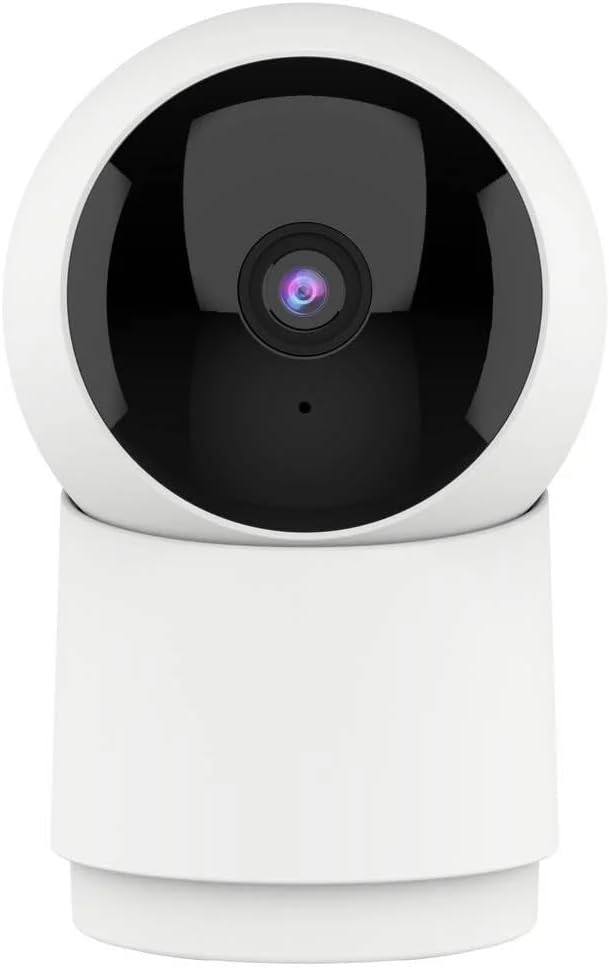
სურათი 1: წინა view of the Denver IIC-251ED WiFi IP Indoor Camera. The camera features a spherical top housing the lens, mounted on a cylindrical base, allowing for pan and tilt functionality.

სურათი 2: Product packaging for the Denver IIC-251ED, indicating key features such as Wi-Fi connectivity, 1080p Full HD resolution, built-in speaker/microphone, IR LED for night vision, and motion detection. It also highlights TUYA compatibility.
5. დაყენება
5.1 აპლიკაციის ინსტალაცია
- Download the compatible smart home application (e.g., Tuya Smart or Smart Life) from your mobile device's app store.
- ძიება "Tuya Smart" or "Smart Life" in the Apple App Store or Google Play Store.
- Install the application and create an account if you are a new user.
5.2 კამერის ჩართვა
- Connect the power adapter to the camera's power input port.
- შეაერთეთ დენის ადაპტერი კედლის განყოფილებაში.
- The camera will power on and initiate its startup sequence. Wait for the indicator light to flash, indicating it is ready for pairing.
5.3 აპლიკაციასთან დაწყვილება
- Open the installed smart home application on your mobile device.
- Tap the "+" icon (usually in the top right corner) to add a new device.
- Select "Security & Video Surveillance" and then choose "Smart Camera" or a similar option.
- Follow the on-screen instructions to connect the camera to your Wi-Fi network. This typically involves entering your Wi-Fi password and scanning a QR code generated by the app with the camera's lens.
- Once connected, the camera will be added to your device list in the app.
6. საოპერაციო ინსტრუქციები
6.1 ცოცხალი View
From the app's device list, tap on your camera to access the live video feed. You can view რეალურ დროში საკვებიtagე თქვენი კამერიდან.
6.2 პანორამირებისა და დახრის კონტროლი
The Denver IIC-251ED camera offers flexible viewing angles. You can remotely control the camera's movement through the app.

სურათი 3: Diagram illustrating the pan (355° horizontal) and tilt (50° vertical) capabilities of the Denver IIC-251ED camera, alongside a smartphone displaying the camera's app interface.
- ლაივში view interface, use the directional controls (usually a joystick or arrow buttons) to pan the camera horizontally up to 355 degrees and tilt it vertically up to 50 degrees.
6.3 ორმხრივი აუდიო
The camera is equipped with a built-in speaker and microphone, allowing for two-way communication.
- კამერის დინამიკით სასაუბროდ შეეხეთ აპლიკაციაში მიკროფონის ხატულას.
- The camera's microphone will pick up audio from its surroundings, which you can hear through your phone.
6.4 მოძრაობის აღმოჩენა და შეტყობინებები
The camera can detect motion and send alerts to your mobile device.
- ჩართეთ მოძრაობის ამოცნობის ფუნქცია აპლიკაციის კამერის პარამეტრებში.
- საჭიროების შემთხვევაში, მგრძნობელობის დონე შეცვალეთ.
- When motion is detected, you will receive a notification on your phone.
6.5 ჩაწერა და დაკვრა
The camera supports video recording, typically to a microSD card (not included) or cloud storage (subscription may be required).
- Insert a microSD card (up to 128GB, Class 10 recommended) into the camera's card slot for local storage.
- Configure recording settings (e.g., continuous recording, event-triggered recording) in the app.
- ჩანაწერებზე წვდომაtage through the "Playback" or "History" section in the app.
6.6 ღამის ხედვა
The integrated IR LEDs provide clear video footagთუნდაც დაბალი განათების ან სრული სიბნელის პირობებში.
- Night vision typically activates automatically in low-light conditions.
- You can usually adjust night vision settings (e.g., auto, on, off) in the app.
7. მოვლა
- დასუფთავება: Use a soft, dry cloth to clean the camera's exterior. Do not use liquid cleaners or aerosols. Gently wipe the lens with a microfiber cloth if necessary.
- Firmware განახლებები: ოპტიმალური მუშაობისა და უსაფრთხოების უზრუნველსაყოფად, რეგულარულად შეამოწმეთ აპლიკაცია ხელმისაწვდომი პროგრამული უზრუნველყოფის განახლებებისთვის.
- შენახვა: თუ კამერას დიდი ხნის განმავლობაში ინახავთ, გამორთეთ ის დენის წყაროდან და შეინახეთ გრილ, მშრალ ადგილას.
8. Დიაგნოსტიკა
- კამერა არ უკავშირდება Wi-Fi-ს: Ensure your Wi-Fi network is 2.4GHz (5GHz is not supported by many smart cameras). Check Wi-Fi password accuracy. Move the camera closer to the router.
- არა ცოცხალი view: Check your internet connection. Ensure the camera is powered on and connected to Wi-Fi. Restart the camera and the app.
- მოძრაობის ამოცნობა არ მუშაობს: Verify that motion detection is enabled in the app settings. Adjust sensitivity. Ensure there are no obstructions blocking the camera's view.
- ვიდეოს ცუდი ხარისხი: Check your Wi-Fi signal strength. Ensure the camera lens is clean.
- Cannot hear audio or speak through camera: შეამოწმეთ ხმის პარამეტრები თქვენს ტელეფონსა და აპლიკაციაში. დარწმუნდით, რომ აპლიკაციას მიკროფონისა და დინამიკის გამოყენების ნებართვები აქვს.
9. სპეციფიკაციები
| მოდელი | IIC-251ED (Reference: 118101020112) |
| ბრენდი | დენვერი |
| დაკავშირება | WiFi (2.4 GHz) |
| ვიდეო რეზოლუცია | 1080p სრული HD |
| პან კუთხე | 355 გრადუსი |
| დახრის კუთხე | 50 გრადუსი |
| აუდიო | Two-way (Built-in Speaker & Microphone) |
| ღამის ხედვა | IR LED |
| მოძრაობის გამოვლენა | დიახ |
| თავსებადობა | TUYA Smart Home Ecosystem |
| ზომები | 15 x 9 x 8 სმ |
| წონა | 330 გრამი |
10. გარანტია და მხარდაჭერა
For warranty information and technical support, please refer to the warranty card included with your product or visit the official Denver webსაიტი. არ სცადოთ მოწყობილობის დამოუკიდებლად შეკეთება, რადგან ამან შეიძლება გააუქმოს თქვენი გარანტია.
For further assistance, please contact Denver customer support.