
შესავალი
This manual provides comprehensive instructions for the setup, operation, and maintenance of your Lepro OE1 AI Smart RGBICW LED Corner Floor Lamp. Please read this manual thoroughly before use to ensure proper functionality and safety.
პაკეტის შიგთავსი
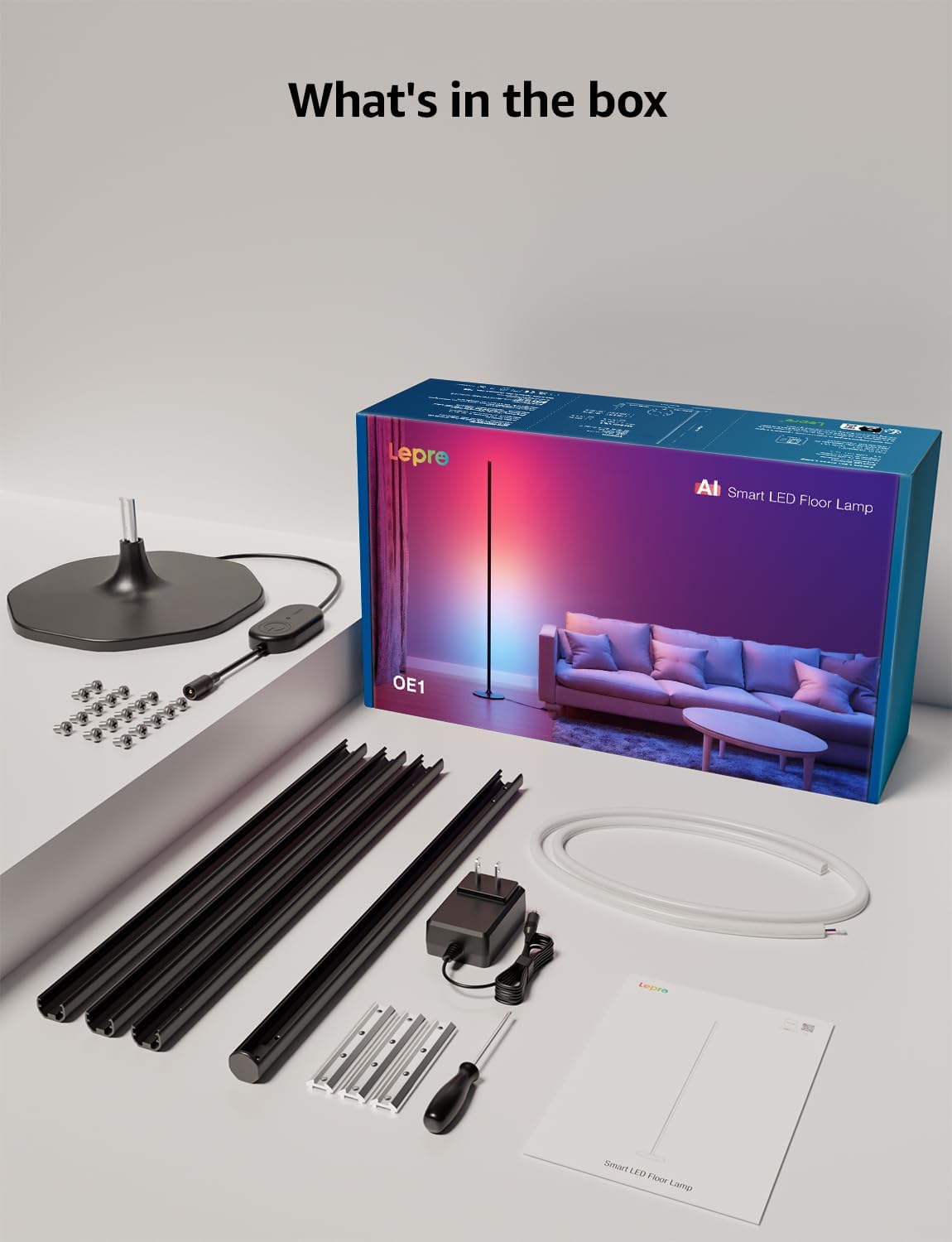
დარწმუნდით, რომ ყველა კომპონენტი შეფუთვაშია:
- Lamp ბაზა
- Metal Poles (multiple sections)
- Metal Connecting Pieces
- LED ზოლის განათება
- ხრახნები და ხრახნები
- დენის ადაპტერი
- მომხმარებლის სახელმძღვანელო
დაყენება და შეკრება
Follow these steps to assemble and set up your Lepro OE1 floor lamp:
- Assemble the Metal Poles: Align the metal slots of the pole sections with the connecting pieces. Use the provided screws and screwdriver to tighten them securely. Continue this process until all pole sections are connected to form the main lamp სხეული.
- ბაზაზე მიმაგრება: Secure the assembled metal pole to the lamp base using the designated screws.
- LED ზოლის ჩასმა: Carefully insert the LED strip light into the channel of the assembled metal pole. Ensure the strip's bottom connector aligns with the wire from the base.
- გაყვანილობის დაკავშირება: Connect the wire from the LED strip to the wire extending from the lamp ბაზა.
- Position the LED Strip: Gently press and adjust the LED strip from the middle outwards to ensure it sits flush and evenly within the pole's channel. Do not cut the strip lights, as this will cause damage.
- დენის კავშირი: შეაერთეთ კვების ადაპტერი lamp and then plug it into a standard electrical outlet.

აპის ჩამოტვირთვა და დაკავშირება
The Lepro OE1 lamp is controlled via the Lepro app. It is compatible with 2.4GHz WiFi networks only. Ensure your phone's Bluetooth is enabled during the pairing process.
- Download the "Lepro" app from your device's app store. (Note: Not compatible with "Lepro Lampux" or "Smart Life" apps).
- დაარეგისტრირეთ ახალი ანგარიში ან შედით სისტემაში.
- Ensure your phone's Bluetooth is on and connected to a 2.4GHz WiFi network.
- In the app, select "Add Device" and follow the on-screen instructions to pair your OE1 lamp.
Video 1: Step-by-step guide on how to assemble the Lepro OE1 AI floor lamp.
Video 2: Instructions on how to connect the OE1 AI floor lamp to the Lepro app.
ოპერაციული ინსტრუქციები
The Lepro OE1 lamp offers various control methods and lighting features:
1. Lepro App Control
The Lepro app provides full control over your lamp's functions:
- LightGPM 4 - Personalized AI Lighting Designer: Use voice or text prompts to describe your desired mood or scene. The AI will generate lighting effects tailored to your preferences. The more you use it, the more it adapts.
- DIY Lighting: Customize your ambiance with over 16 million RGB colors and various effects. Adjust colors, brightness, and speed. Save your custom settings and explore community ideas within the app.
- მუსიკის სინქრონიზაცია: The RGB+ICW color-changing floor lamp reacts to music beats, creating dynamic lighting effects.
- Photo-to-Vibe: Upload a photo of your room, a movie poster, or a game character, and LightGPM will generate a lighting design to match the image's theme.
- თბილი თეთრი განათება: For daily use, the lamp provides 1000 lumens of warm white light at 2700K, adjustable from 1% to 100% brightness.
- დისტანციური მართვა: აკონტროლეთ თქვენი ლamp remotely via the Lepro App, even when away from home.
- განრიგი: Set automatic on/off timers for convenience.


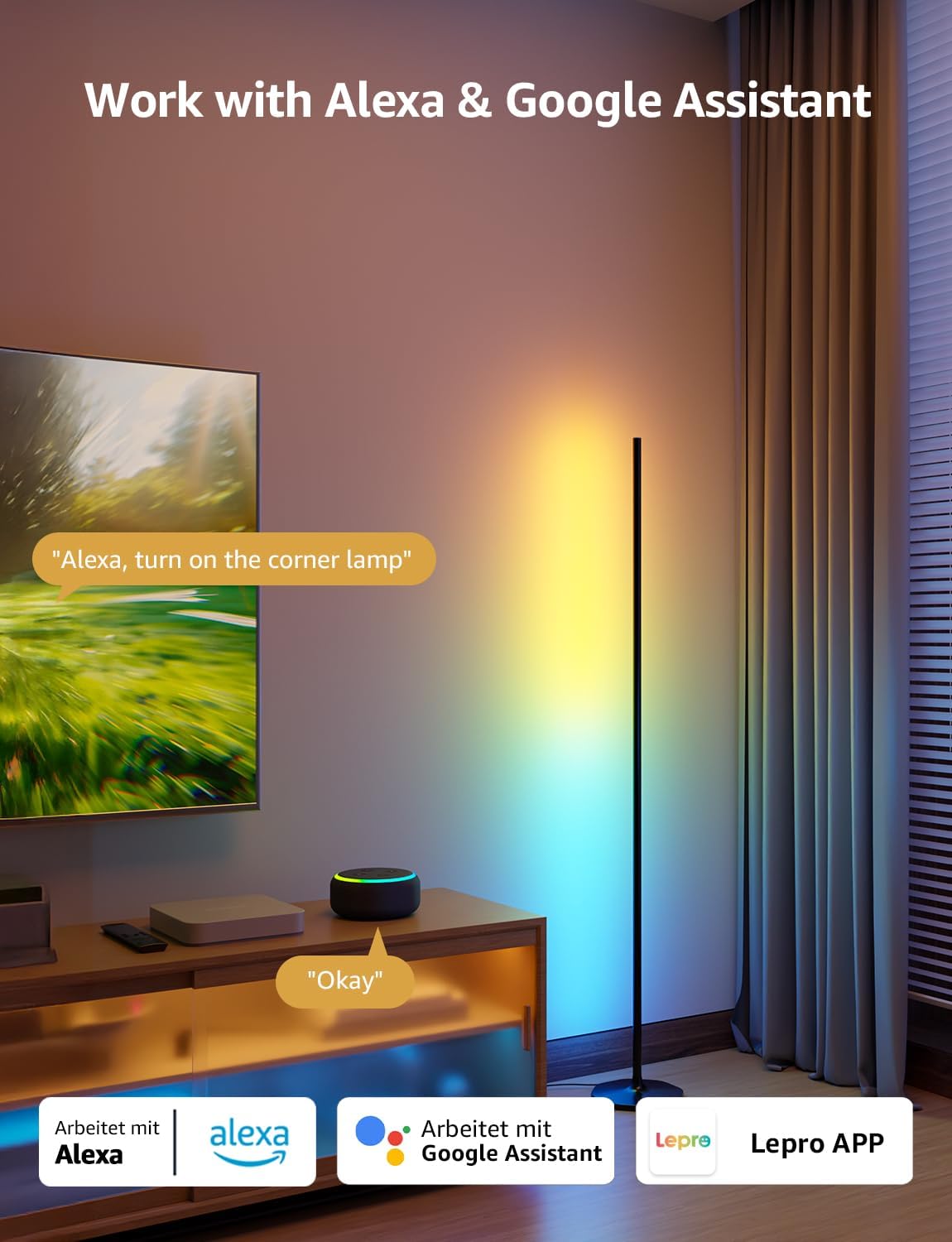
2. ხმოვანი მართვა (Alexa და Google Assistant)
The OE1 lamp supports effortless voice control through Amazon Alexa and Google Assistant. Link your Lepro account with Alexa or Google Assistant in their respective apps to enable voice commands.
- Example commands: "Alexa, turn on the corner lamp," "Hey Google, set the floor lamp to blue," "Alexa, dim the floor lamp 50%-მდე“.
3. ჯგუფის კონტროლი
For multiple Lepro AI devices, simultaneous group control is supported through the Lepro app, allowing you to manage all your smart lights together.
მოვლა
To ensure the longevity and optimal performance of your Lepro OE1 floor lamp:
- დასუფთავება: წაშალეთ ლamp with a soft, dry cloth. Avoid using abrasive cleaners or solvents that may damage the finish or LED strip.
- განთავსება: მოათავსეთ ლamp on a stable, flat surface. Avoid areas with excessive moisture or direct exposure to sunlight, which can affect the LED lifespan.
- სიმძლავრე: Always disconnect the power adapter before cleaning or performing any maintenance.
პრობლემების მოგვარება
If you encounter issues with your Lepro OE1 floor lamp, იხილეთ შემდეგი გავრცელებული გადაწყვეტილებები:
- Lamp არ ირთვება:
- დარწმუნდით, რომ კვების ადაპტერი საიმედოდ არის ჩართული ორივე l-შიamp და მოქმედი ელექტროგადამცემი.
- შეამოწმეთ, მუშაობს თუ არა დენის წყარო სხვა მოწყობილობის ჩართვით.
- Unable to connect to the Lepro app:
- Verify your smartphone's Bluetooth is enabled.
- Confirm your WiFi network is 2.4GHz. The lamp does not support 5GHz WiFi.
- Ensure your phone is connected to the same 2.4GHz WiFi network as the lamp საწყისი დაყენების დროს.
- სცადეთ l-ის გადატვირთვაamp (see "Resetting the Lamp" below).
- ხმოვანი კონტროლი არ მუშაობს:
- Ensure your Lepro account is correctly linked with your Alexa or Google Assistant app.
- Check your internet connection for both the lamp and your voice assistant device.
ლ-ის გადატვირთვაamp
If you experience persistent issues or need to re-pair your lamp, perform a factory reset:
- Locate the control button on the power cable.
- დააჭირეთ ღილაკს და გააჩერეთ 5 წამის განმავლობაში.
- A flashing blue light on the lamp indicates a successful reset. The lamp is now ready for re-pairing with the Lepro app.
Video 3: Visual demonstration of how to reset the Lepro OE1 AI floor lamp.
სპეციფიკაციები
| ფუნქცია | დეტალი |
|---|---|
| ბრენდი | ლეპრო |
| მოდელის ნომერი | O1 |
| პროდუქტის ზომები | 7.87"D x 7.87"W x 55.11"H |
| ნივთის წონა | 2.86 ფუნტი |
| სინათლის წყაროს ტიპი | LED |
| სიკაშკაშე | 1000 ლუმენი |
| ფერის ტემპერატურა | 2700 კელვინი (თბილი თეთრი) |
| ღია ფერი | RGB, თბილი თეთრი |
| ვატtage | 20 ვატი |
| ტtage | 120 ვოლტი (AC) |
| კონტროლის მეთოდი | Voice, App (Lepro App) |
| დაკავშირება | Bluetooth, 2.4G WiFi (5GHz not supported) |
| საშუალო სიცოცხლე | 20000 საათი |
| მასალა | ალუმინის |
| დასრულების ტიპი | მქრქალი |
| შიდა/გარე გამოყენება | შიდა |
| საჭიროა შეკრება | დიახ |
| UPC | 810168791135 |
გარანტია და მხარდაჭერა
For warranty information or technical support, please refer to the official Lepro webსაიტზე ან პირდაპირ დაუკავშირდით მათ მომხმარებელთა მომსახურების სამსახურს. შეინახეთ თქვენი შესყიდვის ქვითარი გარანტიის ნებისმიერი პრეტენზიისთვის.
Optional protection plans may be available for purchase separately. Please check with your retailer for details.