
pocobob PBGOW
pocobob GO უსადენო ყურსასმენების მომხმარებლის სახელმძღვანელო
Model: PBGOW
შესავალი
Thank you for choosing the pocobob GO Wireless Earbuds. These semi in-ear earbuds are designed to provide a comfortable audio experience with clear sound and an integrated ENC (Environmental Noise Cancellation) microphone for enhanced call quality. This manual will guide you through the setup, operation, and maintenance of your new earbuds.

Image: The pocobob GO Wireless Earbuds resting inside their white charging case, showcasinმათი კომპაქტური და ელეგანტური დიზაინი.
დაყენება
1. რა არის ყუთში
- pocobob GO Wireless Earbuds (Left and Right)
- დამუხტვის ქეისი
- USB დამტენი კაბელი (ტიპი-C)
- მომხმარებლის სახელმძღვანელო
2. ყურსასმენებისა და ქეისის დატენვა
პირველი გამოყენების წინ, სრულად დატენეთ ყურსასმენები და დამტენი ქეისი.
- მოათავსეთ ყურსასმენები დამტენ ქეისში, დარწმუნდით, რომ ისინი სწორად არის დამაგრებული.
- Connect the USB charging cable to the charging port on the case and the other end to a 5V/1A power adapter (not included).
- The indicator light on the charging case will show charging status. A full charge is indicated when the light turns solid or off, depending on the model's specific indicator.
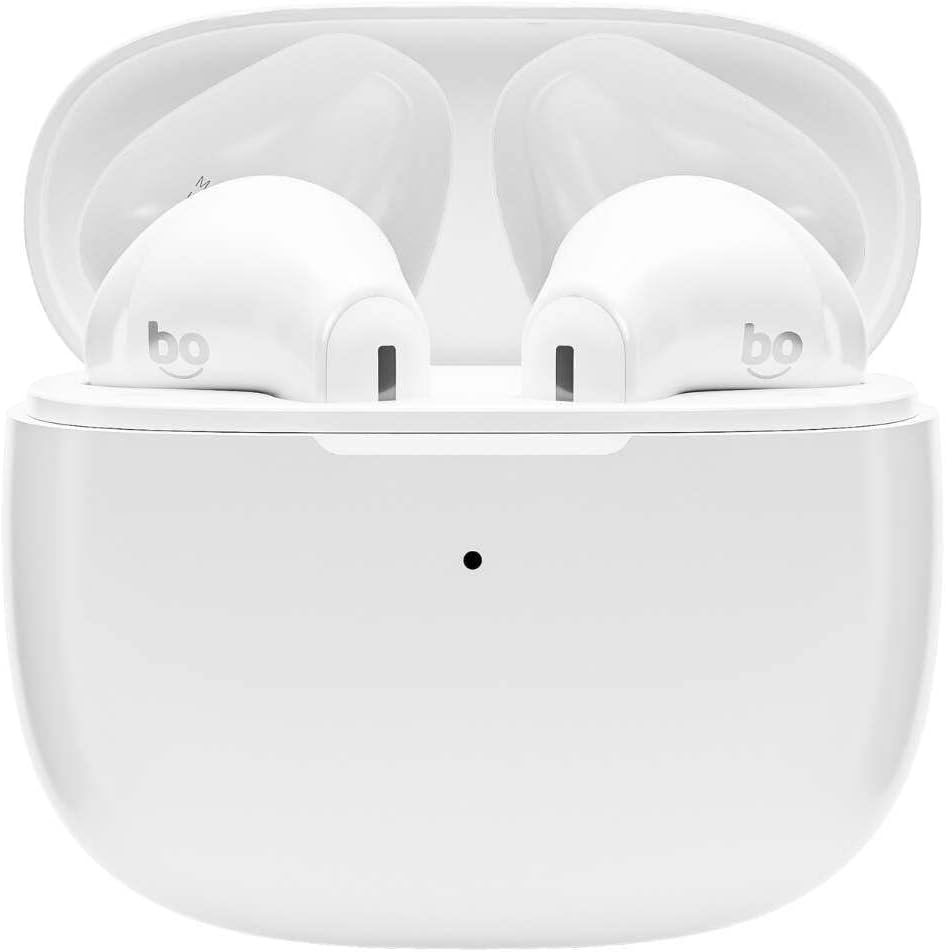
Image: The pocobob GO Wireless Earbuds inside their open charging case, ready for charging or pairing.
3. Bluetooth დაწყვილება
Pair your earbuds with your device for the first time.
- დარწმუნდით, რომ ყურსასმენები დატენულია.
- Open the charging case. The earbuds will automatically enter pairing mode, and an indicator light on the earbuds or case will flash, indicating they are discoverable.
- თქვენს მოწყობილობაზე (სმარტფონი, პლანშეტი და ა.შ.) გადადით Bluetooth-ის პარამეტრებში და ჩართეთ Bluetooth.
- ძიება available devices and select "pocobob GO" from the list.
- Once connected, a voice prompt will confirm successful pairing, and the indicator light will turn off or change.
- შემდგომი გამოყენებისთვის, ყურსასმენები ქეისიდან ამოღების შემდეგ ავტომატურად დაუკავშირდება ბოლოს დაწყვილებულ მოწყობილობას.
ოპერაციული ინსტრუქციები
შეეხეთ კონტროლს
The pocobob GO earbuds feature touch-sensitive controls on each earbud. The specific functions may vary slightly, but common controls include:
| მოქმედება | ფუნქცია |
|---|---|
| ერთჯერადი შეხება (მარცხნივ/მარჯვნივ) | დაკვრა/პაუზა მუსიკა, პასუხის გაცემა/ზარის დასრულება |
| ორმაგი შეხება (მარჯვნივ) | შემდეგი სიმღერა |
| ორმაგი შეხება (მარცხნივ) | წინა სიმღერა |
| სამმაგი შეხება (მარცხნივ/მარჯვნივ) | გააქტიურეთ ხმოვანი ასისტენტი |
| გრძელი პრესა (2 წამი) | ზარის უარყოფა |
Note: Specific touch functions may be customizable via a companion app if available (check product webსაიტი დეტალებისთვის).
Environmental Noise Cancellation (ENC) Microphone
The integrated ENC microphone reduces ambient noise during calls, ensuring clearer voice transmission for the person on the other end. This feature is active automatically during phone calls.
მოვლა
დასუფთავება
ოპტიმალური მუშაობისა და ჰიგიენის შესანარჩუნებლად:
- ფრთხილად გაწმინდეთ ყურსასმენები და დამტენი ქეისი რბილი, მშრალი, ბუსუსების გარეშე ქსოვილით.
- არ გამოიყენოთ აბრაზიული საწმენდები, სპირტი ან ქიმიური გამხსნელები.
- დარწმუნდით, რომ ყურსასმენებსა და ქეისზე დამტენი კონტაქტები სუფთა და მშრალია.
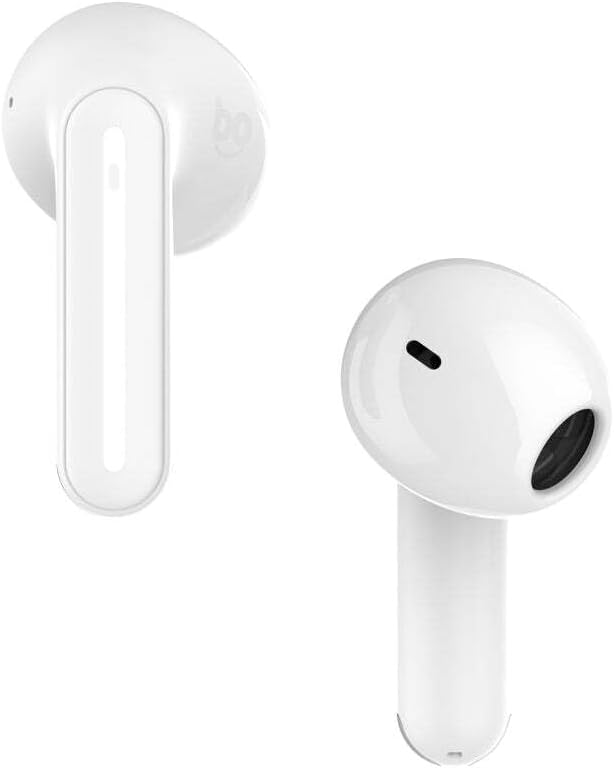
სურათი: ახლო ხედი view of the pocobob GO Wireless Earbuds, highlighting the speaker grille and microphone opening for cleaning purposes.
შენახვა
როდესაც ყურსასმენები არ იყენებთ, მათი დასაცავად და დამუხტვის შესანარჩუნებლად, ისინი დამტენ ქეისში შეინახეთ. შეინახეთ გრილ, მშრალ ადგილას, ექსტრემალური ტემპერატურისგან მოშორებით.
ბატარეის მოვლა
ბატარეის გახანგრძლივების მიზნით:
- მოერიდეთ ბატარეის ხშირ სრულ დაცლას.
- ყურსასმენები რეგულარულად დატენეთ, მაშინაც კი, თუ დიდი ხნის განმავლობაში არ იყენებთ.
- არ ექვემდებარება ექსტრემალურ სიცხეს ან სიცივეს.
პრობლემების მოგვარება
საერთო საკითხები და გადაწყვეტილებები
- ყურსასმენები არ წყვილდება მოწყობილობასთან:
- დარწმუნდით, რომ Bluetooth ჩართულია თქვენს მოწყობილობაზე.
- Make sure earbuds are charged and in pairing mode.
- Forget "pocobob GO" from your device's Bluetooth list and try pairing again.
- Try resetting the earbuds (see below).
- მხოლოდ ერთი ყურსასმენი მუშაობს :(
- ორივე ყურსასმენი დააბრუნეთ დამტენ ქეისში, დაახურეთ თავსახური, დაელოდეთ რამდენიმე წამი და შემდეგ ისევ ამოიღეთ.
- დარწმუნდით, რომ ორივე ყურსასმენი დატენულია.
- სცადეთ ყურსასმენების გადატვირთვა.
- ხმა არ აქვს ან ხმა დაბალია:
- შეამოწმეთ ხმის დონე როგორც თქვენს მოწყობილობაზე, ასევე ყურსასმენებზე.
- დარწმუნდით, რომ ყურსასმენები სწორად არის დაკავშირებული თქვენს მოწყობილობასთან.
- ყურსასმენების დინამიკის გისოსებიდან გაწმინდეთ ნებისმიერი ნარჩენი.
- დატენვის პრობლემები:
- დარწმუნდით, რომ დამტენი კაბელი უსაფრთხოდ არის დაკავშირებული.
- სცადეთ სხვა USB პორტი ან კვების ადაპტერი.
- გაწმინდეთ ყურსასმენებზე და ქეისის შიგნით დამტენი კონტაქტები.
ყურსასმენის გადატვირთვა
If you experience persistent issues, a factory reset may resolve them. Consult the specific instructions provided with your product, as reset procedures can vary. Typically, this involves:
- მოათავსეთ ორივე ყურსასმენი დატენვის შემთხვევაში.
- Press and hold a button on the case or earbuds for a specified duration (e.g., 10-15 seconds) until an indicator light flashes or changes.
- Remove the earbuds from your device's Bluetooth paired list ("Forget Device").
- Re-pair the earbuds as described in the "Bluetooth Pairing" section.
სპეციფიკაციები
| ფუნქცია | დეტალი |
|---|---|
| ბრენდი | პოკობობი |
| მწარმოებელი | Grupo Audio |
| მოდელი | PBGOW |
| ნაწილის ნომერი | 8720165952571 |
| ფორმის ფაქტორი | Semi In-Ear |
| მიკროფონის ტიპი | ENC (გარემოსდაცვითი ხმაურის ჩახშობა) |
| პაკეტის ზომები | 10 x 10 x 3 სმ; 115 გ |
| ASIN | B0DFZ1TCY7 |
| პირველი ხელმისაწვდომი თარიღი | 3 წლის 2024 სექტემბერი |
გარანტია და მხარდაჭერა
For warranty information and customer support, please refer to the warranty card included with your product or visit the official pocobob website. You can also contact Grupo Audio customer service for assistance with product inquiries, troubleshooting, or warranty claims.
Keep your proof of purchase for any warranty-related services.
Ask a question about this manual
Ask about setup, troubleshooting, compatibility, parts, safety, or missing instructions. Manuals+ will review the question and use this page’s manual context to help answer it.