
Rowenta RR8L85WH
Rowenta Xplorer S rie 65+ Robot Vacuum Cleaner User Manual
Model: RR8L85WH | Brand: Rowenta
შესავალი
Welcome to the user manual for your new Rowenta Xplorer S rie 65+ Robot Vacuum Cleaner. This advanced robot is designed to provide effortless and efficient cleaning for your home, combining powerful vacuuming with an electronic mopping function. Its ultra-thin design allows it to clean under low furniture, and its laser navigation ensures thorough coverage. With app control and an automatic dust emptying station, maintaining a clean home has never been easier.
Please read this manual carefully before using the appliance and keep it for future reference. It contains important information on safety, operation, and maintenance.
რა არის ყუთში
Upon unpacking, please ensure all components are present and in good condition. The package should contain:
- Rowenta Xplorer S rie 65+ Robot Vacuum Cleaner
- Automatic Suction Station / Charging Station
- Vibrating Water Tank
- 2 Standard White/Grey Mop Pads (for all floors)
- დენის ადაპტერი
- მომხმარებლის სახელმძღვანელო (ეს დოკუმენტი)
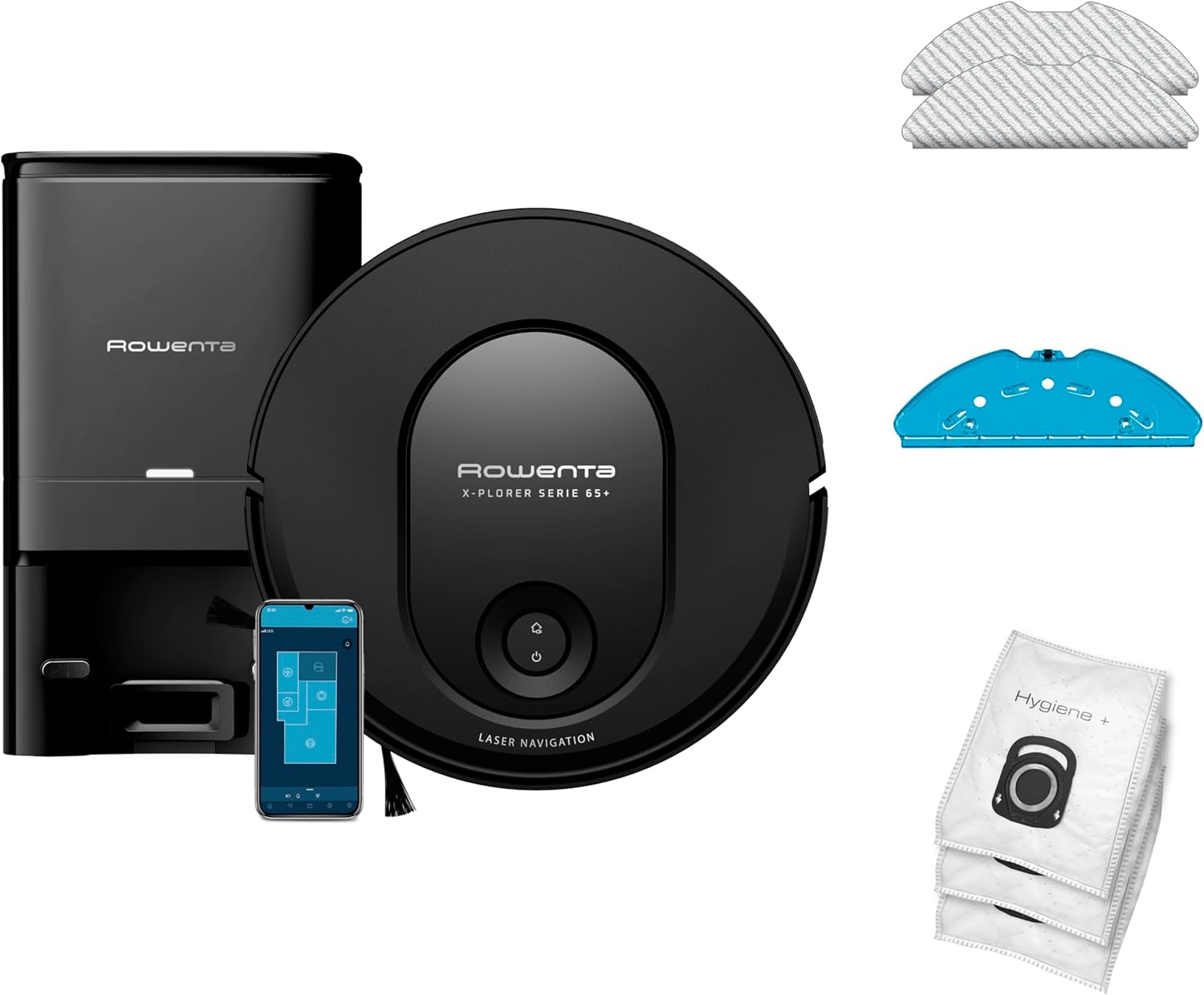
სურათი 1: დასრულდაview of the Rowenta Xplorer S rie 65+ robot vacuum cleaner, its automatic emptying station, included mop pads, and a smartphone demonstrating the control application. This image illustrates the complete set of components.
დაყენების სახელმძღვანელო
Follow these steps to set up your robot vacuum cleaner for the first time.
- Choose a Location for the Charging Station: Place the automatic suction station against a wall in an open area, ensuring there are no obstacles within 1.5 meters (5 feet) in front and 0.5 meters (1.6 feet) on either side. Ensure it is on a hard, level surface.
- შეაერთეთ დენის ადაპტერი: Plug the power adapter into the charging station and then into a wall outlet. Ensure the station is powered on.
- რობოტის დამუხტვა: Place the robot vacuum cleaner onto the charging station. Ensure the charging contacts on the robot align with those on the station. The robot will begin charging automatically. For first use, fully charge the robot (approximately 6 hours).
- ჩამოტვირთეთ აპლიკაცია: ძიება the "Rowenta Robots" app in your smartphone's app store (iOS or Android). Download and install the application.
- დაუკავშირდით Wi-Fi-ს: Open the app and follow the on-screen instructions to connect your robot to your home Wi-Fi network. This will enable full control and access to advanced features.
- დასუფთავების ადგილის მომზადება: Before the first cleaning, remove any loose cables, small objects, or fragile items from the floor to prevent entanglement or damage.

სურათი 2: The Rowenta Xplorer S rie 65+ robot vacuum cleaner positioned next to its automatic emptying station, illustrating the compact design and readiness for initial setup and charging.
ოპერაციული ინსტრუქციები
დასუფთავების ციკლის დაწყება
- Via the Robot: Press the power button on the robot once to start a cleaning cycle. Press again to pause. Hold to send the robot back to the charging station.
- აპლიკაციის საშუალებით: Open the "Rowenta Robots" app. From the main screen, you can initiate a full cleaning, select specific rooms, or set up cleaning schedules.
Laser Navigation and Mapping
The Xplorer S rie 65+ uses advanced laser navigation to map your home, ensuring systematic and efficient cleaning. The robot creates a permanent map of your living space, which can be viewed and managed within the app. This allows for features like:
- ზონის გაწმენდა: განსაზღვრეთ რობოტის გასაწმენდი კონკრეტული ადგილები.
- აკრძალული ზონები: Mark areas the robot should avoid.
- Multi-Floor Management: შეინახეთ რუკები თქვენი სახლის სხვადასხვა დონისთვის.

სურათი 3: The robot vacuum cleaner systematically navigating a room using laser technology, with a smartphone screen showing the real-time mapping and cleaning path. This highlights the methodical navigation and permanent map feature.
Vacuuming and Mopping Functions
The robot offers dual action cleaning, allowing it to vacuum and mop simultaneously.
- მტვერსასრუტი: The powerful suction and rotating brush effectively pick up dust, dirt, and debris from various floor types including carpets, tiles, laminate, and wood.
- მოწმენდა: Attach the vibrating water tank and a mop pad for wet cleaning. The electronic mop allows for 4 water supply settings (dry, low, medium, high) to adapt to different floor types and cleaning needs.

სურათი 4: A view of the robot vacuum cleaner's underside, clearly showing its main rotating brush, side brushes, and the attached mop pad. This illustrates the "Dual Action" capability for simultaneous vacuuming and mopping.

სურათი 5: The robot vacuum cleaner on a hard floor, with visual cues of water droplets increasing in size, demonstrating the "Smart Aqua Power" feature that allows users to adapt the water volume for mopping based on their needs.
Automatic Dust Emptying
The automatic suction station allows the robot to empty its dustbin automatically, providing up to 60 days of hands-free dust management. This significantly reduces the frequency of manual dustbin emptying.

სურათი 6: The robot vacuum cleaner docked with its automatic dust emptying station, illustrating the process of dust being suctioned from the robot into the station's larger dust bag. This highlights the convenience of not needing to manually empty the robot's dust box for up to 60 days.
მოვლა და მოვლა
რეგულარული მოვლა უზრუნველყოფს თქვენი რობოტი მტვერსასრუტის ოპტიმალურ მუშაობას და ახანგრძლივებს მისი სიცოცხლის ხანგრძლივობას.
რობოტის გაწმენდა
- მთავარი ფუნჯი: Remove and clean the main brush regularly (weekly or bi-weekly, depending on usage) to remove tangled hair and debris. Use the cleaning tool provided.
- გვერდითი ჯაგრისები: Check side brushes for wear and tear. Clean them if tangled. Replace if damaged.
- Dustbin (Robot): Although the station empties it, occasionally check the robot's internal dustbin for any residual debris or blockages.
- ფილტრები: Tap the fabric filter to remove dust. Replace filters every 3-6 months, or as needed.
- სენსორები და დამტენი კონტაქტები: Wipe the cliff sensors, wall sensors, and charging contacts on both the robot and the station with a clean, dry cloth.
Cleaning the Automatic Suction Station
- მტვრის ტომარა: The station's dust bag has a capacity of 4.5 liters, typically lasting up to 60 days. Replace the dust bag when the indicator light on the station signals it is full.
- Dust Channel: Periodically check the dust channel within the station for any blockages and clear them.
Mop Pad and Water Tank
- საწმენდი ბალიშები: After each mopping session, remove the mop pad and wash it. The included mop pads are washable and reusable.
- წყლის ავზი: Empty any remaining water from the vibrating water tank after each use. Clean the tank and allow it to air dry to prevent mold or odor.
პრობლემების მოგვარება
If you encounter issues with your Rowenta Xplorer S rie 65+, refer to the table below for common problems and their solutions.
| პრობლემა | შესაძლო მიზეზი | გამოსავალი |
|---|---|---|
| რობოტი არ ირთვება და არ იტენება. | Not properly docked; power adapter unplugged; battery depleted. | Ensure robot is correctly on the charging station. Check power connections. Allow robot to charge for several hours. |
| რობოტი ხშირად იჭედება. | Obstacles (cables, rugs); dirty sensors; robot stuck under low furniture. | Clear the cleaning area. Clean all sensors. Use "No-Go Zones" in the app for problematic areas or note the robot's ultra-thin design (7.8 cm) allows it to clean under low furniture. |
| ცუდი დასუფთავების ეფექტურობა. | Full dustbin/dust bag; clogged filter; tangled main/side brushes. | Check and empty robot's dustbin. Replace station's dust bag if full. Clean or replace filters. Clean main and side brushes. |
| რეცხვის ფუნქცია არ მუშაობს. | Water tank empty; mop pad not attached; water flow setting too low. | Fill the water tank. Ensure mop pad is correctly attached. Adjust water flow setting in the app. |
| აპლიკაციის დაკავშირების პრობლემები. | Incorrect Wi-Fi password; robot out of Wi-Fi range; app outdated. | Verify Wi-Fi credentials. Move robot closer to router. Update the app to the latest version. Restart robot and router. |
სპეციფიკაციები
| ფუნქცია | დეტალი |
|---|---|
| ბრენდი | როვენტა |
| მოდელის ნომერი | RR8L85WH |
| ფერი | შავი ანტრაციტი |
| პროდუქტის ზომები (L x W x H) | 43.1 x 39.4 x 34.7 cm (Robot and Station) |
| რობოტის სიმაღლე | 7.8 სმ |
| ნივთის წონა | 9.5 კგ |
| მტვრის ტომრის ტევადობა (სადგური) | 4.5 Liters (up to 60 days autonomy) |
| ხმაურის დონე | 70 დბ |
| შეწოვის სიმძლავრე | 2300 Pa-მდე |
| ნავიგაციის ტიპი | Laser Navigation (with permanent mapping) |
| კონტროლის ტიპი | App Control (Wi-Fi and Bluetooth compatible) |
| დალაგების ფუნქცია | Electronic Mop with Vibrating Water Tank (4 water flow settings) |
| დაბრკოლებების გასუფთავება | 2 სმ-მდე (0.8 ინჩი) |
| რეკომენდებული ზედაპირები | Carpet, Tile, Laminate, Wood |
| ბატარეის ტიპი | ლითიუმ-იონი |
| მოყვება კომპონენტები | Robot, Suction Station, Vibrating Water Tank, 2 Mop Pads |

სურათი 7: An illustration showing the key dimensions of the Rowenta Xplorer S rie 65+ robot vacuum cleaner and its automatic emptying station, including the robot's height and the overall dimensions of the station.
გარანტია და მხარდაჭერა
დეტალური გარანტიის ინფორმაციისთვის, გთხოვთ, იხილოთ თქვენს პროდუქტთან ერთად მოწოდებული გარანტიის ბარათი ან ეწვიოთ Rowenta-ს ოფიციალურ ვებსაიტს. website. Rowenta provides customer support for product inquiries, technical assistance, and spare parts.
დამატებითი ინფორმაცია და საკონტაქტო ინფორმაცია შეგიძლიათ იხილოთ ოფიციალურ Rowenta-ზე. webსაიტი: www.rowenta.com
Ask a question about this manual
Ask about setup, troubleshooting, compatibility, parts, safety, or missing instructions. Manuals+ will review the question and use this page’s manual context to help answer it.