
შესავალი
Thank you for choosing the INTEMPO EE7183BLKSTKEU7 Wireless Karaoke Microphone Speaker. This device combines a microphone and a speaker, allowing you to enjoy karaoke and music playback wirelessly. This manual provides essential information for safe and efficient use of your product.
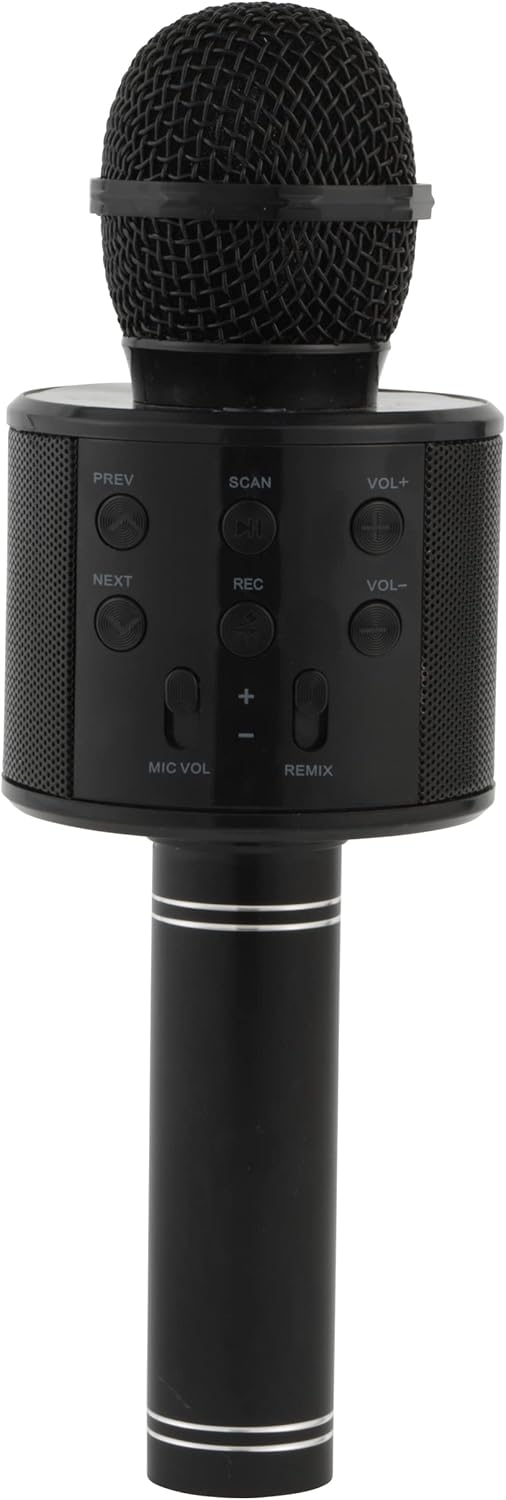
Image: The INTEMPO EE7183BLKSTKEU7 Wireless Karaoke Microphone Speaker, showcasing its sleek black design and integrated speaker grille.
პროდუქტის მახასიათებლები
- Wireless Bluetooth connectivity for seamless audio streaming.
- Integrated speaker for direct sound output.
- Easy-to-use control panel for managing audio and microphone settings.
- Built-in voice sound effects for enhanced karaoke experience.
- Rechargeable battery providing up to 11 hours of playtime.
- Micro USB charging for convenience.
დაყენება
1. მოწყობილობის დატენვა
Before first use, fully charge the microphone speaker. Connect the included Micro USB charging cable to the charging port on the device and the other end to a compatible USB power source (e.g., computer USB port, USB wall adapter). The charging indicator light will typically show charging status and turn off or change color when fully charged.
2. ჩართვა/გამორთვა

სურათი: ახლო ხედი view of the top section of the microphone speaker, highlighting the central power button.
- ჩართვისთვის: დააჭირეთ და გააჩერეთ დენის ღილაკი (usually a circular button with a power symbol) located on the control panel until the device activates.
- გამორთვისთვის: დააჭირეთ და გააჩერეთ დენის ღილაკი ისევ სანამ მოწყობილობა არ გამოირთვება.
3. Bluetooth დაწყვილება
Once powered on, the device will typically enter Bluetooth pairing mode automatically, indicated by a flashing LED light. Follow these steps to connect:
- ჩართეთ Bluetooth თქვენს სმარტფონზე, პლანშეტზე ან სხვა აუდიო მოწყობილობაზე.
- ძიება ხელმისაწვდომი Bluetooth მოწყობილობები.
- Select "INTEMPO EE7183BLKSTKEU7" or a similar name from the list.
- Once paired, the device will confirm the connection, and the LED indicator will stop flashing.
ოპერაციული ინსტრუქციები
საკონტროლო პანელი დასრულდაview

სურათი: დეტალური view of the control panel, showing buttons for PREV, NEXT, SCAN, REC, VOL+, VOL-, MIC VOL, and REMIX.
The control panel provides access to various functions:
- წინა / შემდეგი: ნავიგაცია ტრეკებს შორის.
- SCAN / PAUSE/PLAY: Short press to play/pause music. Long press for scanning (if applicable).
- ჩაწერა: Record your singing (functionality may vary; refer to device specifics).
- VOL+ / VOL-: მთავარი დინამიკის ხმის რეგულირება.
- მიკროფონის მოცულობა: Adjust the microphone's volume level.
- რემიქსი: Activate or cycle through voice sound effects.
მუსიკის დაკვრა
After successfully pairing with your Bluetooth device, open your preferred music application and start playing audio. The sound will be transmitted wirelessly to the INTEMPO microphone speaker.
Using the Microphone for Karaoke

Image: A hand holding the microphone speaker, demonstrating its use for singing, with an inset showing the control panel.
მიკროფონის გამოსაყენებლად:
- Ensure the device is powered on and connected to an audio source.
- დაარეგულირეთ MIC VOL to your desired microphone volume.
- გამოიყენეთ რემიქსი button to experiment with different voice sound effects.
- Sing into the microphone while music plays from the integrated speaker.
მოვლა
სათანადო მოვლა უზრუნველყოფს თქვენი მოწყობილობის ხანგრძლივ მუშაობას:
- დასუფთავება: Use a soft, dry cloth to clean the exterior of the microphone speaker. Do not use abrasive cleaners or solvents.
- შენახვა: შეინახეთ მოწყობილობა გრილ, მშრალ ადგილას, მოარიდეთ მზის პირდაპირ სხივებს და ექსტრემალურ ტემპერატურას, როდესაც არ იყენებთ.
- ბატარეის მოვლა: ელემენტის ხანგრძლივობის შესანარჩუნებლად, მოერიდეთ მის ხშირ სრულად დაცლას. რეგულარულად დატენეთ მოწყობილობა, მაშინაც კი, თუ მას მუდმივად არ იყენებთ.
- წყლის ექსპოზიცია: ეს მოწყობილობა წყალგაუმტარი არ არის. მოერიდეთ წყალთან ან ჭარბ ტენიანობასთან კონტაქტს.
პრობლემების მოგვარება
If you encounter issues with your INTEMPO Wireless Karaoke Microphone Speaker, refer to the following common solutions:
- მოწყობილობა არ ჩართულია: Ensure the battery is charged. Connect the Micro USB charging cable and try again after a few minutes.
- Bluetooth-ის საშუალებით დაწყვილება შეუძლებელია:
- Ensure the microphone speaker is in pairing mode (flashing LED).
- გამორთეთ და ჩართეთ Bluetooth თქვენს წყაროს მოწყობილობაზე.
- მოწყობილობები ერთმანეთთან უფრო ახლოს მიიტანეთ.
- წაშალეთ წინა Bluetooth კავშირები თქვენს წყაროს მოწყობილობაზე.
- ხმა არ არის დინამიკიდან:
- Check the main volume (VOL+) on the microphone speaker and your connected device.
- Ensure the device is successfully paired.
- მიკროფონი არ მუშაობს:
- დაარეგულირეთ MIC VOL to increase microphone volume.
- დარწმუნდით, რომ მიკროფონი არ არის დაბრკოლებული.
თუ პრობლემები შენარჩუნებულია, დაუკავშირდით მომხმარებელთა მხარდაჭერას შემდგომი დახმარებისთვის.
სპეციფიკაციები
| ფუნქცია | სპეციფიკაცია |
|---|---|
| მოდელის ნომერი | EE7183BLKSTKEU7 |
| მიკროფონის ფორმის ფაქტორი | ხელის |
| ზომები (L x W x H) | 8 x 7.6 x 23 სმ |
| დენის წყარო | Rechargeable Battery (Corded Electric for charging) |
| მასალა | Kohlenstoffstahl (ნახშირბადოვანი ფოლადი) |
| სიგნალი ხმაურის თანაფარდობა | 78 დბ |
| აპარატურის პლატფორმა | კარაოკე მანქანა |
| არხების რაოდენობა | 1 |
| დაკავშირების ტექნოლოგია | Bluetooth, USB (for charging) |
| კონექტორის ტიპი | მიკრო USB |
| სპეციალური ფუნქცია | უსადენო |
| რეკომენდებული გამოყენება | კარაოკე |
| თავსებადი მოწყობილობები | Bluetooth ჩართული მოწყობილობები |
| ფერი | შავი |
| მოყვება კომპონენტები | Microphone speaker, Micro USB charging cable |
| წინაღობა | 4 Ohm |
| სათამაშო დრო | 11 საათამდე |
| უსადენო დიაპაზონი | 25 მეტრამდე |
გარანტია და მხარდაჭერა
Warranty and specific support information for the INTEMPO EE7183BLKSTKEU7 Wireless Karaoke Microphone Speaker is not available in the provided product data. Please refer to the product packaging or the manufacturer's official website for details regarding warranty coverage and customer support contacts.