
1. შესავალი
This user manual provides essential information for the safe and efficient operation of your Qoltec 51758 Mains & Inverter Adapter. This power adapter is designed to provide reliable power to compatible HP notebooks, featuring advanced protection mechanisms against overvoltage, overload, short circuit, and overheating. Please read this manual thoroughly before using the product to ensure proper functionality and longevity.
2. უსაფრთხოების ინსტრუქციები
To prevent injury or damage to your device, always follow these safety precautions:
- Do not expose the adapter to water, moisture, or high humidity.
- არ დაშალოთ, არ შეცვალოთ და არ სცადოთ ადაპტერის შეკეთება. ყველა სახის მომსახურება კვალიფიციურ პერსონალს მიმართეთ.
- დარწმუნდით, რომ დენის წყაროს მოცულობაtage is compatible with the adapter's specifications.
- მოერიდეთ ადაპტერის პირდაპირ მზის სხივებზე ან სითბოს წყაროებთან ახლოს განთავსებას.
- Do not use the adapter if the cable or connector is damaged.
- შეინახეთ ბავშვებისთვის მიუწვდომელ ადგილას.
- Unplug the adapter from the power outlet when not in use for extended periods.
3. პროდუქტი დასრულდაview
The Qoltec 51758 adapter is a compact and efficient power solution. It includes the main adapter unit and various interchangeable tips to ensure compatibility with a range of HP notebooks.
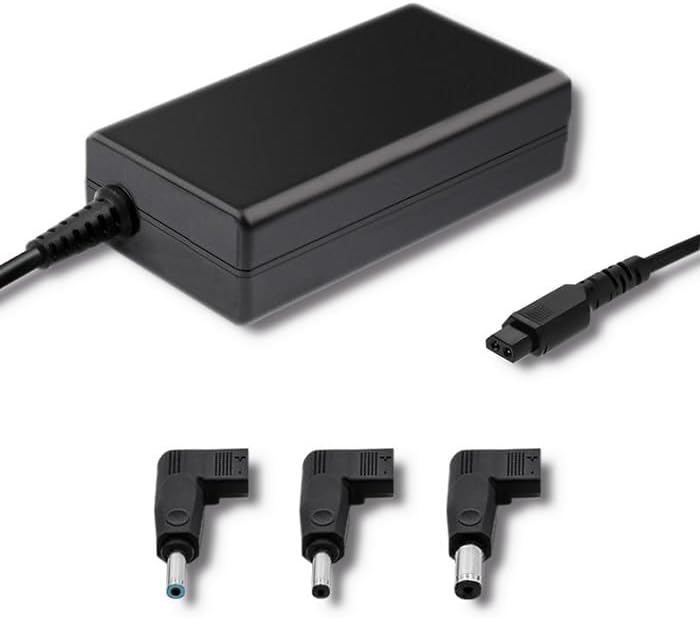
სურათი 3.1: წინა view of the Qoltec 51758 power adapter showing the main unit and three common interchangeable tips.

სურათი 3.2: უკანა view of the Qoltec 51758 power adapter, highlighting the AC input port and the three interchangeable tips.
The adapter features a robust design with a standard AC input port and a DC output cable that connects to the interchangeable tips. These tips ensure a secure and correct fit for various HP notebook models.
4. დაყენება
- სწორი წვერის იდენტიფიცირება: Select the interchangeable tip that matches the power input port of your HP notebook. Ensure it fits snugly and securely.
- Connect the Tip: Attach the selected tip to the DC output cable of the Qoltec 51758 adapter.
- ნოუთბუქთან დაკავშირება: Insert the connected tip into the power input port of your HP notebook.
- დაკავშირება დენის განყოფილებაში: Plug the AC input cable of the adapter into a standard wall power outlet.
- დაადასტურეთ კავშირი: Confirm that the power indicator light (if present on your notebook or adapter) illuminates, indicating a successful power connection.
5. მოქმედებს
Once properly set up, the Qoltec 51758 adapter operates automatically to provide power to your connected HP notebook. It will charge the notebook's battery and/or power the notebook directly.
- დამუხტვა: When connected, the adapter will charge your notebook's battery until it reaches full capacity.
- Direct Power: The adapter can also power your notebook directly, even if the battery is fully charged or removed (if supported by the notebook).
- დაცვის მახასიათებლები: The adapter is equipped with built-in protections against overvoltage, overload, short circuit, and overheating. In case of an anomaly, the adapter may temporarily cease operation to protect itself and the connected device. Disconnect and reconnect to reset if this occurs.
6. მოვლა
Proper maintenance ensures the longevity and optimal performance of your adapter.
- დასუფთავება: Disconnect the adapter from all power sources and devices before cleaning. Use a soft, dry cloth to wipe the surface. Do not use liquid cleaners or aerosols.
- შენახვა: When not in use, store the adapter in a cool, dry place away from direct sunlight and extreme temperatures. Avoid tightly winding the cables to prevent damage.
- საკაბელო მოვლა: Regularly inspect the power cables and connectors for any signs of wear, cuts, or damage. Replace if necessary.
7. Დიაგნოსტიკა
| პრობლემა | შესაძლო მიზეზი | გამოსავალი |
|---|---|---|
| Adapter not providing power. | No power from outlet; loose connection; damaged cable/adapter. | Check outlet with another device. Ensure all connections are secure. Inspect cables for damage. |
| Notebook not charging. | Incorrect tip used; notebook power port issue; adapter fault. | Verify the correct tip is used and fully inserted. Test with another compatible adapter if possible. |
| ადაპტერი ცხელდება. | Normal operation under load; poor ventilation; overload. | Ensure adequate ventilation around the adapter. If excessively hot, disconnect and allow to cool. Reduce load if possible. |
If the problem persists after attempting these solutions, please contact Qoltec customer support.
8. სპეციფიკაციები
| ფუნქცია | დეტალი |
|---|---|
| ბრენდი | ყოლტეკი |
| მოდელი | 51758 |
| ვატtage | 65 ვატი |
| პროდუქტის ზომები | 2.79 x 24.64 x 16.51 სმ |
| ნივთის წონა | 214 გრამი |
| თავსებადი მოწყობილობები | HP Notebooks |
| დაცვის მახასიათებლები | Overvoltage, Overload, Short Circuit, Overheat Protection |
| კონექტორის ტიპი | Interchangeable DC Power Tips |
| დაკავშირების ტექნოლოგია | Wired Power Adapter |
| პირველი ხელმისაწვდომი თარიღი | 29 წლის 2022 აპრილი |
შენიშვნა: სპეციფიკაციები შეიძლება შეიცვალოს გაფრთხილების გარეშე.
9. გარანტია და მხარდაჭერა
Qoltec products are manufactured to high quality standards. For information regarding warranty coverage, terms, and conditions, please refer to the warranty card included with your product or visit the official Qoltec webსაიტი.
For technical support, troubleshooting assistance, or inquiries about replacement parts, please contact Qoltec customer service through their official channels. Have your product model number (51758) and purchase details ready when contacting support.
Qoltec Official Webსაიტი: www.qoltec.com (შენიშვნა: ეს არის ჩანაცვლების ველი URL, please refer to actual Qoltec webსაიტი მხარდაჭერისთვის.)