
Philips AMF220/95
Philips 2000 Series 3-in-1 Purifier, Fan, and Heater User Manual
Model: AMF220/95 | Brand: Philips
1. პროდუქტი დასრულდაview
The Philips 2000 Series AMF220/95 is an advanced 3-in-1 device designed to improve your indoor air quality and comfort. It combines the functions of an air purifier, a cooling fan, and a heater, providing a comprehensive solution for your home environment. Equipped with high-efficiency HEPA and active carbon filters, it effectively captures ultrafine particles, allergens, gases, and odors.
ძირითადი მახასიათებლები:
- Purifies rooms up to 42 m² with a Clean Air Delivery Rate (CADR) of 165 m³/h.
- Integrated HEPA and Active Carbon Filters for comprehensive air purification.
- Adjustable 350° oscillation for wide and effective air distribution.
- Bladeless design for enhanced safety and easy cleaning.
- Provides both cooling fan and heating functionalities.
2. საწყისი დაყენება
2.1 შეფუთვა
Carefully remove the device and all accessories from the packaging. Retain the packaging for future storage or transport. Ensure all components are present and undamaged.
2.2 განთავსება
Place the device on a stable, flat, and dry surface. Ensure there is at least 20 cm of clear space around the device for optimal airflow. Do not place it near heat sources, direct sunlight, or in areas with high humidity.
2.3 ფილტრის დაყენება
The device comes with pre-installed filters. Before first use, ensure the filters are correctly seated and the filter cover is securely closed.
- Locate the filter access panel on the lower part of the device.
- Gently open or slide off the filter cover.
- Verify that the cylindrical HEPA and active carbon filter is properly inserted.
- Close the filter cover securely until it clicks into place.

სურათი: გვერდი view of the device with the filter cover removed, revealing the blue filter.

Image: Close-up of the blue HEPA and active carbon filter inside the device.
3. თქვენი მოწყობილობის მუშაობა
3.1 კონტროლის პანელი დასრულდაview
The control panel is located on the top of the device, featuring intuitive touch controls for various functions.
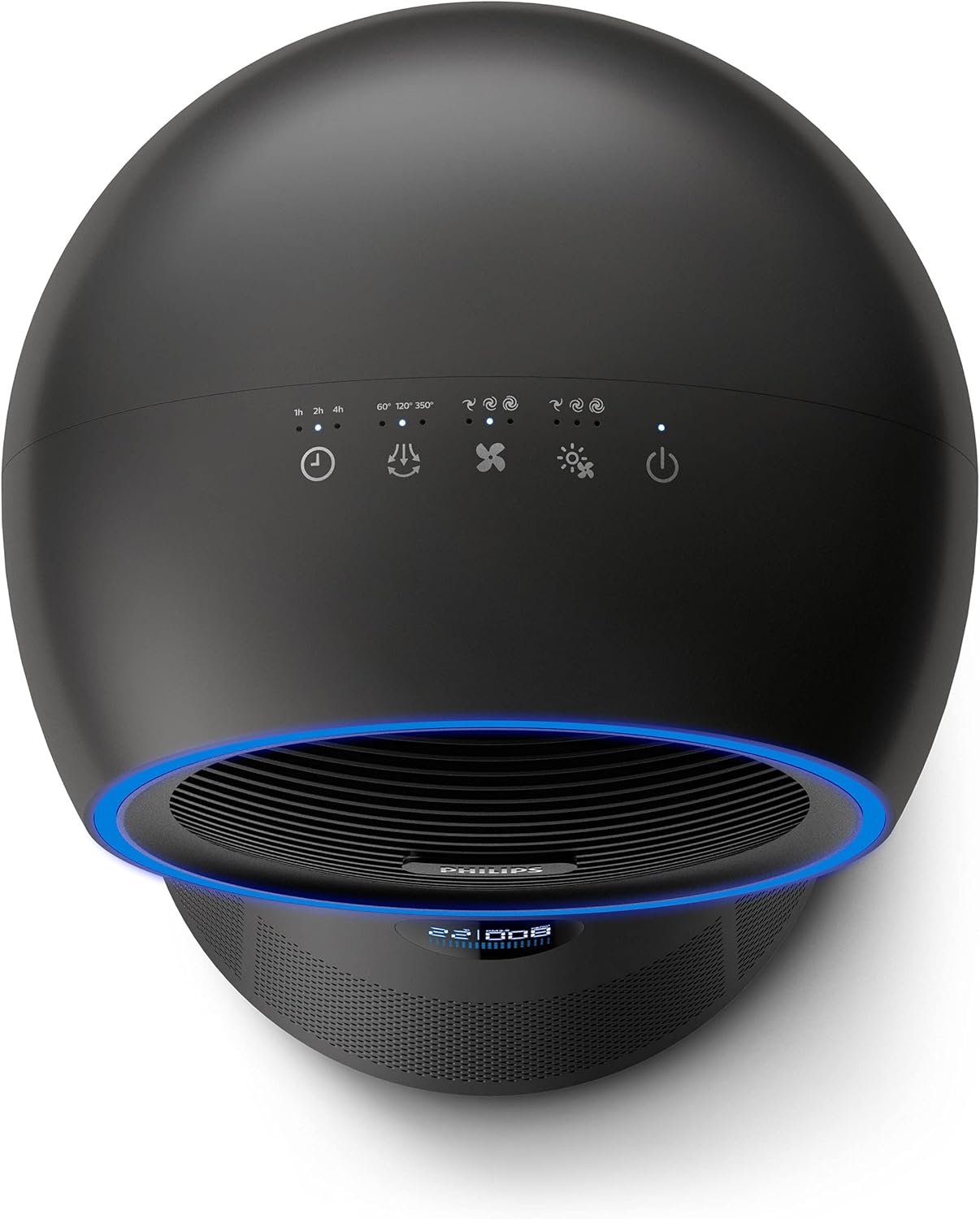
სურათი: ზემოდან ქვემოთ view of the device's control panel, showing various buttons and indicators.
3.2 მუშაობის რეჟიმები
The device offers three primary modes: Purification, Fan, and Heating.
- გაწმენდის რეჟიმი: Activates the air purification system. The device will continuously monitor air quality and adjust fan speed as needed.
- გულშემატკივართა რეჟიმი: Provides a cooling airflow without heating. You can adjust the fan speed to your preference. The light ring will typically display blue.

სურათი: წინა მხარე view of the device with a blue light ring, indicating fan or purification mode.
- გათბობის რეჟიმი: Provides warm air. You can set the desired temperature, and the device will maintain it. The light ring will typically display red.

სურათი: წინა მხარე view of the device with a red light ring, indicating heating mode.
3.3 რხევა
The device features a 350° oscillation function to distribute purified and conditioned air evenly throughout the room. Press the oscillation button on the control panel or remote to activate or deactivate this feature.

Image: Illustration showing the 350-degree oscillation feature with circular arrows around the device.
3.4 ინფორმაციის ჩვენება
The integrated digital display provides real-time information, including current temperature and PM2.5 levels, allowing you to monitor your indoor environment.

Image: Close-up of the digital display showing temperature and PM2.5 levels.
3.5 დისტანციური მართვა
The device comes with a convenient remote control, allowing you to operate all functions from a distance.

Image: Hand holding the circular remote control for the device.
4. მოვლა და მოვლა
4.1 ექსტერიერის გაწმენდა
Regularly wipe the exterior of the device with a soft, dry cloth. Do not use abrasive cleaners or solvents. Ensure the device is unplugged before cleaning.
4.2 ფილტრის გამოცვლა
The HEPA and active carbon filters have a limited lifespan and require periodic replacement to maintain optimal performance. The device will indicate when a filter change is due.
- გამორთეთ მოწყობილობა დენის განყოფილებიდან.
- გახსენით ფილტრის წვდომის პანელი.
- ამოიღეთ ძველი ფილტრი და გადააგდეთ ადგილობრივი რეგულაციების შესაბამისად.
- Insert a new Philips replacement filter, ensuring it is correctly oriented.
- უსაფრთხოდ დახურეთ ფილტრის საფარი.
- Plug in the device and reset the filter lifetime indicator as per the instructions in the main manual.
5. Დიაგნოსტიკა
If you encounter issues with your Philips 3-in-1 device, refer to the table below for common problems and their solutions.
| პრობლემა | შესაძლო მიზეზი | გამოსავალი |
|---|---|---|
| მოწყობილობა არ ირთვება | არ არის შეერთებული; დენის წყაროსთან პრობლემაა; ჩართვის ღილაკი არ არის დაჭერილი. | Ensure power cord is securely plugged in. Test the outlet with another device. Press the power button firmly. |
| ჰაერის ნაკადი არ არის ან სუსტი ჰაერი | Air inlet/outlet blocked; Filter clogged; Device in standby mode. | Check for obstructions around air inlets/outlets. Replace filter if indicator is on. Ensure device is in an active mode. |
| გაწმენდის ცუდი შესრულება | Filter needs replacement; Room size too large; Excessive pollution. | Replace the filter. Ensure device is used in a room within its specified coverage area. Increase fan speed. |
| Heating/Cooling not effective | Temperature setting incorrect; Room too large; Airflow obstructed. | Adjust temperature setting. Ensure device is appropriate for room size. Check for obstructions. |
| არაჩვეულებრივი ხმაური | Foreign object inside; Device not on a stable surface. | Unplug and check for foreign objects. Place device on a flat, stable surface. |
6. ტექნიკური მახასიათებლები
| სპეციფიკაცია | დეტალი |
|---|---|
| ბრენდი | ფილიპსი |
| მოდელის ნომერი | AMF220/95 |
| ფერი | შავი |
| პროდუქტის ზომები | 20 x 20 x 80 სმ |
| ნივთის წონა | 4.92 კგ |
| დენის წყარო | კაბელიანი ელექტრო |
| ოთახის დაფარვა | 42 მ²-მდე |
| CADR (სუფთა ჰაერის მიწოდების განაკვეთი) | 165 მ³/სთ |
| ფილტრის ტიპი | HEPA & Active Carbon |
| რხევა | 350° |
7. გარანტია და მხარდაჭერა
7.1 ინფორმაცია გარანტიის შესახებ
This Philips product is covered by a manufacturer's warranty, typically for a period of 2 years from the date of purchase. The warranty covers defects in materials and workmanship under normal use. Please retain your proof of purchase for warranty claims. For specific terms and conditions, refer to the warranty card included with your product or visit the official Philips webსაიტი.
7.2 მომხმარებელთა მხარდაჭერა
For technical assistance, product inquiries, or warranty service, please contact Philips Customer Support. You can find contact information, including phone numbers and online support portals, on the official Philips webსაიტზე ან თქვენს მოწყობილობასთან ერთად მოწოდებულ დოკუმენტაციაში.
Philips-ის ოფიციალური Webსაიტი: www.philips.com
Ask a question about this manual
Ask about setup, troubleshooting, compatibility, parts, safety, or missing instructions. Manuals+ will review the question and use this page’s manual context to help answer it.