
Smartwatches P80
P80 ჭკვიანი საათის მომხმარებლის სახელმძღვანელო
მოდელი: P80
1. პროდუქტი დასრულდაview
The P80 Smart Watch is a versatile fitness tracker and smartwatch designed to monitor various health metrics and provide smart notifications. It features a 1.3-inch IPS color screen, heart rate and blood pressure monitoring, and multiple sports modes. This manual provides essential information for setting up, operating, and maintaining your P80 Smart Watch.

სურათი 1: წინა view of the P80 Smart Watch displaying time and a vibrant digital wallpaper.
2. რა არის ყუთში
Upon unboxing your P80 Smart Watch, please verify that all components are present:
- 1 x P80 Smart Watch
- 1 x Charging Cable (magnetic interface)
- 1 x მომხმარებლის სახელმძღვანელო (ეს დოკუმენტი)
- 1 x Original Retail Box
3. დაყენების გზამკვლევი
3.1 მოწყობილობის დატენვა
Before initial use, fully charge your P80 Smart Watch. Connect the magnetic charging cable to the charging contacts on the back of the watch and plug the USB end into a compatible USB power adapter (not included) or a computer's USB port.

Figure 2: The P80 Smart Watch displaying a "Charging completed" message, with indicators for 200mAh battery capacity, 5-7 days working hours, and 15 days standby time.
A full charge typically takes approximately 2 hours. The watch has a 200 mAh Lithium polymer battery, providing 5-7 days of normal use and 10-15 days of standby time.
3.2 აპლიკაციის ინსტალაცია და დაწყვილება
To unlock the full functionality of your P80 Smart Watch, you need to install the companion application, და ფიტი, on your mobile phone.
- ჩამოტვირთეთ Da Fit აპლიკაცია: ძიება "Da Fit" in your mobile phone's app store (Google Play Store for Android or Apple App Store for iOS) and install it.
- სისტემის მოთხოვნები: Ensure your mobile phone meets the minimum system requirements: Android 4.4 or above, or Apple iOS 9.0 or above.
- Bluetooth-ის ჩართვა: On your mobile phone, go to settings and enable Bluetooth.
- გახსენით Da Fit აპლიკაცია: Launch the Da Fit application. Follow the on-screen prompts to create an account or log in.
- მოწყობილობის დაწყვილება: Within the Da Fit app, navigate to the device pairing section (usually indicated by a device icon or "Add Device"). The app will search for nearby Bluetooth devices. Select "P80" or a similar identifier from the list to connect.
- დაადასტურეთ დაწყვილება: A pairing request may appear on your watch or phone. Confirm the pairing on both devices if prompted.
Once successfully paired, the watch will synchronize time and data with your phone, and you can configure various settings through the app.
4. საოპერაციო ინსტრუქციები
4.1 ძირითადი ნავიგაცია
The P80 Smart Watch features a 1.3-inch IPS color touch screen for navigation. It operates primarily via a single touch panel.
- შეეხეთ: To select an item or confirm an action.
- გადაფურცლეთ ზემოთ/ქვემოთ: To scroll through menus or notifications.
- გადაფურცლეთ მარცხნივ/მარჯვნივ: To switch between different function screens (e.g., heart rate, steps, weather).
- გრძელი პრესა: May activate certain functions or change watch faces (refer to app for customization).

Figure 3: The P80 Smart Watch interface displaying icons for blood pressure monitoring, heart rate monitoring, movement recording, sedentary reminder, calorie burning, IP68 waterproof rating, multi-motion mode, and durable endurance. The image also highlights the 1.3-inch color touch screen and its ability to display 50 words on a single screen.
4.2 ჯანმრთელობის მონიტორინგი
The P80 Smart Watch is equipped with sensors for continuous health monitoring.
- გულისცემის მონიტორინგი: The watch supports real-time heart rate measurement and all-day heart rate monitoring. To view your current heart rate, navigate to the heart rate screen on the watch. For detailed historical data and analysis, refer to the Da Fit app.
- არტერიული წნევის გაზომვა: The watch can measure blood pressure. For accurate readings, ensure the watch is worn snugly on your wrist. Consult the Da Fit app for instructions on initiating a measurement and viewშედეგების.
- ძილის მონიტორინგი: Wear the watch while sleeping to track your sleep patterns, including deep sleep, light sleep, and awake times. Data is synchronized and analyzed in the Da Fit app.

Figure 4: The P80 Smart Watch on a wrist, displaying a heart rate monitoring graph with real-time motion heart rate, 24-hour real-time heart rate, and section heart rate recording. This illustrates the watch's capability to keep track of your heart health.
4.3 აქტივობის თვალყურის დევნება
Track your daily activities and workouts with the P80 Smart Watch.
- ნაბიჯების მრიცხველი: Automatically records your daily steps, exercise time, exercise mileage, and calorie consumption.
- მრავალ სპორტული რეჟიმი: The watch supports 8 kinds of sports modes, including walking, running, badminton, and football. Select the appropriate mode before starting your activity for more accurate tracking.
4.4 Smart Reminders and Notifications
Once paired with your phone, the P80 Smart Watch can provide various smart reminders and notifications.
- ზარის შეხსენება: Notifies you of incoming calls. You can configure the watch to refuse to answer calls directly from the device.
- Information Push Reminder: Receive notifications from SMS, QQ, WeChat, Skype, Facebook, Twitter, Line, and WhatsApp directly on your watch screen.
- Custom Alarm Reminder: Set alarms through the Da Fit app, and the watch will vibrate to alert you.
- მჯდომარე შეხსენება: The watch can remind you to move if you have been inactive for a prolonged period.
- Intelligent Vibration Reminder: All sit-in, call, SMS, and APP notifications are accompanied by intelligent vibration, designed not to disturb others.

Figure 5: The P80 Smart Watch screen showing an incoming WeChat message notification, demonstrating its intelligent vibration reminder feature for various alerts.
4.5 სხვა ფუნქციები
- Dial Selection: Customize your watch face through the Da Fit app.
- Wrist Display: The screen automatically lights up when you raise your wrist.
- ამინდის ჩვენება: View current weather information (requires app synchronization).
- დროის ჩვენება: აჩვენებს მიმდინარე დროს და თარიღს.
- დისტანციური ფოტოგრაფია: გამოიყენეთ საათი, როგორც დისტანციური ჩამკეტი თქვენი ტელეფონის კამერისთვის.
- მუსიკის დისტანციური მართვა: Control music playback on your phone from the watch.
- არ შემაწუხო რეჟიმი: Set periods when you do not wish to receive notifications.
- მოძებნა სამაჯური: Use the Da Fit app to locate your watch if it's within Bluetooth range.
- WeChat Sports: Integration with WeChat for sports data sharing.
- APP Air Upgrade: Supports over-the-air firmware updates via the Da Fit app.
5. მოვლა და მოვლა
Proper maintenance ensures the longevity and optimal performance of your P80 Smart Watch.
- დასუფთავება: Wipe the watch screen and strap regularly with a soft, dry cloth. If necessary, use a slightly damp ქსოვილით და შემდეგ კარგად გააშრეთ. მოერიდეთ უხეში ქიმიკატების ან აბრაზიული მასალების გამოყენებას.
- წყლის წინააღმდეგობა: The watch has an IP68 waterproof rating, meaning it is resistant to dust and can withstand immersion in water up to 1.5 meters for 30 minutes. However, it is not recommended for hot showers, saunas, or diving. Avoid prolonged exposure to water.
- დატენვის კონტაქტები: Keep the magnetic charging contacts on the back of the watch clean and dry to ensure efficient charging.
- შენახვა: ხანგრძლივი პერიოდის განმავლობაში არ გამოყენების შემთხვევაში, შეინახეთ საათი გრილ, მშრალ ადგილას.
- სამაჯურის მოვლა: The watch comes with a silicone strap. Clean it regularly to prevent skin irritation.
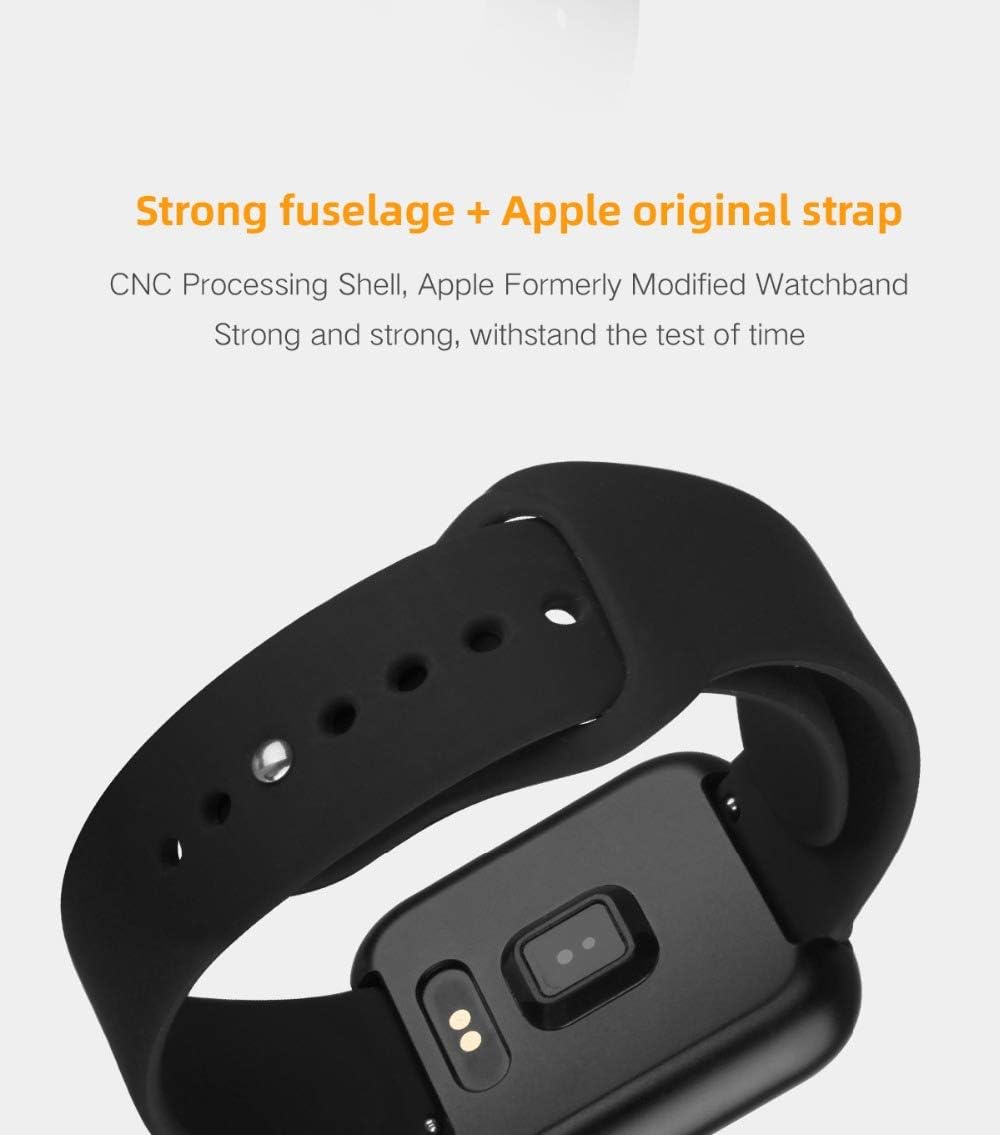
Figure 6: The back of the P80 Smart Watch, highlighting the charging contacts and optical sensors for health monitoring. This view also shows the durable strap attachment.
6. Დიაგნოსტიკა
If you encounter issues with your P80 Smart Watch, try the following troubleshooting steps:
- საათი არ ირთვება: დარწმუნდით, რომ საათი სრულად არის დატენილი. შეაერთეთ ის დამტენ კაბელთან და კვების წყაროსთან მინიმუმ 30 წუთის განმავლობაში.
- საათი ტელეფონთან არ არის დაწყვილებული:
- დარწმუნდით, რომ Bluetooth ჩართულია თქვენს ტელეფონზე.
- დარწმუნდით, რომ საათი Bluetooth-ის დიაპაზონშია (როგორც წესი, 10 მეტრი).
- გადატვირთეთ როგორც ტელეფონი, ასევე საათი.
- გაასუფთავეთ Bluetooth-ის ქეში თქვენს ტელეფონზე (ასეთის არსებობის შემთხვევაში).
- სცადეთ მოწყობილობის დაწყვილების გაუქმება და ხელახლა დაწყვილება Da Fit აპლიკაციის საშუალებით.
- ჯანმრთელობის შესახებ არასწორი მონაცემები:
- დარწმუნდით, რომ საათი მჭიდროდ გიკეთიათ მაჯაზე, არც ძალიან თავისუფალი და არც ძალიან მჭიდრო.
- გაწმინდეთ საათის უკანა მხარეს არსებული სენსორი.
- გაზომვების დროს მოერიდეთ ზედმეტ მოძრაობას.
- შეტყობინებები არ ჩანს:
- Check notification permissions for the Da Fit app on your phone.
- Ensure the Da Fit app is running in the background.
- დარწმუნდით, რომ საათზე ან ტელეფონზე „არ შემაწუხოთ“ რეჟიმი არ არის აქტიური.
- ბატარეის მოკლე ხანგრძლივობა:
- შეამცირეთ ეკრანის სიკაშკაშე.
- Limit frequent screen wake-ups (e.g., wrist raise to wake).
- Disable unnecessary continuous monitoring features if not needed.
- დარწმუნდით, რომ საათი ყოველ ჯერზე სრულად არის დატენული.
If the issue persists, refer to the Da Fit app's help section or contact customer support.
7. სპეციფიკაციები
Detailed technical specifications for the P80 Smart Watch:
| კომპონენტი | სპეციფიკაცია |
|---|---|
| მოდელის ნომერი | P80 |
| CPU | NRF52832 QFAA |
| აჩქარების სენსორი | BOSCH BMA 421 |
| ჩვენება | 1.3 inch IPS color screen, 240*240 resolution |
| ღილაკის რეჟიმი | Single touch panel |
| ბატარეის ტიპი | ლითიუმ პოლიმერული ბატარეა, 200 mAh |
| დატენვის მეთოდი | Magnetic interface in-line charging |
| ლოდინის რეჟიმში ენერგიის მოხმარება | Standby 10-15 days, Normal use 6-8 days |
| Bluetooth ტიპი | Bluetooth 4.0 |
| მხარდაჭერილი APP | და ფიტი |
| მობილური სისტემის მოთხოვნები | Android 4.4 and above, Apple iOS 9.0 or above |
| ზომები (დაახლოებით) | 42.0*36.0*10.25 მმ |
| წყლის წინააღმდეგობა | IP68 |

Figure 7: A detailed table outlining the specifications of the P80 Smart Watch, including its dimensions, available shell and band colors, main chip, display specifications, battery type, charging mode, standby power consumption, Bluetooth type, and mobile system requirements.
8. გარანტია და მხარდაჭერა
პროდუქტის გარანტიისა და მომხმარებელთა მხარდაჭერის შესახებ ინფორმაცია, როგორც წესი, მოცემულია თქვენი შეძენის დოკუმენტაციაში ან მწარმოებლის ოფიციალურ დოკუმენტაციაში. webსაიტი. გთხოვთ, შეინახოთ შეძენის დამადასტურებელი საბუთი გარანტიასთან დაკავშირებული ნებისმიერი პრეტენზიისთვის.
For technical support or inquiries not covered in this manual, please refer to the Da Fit app's help section or contact the retailer where you purchased the product.
Ask a question about this manual
Ask about setup, troubleshooting, compatibility, parts, safety, or missing instructions. Manuals+ will review the question and use this page’s manual context to help answer it.