
შესავალი
This manual provides detailed instructions for the setup, operation, maintenance, and troubleshooting of your Carlsbro CSD120 Electronic Drum Set. Please read this manual thoroughly before using the product to ensure proper function and longevity.

Image: The complete Carlsbro CSD120 Electronic Drum Set, showcasing the drum pads, cymbals, and module.
პროდუქტის კომპონენტები
The Carlsbro CSD120 Electronic Drum Set includes the following main components:
- Drum Module (Commander 120 brain)
- Drum Pads (Snare, Tom x3)
- Cymbal Pads (Hi-Hat, Crash, Ride)
- Hi-Hat კონტროლის პედლებიანი
- დარტყმის დრამის პედალი
- Drum Rack and Mounting Hardware
- Cables for connecting pads to module
- დენის ადაპტერი
The drum module features 20 preset drum kits, 10 user preset kits, 250 drum and percussion samples, and 20 onboard songs.
სურათი: კუთხოვანი view of the Carlsbro CSD120 Electronic Drum Set, highlighting the compact design.
დაყენების ინსტრუქციები
- შეფუთვა: ფრთხილად ამოიღეთ ყველა კომპონენტი შეფუთვიდან. დარწმუნდით, რომ „პროდუქტის კომპონენტების“ განყოფილებაში ჩამოთვლილი ყველა ნაწილი ადგილზეა.
- დოლის თაროს აწყობა: Follow the diagrams provided in the quick start guide (not included in this manual) to assemble the main drum rack frame. Ensure all clamps საიმედოდ არის გამკაცრებული.
- სამაგრი ბალიშები და ციმბალები: Attach the drum pads (snare, toms) and cymbal pads (hi-hat, crash, ride) to the drum rack using the provided mounting hardware. Position them ergonomically for comfortable playing.
- დააინსტალირეთ პედლები: Place the kick drum pedal and hi-hat control pedal on the floor in their respective positions.
- დააკავშირეთ დრამის მოდული: Mount the Commander 120 drum module to the rack.
- საკაბელო კავშირები: Connect each drum pad, cymbal pad, and pedal to the corresponding input on the drum module using the included cables. Refer to the module's rear panel for correct port identification.
- დენის კავშირი: Connect the power adapter to the DC IN port on the drum module and then to a suitable power outlet.
- აუდიო გამომავალი: For sound, connect headphones to the PHONES output or connect the OUTPUT (L/Mono, R) jacks to an ampგამხსნელი ან PA სისტემა.

სურათი: უკანა view of the Commander 120 drum module, showing various input and output ports for connections.

სურათი: ახლო ხედი view of the Commander 120 drum module's connection ports, including USB, MIDI IN/OUT, AUX IN, OUTPUT, PHONES, and DC IN.
ოპერაციული ინსტრუქციები
Drum Module Overview
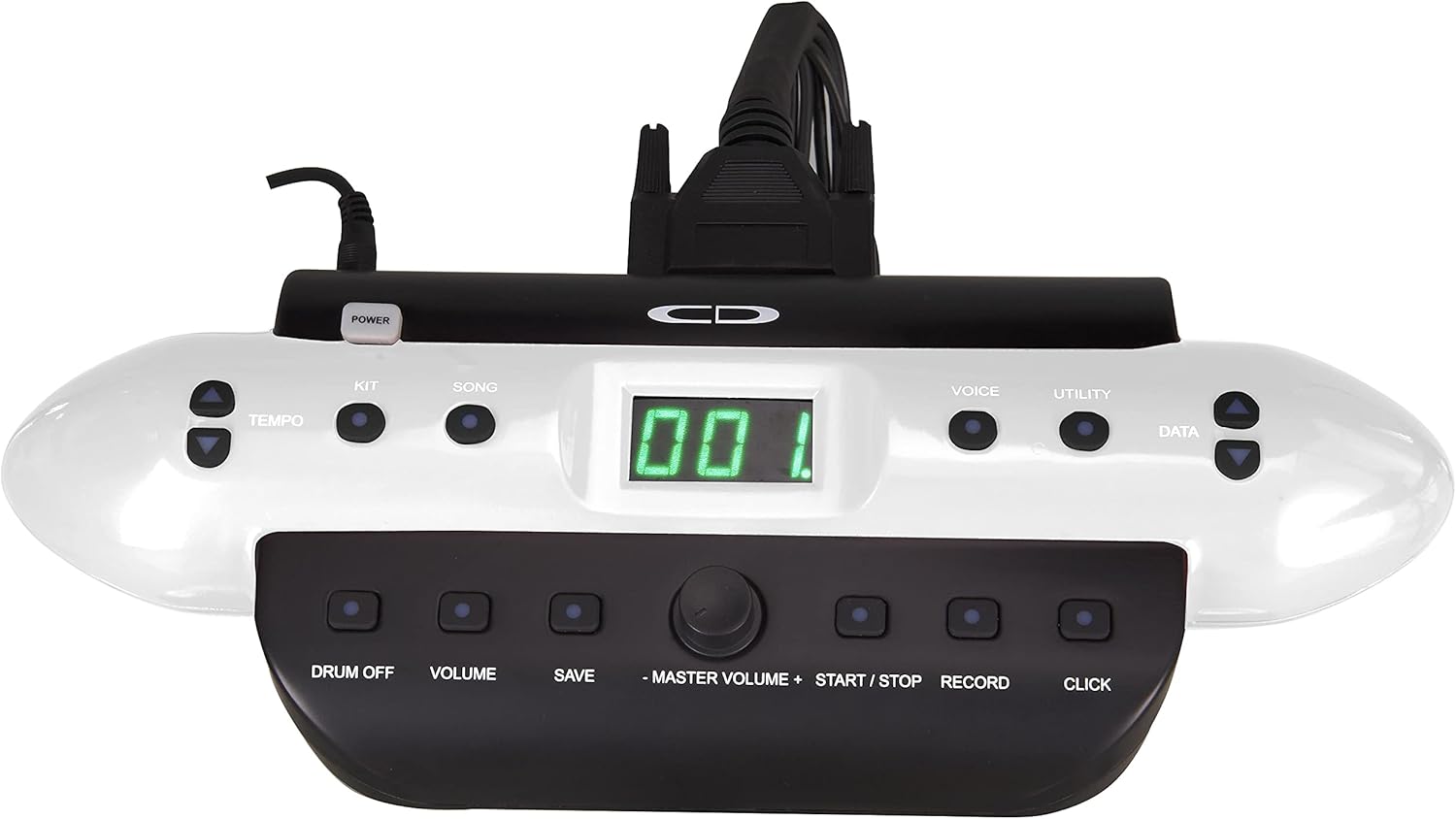
The Commander 120 drum module is the central control unit for your electronic drum set. It features a clear display and intuitive buttons for navigation and sound control.

სურათი: წინა მხარე view of the Commander 120 drum module, showing the display, control buttons, and master volume knob.
ძირითადი ოპერაცია
- ჩართვა/გამორთვა: დააჭირეთ სიმძლავრე button located on the module to turn the unit on or off.
- სამაგისტრო მოცულობა: Adjust the overall output volume using the large მასტერ მოცულობა ღილაკი.
- კომპლექტის შერჩევა: დააჭირეთ ნაკრები button to enter Kit selection mode. Use the DATA buttons (up/down arrows) or the master volume knob to scroll through the 20 preset kits or 10 user kits.
- ხმის შერჩევა: დააჭირეთ ხმა button to select individual drum or percussion sounds. Use the DATA buttons to choose a voice.
- სიმღერის დაკვრა: დააჭირეთ სიმღერა button to access the onboard songs. Use the DATA buttons to select a song. Press START/STOP თამაში ან პაუზა.
- ტემპის რეგულირება: დააჭირეთ ტემპო ღილაკით და გამოიყენეთ DATA buttons to adjust the tempo of songs or the metronome.
- Metronome (Click): დააჭირეთ დააწკაპუნეთ button to activate or deactivate the metronome.
- ჩაწერა: დააჭირეთ ჩანაწერი button to start recording your performance. Press again to stop.
- პარამეტრების შენახვა: After making changes to a user kit or other settings, press the შენახვა button to store them. Follow the on-screen prompts.
- სასარგებლო ფუნქციები: დააჭირეთ კომუნალური button to access advanced settings such as sensitivity, trigger curves, and MIDI parameters.
მოვლა
- დასუფთავება: Use a soft, dry cloth to clean the drum module, pads, and cymbals. For stubborn dirt, a slightly damp შეგიძლიათ გამოიყენოთ ქსოვილი და შემდეგ მშრალი ქსოვილი. მოერიდეთ აბრაზიული საწმენდი საშუალებების ან გამხსნელების გამოყენებას.
- საკაბელო მენეჯმენტი: დაზიანების თავიდან ასაცილებლად, დარწმუნდით, რომ ყველა კაბელი მოწესრიგებულად არის გაყვანილი და არ არის დაჭიმული.
- შენახვა: ხანგრძლივი პერიოდის განმავლობაში არ გამოყენების შემთხვევაში, შეინახეთ დასარტყამი კომპლექტი გრილ, მშრალ ადგილას, მოარიდეთ მზის პირდაპირ სხივებს და ექსტრემალურ ტემპერატურას.
- საფენის მოვლა: Avoid hitting the pads with excessive force, as this can reduce their lifespan.
პრობლემების მოგვარება
| პრობლემა | შესაძლო მიზეზი | გამოსავალი |
|---|---|---|
| ყურსასმენებიდან/დინამიკებიდან ხმა არ ისმის. |
|
|
| Specific pad not triggering sound. |
|
|
| Double triggering or missed triggers. |
|
|
სპეციფიკაციები
| ფუნქცია | დეტალი |
|---|---|
| მოდელის სახელი | CSD120 |
| დრამის ნაკრები | 20 Preset, 10 User |
| ხმები | 250 Drum & Percussion Samples |
| ბორტზე სიმღერები | 20 |
| დაკავშირება | USB, MIDI In/Out, Aux In, Output (L/Mono, R), Phones, DC In |
| მასალა | პლასტმასი, ლითონი |
| ფერი | შავი |
| ნივთის წონა | 33 ფუნტი (14.97 კგ) |
| პროდუქტის ზომები (L x W x H) | 20 x 8 x 17 ინჩი (50.8 x 20.32 x 43.18 სმ) |
| მწარმოებელი | სამსონის ტექნოლოგიები |
საგარანტიო ინფორმაცია
Carlsbro products are typically covered by a limited manufacturer's warranty. Please refer to the warranty card included with your product or visit the official Carlsbro website for specific terms and conditions, including warranty duration and coverage details. Keep your proof of purchase for warranty claims.
მომხმარებელთა მხარდაჭერა
For technical assistance, spare parts, or further inquiries regarding your Carlsbro CSD120 Electronic Drum Set, please contact Carlsbro customer support through their official website. You may also refer to the retailer where the product was purchased for support options.