
1. შესავალი
This manual provides instructions for the Perixx PX-1000 Backlit Gaming Keyboard. It covers setup, operation, maintenance, and troubleshooting to ensure optimal performance and user experience. The PX-1000 is designed for various environments, including office, home, and gaming, featuring adjustable backlighting and a Windows key lock function.
2. პროდუქტი დასრულდაview
2.1 ძირითადი მახასიათებლები
- განათებული ღილაკები: Three-level adjustable backlighting for visibility in low-light conditions.
- ფერის პარამეტრები: Switch between blue, red, and purple backlight colors.
- Windows Lock Function: Disable the Windows key to prevent accidental interruptions during gaming.
- USB კავშირი: Standard USB connection for broad compatibility.
2.2 კლავიატურის განლაგება
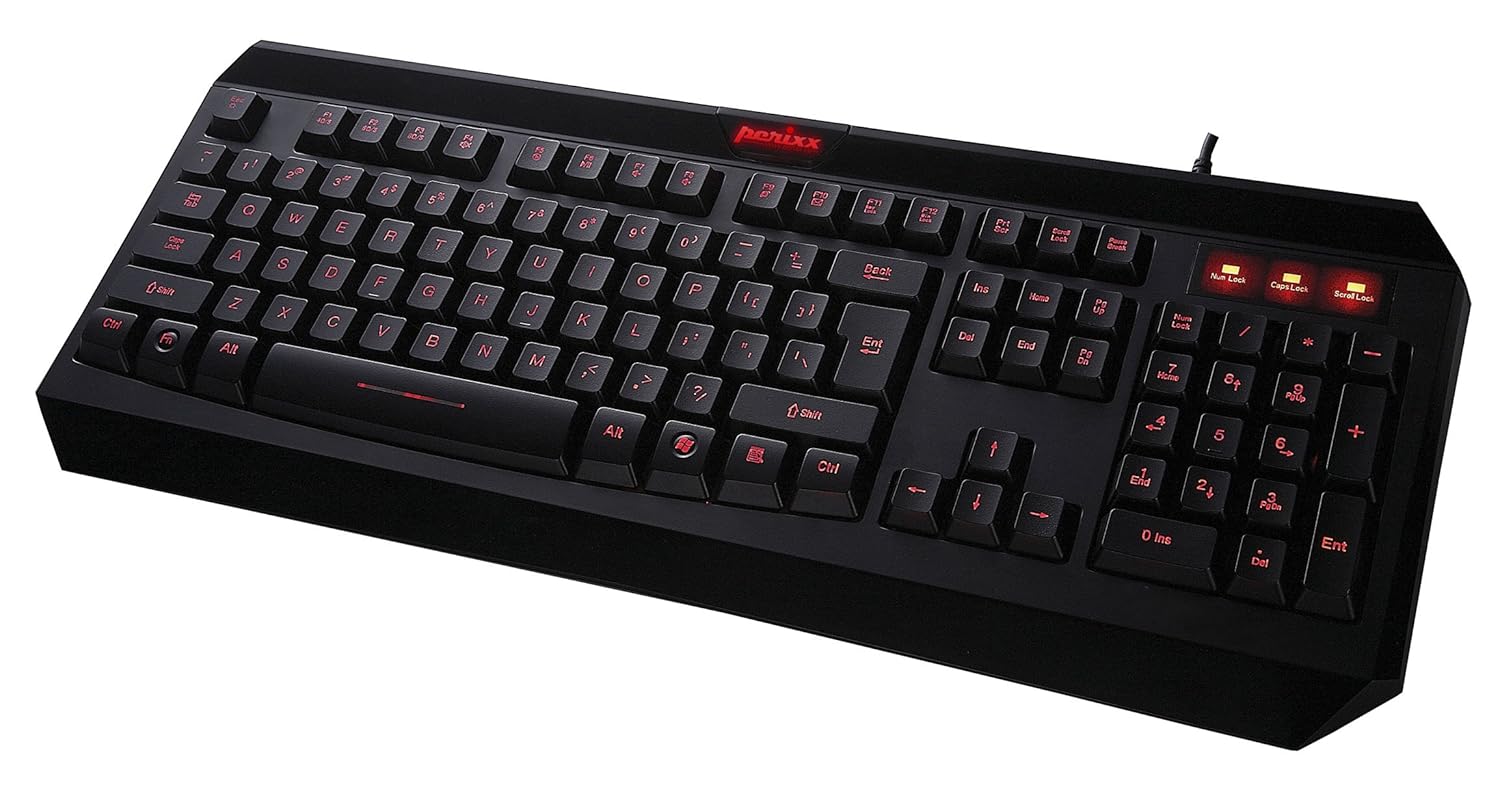
სურათი 2.1: ზემოდან ქვემოთ view of the Perixx PX-1000 keyboard with red backlighting activated. This image displays the full QWERTY layout, numeric keypad, and function keys.

Figure 2.2: Technical diagram illustrating the key layout and dimensions of the Perixx PX-1000 keyboard.
3. დაყენება
- შეფუთვა: Carefully remove the keyboard from its packaging. Ensure all components, including the USB cable, are present.
- კავშირი: შეაერთეთ კლავიატურის USB კონექტორი თქვენს კომპიუტერში არსებულ USB პორტში.
- დრაივერის ინსტალაცია: The Perixx PX-1000 is a plug-and-play device. Your operating system (Windows) should automatically detect and install the necessary drivers. No additional software installation is typically required.
- განთავსება: კლავიატურა კომფორტულად განათავსეთ თქვენს მაგიდაზე.
4. საოპერაციო ინსტრუქციები
4.1 განათების კონტროლი
The PX-1000 features adjustable backlighting with multiple color options.
- Changing Backlight Color: დააჭირეთ Fn გასაღები + გადახვევის ჩაკეტვა key simultaneously to cycle through the available backlight colors: Blue, Red, and Purple.
- უკანა განათების სიკაშკაშის რეგულირება: დააჭირეთ Fn გასაღები + გვერდი ზემოთ key to increase brightness, and Fn გასაღები + გვერდი ქვემოთ key to decrease brightness. There are three brightness levels.
- Turning Backlight On/Off: To turn off the backlight, cycle through the brightness levels until it is off, or press Fn გასაღები + გადახვევის ჩაკეტვა until the backlight is off.
4.2 Windows Key Lock Function
To prevent accidental activation of the Windows Start menu during intensive tasks or gaming, the Windows key can be disabled.
- Activating/Deactivating Windows Key Lock: დააჭირეთ Fn გასაღები + Windows გასაღები simultaneously. An indicator light (usually near the Num Lock/Caps Lock indicators) will illuminate when the Windows key is locked. Repeat the combination to unlock.
5. მოვლა
სათანადო მოვლა უზრუნველყოფს თქვენი კლავიატურის გამძლეობას და მუშაობას.
- დასუფთავება: კლავიატურის ზედაპირის გასაწმენდად გამოიყენეთ რბილი, მშრალი ქსოვილი. უფრო ღრმა წმენდისთვის, კლავიშებს შორის მტვრისა და ნარჩენების მოსაშორებლად გამოიყენეთ შეკუმშული ჰაერის ქილა. მოერიდეთ უხეში ქიმიკატების ან აბრაზიული მასალების გამოყენებას.
- დაღვრა: სითხის დაღვრის შემთხვევაში, დაუყოვნებლივ გამორთეთ კლავიატურა კომპიუტერიდან. გადააბრუნეთ ის სითხის გამოსადევნად და ხელახლა შეერთებამდე დაელოდეთ სრულად გაშრობას. არ სცადოთ კლავიატურის გამოყენება სველ მდგომარეობაში.
- შენახვა: ხანგრძლივი პერიოდის განმავლობაში არ გამოყენების შემთხვევაში, კლავიატურა შეინახეთ სუფთა, მშრალ გარემოში, ექსტრემალური ტემპერატურისგან მოშორებით.
6. Დიაგნოსტიკა
| პრობლემა | შესაძლო მიზეზი | გამოსავალი |
|---|---|---|
| კლავიატურა არ რეაგირებს. | USB კავშირის გაწყვეტა, USB პორტის გაუმართაობა, დრაივერის პრობლემა. |
|
| Backlight not working or stuck on one color. | Backlight function not activated, incorrect settings. |
|
| Windows key not functioning. | Windows key lock is active. | დააჭირეთ Fn + Windows გასაღები to toggle the lock function. Check the indicator light. |
| კლავიშები წებოვანია ან არ რეაგირებს. | Debris under keys, liquid damage. |
|
7. სპეციფიკაციები

Figure 7.1: Detailed dimensions of the Perixx PX-1000 keyboard.
| ფუნქცია | დეტალი |
|---|---|
| ბრენდი | Perixx |
| მოდელის ნომერი | PX-1000 (Item model number: 10992) |
| ფერი | Black, Red (Backlight colors: Blue, Red, Purple) |
| დაკავშირების ტექნოლოგია | USB |
| თავსებადი მოწყობილობები | PC |
| ოპერაციული სისტემა | ფანჯრები |
| პროდუქტის ზომები (LxWxH) | 46 x 19.2 x 3 სმ (18.11 x 7.56 x 1.18 ინჩი) |
| ნივთის წონა | 812 გ (1.79 ფუნტი) |
| მოყვება კომპონენტები | USB კაბელი |
| სპეციალური ფუნქცია | უკანა განათება |
8. გარანტია და მხარდაჭერა
For warranty information and technical support, please refer to the documentation included with your product or visit the official Perixx website. Perixx provides customer support for product-related inquiries and assistance with troubleshooting.
ონლაინ რესურსები: დამატებითი მხარდაჭერისა და პროდუქტის შესახებ ინფორმაციის მისაღებად, შეგიძლიათ ეწვიოთ Perixx მაღაზია Amazon-ზე.


