
შესავალი
The ADATA S102PRO is a high-performance USB 3.0 flash drive designed for fast and reliable data storage and transfer. Its durable design and high-speed interface make it ideal for everyday use, allowing you to carry important files, documents, photos, and videos with ease.
დაყენება
Follow these steps to begin using your ADATA S102PRO USB Flash Drive:
- USB პორტის იდენტიფიცირება: Locate an available USB port on your computer. For optimal performance, use a USB 3.0 port (often colored blue internally). The ADATA S102PRO is backward compatible with USB 2.0 ports, but data transfer speeds will be limited to USB 2.0 rates.
- ამოიღეთ თავსახური: Carefully remove the protective cap from the USB flash drive to expose the USB connector.
- დისკის ჩასმა: Insert the USB connector firmly into the USB port on your computer. Ensure it is inserted correctly; do not force it.
- სისტემის ამოცნობა: Your operating system (Windows, macOS, Linux) should automatically detect and install the necessary drivers. A notification may appear indicating that the device is ready for use. The drive will typically appear as a removable disk or volume in your file მკვლევარი.
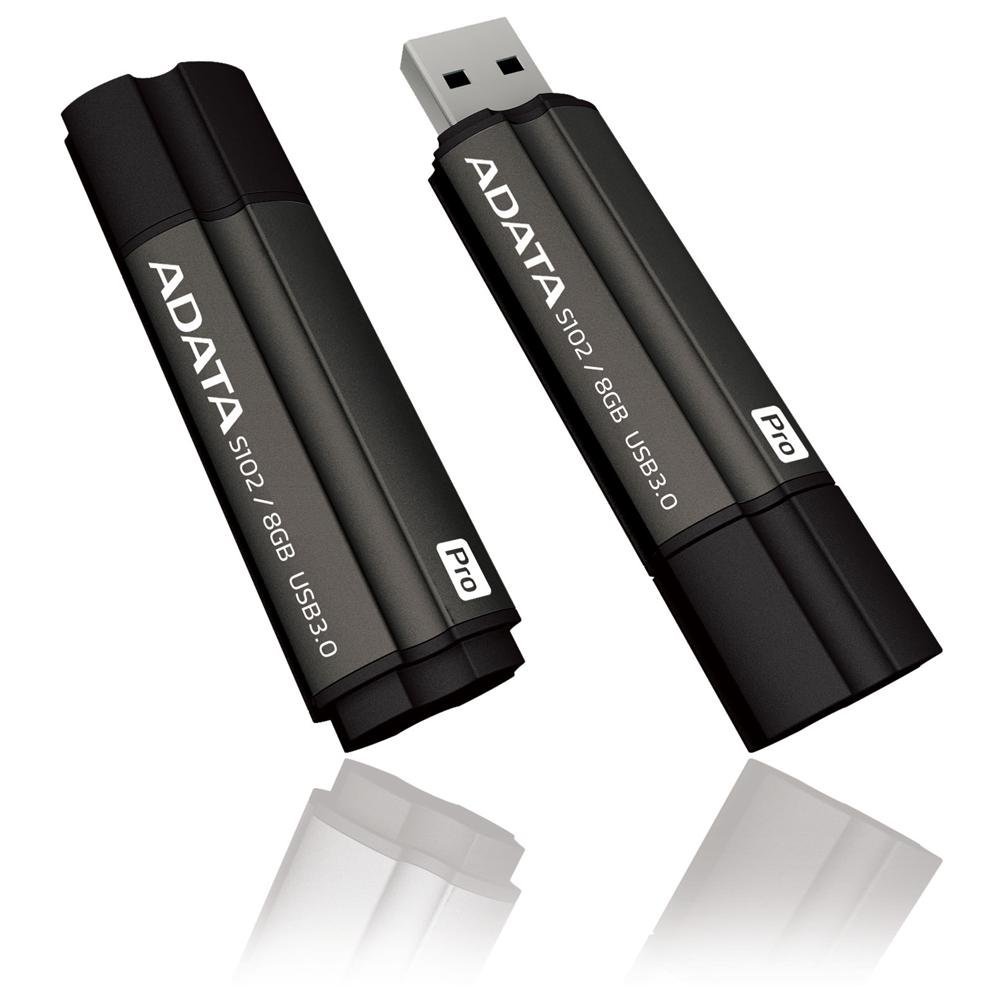
Image: The ADATA S102PRO USB Flash Drive shown with its protective cap on and with the cap removed, revealing the USB 3.0 connector. This illustrates the physical appearance and how to prepare the drive for insertion.
ოპერაციული
Once the ADATA S102PRO is recognized by your computer, you can begin transferring files:
- დისკზე წვდომა:
- Windows: Open "This PC" or "My Computer" and locate the drive listed under "Devices and drives" (e.g., "Removable Disk" or a drive letter like E:).
- macos: The drive icon will appear on your desktop or in the Finder sidebar under "Locations."
- გადაცემა Files:
- კოპირება files რომ the flash drive, drag and drop them from your computer's folders into the flash drive's window.
- კოპირება files საწყისი the flash drive, drag and drop them from the flash drive's window to a folder on your computer.
- You can also use the standard copy (Ctrl+C / Command+C) and paste (Ctrl+V / Command+V) functions.
- დისკის უსაფრთხოდ ამოღება: It is crucial to safely eject the flash drive before physically removing it to prevent data corruption.
- Windows: Click the "Safely Remove Hardware and Eject Media" icon in the system tray (bottom-right corner), then select your flash drive and click "Eject." Wait for the "Safe to Remove Hardware" message.
- macos: Drag the drive icon from the desktop to the Trash, or click the Eject button next to the drive name in the Finder sidebar. Wait for the icon to disappear before removing the drive.
მოვლა
Proper care will help ensure the longevity and reliability of your ADATA S102PRO USB Flash Drive:
- კონექტორის დაცვა: როდესაც დისკი არ გამოიყენება, ყოველთვის დაახურეთ USB კონექტორს დამცავი თავსახური, რათა თავიდან აიცილოთ მტვრის, ჭუჭყისა და ფიზიკური დაზიანება.
- მოერიდეთ ექსტრემალურ პირობებს: Do not expose the drive to extreme temperatures, direct sunlight, high humidity, or strong magnetic fields.
- სიფრთხილით მოპყრობა: მოერიდეთ დისკის დავარდნას ან მასზე ძლიერი დარტყმების ზემოქმედებისგან თავის შეკავებას.
- Do Not Remove During Transfer: Never unplug the drive while data is being read from or written to it. Always follow the safe removal procedure.
- რეგულარული სარეზერვო ასლები: While flash drives are reliable, it is always recommended to back up critical data to another storage device or cloud service.
პრობლემების მოგვარება
If you encounter issues with your ADATA S102PRO, try the following solutions:
- დისკი არ არის ამოცნობილი:
- დარწმუნდით, რომ დისკი სრულად არის ჩასმული USB პორტში.
- სცადეთ სხვა USB პორტი თქვენს კომპიუტერში.
- კომპიუტერის სპეციფიკური პრობლემის გამოსარიცხად, შეამოწმეთ დისკი სხვა კომპიუტერზე.
- Check your computer's Device Manager (Windows) or System Information (macOS) to see if the drive is listed, even if it doesn't appear in File Explorer/Finder.
- ნელი გადაცემის სიჩქარე:
- Ensure you are connected to a USB 3.0 port for optimal performance. USB 2.0 ports will limit speeds.
- ბევრი მცირე ზომის გადატანა fileშეიძლება იყოს უფრო ნელი, ვიდრე რამდენიმე დიდი ფაილის გადატანა files.
- Close other applications that might be using system resources or performing disk operations.
- წერა შეუძლებელია Fileმგზავრობისთვის:
- შეამოწმეთ, სავსეა თუ არა დისკი. წაშალეთ არასაჭირო ფაილები. fileან გადაიტანეთ ისინი სხვა ადგილას.
- უზრუნველყოს file system (e.g., FAT32, NTFS, exFAT) is compatible with your operating system and allows writing. If formatted as NTFS on macOS, you may only have read access without third-party software.
- Check for any software-based write protection or permissions issues on your computer.
სპეციფიკაციები
| ბრენდი | ADATA |
| მოდელის სახელი | S102PRO |
| მოდელის ნომერი | AT806-4G-CPK |
| მეხსიერების შენახვის მოცულობა | 4 GB |
| აპარატურა ინტერფეისი | USB 3.0 (Backward compatible with USB 2.0) |
| მწარმოებელი | A-DATA TECHNOLOGY (USA) CO. L |
| UPC | 842243005080 |
| ASIN | B004AVOGW8 |
გარანტია და მხარდაჭერა
For detailed warranty information, product registration, and technical support, please visit the official ADATA webსაიტი. როგორც წესი, იქ შეგიძლიათ იპოვოთ დახმარების რესურსები, ხშირად დასმული კითხვები და მომხმარებელთა მომსახურების საკონტაქტო ინფორმაცია.
ADATA-ს ოფიციალური პირი Webსაიტი: www.adata.com