
SmallRig RF20C
SmallRig RF20C RGB Portable LED Photo Torch User Manual
Model: RF20C (5335)
ブランド: SmallRig
1. はじめに
The SmallRig RF20C RGB Portable LED Photo Torch is a versatile and powerful lighting tool designed for photographers, videographers, and content creators. It features 5-color LED beads, adjustable beam angle, and supports creative lighting effects with included gobos. This manual provides essential information for the safe and effective use of your device.
2. 安全情報
- デバイスを水や過度の湿気にさらさないでください。
- LED ライトを目に直視しないでください。
- 本製品を分解または改造しないでください。修理は資格のある担当者のみが行ってください。
- お子様の手の届かない場所に保管してください。
- Ensure proper ventilation during extended use, as the device may become warm.
- 指定された充電ケーブルと電源アダプターのみを使用してください。
3. パッケージ内容
パッケージにすべてのアイテムが含まれていることを確認します。
- RF20C Portable Focusable LED Video Light x 1
- Gobos x 20
- Silicone Gobo Holder x 1
- 収納袋×1
- ユーザーマニュアル x 1 (本書)
- 充電ケーブル×1
4. セットアップ
4.1 初期充電
Before first use, fully charge the RF20C. Connect the provided USB-C charging cable to the device's charging port and to a compatible USB power adapter (PD 36W recommended). The device can be used while charging.

Figure 4.1: Internal battery illustration and runtime information.

Figure 4.2: Portable design, mounting options, cooling fan, and charging capability.
4.2 Attaching Gobos
To use the creative pattern gobos, first remove the plano-convex lens from the front of the light. Then, attach the silicone gobo holder and insert the desired gobo. This ensures optimal projection effects.

Figure 4.3: Gobo projection examples and installation tip.
5. 操作手順
5.1 電源のオン/オフと基本的な操作
The RF20C features a single multi-function button for control. To prevent accidental activation during transport, the device requires a specific action to turn on.
- 電源オン: Rotate the control button to turn on the device.
- 電源を切る: コントロールボタンを3秒間押し続けます。
- 色の変更: Short press the control button to cycle through the available colors (Red, 5600K White, Purple, Orange, Cyan).
- 明るさを調整: Rotate the control button to increase or decrease the light brightness.
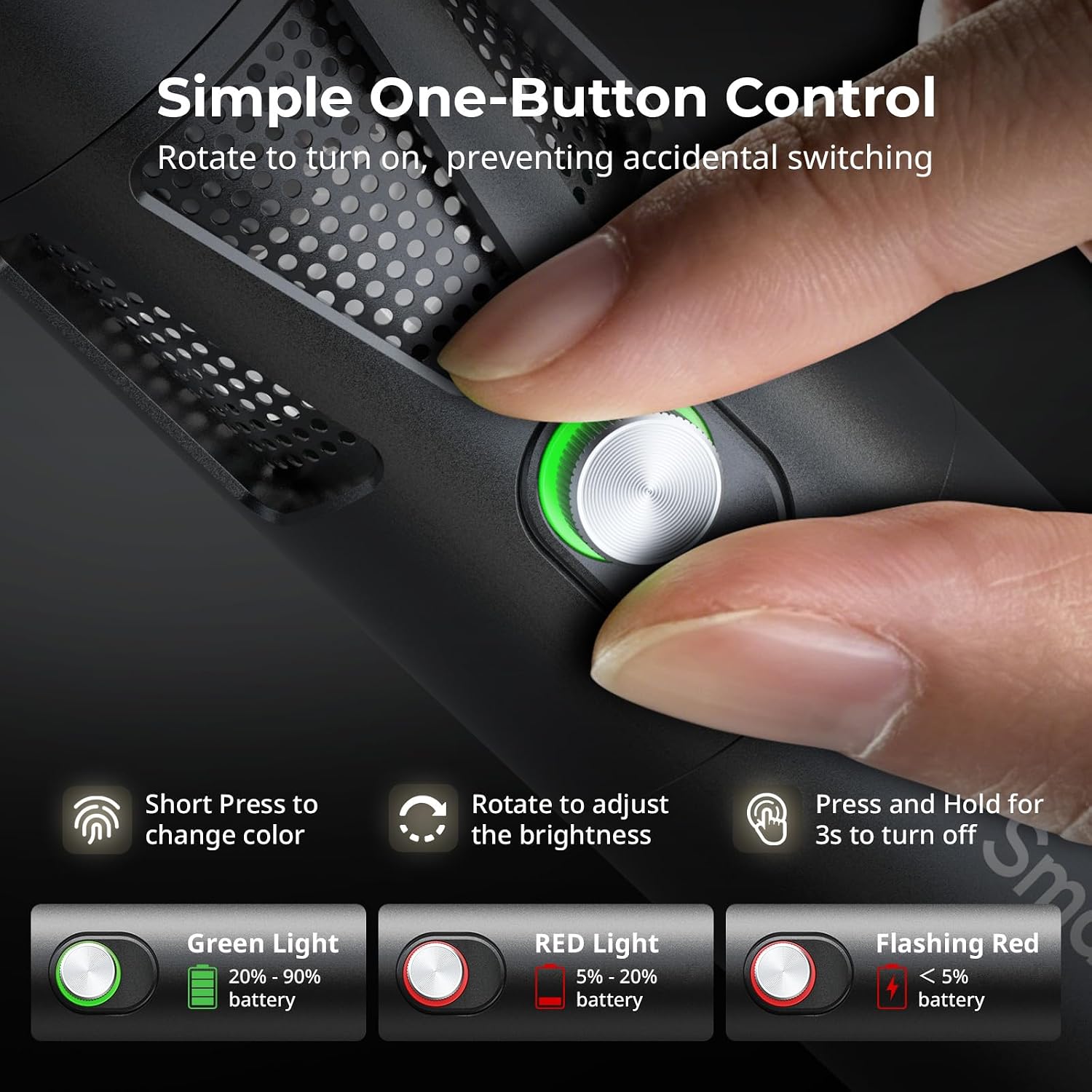
Figure 5.1: One-button control and battery indicator.

Figure 5.2: Available LED colors.
5.2 ビーム角度の調整
The front plano-convex lens allows for adjustment of the beam angle. Push or pull the lens to change the focus of the light from a narrow 24° beam to a wider 60° diffusion.
- Extend the lens: Narrows the beam (e.g., 24°).
- Retract the lens: Diffuses the beam (e.g., 60°).

Figure 5.3: Beam angle adjustment mechanism.
5.3バッテリーインジケーター
The control button's LED indicates the battery status:
- 緑色のライト: バッテリー残量20% - 90%。
- 赤信号: バッテリー残量5% - 20%。
- 点滅する赤いライト: バッテリー残量が5%未満です。

Figure 5.4: Brightness comparison of RF20C.
6. メンテナンス
- Clean the device regularly with a soft, dry cloth. Do not use harsh chemicals or abrasive materials.
- デバイスは直射日光や極端な温度を避け、涼しく乾燥した場所に保管してください。
- When not in use for extended periods, charge the battery to approximately 50% every three months to prolong battery life.
- Keep the lens and LED surface free from dust and fingerprints for optimal light output.
7。 トラブルシューティング
| 問題 | 考えられる原因 | 解決 |
|---|---|---|
| デバイスの電源が入らない。 | バッテリー残量が少ない、または電源オン手順が正しくありません。 | Charge the device. Ensure you rotate the control button to power on. |
| 光出力が暗いです。 | Low battery; brightness set too low; dirty lens. | Charge the device. Rotate the control button to increase brightness. Clean the lens. |
| Gobo projection is blurry. | Plano-convex lens not removed; gobo not seated correctly. | Remove the plano-convex lens before attaching the silicone gobo holder. Ensure gobo is properly inserted. |
| Device becomes warm during use. | Normal operation, especially at high power; fan obstruction. | This is normal. Ensure the fan vents are not obstructed for proper heat dissipation. If excessively hot, reduce brightness or allow to cool. |
| ファンの音が目立ちます。 | 冷却の通常動作です。 | The device uses a high-speed fan for efficient heat dissipation. This noise is part of normal operation. Consider distance from audio recording equipment. |
8. 仕様
| 特徴 | 詳細 |
|---|---|
| モデル | RF20C (5335) |
| 力 | 20ワット |
| 入力 | 20 V / 1.8 A (max. 36 W) |
| LEDの色 | Red, 5600K White, Purple, Orange, Cyan |
| 演色評価数(CRI) | ≥ 97 |
| テレビ照明一貫性指数 (TLCI) | ≥ 99 (at 5600 K) |
| 輝度 | 5400 Lux @ 1m / 5600K |
| バッテリー容量 | 10000mAh (2 x 5000mAh / 7.4V / 37Wh) |
| ランタイム(フルパワー) | 最大1.5時間 |
| 充電 | USB-C PD 36W Fast Charging, supports charging while operating |
| ビーム角調整 | 24°~60° |
| 材料 | アルミニウム合金、ABS |
| 製品寸法 | φ49.0 x 200.0 mm / φ1.9 x 7.9 inches |
| 製品重量 | 520.0±20.0 g / 18.3±0.7オンス |
| 接続技術 | USB |
| 原産国 | 中国 |
9. 保証とサポート
SmallRig products are designed and manufactured to the highest quality standards. This product is covered by a limited warranty from the date of purchase. For detailed warranty terms, technical support, or service inquiries, please refer to the official SmallRig webサイトをご覧いただくか、お近くの販売店にお問い合わせください。
保証請求のために購入証明書を保管してください。
10. 使用シナリオ
The SmallRig RF20C is suitable for various applications, including:
- 写真
- ビデオ録画
- ライブストリーミング
- Creative Accent Lighting
- Macro Work and Close-ups

図10.1:例amples of RF20C usage scenarios.
Ask a question about this manual
Ask about setup, troubleshooting, compatibility, parts, safety, or missing instructions. Manuals+ will review the question and use this page’s manual context to help answer it.