
1.製品オーバーview
The PRUNUS J525 is a versatile portable radio offering AM/FM reception, Bluetooth connectivity for both earphone output and speaker mode, Micro SD card playback, and a convenient sleep timer. Its compact design and long-lasting rechargeable battery make it ideal for various uses.
主な特徴:
- Bluetooth Earphone Output: Connect wireless headphones for private listening.
- Bluetoothスピーカーモード: Use the radio as a portable speaker for your smartphone or other devices.
- AM/FMラジオ: Enjoy clear reception with manual and auto-scan station presets.
- マイクロSD再生: MP3オーディオを再生する files directly from a Micro SD card with shuffle and sequential play options.
- 2500mAh充電式バッテリー: Provides extended listening time.
- 目覚まし時計: Automatically turns off the radio after a set duration (10-120 minutes).
- ポータブルデザイン: 軽量コンパクトなので持ち運びも楽々。

図1: 前面 view of the PRUNUS J525 Portable AM/FM Radio.
2. 箱の中身
開封したらパッケージの内容を確認してください:
- 1 x PRUNUS J525 Portable Radio
- 1 x USBC充電ケーブル
- 取扱説明書 (本書) x 1
3. コントロールとコンポーネント
Familiarize yourself with the buttons and ports on your PRUNUS J525 radio.

Figure 2: Front panel controls including Power, Scan, FM/AM, Mode, Preset, Delete, Previous, Next, M-, M+, and BT Transmitter buttons.
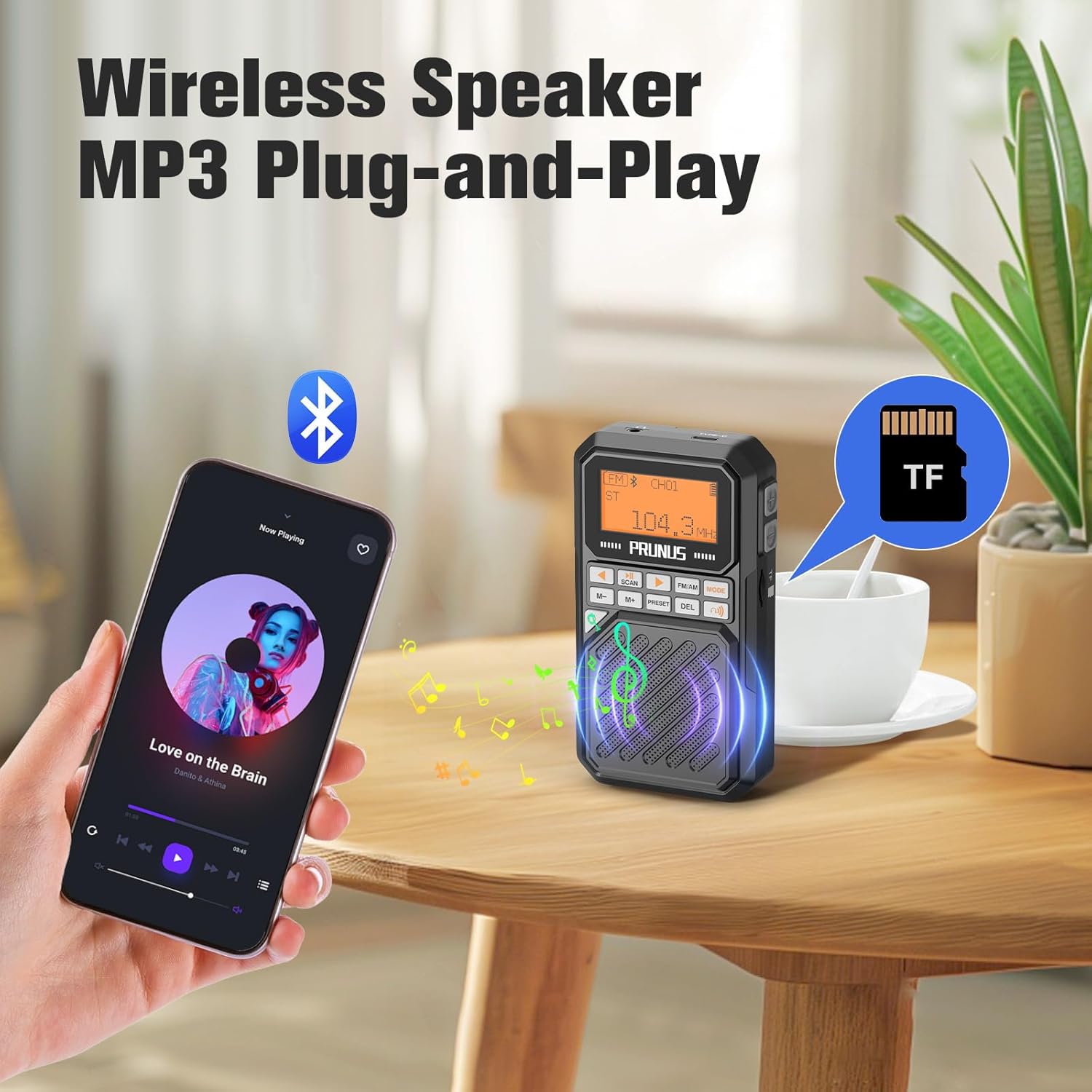
図3:側面 view showing the USB-C charging port, 3.5mm headphone jack, and Micro SD (TF) card slot.
ボタンの機能:
- 電源ボタン: Press and hold to turn the radio on/off. Short press to toggle display backlight.
- スキャン: In radio mode, short press to auto-scan and store stations. In Bluetooth transmitter mode, press to connect.
- FM / AM: FM ラジオと AM ラジオのバンドを切り替えます。
- モード: Cycle through FM, AM, Bluetooth Speaker, Bluetooth Earphone, and Micro SD playback modes.
- プリセット: Access stored radio stations.
- DEL (Delete): Delete a stored radio station.
- Previous/Next (Arrow Buttons): Tune frequency, navigate tracks, or select menu options.
- M-/M+: Adjust volume or navigate through stored stations/menu options.
- BT Transmitter Button (Headphone Icon): Short press to enter Bluetooth transmitter menu.
4. セットアップ
4.1 バッテリーの充電
The PRUNUS J525 radio is equipped with a 2500mAh rechargeable Lithium-ion battery. Before first use, fully charge the device.
- 付属の USB-C 充電ケーブルをラジオの側面にある USB-C ポートに接続します。
- ケーブルのもう一方の端を標準の USB 電源アダプター (別売) またはコンピューターの USB ポートに接続します。
- The battery icon on the display will indicate charging status. A full battery icon indicates a complete charge.
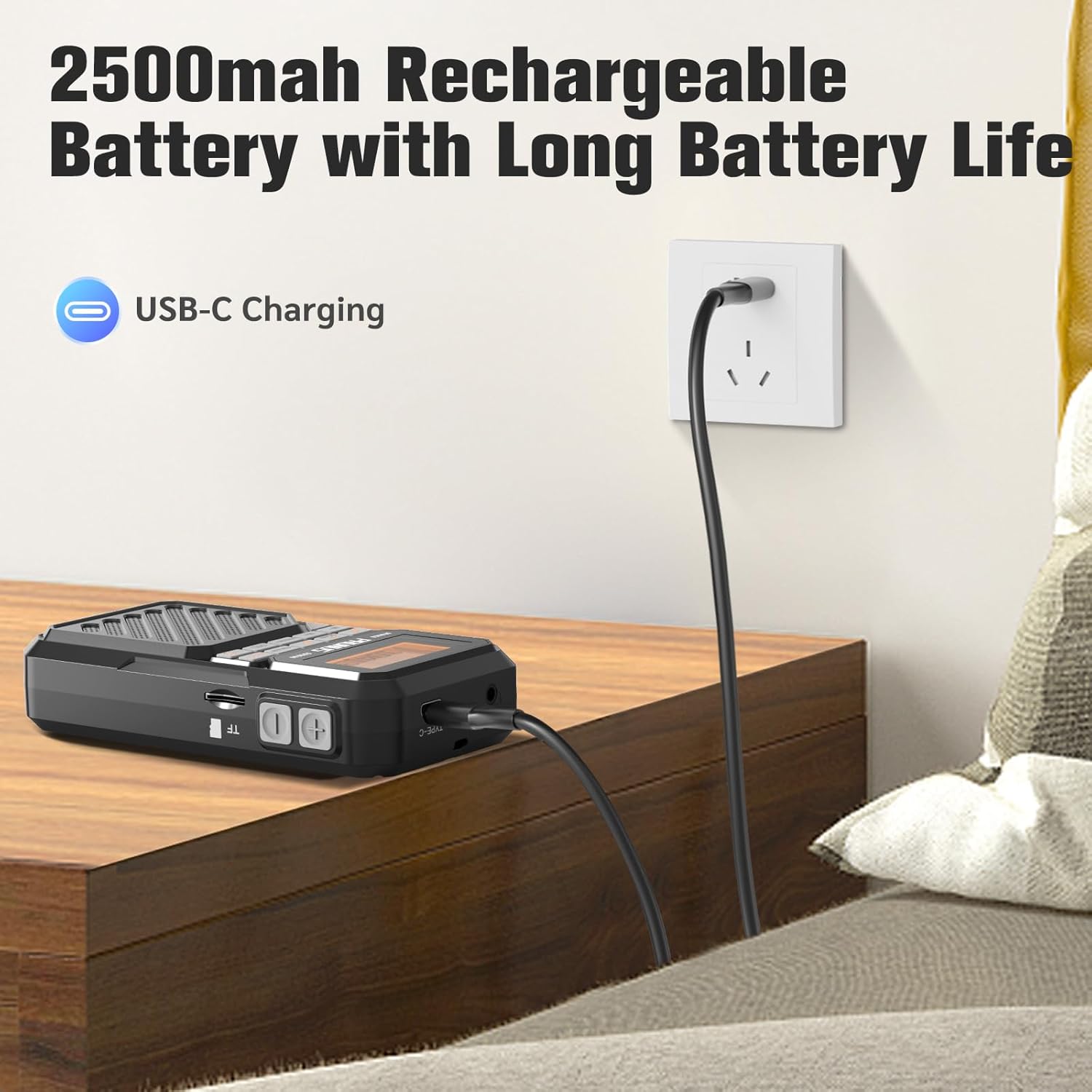
Figure 4: Charging the PRUNUS J525 radio via USB-C.
4.2 アンテナ調整
For optimal FM and AM reception, extend the telescopic antenna fully and adjust its direction. The antenna is 16 inches (41 cm) long and can be rotated 360 degrees.

Figure 5: Extending and adjusting the telescopic antenna for better signal reception.
5. 操作手順
5.1 電源オン/オフ
を押し続けます 力 button (orange button on the left) for a few seconds to turn the radio on or off. The LCD screen will display "welcome" upon startup.
5.2 FM/AM Radio Operation
- ラジオをつけてください。
- を押す FM/AM button to select your desired band (FM: 87-108MHz, AM: 520-1710KHz).
- Auto Scan and Store Stations: を短く押す スキャン button. The radio will automatically scan for available stations and store them as presets.
- Manual Tuning and Presets:
- 使用 前へ/次へ arrow buttons to fine-tune the frequency.
- To manually store a station, tune to the desired frequency, then press and hold the プリセット button. Select a preset number using the arrow buttons and press プリセット 再度確認します。
- To recall a stored station, short press the プリセット button, then use the arrow buttons to select the desired preset.
- To delete a stored station, select it using プリセット and arrow buttons, then press the 削除 ボタン。

Figure 6: Manual preset buttons for storing and recalling radio stations.
5.3 Bluetooth Earphone Output
Connect your Bluetooth headphones to the J525 radio for private listening.
- Ensure your Bluetooth headphones are in pairing mode. If previously connected to another device, disconnect them or reset them.
- Turn on the J525 radio.
- を短く押す BTトランスミッター button (headphone icon) to enter the transmitter menu.
- Select "Searching" using the arrow buttons and press スキャン. The radio will search for nearby Bluetooth devices. This may take 10-30 seconds.
- Once your earphone's name appears in the device list, select it using the arrow buttons and press スキャン 接続します。
- A solid Bluetooth icon next to your device name on the radio's display indicates a successful connection. The radio will automatically reconnect to paired earphones unless they are reset.
Video 1: Demonstrates how to connect Bluetooth headphones to the PRUNUS J525 radio.

Figure 7: PRUNUS J525 radio connected to wireless headphones for on-the-go listening.
5.4 Bluetoothスピーカーモード
Use the J525 radio as a Bluetooth speaker to play audio from your smartphone or other Bluetooth-enabled devices.
- Turn on the J525 radio.
- を押す モード button until the Bluetooth speaker icon appears on the display. The radio will enter pairing mode.
- On your smartphone or Bluetooth device, go to Bluetooth settings and search for "J-525".
- Select "J-525" to pair and connect.
- 接続すると、デバイスからのオーディオをラジオのスピーカーから再生できます。

Figure 8: PRUNUS J525 functioning as a Bluetooth speaker, playing music from a smartphone.
5.5 Micro SD Playback (MP3 Player)
The radio supports playing MP3 fileMicro SD (TF) カードから。
- Insert a Micro SD card (formatted to FAT32) with MP3 audio files into the TF card slot on the side of the radio.
- を押す モード button until the Micro SD card icon appears on the display. The radio will automatically start playing music from the card.
- 使用 前へ/次へ arrow buttons to skip tracks.
- The radio supports shuffle playback, single repeat, and list repeat. These options can typically be accessed via the menu or by long-pressing certain buttons (refer to on-screen prompts if available).
5.6 スリープタイマー機能
スリープ タイマーを使用すると、設定された時間が経過するとラジオが自動的にオフになります。
- While the radio is on, press and hold the モード ボタン。
- 使用 前へ/次へ arrow buttons to select the desired sleep timer duration (10, 15, 30, 45, 60, 90, or 120 minutes).
- を押す モード button again to confirm your selection. A sleep icon will appear on the display.
- 選択した時間が経過すると、ラジオは自動的に電源をオフにします。

Figure 9: Setting the sleep timer on the PRUNUS J525 radio.
6. メンテナンス
To ensure the longevity and optimal performance of your PRUNUS J525 radio, follow these maintenance guidelines:
- クリーニング: ラジオの外装は、柔らかく乾いた布で拭いてください。研磨剤入りの洗剤、溶剤、強力な化学薬品は使用しないでください。表面の仕上げが傷つく可能性があります。
- ストレージ: 長期間使用しない場合は、ラジオを直射日光や極端な温度を避け、涼しく乾燥した場所に保管してください。
- バッテリーのケア: バッテリーの健全性を維持するため、バッテリーを頻繁に完全に放電することは避けてください。長期間保管する場合は、数ヶ月ごとにバッテリーを約50%まで充電してください。
- 水への露出: このデバイスは防水ではありません。水や高湿度にさらさないでください。
- アンテナのケア: 伸縮アンテナは曲がったり壊れたりしないよう丁寧に扱ってください。
7。 トラブルシューティング
If you encounter issues with your PRUNUS J525 radio, refer to the following common problems and solutions:
| 問題 | 考えられる原因 | 解決 |
|---|---|---|
| ラジオがオンになりません。 | 電池残量が少ない、または電源ボタンが正しく押されていません。 | Charge the radio fully. Press and hold the power button for a few seconds. |
| ラジオの受信状態が悪い。 | アンテナが拡張されていないか、信号が弱い領域です。 | Fully extend and adjust the telescopic antenna. Try moving to an area with better signal. |
| Bluetoothヘッドフォンを接続できません。 | Headphones not in pairing mode or already connected to another device. | Ensure headphones are in pairing mode. Disconnect them from other devices or reset them. Follow the pairing steps in Section 5.3. |
| Bluetooth speaker mode not working. | Radio not in Bluetooth speaker mode or not paired with smartphone. | Press MODE to switch to Bluetooth speaker mode. Ensure "J-525" is selected and connected in your smartphone's Bluetooth settings. |
| Micro SD カードが再生されません。 | Card not inserted correctly, unsupported format, or no MP3 files. | Ensure the Micro SD card is inserted correctly. Verify the card is FAT32 formatted and contains MP3 files. Press MODE to select Micro SD playback. |
8. 仕様
| 特徴 | 詳細 |
|---|---|
| ブランド | プルナス |
| モデル | J-525 |
| 色 | グレー |
| 製品寸法 | 長さ2.6インチ x 幅1インチ x 高さ4.8インチ |
| アイテム重量 | 5.5オンス |
| 電源 | 電池駆動 |
| バッテリー | 2500mAhリチウムポリマー電池 x 1(付属) |
| 充電ポート | USB-C |
| 接続技術 | USB, Bluetooth (Wireless Version 5.4) |
| チューナーテクノロジー | FM、AM |
| FM周波数範囲 | 87-108MHz |
| AM周波数範囲 | 520-1710KHz |
| 出力電力 | 3W |
| 表示タイプ | 液晶 |
| エンクロージャ材質 | アクリロニトリルブタジエンスチレン(ABS) |
| 特集 | Built-In AM Antenna, Lightweight, Portable, Rechargeable, Bluetooth Earphone Output, Bluetooth Speaker Mode, Micro SD Playback, Sleep Timer |
9. 保証とサポート
The PRUNUS J525 Portable AM/FM Radio comes with a 1年間の販売者保証.
For technical support, troubleshooting assistance, or warranty claims, please contact PRUNUS customer service through the platform where you purchased the product. Please have your purchase details and model number (J-525) ready when contacting support.