
1. はじめに
Thank you for choosing the ACEMAGIC LX16PRO Gaming Laptop. This manual provides essential information for setting up, operating, maintaining, and troubleshooting your new device. The LX16PRO is designed for performance and productivity, featuring an AMD Ryzen 7 7730U processor, a 16-inch IPS display, 16GB DDR4 RAM, and a 512GB NVMe SSD, running on Windows 11 Pro.

画像: 上view of the ACEMAGIC LX16PRO laptop, highlighting its AMD Ryzen 7 7730U processor, AMD Radeon Graphics, 16-inch FHD IPS display, up to 64GB DDR4 RAM, up to 4TB NVMe SSD, WiFi 6, and backlit keyboard.
2. セットアップ
2.1 初回電源投入
- 開梱: ノートパソコンとすべての付属品をパッケージから慎重に取り出します。
- 接続電源: Plug the power adapter into the DC jack on the laptop and then into a power outlet.
- 電源オン: ノートパソコンの蓋を開けて、通常はキーボード デッキにある電源ボタンを押します。
- Windowsセットアップ 画面の指示に従って、言語、地域、ネットワーク接続、ユーザー アカウントの作成などの Windows 11 Pro の初期セットアップを完了します。
2.2 周辺機器の接続
The LX16PRO offers various ports for connecting external devices:
- USB3.2: マウス、キーボード、外部ストレージドライブなどの USB デバイスを接続します。
- タイプC(フル機能): Use for data transfer, video output, or charging compatible devices.
- HDMI: 外部モニターまたはテレビに接続して拡張表示します。
- 3.5mmヘッドフォンジャック: ヘッドホンまたは外部スピーカーを接続します。
- TFカードソケット: 追加のストレージまたはデータ転送のために、TF (microSD) カードを挿入します。

画像: 右側 view of the laptop, displaying the DC power input, a full-function Type-C port, an HDMI port, and a USB 3.2 port.
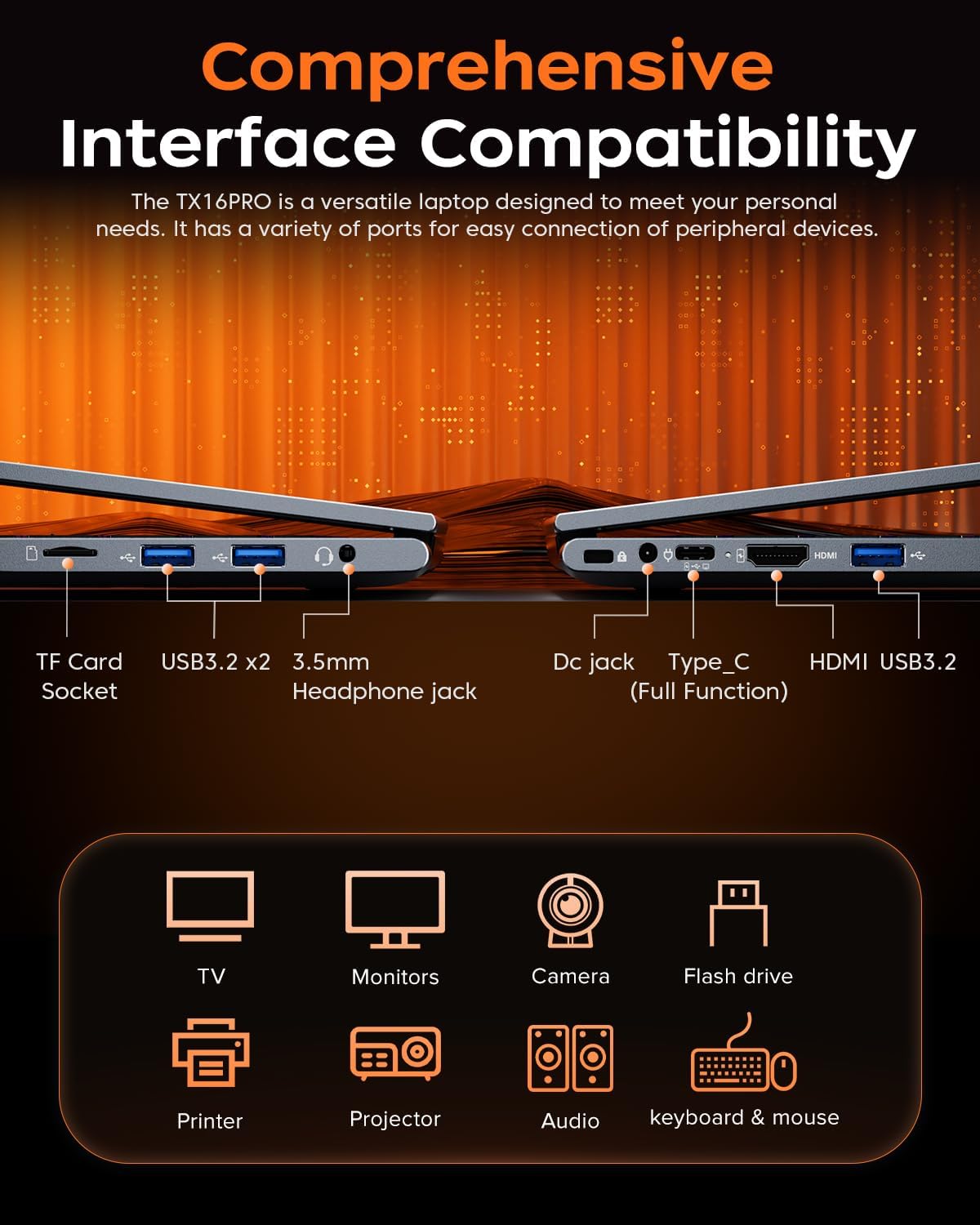
画像: 左側 view of the laptop, showing the TF card socket, two USB 3.2 ports, and the 3.5mm headphone jack.
3. 操作手順
3.1 キーボードとタッチパッド
The laptop features a backlit keyboard and a responsive touchpad with multi-touch capabilities. The backlit keyboard enhances visibility in low-light conditions, and the numeric keypad provides convenience for data entry.
- バックライト制御: Use the dedicated function keys (e.g., Fn + Fx) to adjust keyboard backlight brightness or toggle it on/off.
- タッチパッドのジェスチャ: Utilize multi-touch gestures for navigation, zooming, and other functions within Windows 11 Pro.

Image: Close-up of the laptop's backlit keyboard and large touchpad, illustrating its design and functionality.
3.2 ディスプレイ
The 16-inch IPS display offers Full HD (1920x1200) resolution for clear and vibrant visuals. Adjust display settings through Windows settings for optimal viewing の経験。

画像: ノートパソコンの画面表示asing vivid graphics, emphasizing the 16-inch display with Full HD (1920x1200) resolution and IPS technology.
3.3 ワイヤレス接続
The LX16PRO supports WiFi 6 and Bluetooth 5.2 for fast and reliable wireless connections.
- WiFi 6: Connect to high-speed wireless networks for internet access and online activities.
- Bluetooth 5.2: ヘッドフォン、スピーカー、その他の周辺機器などの Bluetooth 対応デバイスとペアリングします。

Image: A visual comparison demonstrating the improved transfer speeds and reduced latency of WiFi 6 over WiFi 5, beneficial for gaming and streaming.
3.4電源モード
Optimize performance and battery life by adjusting power modes in Windows settings (Settings > System > Power & battery).
- 最高のパフォーマンス: Maximizes system speed for demanding tasks like gaming.
- バランス: Offers a good compromise between performance and power efficiency for everyday use.
- Best Power Efficiency: Conserves battery life for extended usage, suitable for light tasks.

Image: The laptop displayed alongside three power modes, indicating their respective performance levels and recommended uses for gaming, work, and extended battery life.
4. メンテナンス
4.1バッテリーケア
- バッテリーを頻繁に完全に放電することは避けてください。
- 長期間使用しない場合は、ノートパソコンを涼しく乾燥した場所に保管してください。
- バッテリー寿命を最大限に延ばすには、ノートパソコンを極端な温度にさらさないようにしてください。

画像: 内部 view of the laptop highlighting the 54Wh battery, indicating its capacity for extended use.
4.2 ストレージ管理
- 不要なものを定期的に掃除する files and applications to maintain optimal performance of the 512GB NVMe SSD.
- Consider external storage or cloud services for large files to free up internal drive space.

Image: A visual representation of the laptop's memory (16GB DDR4 RAM, upgradable to 64GB) and storage (512GB NVMe SSD, upgradable to 4TB) capabilities.
4.3 クリーニング
- 画面と外部の表面を清掃するには、柔らかく糸くずの出ない布を使用してください。
- 刺激の強い化学薬品や研磨材は使用しないでください。
- Periodically clean the cooling vents to ensure proper airflow and prevent overheating.

Image: An illustration of the laptop's internal cooling system, featuring dual copper pipes and a dedicated fan designed to maintain low temperatures during operation.
5。 トラブルシューティング
If you encounter issues with your ACEMAGIC LX16PRO laptop, refer to the following common solutions:
- 電源なし: 電源アダプターがノートパソコンと電源コンセントの両方にしっかりと接続されていることを確認してください。電源インジケーターランプを確認してください。
- 表示の問題: If the screen is blank, try connecting an external monitor via HDMI to check if the issue is with the laptop's display or graphics output. Adjust display settings in Windows.
- 接続の問題: For WiFi issues, restart your router and the laptop. For Bluetooth, ensure the device is discoverable and within range.
- パフォーマンスが遅い: Close unnecessary applications, check for background processes, and ensure your system is up to date. Consider running a disk cleanup.
- システムフリーズ: システムが応答しなくなった場合は、電源ボタンを10~15秒間押し続けて強制シャットダウンし、ノートパソコンを再起動してください。
さらにサポートが必要な場合は、ACEMAGIC カスタマー サポートにお問い合わせください。
6. 仕様
Below are the detailed specifications for the ACEMAGIC LX16PRO Gaming Laptop:
| 特徴 | 詳細 |
|---|---|
| モデル名 | LX16PRO |
| プロセッサ | AMD Ryzen 7 7730U(8コア、16スレッド、最大4.5GHz) |
| グラフィックス | AMD Radeon™グラフィックス |
| ラム | 16GB DDR4 (2666 MHz), Max 64GB |
| ストレージ | 512GB NVMe SSD (PCIE x 4), Max 4TB |
| 画面 | 16-inch IPS, 1920x1200 (FHD), 60 Hz |
| オペレーティング·システム | ウィンドウズ11プロ |
| 接続性 | WiFi 6(802.11ax)、Bluetooth 5.2 |
| ポート | 1x HDMI, 1x Type-C (Full Function), 3x USB 3.2, 1x 3.5mm Audio Jack, 1x TF Card Socket, 1x DC Jack |
| キーボード | Backlit Keypad, QWERTY Layout |
| タッチパッド | マルチタッチ |
| Webカム | はい(前面) |
| バッテリー | 1 Lithium Ion, 55 Watt Hours (approx. 4 hours life) |
| 寸法 | 35.73 x 22.86 x 1.67 cm |
| 重さ | 1.78キロ |
7. 保証とサポート
ACEMAGIC provides customers with a one-year limited warranty and 30-day returns. Lifetime technical support and offline maintenance are also available. For any issues or inquiries, please feel free to contact ACEMAGIC customer support.
8.製品オーバーview ビデオ
ビデオ: 簡単にview of the ACEMAGIC TX16PRO Laptop, showcasing its 16-inch FHD display, 180-degree hinge, backlit keyboard, and various connectivity ports including DC jack, Type-C, HDMI, USB 3.2, TF card socket, and 3.5mm headphone jack. This video highlights the physical features and design of the laptop.