
1. はじめにview
Welcome to the Samsung Galaxy A07 5G. This smartphone is designed to provide a comprehensive mobile experience with advanced features and robust performance. Key highlights include a 6.7-inch 120Hz immersive display, a massive 6000mAh battery, a 50MP True Dual Camera system, and enhanced security with Knox Vault. This manual provides essential information for setting up, operating, and maintaining your device.

図1.1:以上view of Samsung Galaxy A07 5G key features.
2. デバイスのセットアップ
2.1 箱の中身
始める前に、すべてのコンポーネントが揃っていることを確認してください。
- Smartphone (Samsung Galaxy A07 5G)
- データケーブル(USB-C - USB-C)
- SIM Ejection PIN
- クイックスタートガイド

Figure 2.1: Items included with your Samsung Galaxy A07 5G.
2.2 SIMカードの挿入
- デバイスの側面にある SIM カード トレイを見つけます。
- SIM取り出しピンをトレイの横にある小さな穴に挿入し、トレイが飛び出すまで軽く押します。
- 金色の接点を下にして、Nano-SIM カードおよび/または microSD カードをトレイに置きます。
- トレイをスロットに慎重に再挿入します。
2.3 Initial Power On and Data Transfer
Press and hold the Power button until the Samsung logo appears. Follow the on-screen prompts to complete the initial setup. If you are transferring data from an old device, use the Smart Switch feature for a seamless transition of photos, videos, contacts, and apps.

Figure 2.2: Using Smart Switch for easy data transfer.
3. 操作手順
3.1 基本的なナビゲーション
The Galaxy A07 5G features a responsive touchscreen. Use gestures like tapping, swiping, pinching, and spreading to navigate the interface, open apps, and interact with content.
3.2 One UI 8 Interface
Experience an intuitive and upgraded user interface with One UI 8, designed for ease of use and enhanced functionality.

Figure 3.1: The new One UI 8 interface.
3.3 クイックシェア
簡単に共有 files between Samsung Galaxy devices, and even with iOS and PC devices, using the Quick Share feature.

Figure 3.2: Quick Share functionality.
4. カメラ機能
The Galaxy A07 5G is equipped with a versatile camera system to capture your moments.
- 50MPメインカメラ: 鮮明で詳細な写真を撮るために。
- 2MP深度カメラ: Enhances portraits by separating the subject from the background.
- 8MPフロントカメラ: 高解像度の自撮りやビデオ通話に。

Figure 4.1: Pro-grade camera system.

Figure 4.2: Depth Camera for enhanced portraits.

Figure 4.3: 8MP Selfie Camera.
5.バッテリー管理
The Galaxy A07 5G is powered by a massive 6000mAh battery, designed for extended usage. It also supports 25W fast charging to quickly power up your device.

図 5.1: 長持ちする 6000mAh バッテリー。
5.1 Tips for Extending Battery Life
- Adjust screen brightness to a lower level.
- Enable power-saving modes when not in active use.
- 過剰な電力を消費するバックグラウンド アプリケーションを閉じます。
- Disable Wi-Fi, Bluetooth, and GPS when not needed.
6. 表示機能
Enjoy a vibrant visual experience on the 6.7-inch immersive display with a 120Hz refresh rate for smooth scrolling and an 800 nits High Brightness Mode (HBM) for clear viewing even in bright outdoor conditions.

Figure 6.1: Immersive 120Hz display.
7. 接続性
The Galaxy A07 5G supports superfast 5G speeds with up to 12 5G bands, ensuring swift and reliable connectivity for streaming, gaming, and downloading. It also includes standard connectivity options such as Bluetooth, USB, and Wi-Fi.
8. ソフトウェアの更新とセキュリティ
Your Galaxy A07 5G is designed for long-term relevance and security, offering 6 generations of OS upgrades and 6 years of security updates from the first global launch date.

Figure 8.1: Extended OS upgrade support.
8.1 Samsung Knox Vault
The device features Samsung Knox Vault (EAL5+ certified), providing advanced security to protect your private information from unauthorized access.
9. Physical Design and Durability
The Galaxy A07 5G boasts a slim, modern design with an 8.2mm thickness. It also offers IP54-rated protection against dust and splashes, ensuring durability in various conditions.

Figure 9.1: IP54-rated protection against spills and splashes.
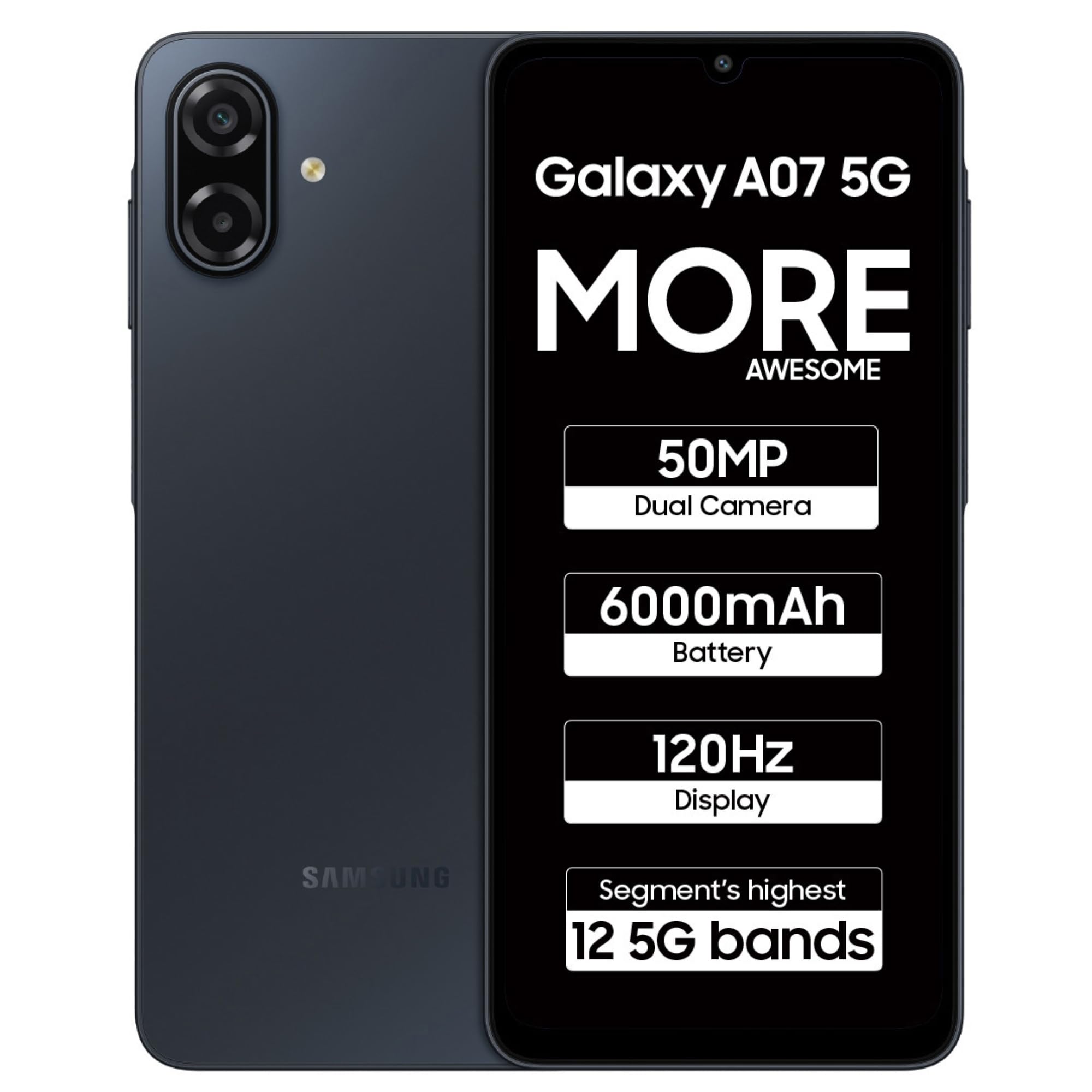
Figure 9.2: Samsung Galaxy A07 5G (Black).
10. メンテナンス
To ensure optimal performance and longevity of your Samsung Galaxy A07 5G, follow these maintenance guidelines:
- ソフトウェアアップデート: 最新の機能、セキュリティ パッチ、パフォーマンスの向上を活用するには、ソフトウェア アップデートを定期的に確認してインストールしてください。
- クリーニング: 画面と本体の清掃には、柔らかく糸くずの出ない布をご使用ください。刺激の強い化学薬品や研磨剤は使用しないでください。
- ストレージ管理: 定期的に不要なものをクリアする files とアプリを同期してストレージ容量を解放し、デバイスの速度を維持します。
- バッテリーのケア: 極端な温度を避け、バッテリーを頻繁に完全に消耗させないでください。
11。 トラブルシューティング
デバイスで問題が発生した場合は、次の一般的なトラブルシューティング手順を試してください。
- デバイスが応答しない: Press and hold the Power button for about 10 seconds to force restart the device.
- アプリの問題: 問題のあるアプリのキャッシュとデータを消去するか、アンインストールして再インストールしてください。
- 接続の問題: Toggle Wi-Fi or Bluetooth off and on. For mobile data, ensure your SIM card is properly inserted and your plan is active.
- パフォーマンスが遅い: 使用していないアプリを閉じ、キャッシュをクリアし、十分なストレージ容量を確保してください。工場出荷時の状態にリセットすることは、最後の手段として検討してください(事前にデータをバックアップしてください)。
- 充電の問題: Ensure the data cable and charger are securely connected and undamaged. Try a different charger or cable if available.
12. 仕様
Detailed technical specifications for the Samsung Galaxy A07 5G (Model: SM-A076B).
| 特徴 | 仕様 |
|---|---|
| オペレーティング·システム | アンドロイド16.0 |
| 製品寸法 | 0.82 x 7.74 x 16.74 cm; 199 g |
| 商品型番 | SM-A076B |
| 接続技術 | Bluetooth、USB、Wi-Fi |
| GPS | トゥルー(GPS内蔵) |
| 特集 | Dual SIM, Expandable Memory, Mobile Hotspot Capability, Supports USB OTG |
| 表示機能 | Wireless, Touchscreen, 720 x 1600 Resolution, 120Hz Refresh Rate, 800 nits HBM |
| カメラ機能 | Front (8MP), Rear (50MP Main, 2MP Depth) |
| オーディオジャック | 3.5ミリメートル |
| フォームファクター | バー |
| 色 | 黒 |
| バッテリー電力定格 | 6000ミリamp 営業時間 |
| RAMメモリインストールサイズ | 4ギガバイト |
| CPUモデル | メディアテック ディメンシティ 6300 |
| CPU速度 | 2.4GHz帯 |
| IP 定格 | IP54 |
13. 保証とサポート
保証情報およびカスタマーサポートについては、Samsungの公式ウェブサイトをご覧ください。 website or contact Samsung customer service. Samsung provides extensive support with over 3300 service touchpoints.

Figure 13.1: Samsung service center network.
また、 AmazonのSamsungストア 製品情報とアクセサリの詳細については、こちらをご覧ください。