
1. はじめに
This manual provides detailed instructions for the installation, operation, and maintenance of your ATOTOEXCEL V10 10-inch QLED Android Double DIN Car Stereo. Please read this manual thoroughly before using the product to ensure proper function and safety. Keep this manual for future reference.
The ATOTOEXCEL V10 is an advanced car stereo system featuring a 10-inch QLED display, Android 14 operating system, Car Karaoke, Pro DSP, 4G LTE connectivity, Wireless CarPlay & Android Auto, and integrated dual cameras for front dash and backup recording.
2. 安全情報
- 専門家による取り付けを推奨: カーオーディオ システムは複雑なため、ユニットや車両の損傷を防ぐために専門家による設置を強くお勧めします。
- 電源: ユニットがマイナス接地の 12V DC 電源に接続されていることを確認します。
- 配線: Incorrect wiring can cause damage or fire. Follow the wiring diagram precisely.
- 安全運転: 運転の妨げになるような操作はしないでください。常に道路の安全を最優先にしてください。
- 温度: ユニットを極端な温度や直射日光に長時間さらさないでください。
- 水分: 本体を水や湿気から遠ざけてください。
- クリーニング: 清掃には柔らかく乾いた布を使用してください。研磨剤や溶剤は使用しないでください。
3. 箱の中身
パッケージにすべてのアイテムが揃っていることを確認します。
- V10 Car Stereo (10.1")
- 16P Male Power Cable (16-Pin Wire Harness)
- Male GPS Antenna
- Male 4G Antenna
- Male 4G Antenna S
- 6P Male Dual USB Cable
- 4-Pin Male USB Cable
- HN9-SIM Card Cable
- HN9-Male KTV Function Cable
- HN9-RCA Cable
- 取り付けネジ
- ダブルDINブラケット
- ユニバーサル取り付けブラケット
- SIM Data Card
- オンラインリソースクイックガイド
- Guide Product Care Online Support
- AC-HN9FR Front Dash Camera
- Extension Cable for AC-HN9FR (3.5m/11.5ft)
- ケーブルフレーム
- AC-HN9RRV3 Rear Dash Camera
- Extension Cable for AC-HN9RRV3 (8m/26.3ft)

Image: All components included in the ATOTOEXCEL V10 package.
4. セットアップとインストール
4.1. 物理的な設置
The V10 is designed for standard Double-DIN dashboard openings. Confirm your vehicle's dashboard contours before purchase. Professional installation is recommended.
- 取り付け: Use the provided Double-DIN brackets and universal mounting bracket to secure the head unit.
- 配線: Connect the 16-pin power cable, USB cables, GPS antenna, and 4G antennas according to the wiring diagram.
- カメラ接続: Connect the Front Dash Cam (AC-HN9FR) and Rear Dash Camera (AC-HN9RRV3) using their respective extension cables.
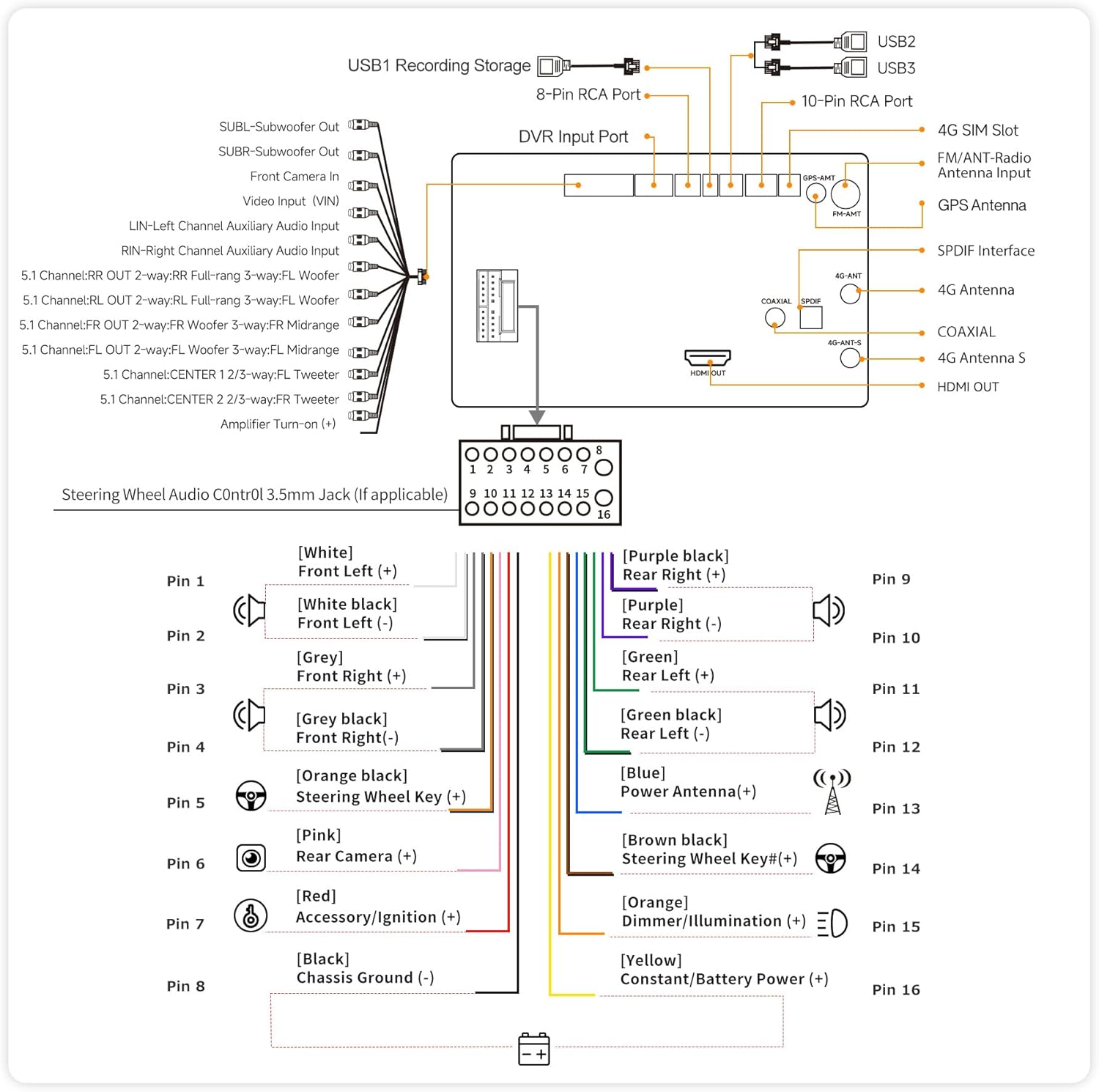
Image: Wiring diagram for the V10 unit.

Image: EdgeFit 10.1 Flush-Mount Installation Diagram.
4.2. 初期電源投入とネットワーク設定
After installation, power on the unit. The Android 14 system will boot up. You will need to set up network connectivity for full functionality.
- 4GLTE: Insert the provided SIM data card or your own compatible SIM into the HN9-SIM Card Cable. The unit will automatically connect to the 4G network.
- Wi-Fi: Navigate to Settings > Network & Internet > Wi-Fi to connect to an available Wi-Fi network.
- ホットスポットとテザリング: The V10 can act as a rolling hotspot to share its LTE connection with other devices.
Video: This video demonstrates the V10's features including Quad-Cam Recording and Car Karaoke.
5. 操作手順
5.1. Touchscreen and Basic Navigation
The 10.1-inch QLED touchscreen provides a responsive interface. Swipe left/right to navigate between app screens, tap icons to open applications, and use the top bar for quick settings and notifications.

Image: The V10 QLED display in a vehicle.
5.2. ワイヤレスCarPlayとAndroid Auto
Connect your smartphone wirelessly for seamless integration with Apple CarPlay or Android Auto. This allows access to navigation, music, calls, and messages directly from the stereo display.
- スマートフォンで Bluetooth と Wi-Fi が有効になっていることを確認します。
- On the V10, select the CarPlay or Android Auto icon.
- 画面上の指示に従ってデバイスをペアリングします。

画像: ワイヤレス CarPlay と Android Auto インターフェース。
5.3. Car Karaoke (DriveKaraoke)
Transform your car into a KTV space with the built-in DriveKaraoke system. It uses vocal removal algorithms and DSP effects for studio-grade sound.
- Access the DriveKaraoke app from the main menu.
- Connect compatible wireless microphones (sold separately).
- Select a song; the system will remove lead vocals.
- Adjust DSP settings for your voice.

Image: DriveKaraoke System features.
5.4. Quad-Cam Recording
The V10 supports simultaneous recording from up to four 1080P cameras, providing comprehensive coverage for front, rear, and cabin views. This package includes the Front Dash Cam (AC-HN9FR) and Rear Camera (AC-HN9RRV3).
- Access the Q-DVR app to view ライブフィードと録画されたフードtage.
- Emergency video lock automatically saves footag衝突時のe。
- Review recorded videos with geo-tagged playback.

Image: Quad-Cam Recording Input overview.
5.5. Pro DSP Audio Tuning
Fine-tune your audio experience with the robust DSP, featuring a 32-band EQ, time alignment, and 3-way crossover. This allows for custom sound profiles and optimal audio delivery.
- Access the DSP app from the main menu.
- Adjust the 32-band equalizer to match your audio preferences.
- Utilize time alignment to synchronize sound from all speakers.
- Configure the 3-way crossover for precise audio distribution to tweeters, midranges, and subwoofers.

Image: Advanced DSP Audio Tuning interface.
5.6. HDMI出力
The HDMI output allows you to connect the V10 to external screens, such as rear-seat monitors or passenger displays, for extended entertainment options.
- Connect an HDMI cable from the V10 to your external display.
- Configure the display settings within the V10's system menu to mirror or extend the screen.

Image: HDMI Output for multi-screen entertainment.
5.7. スマートな機能
- DriveChat AI Voice Assistant: ナビゲーション、音楽、その他の機能には音声コマンドを使用します。
- TrackHU GPSトラッキング: Monitor your vehicle's real-time location and receive alerts.
- BLE-enabled IoT Hub: Connect and control various IoT devices.

Image: DriveChat AI and IoT Hub features.
6. メンテナンス
- 画面の掃除: Use a soft, lint-free cloth to clean the QLED screen. For stubborn smudges, lightly damp布に水または画面に安全なクリーナーを含ませます。
- ソフトウェアアップデート(OTA): The V10 supports Over-The-Air (OTA) firmware upgrades. Regularly check for updates in the system settings to ensure optimal performance and access new features.
- 一般的なケア: Avoid placing heavy objects on the unit. Protect it from extreme temperatures and direct sunlight.
7。 トラブルシューティング
| 問題 | 考えられる原因 | 解決 |
|---|---|---|
| ユニットの電源が入りません。 | 配線間違い、ヒューズ切れ、電源の問題。 | Check power connections and fuses. Ensure proper 12V DC supply. |
| 音声出力がありません。 | Volume too low, mute activated, incorrect speaker wiring, DSP settings. | Increase volume, check mute status, verify speaker connections, adjust DSP settings. |
| CarPlay/Android Autoが接続されません。 | Bluetooth/Wi-Fi off, incompatible phone, software glitch. | Ensure phone's Bluetooth/Wi-Fi is on. Restart both devices. Check phone compatibility. |
| Camera feed not displayed. | Incorrect camera connection, camera malfunction. | Verify camera wiring. Check camera settings in Q-DVR app. |
| Poor 4G LTE signal. | Weak network coverage, incorrect SIM card installation. | SIMカードの挿入を確認してください。ネットワークの電波状況が良い場所に移動してください。 |
If problems persist, refer to the online manual or contact ATOTOEXCEL support.
8. 仕様
| 特徴 | 詳細 |
|---|---|
| ブランド | ATOTOEXCEL |
| モデル | バージョン10 |
| 画面 | 10.1" QLED, 1280 x 800, 550 nits brightness |
| オペレーティング·システム | アンドロイド14 |
| プロセッサ | 8 nm octa-core 2.3 GHz Cortex-A72 + dual-core NPU |
| メモリとストレージ | 6GB RAM、128GB ストレージ |
| 接続性 | 4G LTE, Wi-Fi (2.4 GHz & 5 GHz), Bluetooth (aptX HD), USB, Auxiliary, HDMI |
| オーディオ機能 | Pro DSP, 32-band EQ, Time Alignment, 3-way Crossover, HD 24-bit DAC, Coaxial/SPDIF Out, 8 assignable channels, 4V 4 RCA Preamp Outputs, 4 × 29 W RMS ampリファイアー |
| カメラサポート | 4-Channel Dash Cam Recording (1080P), Front Dash Cam (AC-HN9FR), Rear Camera (AC-HN9RRV3) included |
| 特集 | Car Karaoke, Wireless CarPlay & Android Auto, DriveChat AI Voice Assistant, TrackHU GPS Tracking, BLE-enabled IoT Hub, HDMI Output |
| アイテム重量 | 5.86 ポンド |
9.保証とサポート
9.1. 製造元の保証
The ATOTOEXCEL V10 comes with a 1-year manufacturer's warranty. Additionally, ATOTOEXCEL offers 12 plus 6 months extended coverage options. Please refer to the product care guide or online resources for specific terms and conditions.
9.2. カスタマーサポート
For technical assistance, troubleshooting, or warranty claims, please contact ATOTOEXCEL customer support. You can find contact information in the online manual or on the product care quick guide included in the box.
- オンラインマニュアル: Scan the QR code on the product box or quick guide to access the eproductcare platform for help.
- ファームウェアのアップグレード: Benefit from frequent OTA firmware upgrades that add new functions over time.