
1. はじめに
ご購入ありがとうございますasing the ELEPHAS BL128MINI Mini Projector. This manual provides essential information for setting up, operating, and maintaining your projector. Please read it thoroughly before use to ensure optimal performance and longevity of the device.
2. パッケージ内容
以下にリストされているすべてのアイテムがパッケージに含まれていることを確認してください。
- 1 x ELEPHAS BL128MINI Projector
- リモコン x 1
- ユーザーマニュアル (本書) x 1
- HDMIケーブル x 1
- 1 x Detachable Tripod
3.製品オーバーview
3.1 主な特徴
- 1080PフルHD解像度: Supports 1920 x 1080 resolution for clear images.
- 24-bit True Color: 鮮やかで正確な色彩を実現します。
- 大画面投影: 最大200インチのスクリーンに投影可能。
- Detachable Tripod: Provides stable placement and flexible positioning.
- 内蔵HIFIスピーカー: Offers integrated audio output.
- 複数の接続オプション: Includes USB, HDMI, AV, and Audio ports.

Image 3.1: The ELEPHAS BL128MINI Projector offers 1080P Full HD resolution with 24-bit true color, an 8000:1 contrast ratio, and enhanced brightness for a vivid viewing の経験。
3.2 プロジェクターのポートとコントロール
Familiarize yourself with the various ports and controls on your projector for proper connection and operation.

Image 3.2: Rear panel of the ELEPHAS BL128MINI Projector, highlighting DC power input, USB ports, HDMI port, AV port, and audio output. Compatible devices include Xbox, TV Stick, PC, Smartphone, USB drives, speakers, and headphones.
4. セットアップ
4.1電源接続
- 電源アダプターをプロジェクターの DC IN ポートに接続します。
- 電源アダプタを壁のコンセントに差し込みます。
4.2 三脚の取り付け
The included detachable tripod allows for stable placement on various surfaces.
- Locate the tripod mounting screw hole on the bottom of the projector.
- Screw the tripod securely into the mounting hole.
- Adjust the tripod legs to achieve the desired height and angle for projection.

Image 4.2: The detachable tripod provides stability for the projector, whether placed on a desktop or uneven outdoor surfaces.
4.3 設置と投影距離
Position the projector on a flat, stable surface. The optimal projection distance ranges from 3.3 to 9.8 feet for screen sizes between 50 and 200 inches.

Image 4.3: Recommended projection distances for achieving various screen sizes, from 50 to 200 inches.
5. 操作手順
5.1 電源オン/オフ
- 電源オン: プロジェクターまたはリモコンの電源ボタンを押します。
- 電源を切る: 電源ボタンをもう一度押すと、プロジェクターはスタンバイモードになります。
5.2 フォーカス調整
投影された画像が鮮明になるまで、プロジェクター レンズのフォーカス リングを回転させます。
5.3 入力ソースの選択
Use the 'Source' button on the remote control or the projector to select the desired input source (HDMI, USB, AV).
5.4 外部機器の接続
プロジェクターはさまざまな外部デバイスをサポートしています。
- HDMI: Connect laptops, PCs, TV boxes, TV sticks, gaming consoles (e.g., Xbox), or other HDMI-enabled devices using the provided HDMI cable.
- USB: USBフラッシュドライブをUSBポートに挿入してメディアを再生します file直接。
- AV: 複合ビデオ出力を備えた古いデバイスの場合は AV ポートを使用します。
- スマートフォン/タブレット: For iOS and Android devices, an additional HDMI adapter (not included) is required for connection.
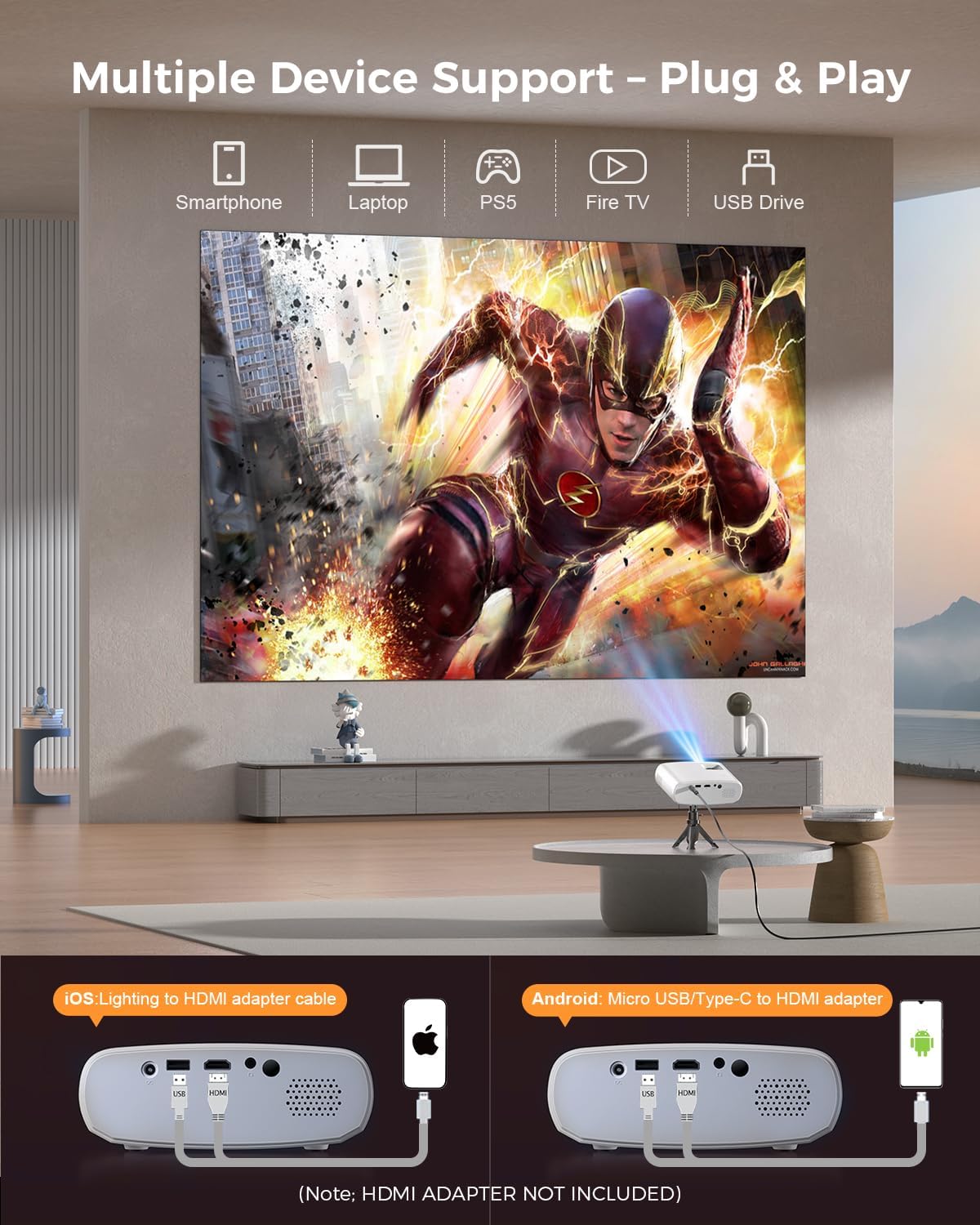
Image 5.4: The projector supports multiple devices via HDMI and USB. Note that an HDMI adapter is required for direct smartphone connection (not included).
5.5オーディオ出力
The projector has a built-in HIFI speaker. For external audio, connect headphones or external speakers to the Audio Out port.
6. メンテナンス
6.1 クリーニング
- レンズ: Use a soft, lint-free cloth or lens cleaning paper. Avoid abrasive materials.
- Casing: プロジェクターcを拭くasing with a soft, dry cloth. Do not use liquid cleaners or solvents.
- 換気: Ensure ventilation openings are clear of dust and obstructions to prevent overheating.
6.2 ストレージ
When not in use, store the projector in a cool, dry place, away from direct sunlight and extreme temperatures. Use the original packaging or a protective bag to prevent dust accumulation.
7。 トラブルシューティング
| 問題 | 考えられる原因 | 解決 |
|---|---|---|
| 画像が投影されない | 電源ケーブルが緩んでいる、入力ソースが正しくない、デバイスが正しく接続されていない。 | 電源接続を確認し、正しい入力ソースを選択し、HDMI/USB ケーブルを再接続します。 |
| 画像がぼやけている | フォーカスが調整されていません。プロジェクターがスクリーンに近すぎる/遠すぎます。 | フォーカスリングを調整し、投影距離を調整します。 |
| 音が出ない | 音量が低すぎます。ミュートされています。外部オーディオ デバイスが接続されていません。 | 音量を上げる; ミュートを解除する; 外部オーディオ接続を確認する。 |
| リモコンが動作しない | 電池残量が少ない/切れている。リモコンとプロジェクターの間に障害物がある。 | 電池を交換してください。IR 受信機までの見通しが確保されていることを確認してください。 |
| Cannot play Netflix/Hulu/Prime Video | HDCP 著作権保護。 | Use an external streaming device like Amazon Fire Stick or Roku Stick (not included). |
8. 仕様
| 特徴 | 詳細 |
|---|---|
| モデル | BL128MINI |
| ブランド | エレファス |
| ディスプレイ解像度 | 1920 x 1080 (1080P フルHD) |
| 接続技術 | HDMI、USB、AV、オーディオ出力 |
| 特集 | HDMI Connectivity, Portable, Built-in Speakers, Detachable Tripod |
| 推奨用途 | 屋内/屋外 |
| アイテム重量 | 1.96ポンド(約0.89kg) |
| 製品寸法 | 6 x 4.4 x 2.4インチ(約15.2 x 11.2 x 6.1 cm) |
9. 保証とサポート
ELEPHAS projectors are certified with CE, FCC, and RoHS standards.
- 工場サポート: We provide 3-years factory support for this product.
- テクニカルサポート: 生涯にわたるテクニカルサポートが利用可能です。
- 顧客サービス: 24/7 professional service is provided.
- 戻り値: A 30-day return or exchange policy is in place.
For further assistance, please refer to the contact information provided on the product packaging or the official ELEPHAS webサイト。

Image 9.1: ELEPHAS offers comprehensive customer support, including 24/7 professional service, a 30-day return policy, and lifetime technical support.