1.製品オーバーview
The AEOCKY Air Purifier is designed to improve indoor air quality through advanced filtration technology. It features a bionic turbo-jet design for efficient air circulation and a multi-effect filter system for comprehensive air purification.

画像1.1:正面 view of the AEOCKY Air Purifier unit.
主な特徴:
- Bionic Turbo-Jet Design: Incorporates 16 CFD-Optimized Blades, an Integrated Airflow Chamber, and a 2-GEN DC VFD Motor to enhance airflow circulation and reduce wind resistance.
- YearChange Filter Technology: Engineered for extended filter longevity, designed to last significantly longer than conventional filters. Includes two pet-specific washable pre-filters.
- All-in-One Multi-Effect Filter: A 5-layer filtration system effectively removes dust, dander, pollen, smoke, VOCs, odors, and fine particles.
- エネルギー効率: Consumes approximately 0.15 kWh per day at its highest setting.
- Authoritative Certifications: Tested and certified by SGS, CARB, ETL, DOE, and FCC, ensuring zero ozone emission.
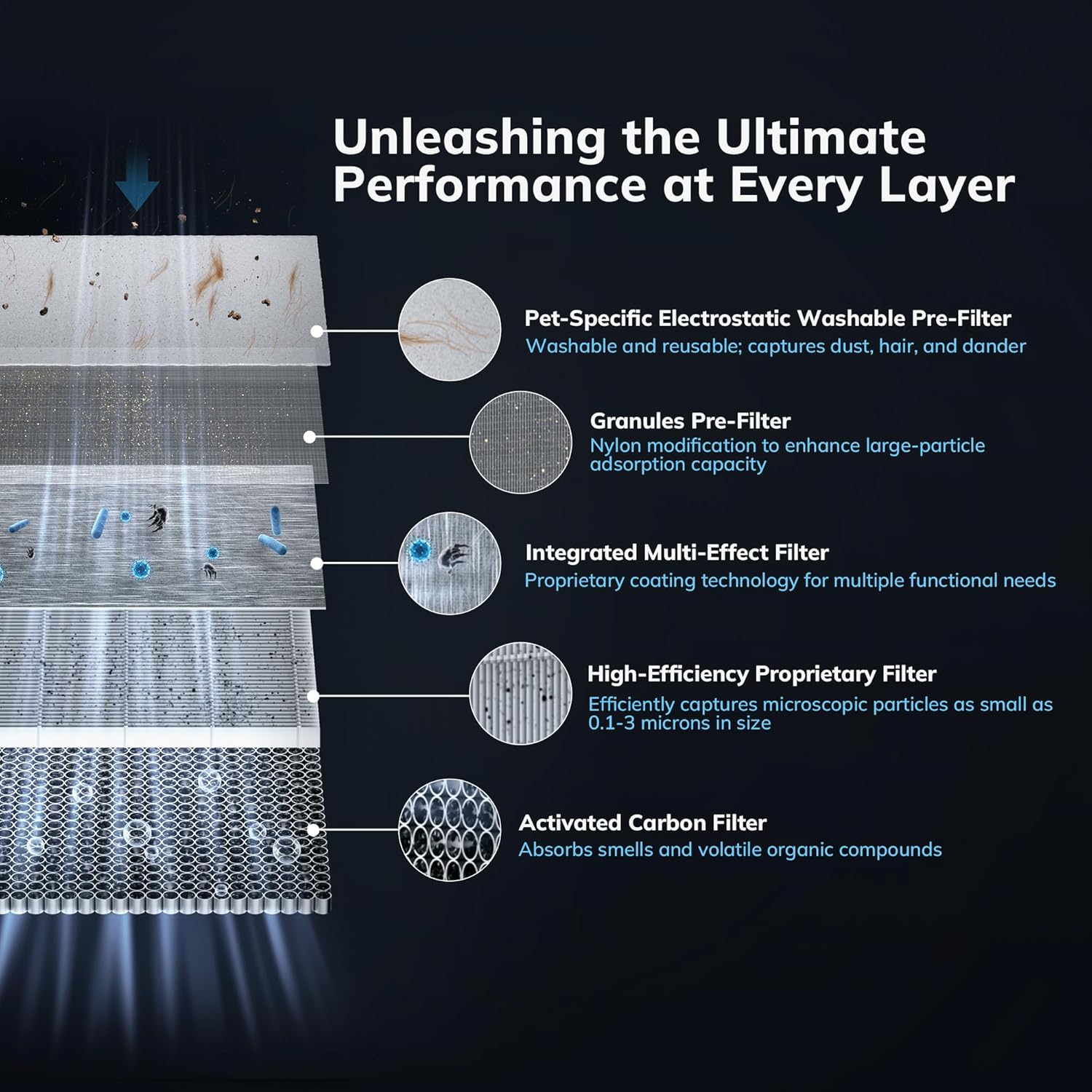
Image 1.2: Diagram illustrating the five distinct layers of the multi-effect filter system, including the Pet-Specific Electrostatic Washable Pre-Filter, Granules Pre-Filter, Integrated Multi-Effect Filter, High-Efficiency Proprietary Filter, and Activated Carbon Filter.
2. 安全に関する注意事項
Please read all safety instructions carefully before using the air purifier to prevent injury or damage.
- Always unplug the air purifier before cleaning, performing maintenance, or when not in use for extended periods.
- コードやプラグが損傷している状態で機器を操作しないでください。サポートが必要な場合は、カスタマーサポートにお問い合わせください。
- Keep the air purifier away from water or moist environments. Do not immerse the unit in water or other liquids.
- Ensure that air inlets and outlets are not blocked. Maintain adequate clearance around the unit for proper airflow.
- 開口部に指や異物を入れないでください。
- この機器は、安全に責任を負う人物による機器の使用に関する監督または指示がない限り、身体的、感覚的、または精神的能力が低下している人、あるいは経験と知識が不足している人(子供を含む)による使用を想定していません。
- Use only AEOCKY genuine replacement filters.
3. パッケージ内容
パッケージにすべてのアイテムが揃っていることを確認します。
- AEOCKY Air Purifier Unit
- One (1) Multi-Effect Filter (pre-installed)
- One (1) Extra Multi-Effect Filter
- ユーザーマニュアル(このドキュメント)
4. セットアップとインストール
4.1 開梱
- 空気清浄機をパッケージから慎重に取り出します。
- ビニール袋や保護材をすべて取り除きます。
4.2フィルターの取り付け
The air purifier comes with one filter pre-installed and one extra filter. Ensure the pre-installed filter is correctly seated before first use.
- 空気清浄機を逆さまにします。
- ベースカバーを反時計回りに回してロックを解除し、取り外します。
- Remove the pre-installed filter from its protective plastic bag.
- フィルターをユニットに挿入し、正しく装着されていることを確認します。
- ベースカバーを元に戻し、時計回りに回してしっかりとロックします。

Image 4.1: The AEOCKY YearChange Series Filter and its packaging, demonstrating the filter's design.
4.3 配置
- 空気清浄機をしっかりした平らな面に置きます。
- Ensure there is at least 6 inches (15 cm) of clearance on all sides for optimal airflow.
- Avoid placing the unit near heat sources, direct sunlight, or in areas with excessive moisture.
4.4電源接続
電源コードを標準のコンセントに差し込みます。これでユニットは使用可能になります。
5. 操作手順
5.1 電源オン/オフ
Press the power button on the control panel to turn the air purifier on or off.
5.2 ファン速度制御
Cycle through available fan speeds (e.g., Low, Medium, High, Turbo) by pressing the fan speed button. Select the desired speed based on your air purification needs.
5.3 モード選択
If available, press the mode button to switch between different operating modes such as Sleep Mode (for quiet operation) or Auto Mode (adjusts fan speed based on air quality).
5.4 Filter Reset Indicator
The air purifier is equipped with a filter life indicator. When the indicator light illuminates, it signifies that the filter needs to be checked or replaced. After replacing the filter, press and hold the filter reset button (if available) for 3-5 seconds to reset the filter life counter.
6. メンテナンス
Regular maintenance ensures optimal performance and extends the lifespan of your AEOCKY Air Purifier.
6.1フィルターの交換
The AEOCKY YearChange filter technology is designed for extended use, lasting significantly longer than conventional filters. Replace the filter when the filter indicator light illuminates or when you notice a decrease in performance or an increase in odors.
- 空気清浄機のプラグをコンセントから抜きます。
- ユニットを裏返し、ベースカバーを反時計回りに回してロックを解除します。
- 古いフィルターを取り外して適切に廃棄してください。
- Unpack a new AEOCKY genuine replacement filter.
- Insert the new filter into the unit, ensuring it is seated correctly.
- ベースカバーを元に戻し、時計回りに回してしっかりとロックします。
- Plug in the air purifier and reset the filter life indicator as described in Section 5.4.
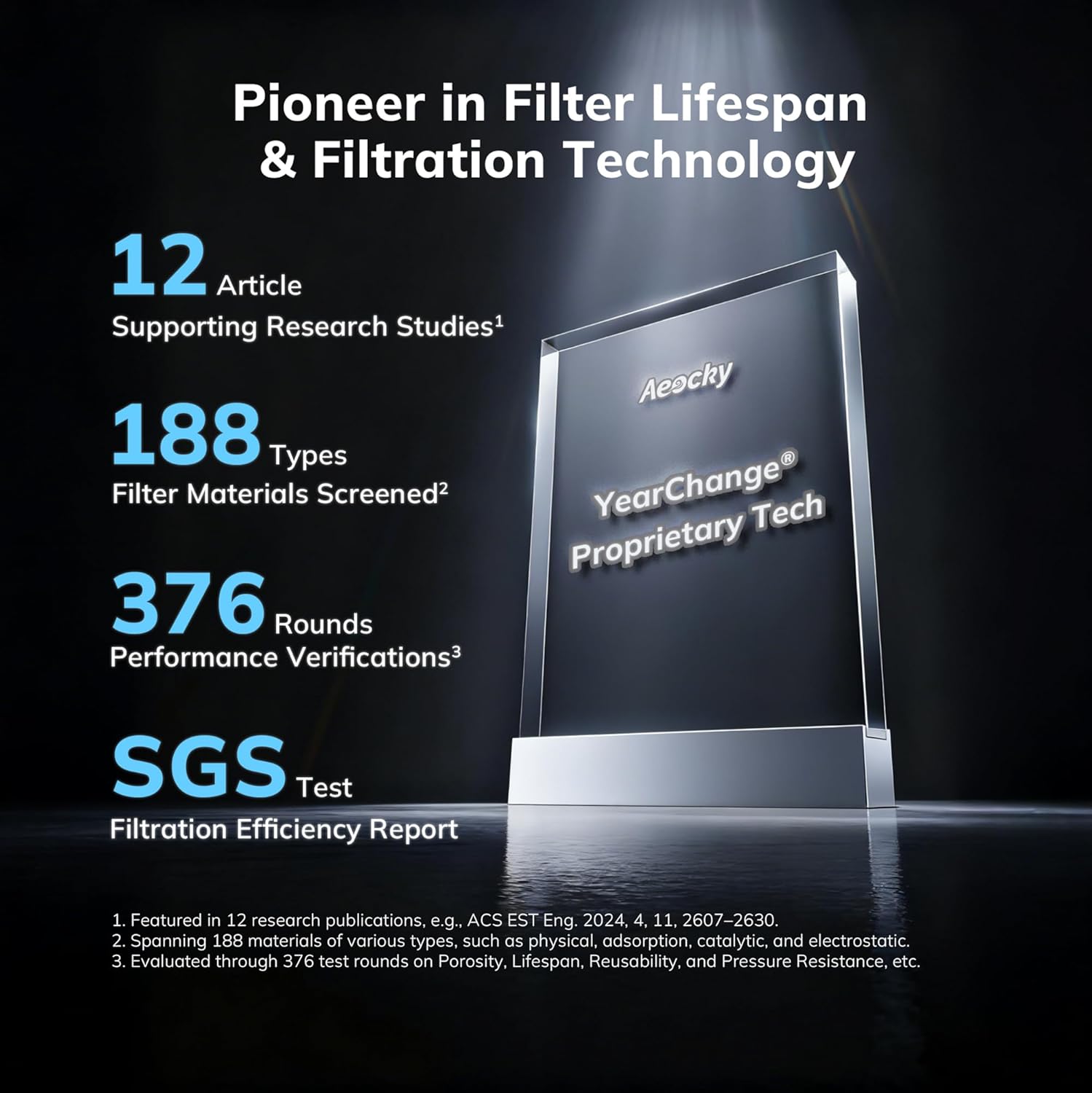
Image 6.1: An illustration highlighting AEOCKY's commitment to filter lifespan and filtration technology, showing research studies, material screening, performance verifications, and SGS test results.
6.2 洗えるプレフィルターのクリーニング
The air purifier includes pet-specific washable pre-filters designed to capture large particles like hair and dander. Regular cleaning of these pre-filters helps prolong the life of the main filter.
- 空気清浄機のプラグを抜いてください。
- Remove the pre-filter layer (refer to filter replacement steps for access).
- Gently rinse the pre-filter under running water.
- Allow the pre-filter to air dry completely before re-installing it. Do not use heat to dry.
6.3 外装清掃
Wipe the exterior surface of the air purifier with a soft, dry cloth. Do not use abrasive cleaners or solvents.
7。 トラブルシューティング
一般的な問題とその解決策については、このセクションを参照してください。
| 問題 | 考えられる原因 | 解決 |
|---|---|---|
| ユニットがオンにならない | 電源が供給されていない、電源コードがしっかりと差し込まれていない | Check power outlet; Ensure power cord is firmly connected. |
| 空気の流れが減少 | フィルターが汚れているか詰まっている、空気の入口/出口が塞がれている | Clean or replace filter; Ensure no obstructions around the unit. |
| 異常なノイズ | Filter not installed correctly; Foreign object inside unit | Reinstall filter; Unplug and check for foreign objects (if safe to do so). |
| フィルターインジケーターライトは交換後も点灯したままです | Filter life counter not reset | Press and hold the filter reset button for 3-5 seconds. |
これらの解決策を試しても問題が解決しない場合は、カスタマー サポートにお問い合わせください。
8. 仕様
- モデル: B0G2SS3VLJ
- ブランド: AEOCKY
- フィルタータイプ: 5-layer Multi-Effect Filter with YearChange Technology and Washable Pre-Filter
- エネルギー消費量: Approximately 0.15 kWh per day (at highest setting)
- Ozone Emission: ゼロ
- 認定: SGS, CARB, ETL, DOE, FCC
- 初回利用可能日: 21年2025月XNUMX日

Image 8.1: Display of various authoritative certifications including California Air Resources Board Certificate, Electrical Testing Laboratories Certificate, Federal Communications Commission Certificate, and SGS verification, confirming the product's adherence to international standards.
9. 保証とサポート
9.1 保証情報
Specific warranty details for your AEOCKY Air Purifier are typically provided with the product packaging or available on the official AEOCKY webサイトでご確認ください。保証請求のために購入証明書を保管してください。
9.2 カスタマーサポート
For technical assistance, troubleshooting beyond this manual, or warranty inquiries, please contact AEOCKY customer support through their official web製品を購入したサイトまたは小売店。