
1. はじめに
ご購入ありがとうございますasing the Gueray Portable Bluetooth CD Player. This device combines classic CD playback with modern connectivity options, including Bluetooth, FM radio, USB, and AUX input. This manual provides detailed instructions for setup, operation, maintenance, and troubleshooting to ensure optimal performance and longevity of your player.
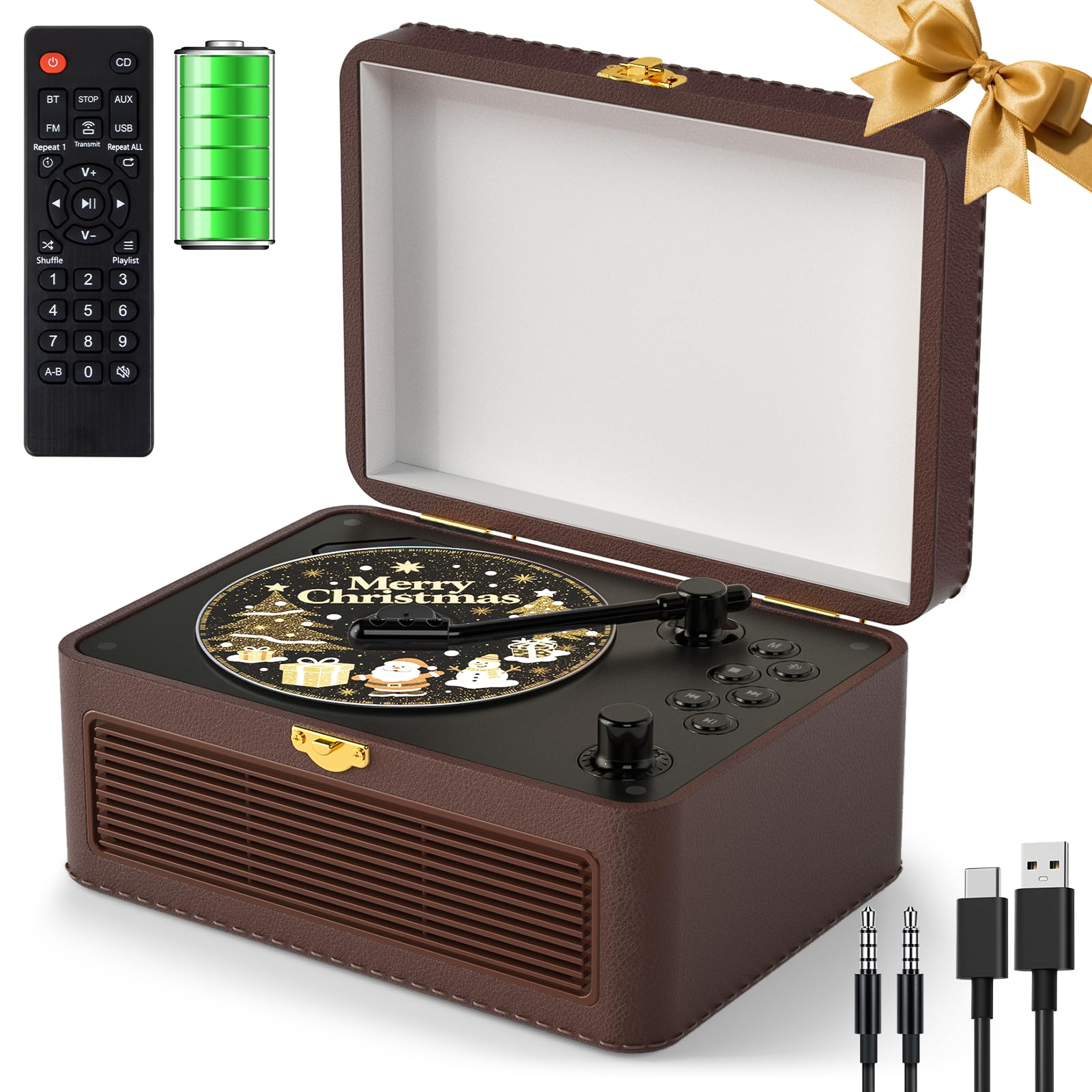
Image 1: The Gueray Portable Bluetooth CD Player, showcasing its retro design and compact form factor.
2.製品オーバーview
2.1 パッケージ内容
- 1 x Gueray Portable Bluetooth CD Player
- リモコン x 1
- ユーザーマニュアル x 1
- タイプC電源ケーブル x 1
- 1 x 3.5mm AUXケーブル

Image 2: The CD player shown with its remote control, user manual, charging cable, and AUX cable, along with its dimensions (21cm/8.3inch width, 14.5cm/5.7inch depth, 10cm/3.9inch height when closed).
2.2 コントロールとポート
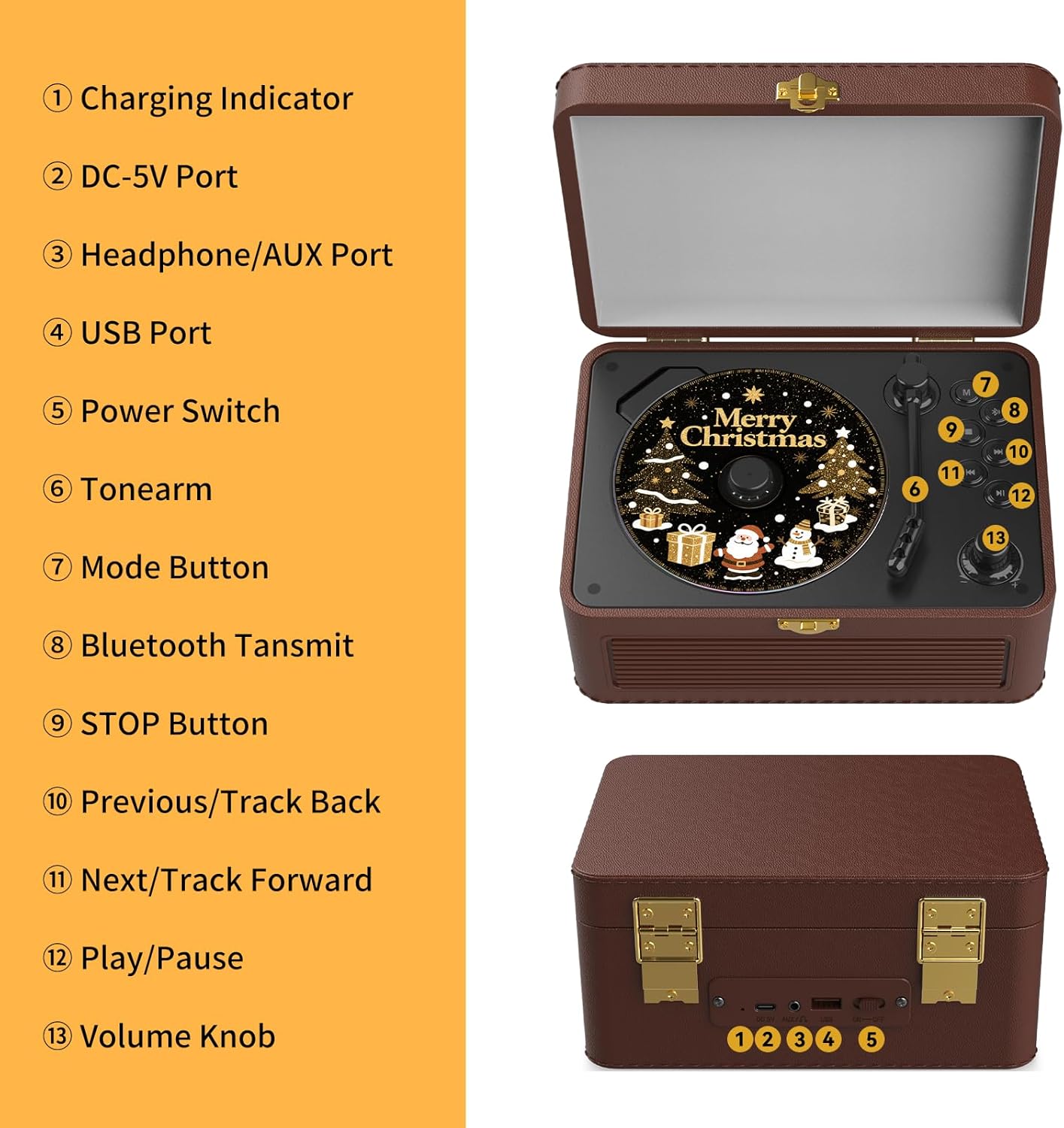
Image 3: Detailed diagram illustrating the controls and ports on the Gueray CD Player.
- 充電インジケーター: 充電中に点灯します。
- DC-5Vポート: デバイスを充電するための電源入力。
- Headphone/AUX Port: 3.5mm jack for headphones or AUX input.
- USBポート: USBドライブの再生用。
- 電源スイッチ: デバイスのオン/オフを切り替えます。
- トーンアーム: Used to access the CD compartment.
- モードボタン: CD、Bluetooth、FM、USB、AUX モードを切り替えます。
- Bluetooth Transmit Button: Initiates Bluetooth transmission pairing.
- 停止ボタン: 再生を停止します。
- Previous/Track Back Button: 前のトラックにスキップするか、FM 周波数を下げます。
- Next/Track Forward Button: 次のトラックにスキップするか、FM 周波数を調整します。
- 再生/一時停止ボタン: 再生を開始または一時停止します。
- ボリュームノブ: オーディオの音量を調整します。
2.3リモコン

Image 4: The remote control for the Gueray CD Player, showing various function buttons for convenient operation. Note: Batteries are not included.
The included remote control allows for convenient operation of the CD player from a distance of up to 5 meters. It provides access to functions such as power, mode selection, volume control, track navigation, play/pause, stop, and A-B repeat. Insert 2 AAA batteries (not included) into the remote control before use.
3. セットアップ
3.1 電源のオンと充電
The Gueray CD Player features a built-in 3600mAh rechargeable battery, providing up to 6 hours of playtime at medium volume. To charge the device:
- Connect the provided Type-C power cable to the DC-5V port on the player.
- ケーブルのもう一方の端を 5V/2A USB 電源アダプター (別売) に接続します。
- The charging indicator will illuminate during charging. A full charge takes approximately 5-6 hours.
To power on the device, slide the Power Switch to the ON position. To power off, slide it to the OFF position.

Image 5: The Gueray CD Player highlighting its 3600mAh rechargeable battery, enabling portable use.
3.2 CDの挿入
- Gently lift the tonearm to open the CD compartment cover.
- Place a CD (CD, CD-R, CD-RW, MP3, WMA formats supported) onto the spindle with the label side facing up.
- CDコンパートメントカバーを閉じます。

図6: 内部 view of the CD player, showing the high-precision reading laser head and various interface options (DC-5V, AUX, USB, Power Switch).
4. 操作手順
4.1 CD再生
- セクション 3.2 の説明に従って CD を挿入します。
- プレーヤーの電源がオンになっていることを確認します。
- を押す モード 「CD」モードが選択されるまでボタンを押します。
- CDは自動的に再生を開始します。再生されない場合は、 再生/一時停止 ボタン。
- 使用 Previous/Track Back そして Next/Track Forward トラックをナビゲートするためのボタン。
- を使用して音量を調整します ボリュームノブ またはリモコン。
- を押す 停止 再生を停止するボタン。
4.2 Bluetooth Mode (Receiver & Transmitter)
プレーヤーは、オーディオの受信と送信の両方で Bluetooth 5.2 をサポートしています。
4.2.1 Bluetooth レシーバーモード
Use this mode to stream music wirelessly from your smartphone, tablet, or laptop to the CD player's speakers.
- を押す モード button until "Bluetooth" mode is selected. The player will enter pairing mode, indicated by a flashing Bluetooth icon or light.
- 外部デバイス(スマートフォン、タブレット)で Bluetooth を有効にし、利用可能なデバイスを検索します。
- Select "Gueray CD Player" (or similar name) from the list to pair.
- Once paired, you can play audio from your device, and it will output through the CD player's speakers.

Image 7: The CD player functioning as a Bluetooth receiver, wirelessly playing audio from a smartphone or tablet.
4.2.2 Bluetooth 送信機モード
Use this mode to transmit audio from the CD player (e.g., CD playback, FM radio) to external Bluetooth speakers or headphones.
- 外部 Bluetooth スピーカーまたはヘッドフォンがペアリング モードになっていることを確認します。
- CDプレーヤーで、 Bluetooth送信 button. The player will search for nearby Bluetooth receiving devices.
- Once connected, the audio from the CD player will be transmitted to your external Bluetooth device.

Image 8: The CD player transmitting audio via Bluetooth to wireless headphones and a Bluetooth speaker.
4.3FMラジオ
The player includes an FM radio tuner with a frequency range of 76MHz to 108MHz.
- を押す モード 「FM」モードが選択されるまでボタンを押します。
- 使用 Previous/Track Back そして Next/Track Forward 希望する周波数に手動でチューニングするためのボタン。
- 自動スキャンの場合は、 再生/一時停止 button. The player will scan and save available stations.
- 使用 Previous/Track Back そして Next/Track Forward 保存したステーション間を循環するボタン。

Image 9: The CD player operating in FM Radio mode, tuning into stations across the 76MHz to 108MHz frequency range.
4.4 USB再生
The player supports USB drives formatted in FAT16/FAT32 (NTFS not compatible) for audio playback.
- Insert a USB drive into the USB Port.
- を押す モード 「USB」モードが選択されるまでボタンを押します。
- プレーヤーは自動的にオーディオを検出し、再生を開始します。 fileUSB ドライブから s を取得します。
- 使用 Previous/Track Back そして Next/Track Forward トラックをナビゲートするためのボタン。
4.5 AUX入力
Connect external audio devices (e.g., MP3 players, smartphones) via the 3.5mm AUX jack for wired music playback.
- Connect one end of the 3.5mm AUX cable to the Headphone/AUX Port on the CD player.
- もう一方の端を外部デバイスのオーディオ出力に接続します。
- を押す モード 「AUX」モードが選択されるまでボタンを押します。
- 外部デバイスからオーディオを再生します。音はCDプレーヤーのスピーカーから出力されます。
5. メンテナンス
To ensure the longevity and optimal performance of your Gueray CD Player, follow these maintenance guidelines:
- クリーニング: Use a soft, dry cloth to clean the exterior of the player. Do not use liquid cleaners or abrasive materials. For the CD lens, use a specialized CD lens cleaning kit.
- ストレージ: プレーヤーは、直射日光、極端な温度、高湿度を避け、涼しく乾燥した場所に保管してください。
- CDの取り扱い: Always handle CDs by their edges. Avoid touching the playing surface. Store CDs in their cases to prevent scratches and dust accumulation.
- バッテリーのケア: If the player will not be used for an extended period, charge it periodically to maintain battery health.
6。 トラブルシューティング
CD プレーヤーで問題が発生した場合は、次の一般的な問題と解決策を参照してください。
| 問題 | 考えられる原因 | 解決 |
|---|---|---|
| プレーヤーの電源が入りません。 | バッテリーが消耗しています。電源スイッチがオフになっています。 | Charge the player using the provided cable and a 5V/2A adapter. Ensure the power switch is in the ON position. |
| CD が再生されない、またはスキップします。 | CD が汚れているか、傷が付いているか、または正しく挿入されていない、または間違ったモードが選択されています。 | Clean the CD with a soft cloth. Ensure the CD is inserted correctly. Select CD mode using the Mode button. |
| スピーカーから音が出ない。 | Volume is too low; Player is in Bluetooth Transmitter mode; Headphones are connected. | Increase the volume. Ensure the player is not transmitting to external Bluetooth devices if you want sound from its internal speakers. Disconnect headphones. |
| Bluetoothデバイスをペアリングできません。 | Player not in pairing mode; Device too far; Interference. | Ensure the player is in Bluetooth Receiver pairing mode. Keep devices within 10 meters. Reduce interference from other electronic devices. |
| リモコンが機能しない。 | 電池が切れているか、正しく挿入されていない。リモコンとプレーヤーの間に障害物がある。 | Replace batteries (2x AAA). Ensure correct polarity. Remove any obstructions. |
7. 仕様
| 特徴 | 詳細 |
|---|---|
| ブランド | ゲレイ |
| モデル | B0FXF4TY3K |
| 接続技術 | ブルートゥース |
| 色 | 茶色 |
| 対応デバイス | Speaker, Headphones, Smartphones, Tablets, USB Drives |
| サポートされているオーディオ形式 | CD, CD-R, CD-RW, MP3, WMA, WAV (via USB) |
| バッテリー容量 | 3600mAh充電式 |
| 遊びの時間 | 最大6時間(中容量で) |
| FMラジオ周波数 | 76MHz~108MHz |
| USB Format Support | FAT16/FAT32 (NTFS not compatible) |
| 内蔵メディア | CDプレーヤー |
| スタイル | レトロ |
8. 保証情報
This Gueray CD Player comes with a 6ヶ月保証 ご購入日から1年間有効です。本保証は、通常の使用における製造上の欠陥および故障を対象としています。誤用、事故、不正改造、または通常の摩耗や損耗による損傷は保証の対象外となります。保証請求の際は、購入証明書を保管してください。
9. カスタマーサポート
For any questions, technical assistance, or warranty claims, please contact Gueray customer support. Refer to the contact information provided with your product packaging or visit the official Gueray webサポート オプションのサイト。