
導入
This manual provides essential information for setting up, operating, maintaining, and troubleshooting your HP 15.6-inch FHD IPS Touchscreen Laptop. Please read this guide thoroughly to ensure optimal performance and longevity of your device. This laptop features an AMD Ryzen 7 7730U processor, 64GB DDR4 RAM, 2.28TB storage (2TB SSD + 288GB Docking Station Set), AMD Radeon Graphics, and runs on Windows 11 Pro.
設定
Unpacking and Initial Power-On
Carefully remove all components from the packaging. Connect the power adapter to the laptop and a power outlet. Press the power button to turn on the laptop. Follow the on-screen instructions to complete the initial Windows 11 Pro setup.
付属アクセサリ
Your laptop package includes the following accessories:
- 1x 7-in-1 Docking Station with 256GB Storage
- アダプタ付き 32GB MicroSD カード x 1
- タイプCデータケーブル1本
- 3-in-1充電ケーブル×1
- スエードクリーニングクロス1枚
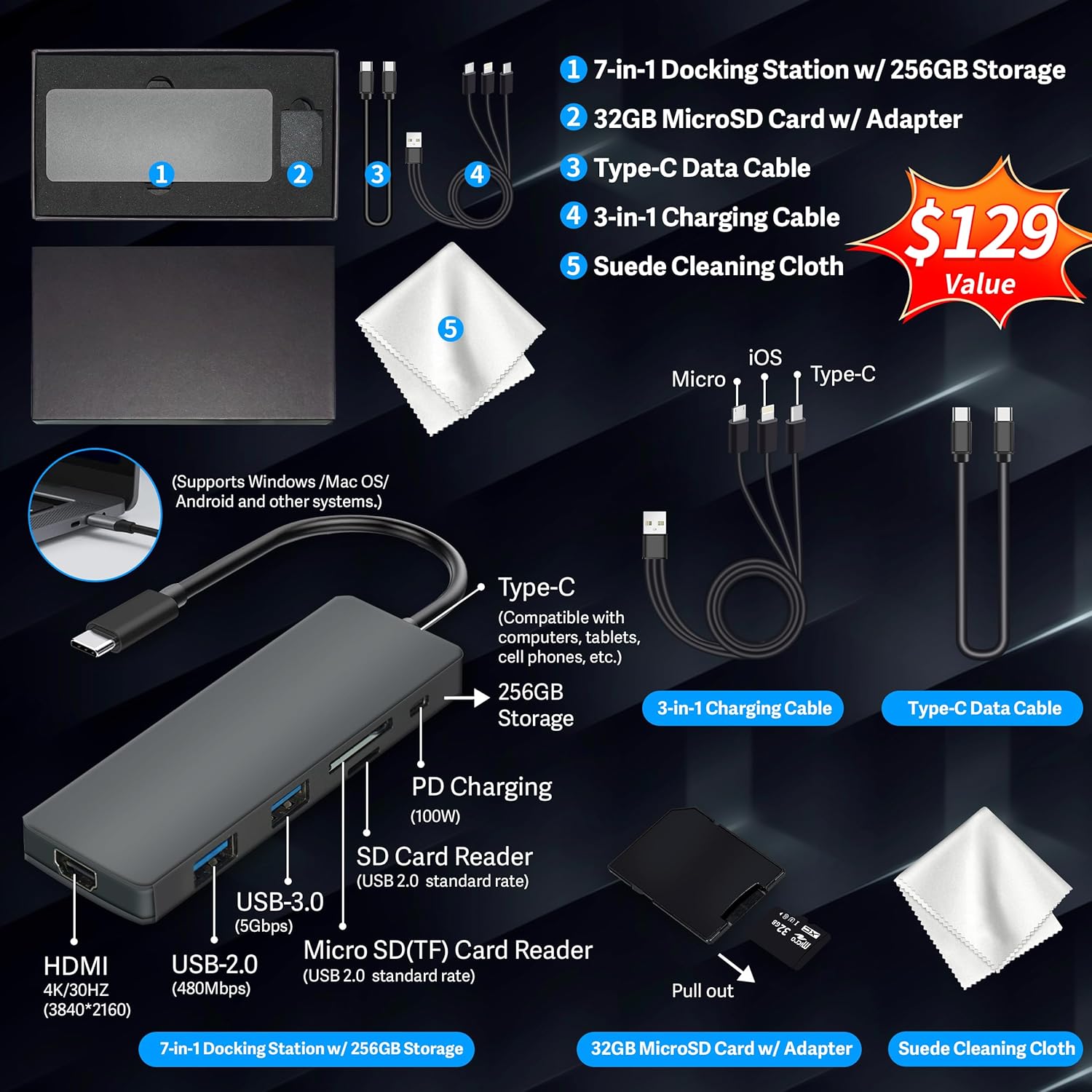
Figure 1: Included accessories, including the 7-in-1 docking station, various cables, and a cleaning cloth.
ノートパソコンの操作
表示機能
The HP 15.6-inch laptop features an FHD IPS touchscreen display with a resolution of 1920 x 1080 pixels and an anti-glare coating. This display provides clear and vibrant visuals from various view角度を変える。

Figure 2: The 15.6-inch FHD IPS display offers crisp and vivid details.
接続性と周辺機器
Your laptop is equipped with various connectivity options and integrated features to enhance your user experience.
- 720p HDカメラ: ビデオ通話やオンライン会議に。
- Wi-Fi 6: 高速ワイヤレスインターネット接続用。
- ブルートゥース: マウス、キーボード、ヘッドフォンなどのワイヤレス周辺機器を接続します。
- テンキー: A full numeric keypad is integrated for efficient data entry and calculations.

Figure 3: Key features for staying connected and productive, including the numeric keypad.
The laptop includes multiple ports for connecting external devices:
- USBタイプAポート×2
- USBタイプCポート×1
- HDMIポート x 1
- 1x Headphone/Microphone Combo jack

Figure 4: Multi-port configuration on the laptop for various connections.
パフォーマンスとマルチタスク
Equipped with an AMD Ryzen 7 7730U processor, 64GB DDR4 RAM, and AMD Radeon Graphics, this laptop is designed for efficient multitasking and demanding applications. The 2.28TB storage (2TB SSD + 288GB Docking Station Set) provides ample space and fast access to your files.

Figure 5: Core specifications for performance and storage.

Figure 6: Laptop demonstrating effortless multitasking with several applications running simultaneously.
The laptop is designed for extended use, offering reliable battery life to support your daily tasks.

Figure 7: The laptop supports continuous work throughout the day with its battery performance.
メンテナンス
To ensure the longevity and optimal performance of your HP laptop, follow these maintenance guidelines:
- クリーニング: Use the provided suede cleaning cloth or a soft, lint-free cloth to clean the screen and exterior. Avoid harsh chemicals.
- ソフトウェアアップデート: Regularly update your Windows 11 Pro operating system and drivers to ensure security and performance.
- バッテリーのケア: バッテリーを頻繁に完全に放電することは避けてください。長期保管する場合は、バッテリーを50~70%程度まで充電してください。
- 換気: 過熱を防ぐため、ノートパソコンの通気口が塞がれていないことを確認してください。ノートパソコンは硬くて平らな面に置いて使用してください。
- ストレージ: ノートパソコンは、直射日光や極端な温度を避け、涼しく乾燥した場所に保管してください。
トラブルシューティング
このセクションでは、ラップトップで発生する可能性のある一般的な問題について説明します。
ノートパソコンの電源が入らない
- 電源アダプターがノートパソコンと正常に機能している電源コンセントの両方にしっかりと接続されていることを確認します。
- 別のデバイスを接続して、電源コンセントが機能していることを確認します。
- バッテリーが完全に消耗している場合は、電源を入れる前に少なくとも 15 ~ 30 分間充電してください。
Screen Remains Blank
- ノートパソコンの電源がオンになっているかどうかを確認します(電源インジケータライト)。
- Try connecting an external monitor to see if display output is available.
- ファンクションキーを使用して画面の明るさを調整します。
Wi-Fi接続の問題
- Windows 設定で Wi-Fi が有効になっていることを確認します。
- ルーターとモデムを再起動します。
- デバイス マネージャーから Wi-Fi ドライバーを更新します。
- 物理的な障害や干渉がないか確認してください。
パフォーマンスが遅い
- バックグラウンドで実行されている不要なアプリケーションを閉じます。
- タスク マネージャーで、CPU または RAM を大量に消費しているプロセスを確認します。
- オペレーティング システムとドライバーが最新であることを確認してください。
- ディスク クリーンアップとデフラグを実行します (HDD の場合、SSD の場合は必要ありません)。
- マルウェアやウイルスをスキャンします。
仕様
Below are the detailed technical specifications for your HP 15.6-inch FHD IPS Touchscreen Laptop.

Figure 8: Laptop dimensions and weight for portability.
| 特徴 | 詳細 |
|---|---|
| ブランド | HP |
| モデル名 | HP 15.6" FHD IPS Touchscreen Laptop |
| 画面サイズ | 15.6インチ |
| ディスプレイ解像度 | 1920 x 1080ピクセル(FHD) |
| 表示タイプ | LED IPS Touchscreen |
| プロセッサ | AMD Ryzen 7 7730U (8 Cores, 2 GHz base) |
| グラフィックスコプロセッサ | AMD Radeon グラフィックス(統合) |
| RAMメモリ | 64 GB DDR4 (3200 MHz) |
| ストレージ | 2 TB SSD + 288 GB Docking Station Set (Total 2.28 TB) |
| オペレーティング·システム | ウィンドウズ11プロ |
| 接続性 | Wi-Fi 6 (802.11ax), Bluetooth, HDMI, USB |
| ポート | 2x USB Type-A, 1x USB Type-C, 1x HDMI, 1x Headphone/Microphone Combo |
| Webカム | 720p HDカメラ |
| キーボード | フルサイズ、テンキー付き |
| 寸法(長さ x 幅 x 厚さ) | 14.17インチ x 9.29インチ x 0.73インチ |
| アイテム重量 | 3.52ポンド(約1.6kg) |
| 色 | 銀 |
| 欧州連合 | 196188514924 |
| ASIN | B0FX2NR2WN |
保証情報
Your HP laptop comes with a manufacturer's warranty. For upgraded components (RAM/SSD), a 1-year warranty is provided by SnowBell. The original 1-year manufacturer warranty applies to all other components of the laptop. Please retain your proof of purchase for warranty claims. For detailed terms and conditions, refer to the warranty documentation included with your product or visit the official HP support webサイト。
サポート
さらに詳しいサポート、テクニカル サポート、またはサービスに関するお問い合わせについては、次のリソースを参照してください。
- HP公式サポート Webサイト: 訪問 サポート ドライバー、マニュアル、トラブルシューティング ガイド。
- オンラインヘルプ: Utilize the built-in Windows 11 Pro help features for software-related questions.
- Contact Retailer: For issues related to upgraded components or purchase, contact SnowBell or your point of purchase.


