
1. はじめに
The YUNZII X98 is a 98% layout QMK/VIA compatible wireless mechanical keyboard designed for versatility and performance. It features tri-mode connectivity (wired, 2.4GHz wireless, and Bluetooth 5.0), hot-swappable switches, a gasket-mounted structure for enhanced typing feel, and vibrant RGB backlighting. This manual provides detailed instructions for setting up, operating, and maintaining your YUNZII X98 keyboard.
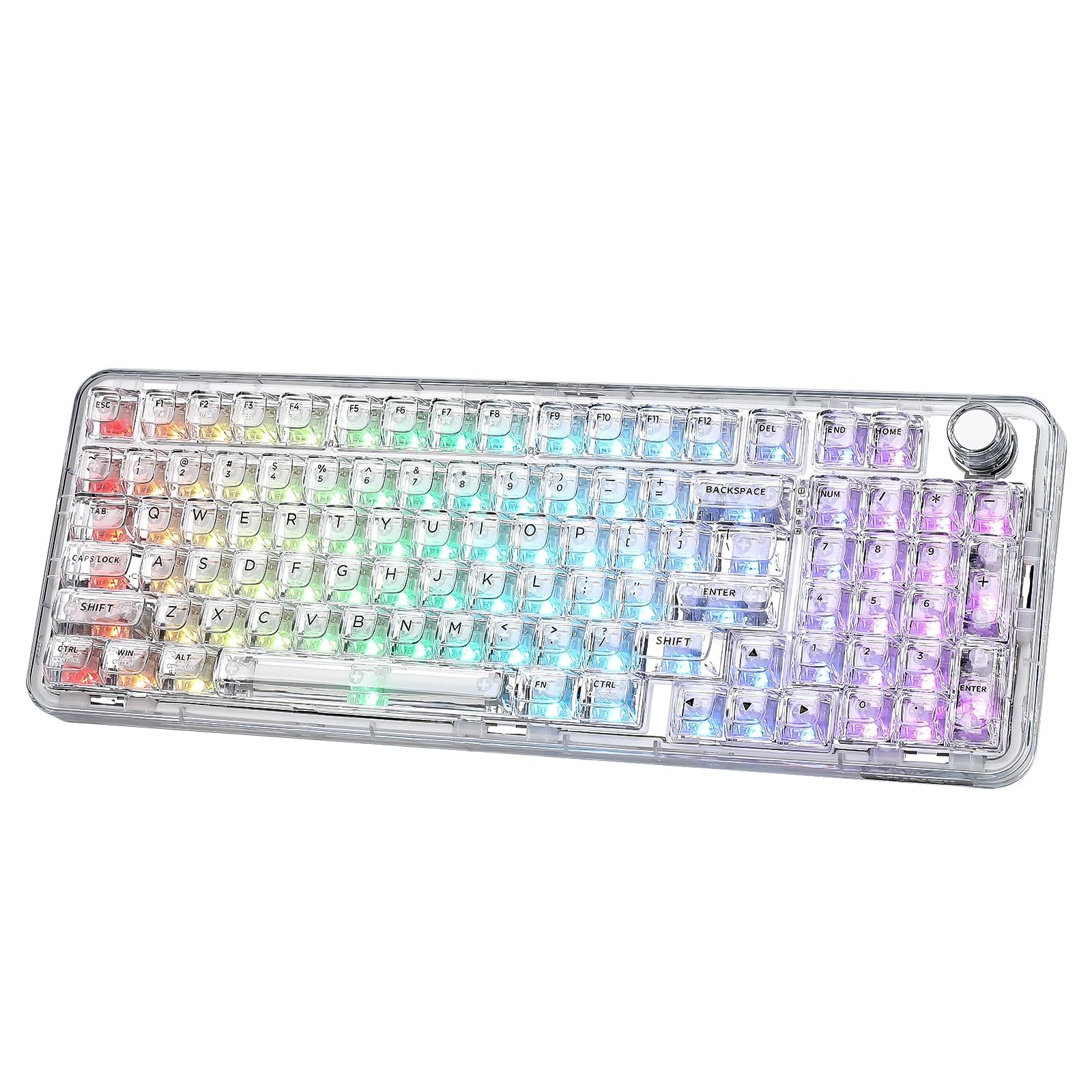
Figure 1: YUNZII X98 QMK/VIA Wireless Mechanical Gaming Keyboard.

図2:以上view of YUNZII X98 key features including 96% layout, tri-mode connectivity, 8000mAh battery, hot-swappable switches, QMK/VIA programmability, multi-function knob, full RGB, and gasket structure.
2. パッケージ内容
以下の項目のボックスにチェックを入れてください。
- YUNZII X98 Mechanical Keyboard
- USB Type-Cケーブル
- 2.4G Wireless Dongle (often stored in the keyboard's back compartment)
- スイッチとキーキャッププーラー
- 追加のキーキャップとスイッチ
- 機能カードとマニュアル
- ダストカバー
3. セットアップ
3.1 初期充電
Before first use, it is recommended to fully charge the keyboard. Connect the provided USB Type-C cable to the keyboard's Type-C port and the other end to a USB power source (e.g., computer USB port, wall adapter). The keyboard features an 8000mAh battery.

Figure 3: The YUNZII X98 features an 8000mAh battery, offering up to 45 hours with RGB on and 320 hours with RGB off. Charging takes approximately 13 hours.
3.2 接続モード
The YUNZII X98 supports three connection modes: Wired, 2.4GHz Wireless, and Bluetooth 5.0. Use the mode switch located on the side of the keyboard to select your desired connection type.
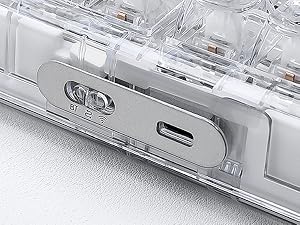
Figure 4: Close-up of the mode switch for Bluetooth (BT), 2.4G Wireless, and Wired connections.
3.2.1 有線接続
- Set the mode switch to the 'Wired' position.
- キーボードのUSB Type-Cケーブルをコンピューターに接続します。
- キーボードはオペレーティング システムによって自動的に認識されます。
3.2.2 2.4GHzワイヤレス接続
- モードスイッチを「2.4G」の位置に設定します。
- Retrieve the 2.4G USB dongle from its storage slot on the back of the keyboard.
- 2.4G ドングルをコンピューターの使用可能な USB ポートに差し込みます。
- 押し続ける FN+4 to enter pairing mode. The indicator light will flash.
- 接続されると、インジケーター ライトが点灯します。

Figure 5: Steps for connecting the YUNZII X98 via 2.4GHz wireless mode, including locating the dongle and pairing.
3.2.3 Bluetooth接続
キーボードは最大 3 台の Bluetooth デバイスをサポートします。
- Set the mode switch to the 'BT' position.
- ショートプレス FN+1, FN+2、 または FN+3 Bluetooth チャネルを選択します。
- 選択したものを長押し FN + (1/2/3) key combination for 3-5 seconds to enter Bluetooth pairing mode. The corresponding key's backlight will flash rapidly.
- On your device (PC, laptop, smartphone, tablet), search for Bluetooth devices and select 'YUNZII X98 BT1/BT2/BT3'.
- Once paired, the key's backlight will stop flashing and remain solid for a few seconds before returning to the normal lighting effect.

Figure 6: Instructions for connecting the YUNZII X98 via Bluetooth, including channel selection and pairing process.
3.3 調節可能な足
キーボードの底面には調節可能な脚が付いており、人間工学に基づいた快適さに合わせてタイピング角度をカスタマイズできます。
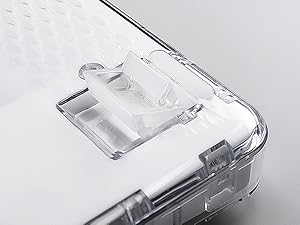
Figure 7: Close-up of the adjustable feet on the YUNZII X98 keyboard, allowing users to modify the typing angle.
4. 操作手順
4.1 QMK/VIA のカスタマイズ
The YUNZII X98 supports QMK/VIA open-source firmware, allowing for extensive customization of key mappings, macros, and RGB lighting effects. To use VIA, download the appropriate JSON file for your X98 model from the YUNZII official website and load it into the VIA software.
- キーの再マッピング: ワークフローやゲーム スタイルに合わせて、任意のキーの機能を変更します。
- マクロ: 複雑なキー押下のシーケンスを作成し、それを 1 つのキーに割り当てます。
- 複数のレイヤー: Configure different key layouts for various applications or operating systems.

Figure 8: The QMK/VIA interface allows for comprehensive customization of key settings, RGB lighting, and macros.
4.2 RGB照明制御
The YUNZII X98 features 16.8 million colors RGB backlighting with south-facing LEDs. You can control the lighting effects directly from the keyboard using FN key combinations or through the VIA software for advanced customization.
4.2.1 Onboard RGB Control
- FN + バックスペース: バックライト効果のオン/オフを切り替える
- FN + Tab: Toggle White Light ON/OFF
- FN + \|: バックライト効果の変更
- FN + Enter: バックライトの色を変更する
- FN + ↑: 明るさを上げる
- FN + ↓: 明るさを下げる
- FN + ←: 点滅速度を上げる
- FN + →: 点滅速度を遅くする

Figure 9: Visual guide to FN key shortcuts for controlling RGB lighting effects on the YUNZII X98.
4.3 多機能ノブ
The rotary knob on the YUNZII X98 provides convenient control over various functions. By default, it controls volume.
- 回転: Adjust volume (default).
- ショートプレス: Mute/Unmute (default).
- FN + Short Press: Change the RGB effect of the knob.
- VIAカスタマイズ: The knob's function can be customized using VIA software to control other parameters like brightness, scroll, etc.

Figure 10: The multi-function knob allows for volume control, muting, and changing its RGB effect with FN key combinations.
4.4 ホットスワップスイッチ
The YUNZII X98 is hot-swappable, allowing you to change mechanical switches without soldering. It is compatible with both 3-pin and 5-pin switches.
- スイッチの取り外し: 付属のスイッチプーラーを使用してスイッチを慎重につかみ、まっすぐ上に引きます。
- スイッチのインストール: 新しいスイッチのピンをPCBの穴に合わせます。カチッと音がするまでスイッチを軽く押し下げます。ピンが曲がっていないことを確認してください。

Figure 11: The YUNZII X98 supports full key hot-swapping, compatible with 3-pin and 5-pin mechanical switches.
4.5 FN Shortcuts
The keyboard includes various FN key shortcuts for quick access to system functions, compatible with both Windows and macOS.

Figure 12: A detailed chart of FN key shortcuts for both Windows (FN+A) and macOS (FN+S) users, covering screen brightness, media control, and volume.
5. メンテナンス
5.1 クリーニング
- キーボードを使用していないときは、ほこりがたまらないように付属のダストカバーを使用してください。
- 通常の清掃には、柔らかく糸くずの出ない布を使用してください。
- キーキャップの間を掃除するには、圧縮空気または小さなブラシを使用します。
- For stubborn dirt, remove keycaps using the keycap puller and clean them with mild soap and water. Ensure they are completely dry before reattaching.
5.2 スイッチとキーキャップの交換
Refer to section 4.4 for detailed instructions on hot-swapping switches. Use the provided keycap puller to carefully remove keycaps without damaging the switches.
6。 トラブルシューティング
- キーボードが反応しない: Ensure the keyboard is charged. Check the mode switch position (Wired, 2.4G, BT) and verify the connection. For wired mode, try a different USB port or cable. For wireless modes, re-pair the device.
- Bluetooth接続の問題: Ensure the keyboard is in Bluetooth pairing mode (FN + 1/2/3 long press). Remove previous pairings from your device and try connecting again. Ensure your device's Bluetooth is enabled.
- 2.4GHzワイヤレスの問題: Ensure the dongle is securely plugged in. Try a different USB port. Re-pair the keyboard by holding FN + 4.
- RGB照明が機能しない: Check if RGB is toggled off (FN + Backspace). Adjust brightness (FN + ↑/↓). If using VIA, ensure the lighting settings are correctly configured.
- キーが登録されない: If only specific keys are affected, the switch might be faulty. Try hot-swapping the switch with one of the extra switches provided. Ensure the switch is fully seated.
- VIA ソフトウェアがキーボードを検出しない: Ensure the keyboard is connected via USB-C. Download the correct JSON file for the X98 model from the YUNZII webサイトを作成して VIA にロードします。
7. 仕様
| 特徴 | 説明 |
|---|---|
| ブランド | ユンジ |
| モデル | X98 |
| レイアウト | 98%レイアウト(96キー) |
| 接続性 | Tri-Mode: USB-C Wired, 2.4GHz Wireless, Bluetooth 5.0 |
| スイッチ | Pre-lubed Crystal Switches (Linear) |
| ホットスワップ可能 | Yes, compatible with 3-pin and 5-pin mechanical switches |
| 取り付けスタイル | Gasket Mount (5 layers of damp(材料を磨く) |
| キーキャップ | Transparent PC material, shine-through |
| バックライト | RGB, 16.8 million colors, South-facing LEDs |
| プログラミング可能性 | QMK/VIA互換 |
| バッテリー容量 | 8000mAh |
| 対応OS | Windows、macOS |
| 材料 | Plastic (transparent PC) |

図 13: 分解 view of the YUNZII X98 gasket mount keyboard, highlighting its 5 layers of dampening materials for a satisfying sound and feel.

Figure 14: Detailed specifications for the pre-lubed Crystal Switch, including type (Linear), pin (5-pin), operating force, end force, total travel, and pre-travel.
8. 保証とサポート
The YUNZII X98 keyboard comes with a 1-year warranty. For technical support, warranty claims, or any inquiries, please contact YUNZII customer service through the platform where you purchased the product or visit the official YUNZII webサポート リソースのサイト。

Figure 15: Guide on how to contact YUNZII customer support via Amazon, both before and after placing an order.
9. 製品ビデオ
9.1 YUNZII X98 Unboxing and Typing Sound (Preview)
ビデオ1: 短い事前view ショーasing the unboxing experience and the satisfying typing sound of the YUNZII X98 keyboard.
9.2 YUNZII X98 RGB Lighting Demonstration (Preview)
Video 2: A brief demonstration of the YUNZII X98's vibrant RGB lighting effects and color changes.
9.3 YUNZII X98 Features Overview (プレview)
ビデオ3: 簡単にview of the YUNZII X98's design, connectivity options, and key features.