
1. はじめに
Thank you for choosing the BOSGAME P3 Mix Mini PC. This manual provides essential information for setting up, operating, maintaining, and troubleshooting your new mini PC. Please read it carefully before use and retain it for future reference.
2. 箱の中身
以下にリストされているすべてのアイテムがパッケージに含まれていることを確認してください。
- 1x P3 MIX Mini PC
- HDMIケーブル x 1
- VESAマウントとネジ×1
- 電源アダプター x 1
- ユーザーマニュアル x 1
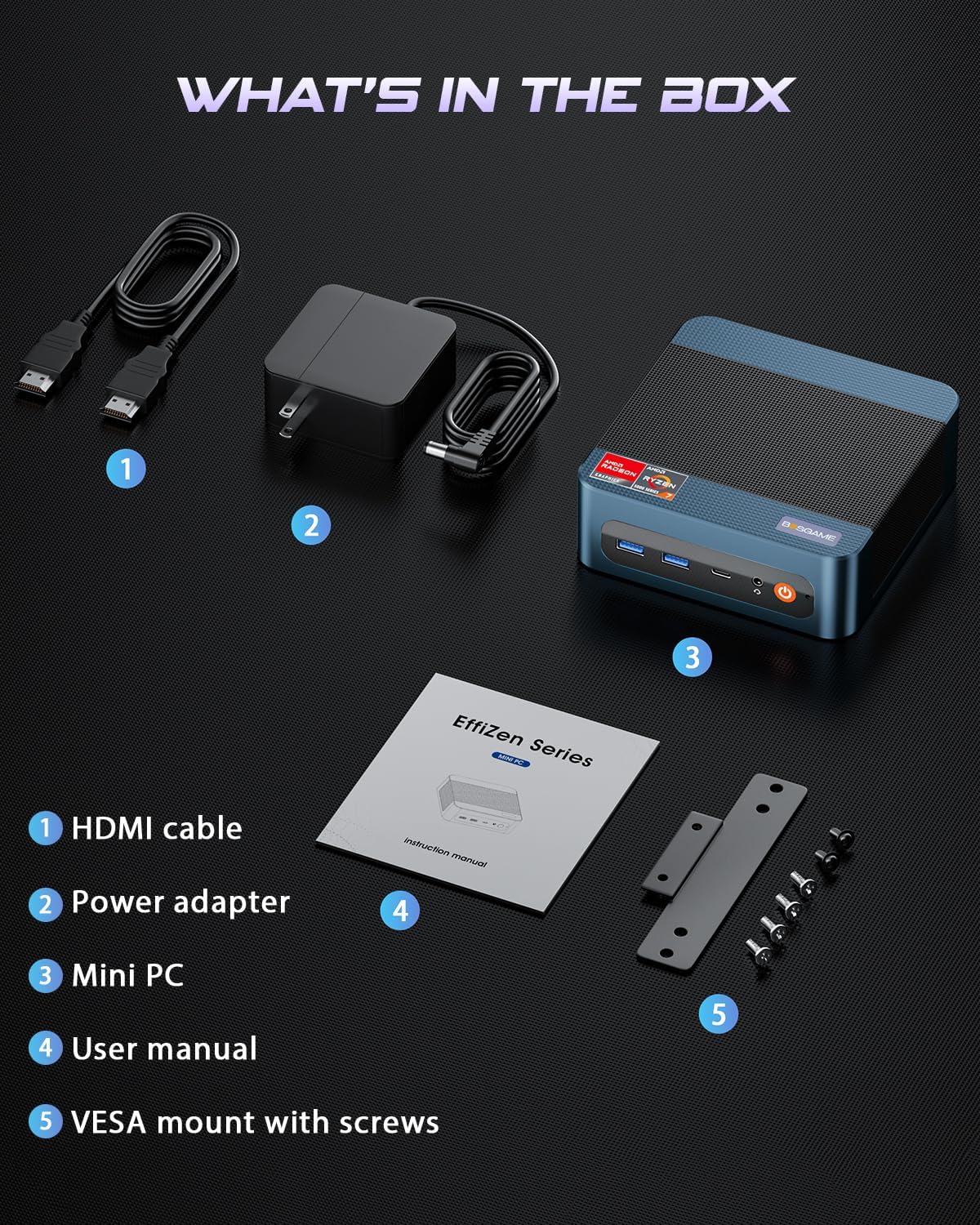
This image displays the BOSGAME P3 Mix Mini PC and its included accessories: an HDMI cable, a power adapter, the mini PC unit, a user manual, and a VESA mount with screws for installation.
3.製品オーバーview
The BOSGAME P3 Mix Mini PC is a compact desktop computer designed for various applications, from home office tasks to gaming and 4K video editing. It features a powerful AMD Ryzen 7640HS processor and Radeon 760M graphics.

This image highlights the core specifications of the mini PC, including its AMD Ryzen 5 7640HS processor, AMD Radeon 760M GPU, 16GB DDR5 RAM, 512GB M.2 PCIe 3.0 x4 SSD, support for 8K 60Hz display, USB-4 (40Gbps) connectivity, Wi-Fi 6E AX210, and Bluetooth 5.2.
This diagram illustrates the various input/output ports available on the mini PC, including power input, dual 2.5G LAN, HDMI, DisplayPort, USB 2.0, USB 4, USB 3.2 ports, and a 3.5mm audio jack.
Video 3.1: BOSGAME Ryzen 5 7640HS MINI PC Overviewこのビデオでは、view of the BOSGAME P3 Mix Mini PC, showcasing its compact design, internal components, port layout, and connectivity features.
4. セットアップ手順
4.1 電源アダプタの接続
- Connect the power adapter cable to the DC 19V 6.3 port on the rear of the mini PC.
- 電源アダプタを壁のコンセントに差し込みます。
4.2 ディスプレイへの接続
The P3 Mix Mini PC supports triple display output via HDMI, DisplayPort, and USB4.
- Connect one end of an HDMI cable to the HDMI port on the mini PC and the other end to your monitor.
- For additional displays, connect a DisplayPort cable to the DP port and/or a USB4 cable to the USB4 port, then connect to your respective monitors.
- モニターの電源がオンになっており、正しい入力ソースに設定されていることを確認してください。

This image demonstrates how to set up a triple display configuration with the mini PC, utilizing the DP 1.4, HDMI 2.0, and USB4 ports to connect to multiple monitors.
4.3 周辺機器の接続
- Connect your USB keyboard and mouse to any available USB ports (USB 2.0, USB 3.2).
- 有線ネットワーク アクセスの場合は、イーサネット ケーブルを 2.5G LAN ポートの 1 つに接続します。
- オーディオ出力の場合は、スピーカーまたはヘッドフォンを 3.5 mm オーディオ ジャックに接続します。
4.4初期電源オン
- After connecting all necessary cables, press the power button located on the front of the mini PC.
- The system will boot up, and you should see the operating system on your connected display(s).
5. 操作手順
5.1 電源オン/オフ
- 電源を入れるには: 電源ボタンを1回押します。
- シャットダウンするには: From the operating system, select 'Shut Down'. Alternatively, press and hold the power button for 5 seconds to force a shutdown (use only when necessary).
- 再起動します: オペレーティング システムから、「再起動」を選択します。
5.2 ネットワーク接続
- 有線接続: Connect an Ethernet cable to one of the two 2.5G LAN ports. The system will automatically detect the connection.
- ワイヤレス接続(Wi-Fi 6E): Navigate to your operating system's network settings, select the desired Wi-Fi network, and enter the password.
5.3 Bluetooth接続
The mini PC supports Bluetooth 5.2 for connecting wireless peripherals.
- Bluetooth デバイスがペアリング モードになっていることを確認します。
- On your mini PC, go to the operating system's Bluetooth settings.
- 検索する and select your device to pair.
6. メンテナンスとアップグレード
6.1 RAMとSSDのアップグレード
The BOSGAME P3 Mix Mini PC allows for easy upgrades of its DDR5 RAM and M.2 PCIe SSD. Always power off and unplug the device before performing any internal maintenance.

This image provides a visual guide for upgrading the RAM and SSD. The process involves removing screws, carefully opening the base plate, repositioning the system fan, and then replacing the memory modules and SSD.
- 電源を切ってプラグを抜きます: Ensure the mini PC is completely powered off and disconnected from the power source.
- ネジを外す: Locate and remove the screws securing the bottom panel.
- Open Base Plate: Carefully open the base plate to access the internal components.
- アクセスコンポーネント: You may need to gently move the system fan or other components to gain full access to the RAM and SSD slots.
- Replace RAM/SSD: Install new DDR5 SO-DIMM RAM modules into the dual channel slots (up to 64GB supported) or a new M.2 2280 NVMe PCIe 3.0 SSD (up to 4TB per slot, 8TB total capacity).
- 組み立て直す: Carefully reassemble the mini PC, ensuring all connections are secure and screws are tightened.
6.2 クリーニング
- ミニ PC の外側は、定期的に柔らかい乾いた布で拭いてください。
- Use compressed air to clear dust from ventilation grilles to ensure optimal airflow and prevent overheating. Do not insert objects into the vents.
7。 トラブルシューティング
7.1 電源なし
- 電源アダプタがミニ PC と正常な電源コンセントの両方にしっかりと接続されていることを確認します。
- 別のデバイスを接続して、電源コンセントが機能していることを確認します。
- 互換性があり利用可能な場合は、別の電源アダプターを試してください。
7.2 ディスプレイ出力なし
- Check all display cable connections (HDMI, DP, USB4) between the mini PC and the monitor(s).
- Ensure the monitor(s) are powered on and set to the correct input source.
- Try connecting to a single monitor using a different cable or port.
- If you recently reinstalled the operating system, ensure all display drivers are correctly installed. Some users have reported needing specific drivers from the manufacturer for optimal display performance.
7.3 ネットワーク接続の問題
- 有線: イーサネットケーブルの接続を確認してください。ルーター/モデムが正常に動作していることを確認してください。
- 無線: Ensure Wi-Fi is enabled in your operating system settings. Re-enter the Wi-Fi password. Restart your router/modem.
7.4 パフォーマンスの問題
- バックグラウンドで実行されている不要なアプリケーションを閉じます。
- ミニ PC に適切な換気があり、過熱していないことを確認します。
- オペレーティング システムの更新とドライバーの更新を確認します。
- Verify that the RAM and SSD are properly seated if you have performed an upgrade.
8. 仕様
| 特徴 | 仕様 |
|---|---|
| ブランド | ボスゲーム |
| モデル名 | P3 |
| CPUモデル | AMD Ryzen 5 7640HS (6C/12T, up to 5.0 GHz) |
| グラフィックスコプロセッサ | Radeon 760M (Integrated) |
| RAMメモリ | 16GB DDR5 4800MHz (2x8GB), Max 64GB |
| メモリストレージ容量 | 512GB PCIe 3.0 SSD (M.2 2280), Max 8TB (2x4TB) |
| オペレーティング·システム | OS11 サポート Win/Ubuntu/Linux |
| ビデオ出力インターフェース | HDMI 2.0, DisplayPort 1.4, USB4 (8K@60Hz) |
| 接続技術 | Dual 2.5G LAN, Wi-Fi 6E (802.11ax), Bluetooth 5.2 |
| USBポート | USB 3.2 (10Gbps) x 3、USB 4 (40Gbps) x 1、USB 2.0 (480Mbps) x 2 |
| オーディオ出力 | 3.5mmオーディオジャック |
| アイテム重量 | 1.26キログラム |
| 電源プラグタイプ | Type A - 2 pin (North American) |
9. 保証とサポート
9.1 保証情報
BOSGAME offers a 1-year limited warranty for the P3 Mix Mini PC. This warranty covers manufacturing defects and ensures product quality.
9.2 カスタマーサポート
For any product-related inquiries, technical assistance, or warranty claims, please contact BOSGAME customer support. You can reach out via the following methods:
- メールアドレス: Qingzhuomao@163.com
- オンライン: Visit the BOSGAME store on Amazon or their official webFAQ とサポート リソースのサイト。
A professional after-sales team is available to assist you with your needs.