
1. 安全情報
本製品をご使用になる前に、すべての安全に関する注意事項をよくお読みになり、ご理解ください。このマニュアルは、今後の参考のために保管してください。
- デバイスを極端な温度、直射日光、高湿度にさらさないでください。
- 落としたり、強い衝撃を与えないでください。
- ご自身でデバイスを分解したり修理したりしないでください。保証が無効になり、損傷の原因となる可能性があります。
- Use only the specified charging cable and power adapter (5V/1A) to charge the device.
- デバイスを水やその他の液体から遠ざけてください。
- 地域の規制に従ってバッテリーを廃棄してください。
2. パッケージ内容
- PRUNUS J-168 デジタルポータブルラジオ
- USB-C充電ケーブル
- リストストラップ
- ユーザーマニュアル
3.製品オーバーview
The PRUNUS J-168 radio features a compact design with an intuitive button layout and a clear display.
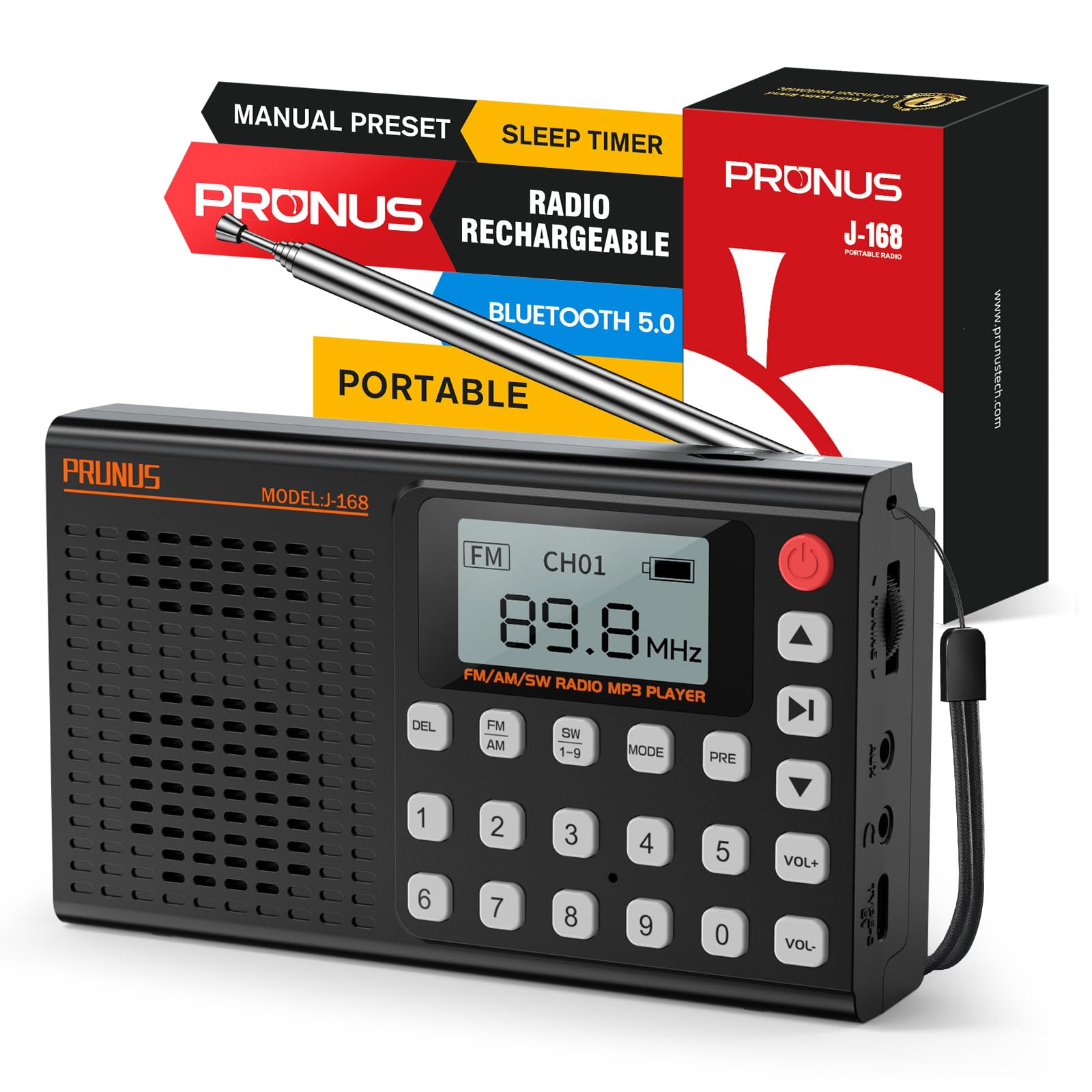
画像: 正面 view of the PRUNUS J-168 radio, showing the speaker grille, display, and numeric keypad.
コントロールとポート:
- 表示画面: 周波数、モード、バッテリーの状態などの情報を表示します。
- 数字キーパッド (0-9): 直接周波数入力とチャンネル選択用。
- DELボタン: Delete preset stations.
- FM/AM/SW ボタン: 無線バンドを選択します。
- モードボタン: Switch between radio, Bluetooth, TF card, and AUX modes.
- PRE Button: Preset/Recall stations.
- 再生/一時停止ボタン: Control playback in media modes.
- 前/次のトラック ボタン: Navigate tracks or search channels.
- VOL+/-ボタン: 音量を調整します。
- 電源ボタン: Turn the radio on/off.
- 伸縮アンテナ: ラジオの受信状態を良くするため。
- チューニングホイール: 無線周波数を微調整します。
- USB-C充電ポート: 内蔵バッテリーを充電します。
- TFカードスロット: For playing music from a TF/Micro SD card.
- AUX入力: 外部オーディオ機器を接続します。
- 3.5mmヘッドフォンジャック: プライベートリスニング用。
- 折りたたみ式スタンド: For convenient placement on flat surfaces.
4. セットアップ
4.1 初期充電
Before first use, fully charge the radio. Connect the supplied USB-C cable to the radio's charging port and the other end to a 5V/1A USB power adapter (not included) or a computer's USB port.
- ディスプレイのバッテリーインジケーターに充電状態が表示されます。
- フル充電には通常3〜4時間かかります。
4.2 アンテナ延長
For optimal radio reception, extend the telescopic antenna to its full length (42 cm / 16.5 in).
Image: A hand extending the telescopic antenna from the top of the PRUNUS J-168 radio.
5. 操作手順
5.1 電源オン/オフ
を押す 電源ボタン (red button on the top right) to turn the radio on or off.
5.2 ラジオモード (FM/AM/SW)
を押す FM, AM、 または SW1-9 buttons to select the desired radio band.
5.2.1 Auto Search and Store
無線モードでは、を押し続けます 再生/一時停止 button to automatically search for and store all available stations. The radio will scan frequencies and save them to preset channels.
Video: Demonstrates auto-searching and storing radio stations. The display shows the frequency changing and channels being saved.
5.2.2手動チューニング
- チューニングホイール: Rotate the tuning wheel on the side of the radio to adjust the frequency step by step.
- 直接周波数入力: Use the numeric keypad to enter a specific frequency (e.g., for 104.3 MHz, press 1-0-4-3).
- Next/Previous Available Channel: 短く押すと 前/次のトラック buttons to jump to the next or previous available station.
5.2.3 放送局のプリセットと呼び出し
- To Preset: 希望の放送局に合わせます。 前 button. The display will show 'CHXX'. Enter the desired channel number using the numeric keypad, then press 前 再度確認します。
- 思い出すこと: Enter the channel number directly using the numeric keypad (e.g., for CH14, press 1 then 4).
- To Delete a Preset: Select the preset channel you wish to delete. Press and hold the 削除 ボタン。プロンプトが表示されたら削除を確定します。
5.3Bluetoothモード
を押す モード button until 'Bluetooth Mode' appears on the display.
- The radio will enter pairing mode, indicated by a blinking Bluetooth icon.
- On your smartphone or other Bluetooth device, search for 'PRUNUS J-168' and connect.
- Once connected, you can play audio from your device through the radio. Use the radio's 再生/一時停止 そして 前/次のトラック 再生を制御するボタン。
Video: Shows connecting a smartphone via Bluetooth to the PRUNUS J-168 radio and controlling music playback.
5.4 TF/SD Card Mode
Insert a TF/Micro SD card (up to 32GB, FAT32 format) with MP3 audio files into the TF card slot. The radio will automatically switch to TF card mode or you can select it using the モード ボタン。
- 使用 再生/一時停止 そして 前/次のトラック 再生を制御するボタン。
- The radio offers 6 EQ presets (Normal, Classical, Pop, etc.) for TF card mode.
5.5 AUX モード
Connect an external audio device (e.g., MP3 player, smartphone) to the radio's AUX input using a 3.5mm audio cable. Press the モード button until 'AUX Mode' appears.
- Audio will be played from the connected device. Control playback from the external device.
5.6スリープタイマー
スリープ タイマーを使用すると、設定された時間が経過するとラジオが自動的にオフになります。
- を押す スリープタイマー ボタン (多くの場合、別の機能と組み合わせられます。ボタンのラベルを参照してください)。
- 使用 前/次のトラック buttons to adjust the timer from 0 to 90 minutes.
- Confirm your selection. A clock icon will appear on the display when the sleep timer is active.
Video: Demonstrates setting the sleep timer on the PRUNUS J-168 radio, showing the timer adjustment and the clock icon appearing on the display.
5.7 ヘッドホンの使用
Plug 3.5mm headphones into the headphone jack for private listening. The radio's speaker will automatically mute.
5.8 折りたたみ式スタンド
The radio includes a foldable stand on the back for convenient upright placement on flat surfaces.
6. メンテナンス
- クリーニング: ラジオの表面を拭く際は、柔らかく乾いた布を使用してください。研磨剤入りの洗剤や溶剤は使用しないでください。
- ストレージ: 長期間使用しない場合は、ラジオを涼しく乾燥した場所に保管してください。
- バッテリーのケア: バッテリーの寿命を延ばすには、バッテリーを頻繁に完全に放電させないでください。使用していない場合でも、定期的に充電してください。
7。 トラブルシューティング
- 電源なし: バッテリーが充電されていることを確認してください。充電器を接続してもう一度お試しください。
- ラジオの受信状態が悪い: 伸縮アンテナを完全に伸ばしてください。ラジオの位置を変えるか、電波の届きやすい場所に移動してみてください。
- Bluetoothが接続されない: Ensure the radio is in Bluetooth mode and your device's Bluetooth is enabled. Make sure the radio is not connected to another device.
- TF カードが再生されない: Ensure the TF card is inserted correctly and contains compatible MP3 files. Check if the card is formatted to FAT32.
- 音が出ない: Check the volume level. Ensure headphones are not plugged in if you want sound from the speaker.
8. 仕様
- モデル番号: J-168
- ブランド: プルナス
- 色: 黒
- 材料: アクリロニトリルブタジエンスチレン(ABS)
- 電源: 充電式バッテリー
- バッテリー: リチウムイオン(2000mAh)1個
- 充電ポート: USB-C (5V/1A)
- 最大出力: 3ワット
- ラジオバンド: FM (87-108 MHz), AM (522-1710 kHz), SW (3.2-21.85 MHz)
- 接続性: Bluetooth、AUX、TFカード
- ヘッドフォンジャック: 3.5mm
- 特集: Built-in Flashlight (Information not explicitly in feature bullets, but often a common radio feature. Removed as it's not in the provided feature bullets.)
- 寸法: 約13.9 x 8 x 3.2 cm(5.47 x 3.15 x 1.26インチ)
- 重さ: 約196 g(0.43ポンド)
9. 保証とサポート
This product comes with a standard manufacturer's warranty. For detailed warranty information or technical support, please refer to the contact information provided on the product packaging or the official PRUNUS webサイト。