
導入
This manual provides essential information for the setup, operation, and maintenance of your WalkerFit M6 GPS Smart Watch. Designed for active users, this smartwatch features multi-satellite positioning, a durable full-metal body, long battery life, 5ATM water resistance, Bluetooth calling, and a vibrant 1.43-inch AMOLED screen. Please read this manual thoroughly to ensure proper usage and to maximize your device's capabilities.
パッケージ内容
以下にリストされているすべてのアイテムが製品ボックスに含まれていることを確認してください。
- 1x WalkerFit M6 GPS Smart Watch
- 1x Magnetic Base Charger
- ユーザーマニュアル x 1
- 1x Black Silicone Band
- 1x Camouflage Band

Image: Contents of the WalkerFit M6 GPS Smart Watch package, showing the watch, magnetic charger, user manual, and two interchangeable bands.
設定
初期充電
Before first use, fully charge your WalkerFit M6 GPS Smart Watch. Connect the magnetic charging cable to the charging points on the back of the watch and plug the USB end into a compatible power source. A full charge typically takes approximately 2.5 hours.
電源のオン/オフ
- 電源を入れるには: Press and hold the power button (typically the top right button) until the screen illuminates.
- 電源を切るには: 電源ボタンを長押しし、画面上の「電源オフ」オプションを選択します。
Video: Instructions on how to power on the WalkerFit M6 GPS Smart Watch.
アプリのダウンロードとペアリング
To unlock the full functionality of your smartwatch, download the companion app. The app is compatible with both Android and iPhone devices.
- Scan the QR code provided in the user manual or on the watch screen to download the 'FitCloudPro' app from your device's app store.
- 「FitCloudPro」アプリを開き、画面の指示に従ってアカウントを作成するか、ログインします。
- スマートフォンでBluetoothを有効にします。
- Within the app, navigate to the 'Device' section and select 'Add Device' or 'Scan for Device'.
- Select 'M6 GPS' from the list of available devices to initiate pairing. Confirm the pairing request on both your smartphone and the smartwatch.
操作手順
ナビゲーションと表示
- タッチスクリーン: 上下左右にスワイプしてメニューや機能を操作します。タップしてオプションを選択します。
- 物理ボタン: The watch features multiple physical buttons for quick access to functions like Sport mode, Menu, and Back.
- カスタマイズ可能なウォッチフェイス: Change your watch face directly from the device settings or through the companion app to personalize your display.

Image: The 1.43-inch AMOLED display of the WalkerFit M6 GPS Smart Watch, showcasing different customizable watch faces and the Always-On Display feature.
Multi-Satellite GPS and Outdoor Features
The WalkerFit M6 GPS Smart Watch is equipped with advanced multi-system positioning (GPS, GLONASS, Galileo, BeiDou) for accurate outdoor tracking. It also includes a built-in compass, altimeter, and barometer.
- Route Recording: Activate a sports mode (e.g., hiking, trail running, cycling) to automatically record your route, distance, and other metrics using GPS.
- 環境への意識: Utilize the compass for real-time directional guidance, the altimeter to track elevation changes, and the barometer to monitor air-pressure trends.

Image: A user wearing the WalkerFit M6 GPS Smart Watch while hiking, demonstrating its multi-satellite GPS tracking capabilities, compass, altimeter, and barometer features.
スポーツモードと健康トラッキング
Access over 170 indoor and outdoor sports modes directly from your watch. The device continuously monitors various health metrics.
- スポーツモード: Select your desired activity (e.g., running, cycling, swimming, strength training) to track performance data such as heart rate, calories burned, and duration.
- Daily Wellness: The watch provides all-day tracking for heart rate, SpO₂, sleep patterns, stress levels, and activity trends. Review detailed insights in the companion app.

Image: A user engaging in water sports while wearing the WalkerFit M6 GPS Smart Watch, highlighting its 5ATM waterproof rating and the availability of over 170 sports modes.
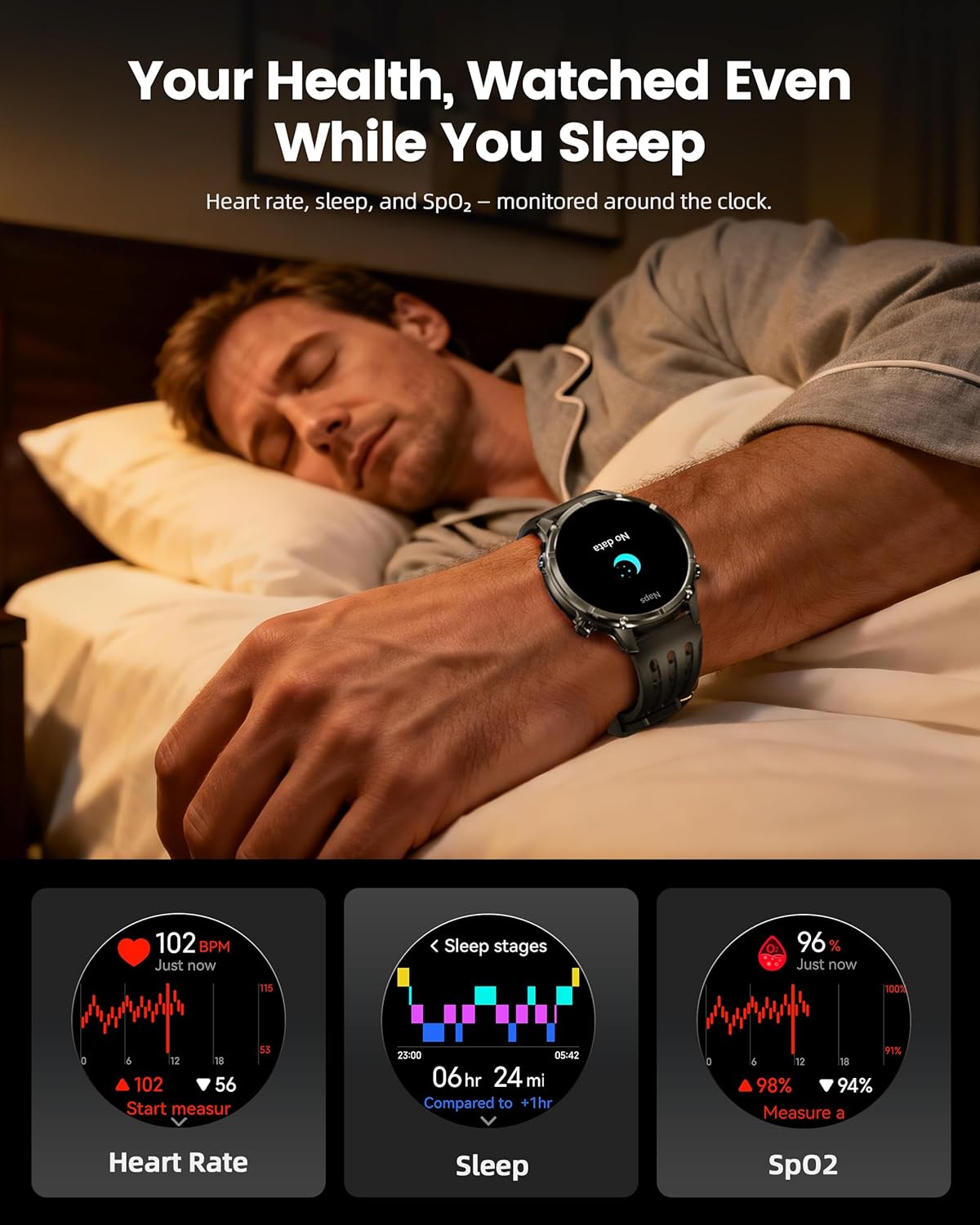
Image: The WalkerFit M6 GPS Smart Watch monitoring health metrics such as heart rate, sleep stages, and SpO₂ levels, even during sleep.
Bluetooth通話とスマート通知
Stay connected with Bluetooth calling and smart notifications directly on your wrist.
- Bluetooth通話: Answer or place calls directly from your smartwatch when connected to your smartphone.
- 通知: Receive alerts for SMS, email, and app notifications (e.g., WhatsApp, Facebook, Instagラム)。
- 追加ツール: Access music control, weather updates, world clock, timer, alarm, calculator, flashlight, find-phone, and camera control.
Video: Demonstration of the smartwatch's communication functions, including Bluetooth calls and smart notifications.

Image: The WalkerFit M6 GPS Smart Watch showing smart notifications from various apps and its AI assistant capabilities for calls and messages.
主な特徴view
頑丈なデザインとディスプレイ
The WalkerFit M6 GPS Smart Watch is built with a durable full-metal zinc-alloy body and features a 1.43-inch AMOLED display with Always-On Display (AOD) functionality. The screen is designed for clear visibility even under strong sunlight and is protected with 8H hardness.
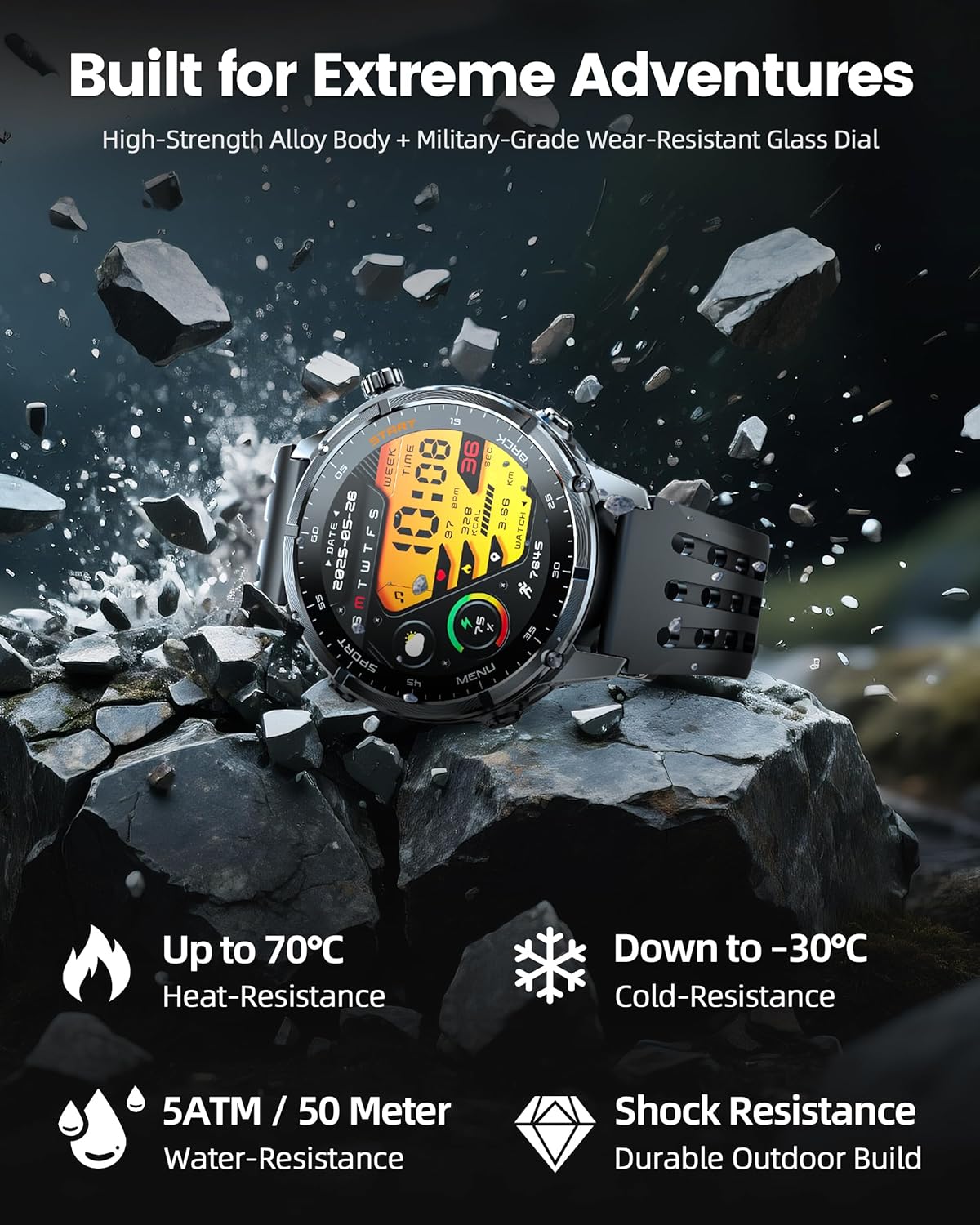
Image: The WalkerFit M6 GPS Smart Watch in a rugged outdoor setting, illustrating its high-strength alloy body, military-grade wear-resistant glass, and resistance to heat, cold, water, and shock.
長持ちバッテリー
Equipped with a 520mAh battery, the smartwatch offers extended usage times:
- Up to 14 days for daily use.
- 7+ days during active outdoor training.
- Up to 60 days in standby mode.
Recharging to full capacity takes approximately 2.5 hours.

Image: The WalkerFit M6 GPS Smart Watch on its magnetic charger, emphasizing its 520mAh battery capacity and multi-day usage capabilities.
メンテナンス
クリーニングとお手入れ
- Regularly clean the watch and bands with a soft, damp 布。
- Avoid using harsh chemicals or abrasive materials that could damage the watch's finish or sensors.
- 腐食を防ぐため、充電する前に充電接点が清潔で乾燥していることを確認してください。
耐水性
The WalkerFit M6 GPS Smart Watch is rated 5ATM, making it suitable for swimming in pools, use in rainy weather, splashes, and sweat during workouts. It is not recommended for diving or high-pressure water activities.
トラブルシューティング
- 時計の電源が入らない: Ensure the watch is fully charged. If the issue persists, try connecting it to the charger for a few minutes before attempting to power on again.
- ペアリングの問題: Confirm Bluetooth is enabled on your smartphone and the watch is within range. Restart both devices and try pairing again through the 'FitCloudPro' app.
- Inaccurate Heart Rate/SpO₂ Readings: 時計が手首にぴったりとフィットしていることを確認してください。締めすぎたり緩すぎたりしないでください。時計の裏側にあるセンサーを清掃してください。
- GPS信号損失: Move to an open area away from tall buildings or dense foliage for better signal reception.
- バッテリー寿命が短い: Adjust display brightness, reduce the display duration, or disable features like Always-On Display if not needed to extend battery life.
仕様
| 特徴 | 詳細 |
|---|---|
| モデル番号 | M6 GPS |
| 画面 | 1.43 Inches AMOLED, 466*466 resolution |
| バッテリー容量 | 520ミリamp 時間(520mAh) |
| 接続性 | ブルートゥース |
| GPS | Built-in GPS (Multi-Satellite Positioning) |
| 耐水性 | 5気圧 |
| オペレーティング·システム | ウェアOS1.1 |
| アイテム重量 | 4.8オンス |
| 材料 | Full Metal Zinc-Alloy Body |
保証とサポート
For warranty information, technical support, or service inquiries, please refer to the contact details provided on the product packaging or visit the official WalkerFit webサイトでご確認ください。保証請求の際は購入証明として領収書を保管してください。