
1. はじめに
Thank you for choosing the DazzlingStage 60W 9LED RGBW Stage Wall Wash Bar Light. This manual provides essential information for the safe and effective operation of your lighting fixture. Please read it thoroughly before installation and use, and retain it for future reference.
これはtage light bar features 9 high-power RGBW LEDs, offering a wide spectrum of colors and dynamic lighting effects suitable for various events and venues.

画像1.1: 以上view of the DazzlingStage 60W 9LED RGBW Stage Wall Wash Bar Lights in various colors.
2. 安全に関する注意事項
- 電気安全: 電源のボリュームを確認してくださいtage matches the specifications of the fixture. Always disconnect power before cleaning, servicing, or moving the unit.
- インストール: Install the fixture in a well-ventilated area, away from heat sources. Ensure secure mounting to prevent accidental falls.
- 手術: Do not look directly into the light source when the fixture is operating, as it can cause eye damage. Avoid operating the unit in wet or damp 条件。
- メンテナンス: すべての修理は資格を持った専門家にお任せください。ご自身でユニットを修理しようとしないでください。
- 子供たち: デバイスを子供の手の届かない場所に保管してください。
3. パッケージ内容
開梱の際には、以下にリストされているすべてのアイテムが同梱されており、良好な状態であることを確認してください。
- まばゆいばかりのStage 60W 9LED RGBW Stage Wall Wash Bar Light (x1 per pack)
- Power Cord (x1 per pack)
- Remote Control (x1 per pack)
- Mounting Bracket (x1 per pack)
- Knobs (x2 per pack)
- Black Gaskets (x2 per pack)
- Instruction Manual (x1 per pack)

画像3.1: 製品パッケージに含まれる内容物。
4.製品コンポーネント
ライトバーの主なコンポーネントについて理解しておきましょう。
- LEDアレイ: 9 RGBW LEDs for color mixing.
- コントロールパネル: Features a 4-digit LED display and control buttons (MENU, UP, DOWN, ENTER) for mode selection and parameter adjustment.
- DMX 入力/出力ポート: For connecting to a DMX controller or linking multiple units.
- Power IN/OUT: For power connection and daisy-chaining power to other units.
- 取付けブラケット: Adjustable bracket for floor standing or truss mounting.
- ヒートシンク: Integrated cooling system to maintain optimal operating temperature.

Image 4.1: Key components and dimensions of the light bar.
5. セットアップとインストール
The DazzlingStage Wall Wash Bar Light offers flexible installation options:
5.1 ブラケットの取り付け
Attach the included mounting bracket to the light bar using the provided knobs and gaskets. Ensure the bracket is securely fastened.
5.2 配置オプション
- フロアスタンディング: The bracket allows the light bar to stand upright on a flat surface. Adjust the angle as needed.
- トラス取り付け: 適切なclを使用するamps (not included) to attach the bracket to a lighting truss. Ensure the truss and clamps can support the weight of the fixture.
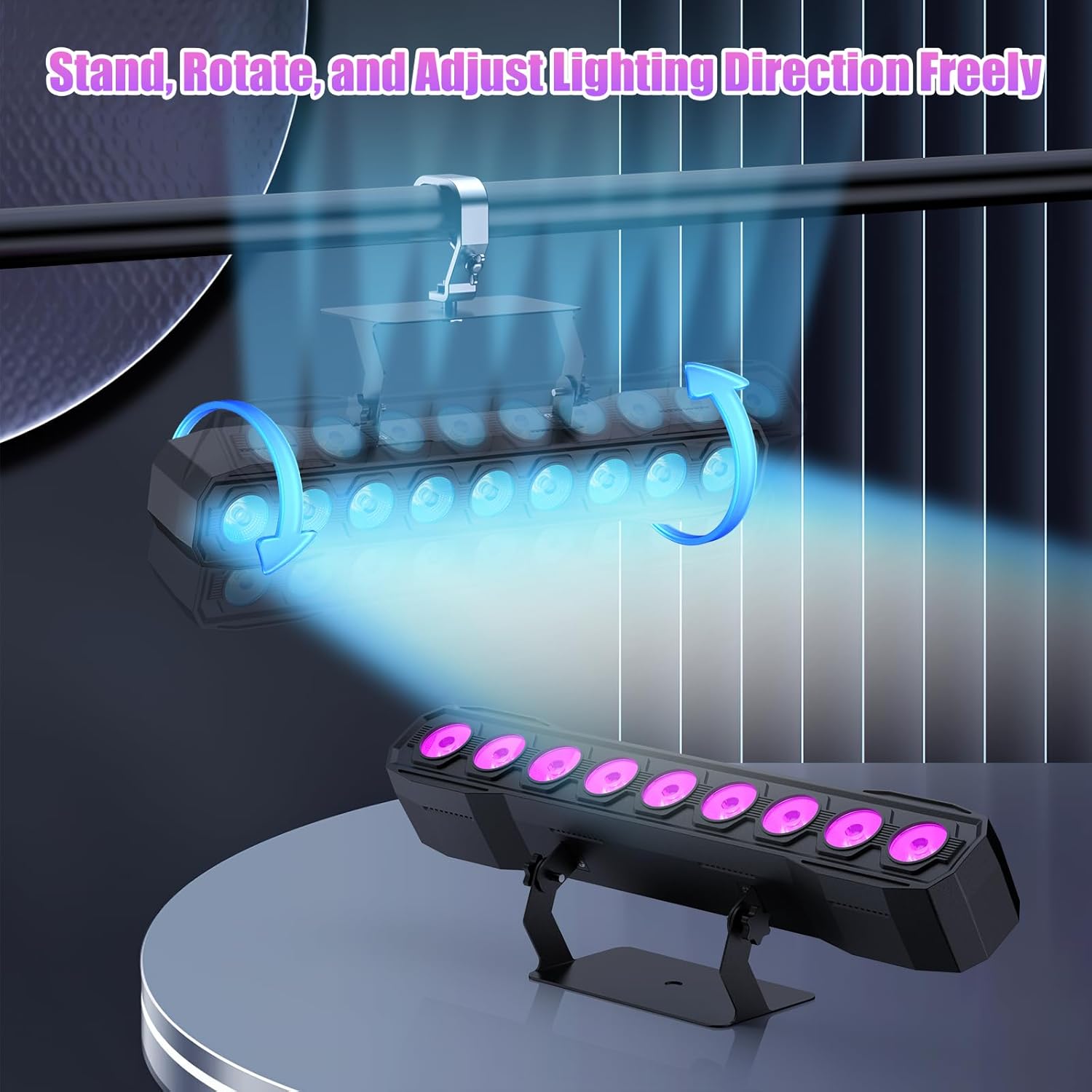
Image 5.1: Illustration of mounting and angle adjustment options.
5.3電源接続
Connect the power cord to the Power IN port on the back of the fixture and then to a suitable power outlet. Multiple units can be daisy-chained using the Power OUT port to simplify wiring for larger setups.
6。 動作モード
The DazzlingStage Wall Wash Bar Light supports several control modes:
- DMX512制御: For professional control via a DMX console.
- 自動モード: Pre-programmed lighting sequences.
- Sound-Activated Control: Lights react to ambient sound.
- リモートコントロール: Convenient wireless control using the included remote.
- マスター/スレーブモード: Link multiple units where one acts as a master and others as slaves, synchronizing effects.
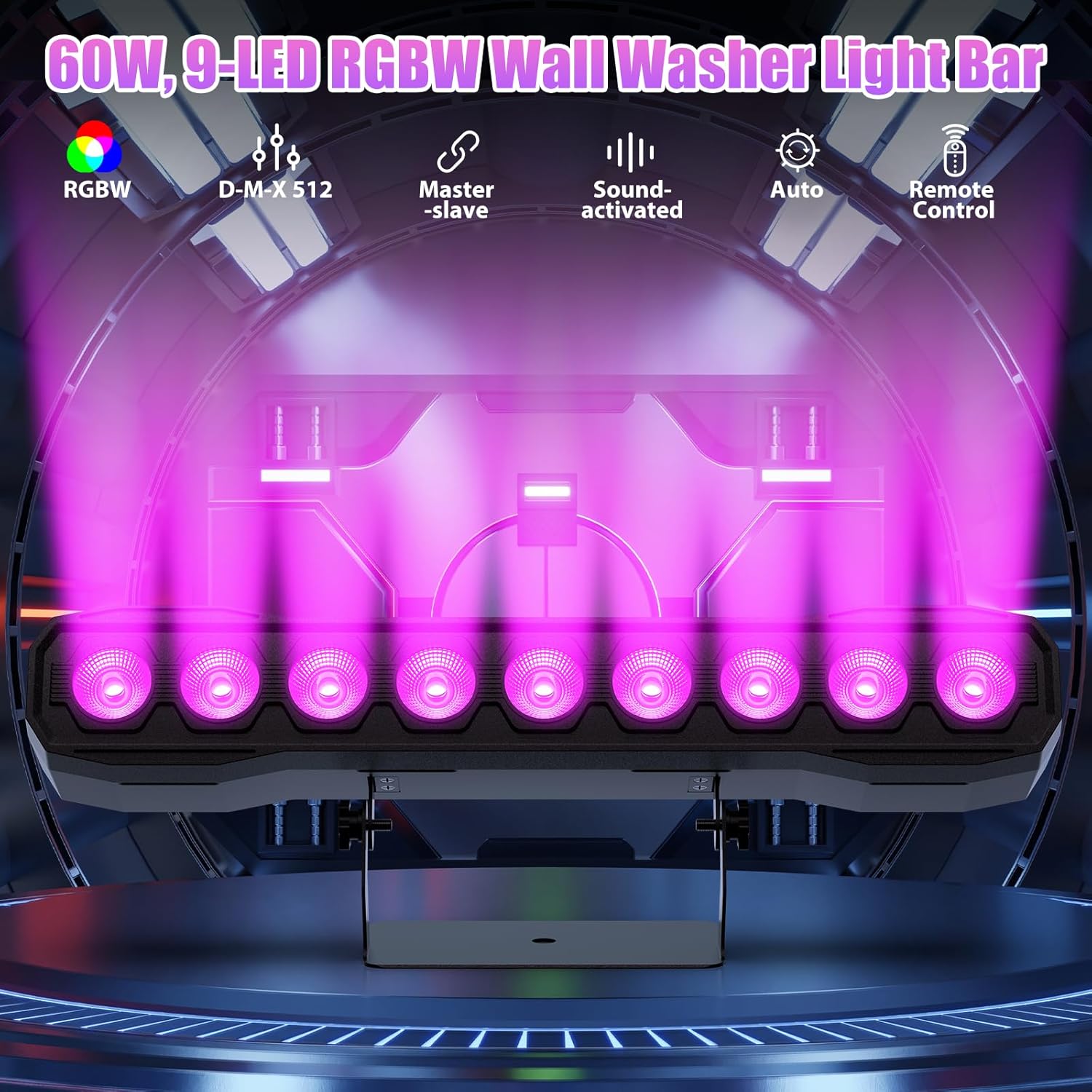
画像6.1: 以上view of available control modes.
6.1 Display Panel Operation
Use the buttons on the back of the fixture to navigate the menu and select modes:
- メニュー: メイン メニュー オプションを切り替えます。
- 上下: Adjusts values or navigates sub-menus.
- 入る: 選択を確認します。
6.2 照明効果
The fixture supports various dynamic effects:
- 色の混合: Over 16.7 million color combinations with 0-100% linear dimming.
- ストロボ: Flashing effect.
- ジャンプ: Instant color changes.
- フェード: 色間のスムーズな移行。
- 脈: Gradual changing effects.
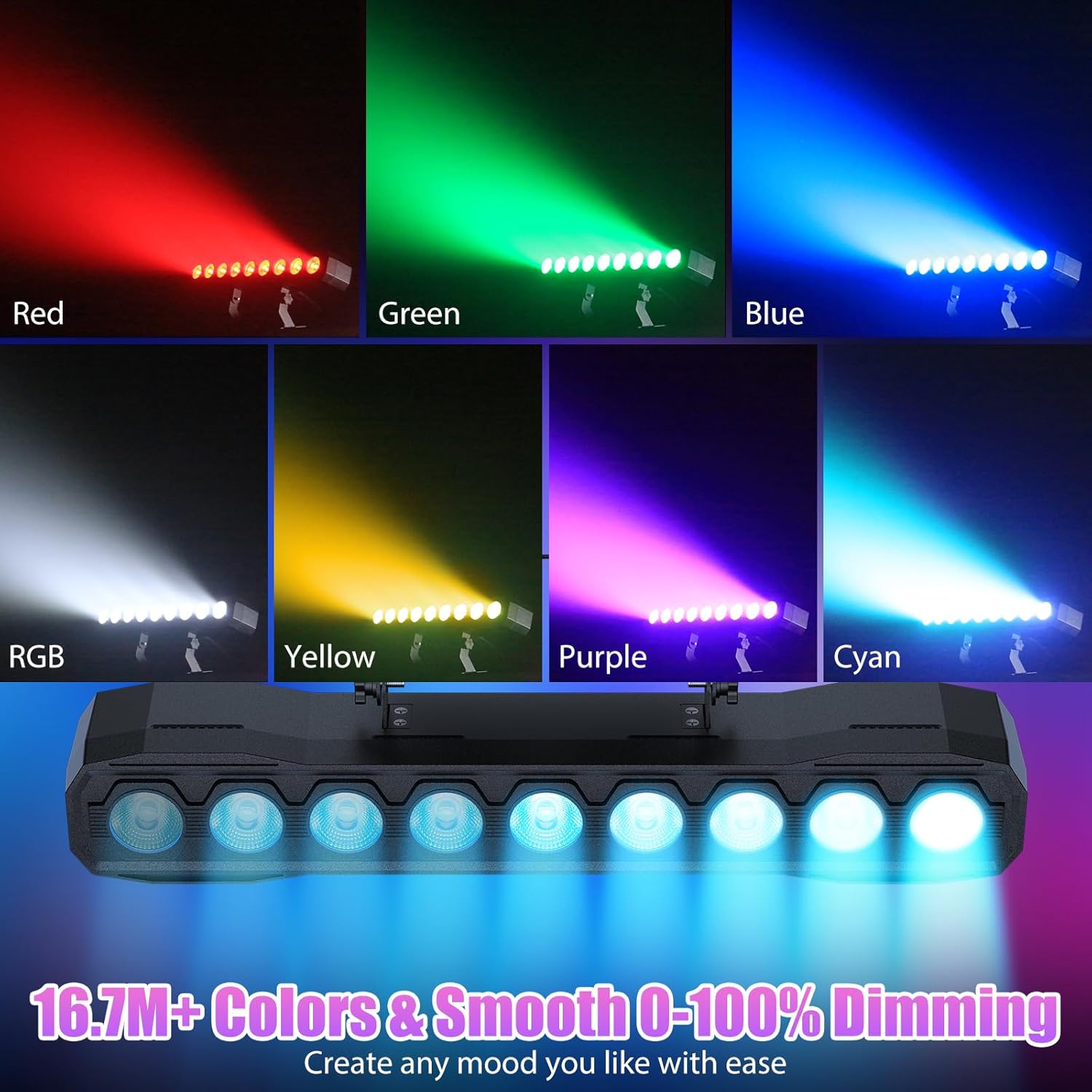
図6.2: 例amples of color mixing and dimming capabilities.

Image 6.3: Visual representation of Strobe, Jump, Fade, and Pulse effects.
7.リモコン機能
付属のリモコンを使用すると、さまざまな機能に簡単にアクセスできます。
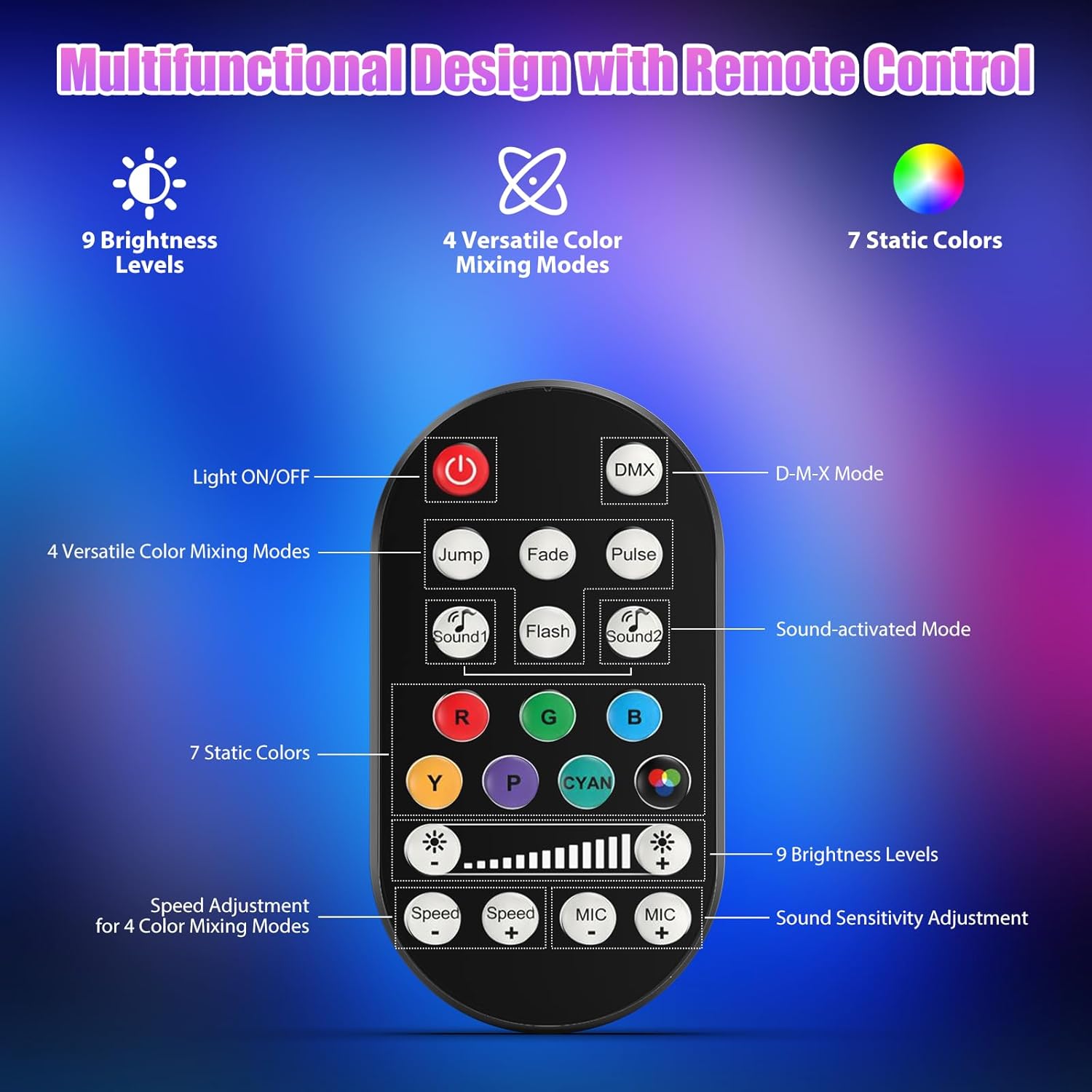
画像 7.1: リモコンのレイアウトと機能。
- ライトのオン/オフ: ユニットの電源をオンまたはオフにします。
- DMX: Activates DMX control mode.
- Jump, Fade, Pulse, Flash: Selects different color mixing modes.
- Sound1, Sound2: Activates sound-activated modes with different sensitivities.
- R, G, B, Y, P, Cyan, White: Selects static colors.
- 明るさレベル: Adjusts the overall intensity of the light (9 levels).
- 速度 +/-: ダイナミックエフェクトの速度を調整します。
- マイク +/-: Adjusts the sound sensitivity for sound-activated modes (15 levels).
8. DMX512 Control
For advanced control, connect the fixture to a DMX512 controller. The light bar typically uses 4 or 8 DMX channels. Refer to the display panel for DMX address setting and channel assignments.
8.1 DMXアドレス設定
Use the MENU, UP, DOWN, and ENTER buttons on the fixture's display panel to set the DMX starting address. The display will show 'AXXX' where XXX is the address (e.g., A001).
8.2 DMX Channel Functions (Example - 8 Channel Mode)
| チャネル | 関数 | 値の範囲 | 説明 |
|---|---|---|---|
| 1 位 | マスターディマー | 0-255 | 全体の明るさ (0% ~ 100%) |
| 2 位 | 赤の強度 | 0-255 | Red LED brightness (0% to 100%) |
| 3 位 | 緑の強度 | 0-255 | Green LED brightness (0% to 100%) |
| 4 位 | 青の強度 | 0-255 | Blue LED brightness (0% to 100%) |
| 5 位 | 白の強度 | 0-255 | White LED brightness (0% to 100%) |
| 6 位 | Strobe/Effect | 0-255 | 0-10: No function; 11-255: Strobe speed (slow to fast) |
| 7 位 | 自動プログラム | 0-255 | Selects and controls speed of built-in auto programs |
| 8 位 | サウンドアクティブ | 0-255 | Activates sound mode and adjusts sensitivity |
表8.1:例ample DMX Channel Functions (may vary slightly by firmware version).
9. メンテナンス
定期的なメンテナンスにより、最適なパフォーマンスが確保され、器具の寿命が延びます。
- クリーニング: Periodically clean the lens and housing with a soft, lint-free cloth. Do not use abrasive cleaners or solvents. Ensure the fixture is powered off and cool before cleaning.
- 検査: 電源ケーブル、DMXケーブル、取り付け金具に摩耗や損傷の兆候がないか定期的に点検してください。損傷した部品は直ちに交換してください。
- ストレージ: When not in use for extended periods, store the fixture in a dry, dust-free environment.
10。 トラブルシューティング
問題が発生した場合は、次の一般的な問題と解決策を参照してください。
| 問題 | 考えられる原因 | 解決 |
|---|---|---|
| 電源なし | 電源ケーブルが外れている;コンセントから電源が来ない;ヒューズが切れている | Check power cable connection; Test outlet with another device; Replace fuse if necessary |
| 光出力なし | Dimmer channel at 0%; Incorrect mode selected; DMX signal issue | Increase dimmer level; Select desired operating mode; Check DMX cable and address settings |
| Incorrect colors/effects | Incorrect DMX channel values; Remote control interference | Verify DMX channel settings; Ensure remote is pointed directly at the sensor; Check for other IR interference |
| サウンド起動モードが機能しない | Microphone sensitivity too low; No sound input | Increase MIC sensitivity via remote or display; Ensure sufficient sound is present near the fixture |
| 器具の過熱 | Poor ventilation; Blocked heat sink | Ensure adequate airflow around the unit; Clean any dust or debris from the heat sink fins |
11. 仕様
| 特徴 | 詳細 |
|---|---|
| ブランド | まばゆいばかりのStage |
| モデル番号 | ZQ220 |
| 光源 | 9 x 60W RGBW LED |
| 色混合 | RGBW 4-in-1, 16.7 million colors |
| 減光 | 0~100%のリニア電子調光 |
| ビーム角度 | 35°広角 |
| 制御モード | DMX512, Auto, Sound-Activated, Remote Control, Master-Slave |
| DMXチャンネル | 4 or 8 Channels (selectable) |
| 画面 | 4桁のLEDディスプレイ |
| 材料 | アクリロニトリルブタジエンスチレン(ABS) |
| 製品寸法 | 18.1 x 5.5 x 5.1 インチ (46 x 14 x 13 cm) |
| アイテム重量 | 約1.98ポンド(0.9kg) |
| 電源入力 | AC 100-240V、50/60Hz |
| メーカー | 深セン卓瓊技術有限公司 |
12. 保証とサポート
まばゆいばかりのStage products are designed for reliability and performance. For warranty information, please refer to the terms and conditions provided at the time of purchase or contact your retailer.
If you require technical assistance or have questions not covered in this manual, please contact DazzlingStage customer support through the retailer's platform or the official brand website. Please have your model number (ZQ06190) and purchase details ready when contacting support.