
1. はじめに
This manual provides detailed instructions for the installation, operation, and maintenance of your ATOTOEXCEL X10G129PE 12.95" QLED Android Car Stereo. Please read this manual thoroughly before using the product to ensure proper functionality and safety. Keep this manual for future reference.
2.製品オーバーview
The ATOTOEXCEL X10G129PE is an advanced car stereo system featuring a 12.95-inch QLED display, powerful processing capabilities, and extensive connectivity options. It is designed to enhance your in-car entertainment and navigation experience.
主な特徴:
- 強力なパフォーマンス: Equipped with a QCM SD665 SoC and 8GB RAM + 128GB storage for responsive operation, multi-tasking, and support for wireless CarPlay/Android Auto/MirrorLink.
- 12.95インチQLEDフローティングディスプレイ: A high-resolution (1920x1200) QLED panel with 550 nits brightness and anti-glare coating. The FlexView Pro mount allows for adjustable height, tilt, and angle.
- デュアルカメラ録画: Supports two 1080P cameras for simultaneous front and rear or interior recording, including parking monitoring and emergency video lock.
- 進化したオーディオスイート: Features a Digital Signal Processor (DSP) with 36-band EQ, time alignment, 3-way crossover, and HD 24-bit DAC. Includes optical output and 10 assignable channels for a custom 7.1.2 sound experience.
- セルラーネットワークとデュアルバンドWi-Fi: Built-in modem for streaming, map updates, and app installation. Supports hotspot functionality for other devices.
- 車両データ統合: ステアリングホイールコントロールと互換性あり、工場 amplifiers, and vehicle information systems (gauges, climate data) where supported.
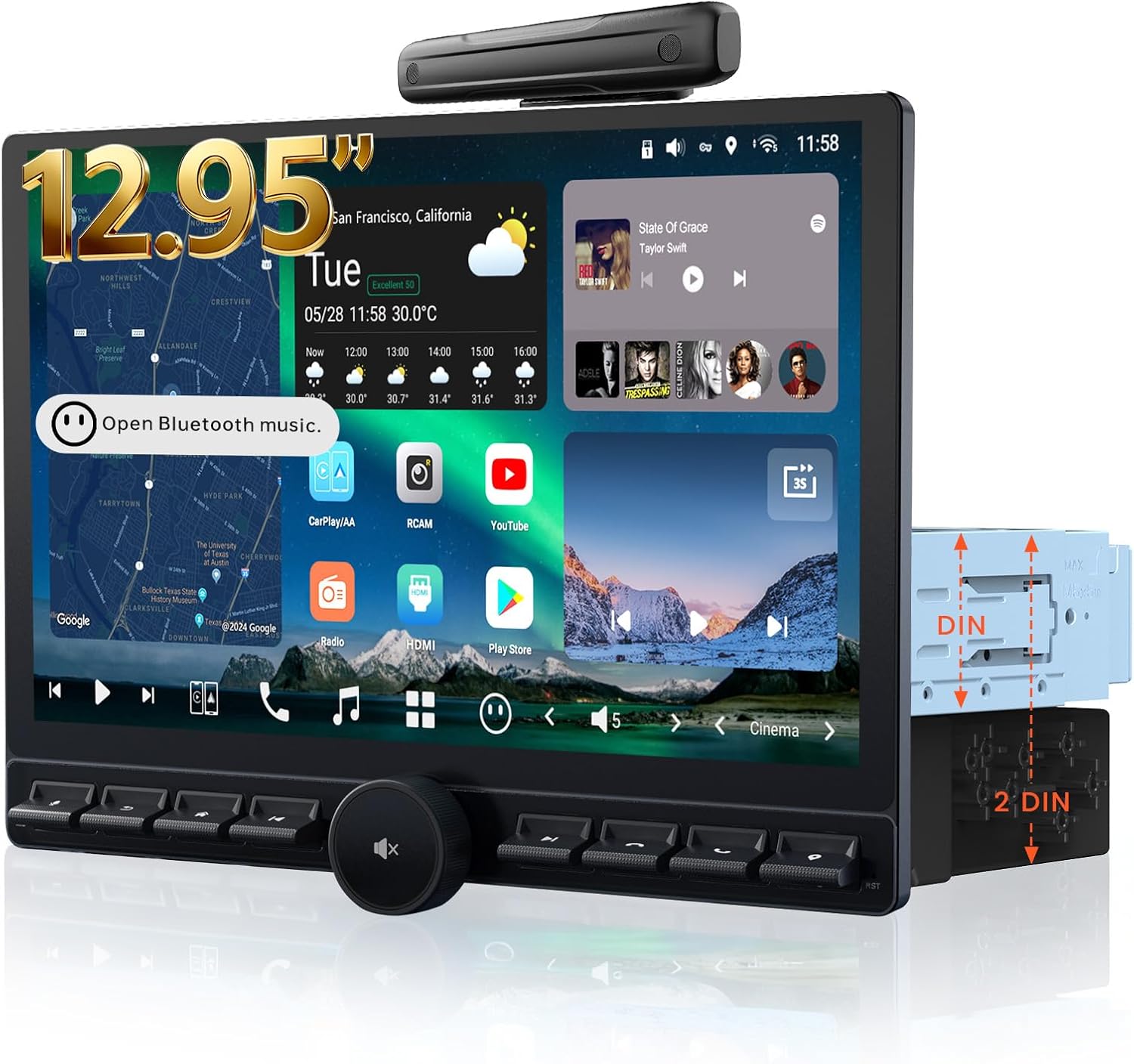
画像2.1:正面 view of the ATOTOEXCEL X10G129PE car stereo, showcasing the 12.95-inch QLED display and physical control buttons.

Image 2.2: Diagram illustrating the adjustable features of the FlexView Pro mount, including up/down, left/right, forward, swivel, and tilt adjustments for optimal viewing。

Image 2.3: Visual representation of the package contents, including the main unit, wiring harnesses, USB cables, RCA cables, antenna, and mounting brackets.
3. セットアップとインストール
カーステレオの最適な性能を得るには、適切な取り付けが不可欠です。資格を持った専門家に取り付けを依頼することをお勧めします。
3.1. インストール前のチェック
- Verify that all components listed in the package contents are present.
- Ensure your vehicle's dashboard opening is compatible with Single DIN or Double DIN installation.
- Measure the available space to avoid obstruction of essential vehicle controls by the display.

Image 3.1: Diagrams showing standard Double-DIN and Single-DIN opening installations. Note that DIN Sleeve 1 and 2 may need to be removed if pre-installed.

Image 3.2: Visual guide reminding users to measure and ensure the display's full range of motion (left/right, up/down, forward/backward slide) does not obstruct vehicle controls or vents.
3.2. 配線接続
Refer to the detailed wiring diagram for connecting power, speakers, antennas, and other peripherals. Ensure all connections are secure and correctly matched to avoid damage to the unit or vehicle.

Image 3.3: Comprehensive wiring diagram illustrating connections for power, ground, illumination, parking brake, reverse camera, steering wheel controls, audio outputs, and other inputs/outputs.
3.3. 初回電源投入
インストール後、車両のイグニッションをオンにしてください。ステレオは自動的に電源が入ります。言語の選択やタイムゾーンなど、初期設定に関する画面上の指示に従ってください。
4. 操作手順
4.1. ユーザーインターフェース(UI)ナビゲーション
The X10G129PE features a custom AICE 13 UI. Navigate through menus and applications using the touchscreen or physical buttons and knob. Customizable widgets and dynamic wallpapers allow for personalization.
4.2.オーディオ設定
Access the DSP settings to fine-tune your audio experience. Adjust the 36-band equalizer, set time alignment for optimal sound staging, and configure the 3-way crossover for connected speakers and subwoofers.

Image 4.1: Screenshot of the 36-band equalizer and time alignment interface, demonstrating the audio customization options.

Image 4.2: Diagram illustrating the 24-bit HD DAC and active 3-way crossover, showing dedicated outputs for tweeters, midrange, and dual subwoofers.
4.3. 接続性
- ワイヤレスCarPlay/Android Auto: Connect your smartphone wirelessly for navigation, music, and communication.
- 4G LTE & Wi-Fi: Insert a SIM card for cellular data or connect to a Wi-Fi network for internet access. The unit can also act as a hotspot.
- ブルートゥース: Pair your phone for hands-free calling and audio streaming. Supports dual phone connection.
- HDMI入力: Connect external devices like game consoles or media sticks for video playback on the QLED display.

Image 4.3: Illustration of the built-in cellular network modem and its ability to provide internet access and hotspot functionality for various devices.

画像4.4: 以上view of seamless connectivity features, including dual Bluetooth phone connection, auto lock/unlock, and compatibility with accessories like OBDII scanners and footwell lights.
4.4. コントロールオプション
The stereo offers multiple ways to control its functions:
- ステアリングホイールコントロール: Integrate with your vehicle's existing steering wheel buttons (requires compatible data interface or adapter).
- ワイヤレスリモート: Use an optional wireless remote for convenient control.
- 音声コマンド: Utilize voice commands for various functions, including navigation and media playback.

Image 4.5: Visual representation of various control methods, including data interface, OEM steering wheel controls, third-party SWC adapters, wireless remote, and voice commands.
4.5. デジタルアプリ
The unit comes with built-in digital applications and supports additional app installations via Google Play and Findapps.
- ドライブチャット: GenAI Voice Assistant for interactive commands.
- トラックHU: GPS tracking app with flexible refresh rates and geofence alerts.
- アプリを探す: APK downloader for installing apps not available on Google Play Store.
- 雲の写真: Image and video album with photo sync functionality (in progress).

Image 4.6: Display of the built-in digital applications: DriveChat, TrackHU, FindApps, and Cloud Photo, highlighting their respective functionalities.
5. メンテナンス
To ensure the longevity and optimal performance of your ATOTOEXCEL X10G129PE, follow these maintenance guidelines:
- ディスプレイの掃除: 柔らかく糸くずの出ない布でQLEDスクリーンを優しく拭いてください。頑固な汚れには、軽く拭いてください。amp布を水またはスクリーンに安全なクリーナーで拭いてください。刺激の強い化学薬品や研磨剤は使用しないでください。
- 一般的な清掃: Keep the unit and surrounding areas free from dust and debris. Use a soft brush or compressed air to clean vents and button crevices.
- ソフトウェアアップデート: Regularly check for Over-the-Air (OTA) firmware updates. These updates often include performance improvements, new features, and bug fixes. Updates can be applied directly on the device.
- 極端な温度を避ける: 電子部品やディスプレイに影響を及ぼす可能性があるため、ユニットを長時間極端な高温または低温にさらさないでください。
6。 トラブルシューティング
If you encounter issues with your ATOTOEXCEL X10G129PE, refer to the following common troubleshooting steps:
6.1.ノーパワー
- Check the vehicle's fuse box for any blown fuses related to the stereo or accessory power.
- Ensure all power connections (constant 12V, ignition 12V, ground) are securely connected according to the wiring diagram.
- 車両のバッテリーが十分に充電されていることを確認してください。
6.2.音が出ない
- スピーカー ワイヤの接続が正しい極性で確実に接続されていることを確認します。
- 音量がミュートされていないか、非常に低いレベルに設定されていないことを確認してください。
- 正しいオーディオ ソースが選択されていることを確認します。
- 外部を使用する場合 amplifiers, check their power and signal connections.
6.3. 表示の問題
- If the screen is black or unresponsive, try restarting the unit by turning the vehicle's ignition off and on.
- Check the display cable connection to the main unit.
- Adjust display brightness and contrast settings in the system menu.
6.4. GPS Signal Loss
- GPSアンテナが正しく取り付けられ、クリアな視界があることを確認してください。 view 空の。
- ユニットへの GPS アンテナの接続を確認してください。
- Move the vehicle to an open area away from tall buildings or dense foliage that might obstruct satellite signals.
6.5. Bluetooth接続の問題
- ステレオとモバイル デバイスの両方で Bluetooth が有効になっていることを確認します。
- 両方のデバイスで以前のペアリングを削除し、再度ペアリングを試みます。
- Move your mobile device closer to the stereo.
For issues not covered here, please refer to the online manual or contact customer support.
7. 仕様
| 特徴 | 仕様 |
|---|---|
| 表示サイズ | 12.95インチ |
| 表示タイプ | クォリティLED |
| ディスプレイ解像度 | 1920×1200 |
| プロセッサ | QCM SD665 SoC |
| ラム | 8GB |
| 内部ストレージ | 128GB |
| オペレーティング·システム | Android 13 Based (AICE 13 UI) |
| オーディオチャンネル | 7.1.2 チャンネル |
| イコライザ | 36バンドEQ |
| DAC | HD 24-bit |
| 接続性 | 4G LTE, Dual-Band Wi-Fi, Bluetooth, Wireless CarPlay, Wireless Android Auto |
| 入力 | HDMI, Dual 1080P Camera Inputs |
| 出力 | Optical SPDIF, 4V RCA Preamp 出力 |
| アイテム重量 | 9.68ポンド |
| パッケージ寸法 | 14.76 x 10.83 x 10.83インチ |
8. 保証とサポート
Your ATOTOEXCEL X10G129PE comes with a standard 12-month warranty from the date of purchase, with an option for an additional 6 months of extended coverage by communicating with the manufacturer within 30 days of purchase.
8.1. オンラインリソース
Access the online manual and quick guide by scanning the QR code provided on the product box or visiting the Eproductcare platform for assistance.

Image 8.1: Information regarding Over-the-Air updates, 12+6 months extended coverage, product care team availability, and access to the online manual via QR code.
8.2. カスタマーサポート
For further assistance, technical support, or warranty claims, please contact ATOTOEXCEL customer support through your order center or the Eproductcare platform. Responsive support staff are available to assist you.