
ピセン TP-D183
PISEN 10000mAh 22.5W ポータブルパワーバンク(モデル TP-D183)ユーザーマニュアル
モデル: TP-D183 | ブランド: PISEN
1. はじめに
This manual provides essential instructions for the safe and efficient use of your PISEN 10000mAh 22.5W Portable Power Bank, Model TP-D183. Please read this manual thoroughly before using the product and retain it for future reference.
2. 安全情報
Your PISEN power bank is designed with multiple safety features and is certified by 3C, CE, FCC, ROHS, and UL2056 standards. Adhere to the following guidelines to ensure safe operation:
- パワーバンクを極端な温度(60°C/140°F 以上または 0°C/32°F 以下)にさらさないでください。
- デバイスを落としたり、分解したり、自分で修理しようとしたりしないでください。
- 水、湿気、可燃性物質から遠ざけてください。
- 互換性のある充電ケーブルとアダプターのみを使用してください。
- 出力ポートを短絡させないでください。
- お子様の手の届かない場所に保管してください。
- パワーバンクは地域の規制に従って責任を持って廃棄してください。
The power bank includes comprehensive protection mechanisms:
- 過放電保護
- 入力ボリュームtag保護
- 短絡保護
- 過電流保護
- Output And Input Short Connection protection
- 充電/放電過熱保護

画像: 内部 view of the PISEN power bank highlighting its multi-layered safety protection systems.
3.製品オーバーview
The PISEN 10000mAh 22.5W Portable Power Bank (Model TP-D183) is a compact and efficient charging solution. It features fast charging capabilities, multiple output ports, and an intelligent LED display.

画像: 前面と背面 view of the PISEN 10000mAh 22.5W Power Bank, showing the LED display and specifications.

画像: 詳細 view of the power bank's ports, including one USB-C (input/output) and two USB-A (output) ports.
主な特徴:
- 大容量: 10000mAh 内蔵バッテリー。
- 急速充電: Supports PD3.0 & QC3.0 with up to 22.5W output.
- 多用途ポート: One USB-C port (20W output, 18W input) and two USB-A ports (22.5W output).
- 同時充電: 最大3台のデバイスを同時に充電できます。
- インテリジェント LED ディスプレイ: 残りの電力のパーセントを表示しますtag正確な監視のために。
- コンパクトなデザイン: Measures 5.8 x 2.7 x 0.67 inches and weighs 10.2 ounces, making it travel-friendly and flight-approved.
- 認定された安全性: 3C, CE, FCC, ROHS, and UL2056 certified for reliable and safe operation.

Image: The power bank's compact size and airline-approved status, shown with a smartphone and an airplane.
4. セットアップと初期使用
パワーバンクの充電:
- Connect a USB-C charging cable to the power bank's USB-C port.
- ケーブルのもう一方の端を互換性のある USB 壁アダプタ (付属していません) に接続します。
- LEDディスプレイに充電の進行状況が表示され、バッテリーのパーセンテージが表示されます。tage.
- 初めて使用する前に、パワーバンクを完全に充電してください。

Image: The power bank connected to a smartphone, demonstrating its 22.5W fast charging capability.
5. 操作手順
デバイスの充電:
- Connect your device's charging cable to one of the power bank's output ports (USB-C or USB-A).
- ケーブルのもう一方の端をデバイスに接続します。
- パワーバンクは自動的にデバイスの充電を開始します。LEDディスプレイにパワーバンクの残量が表示されます。
- 充電を停止するには、デバイスまたはパワーバンクからケーブルを外すだけです。
同時充電:
The power bank can charge up to three devices simultaneously using its USB-C and two USB-A ports. Note that when multiple ports are in use, the total output power may be distributed, potentially affecting individual charging speeds.
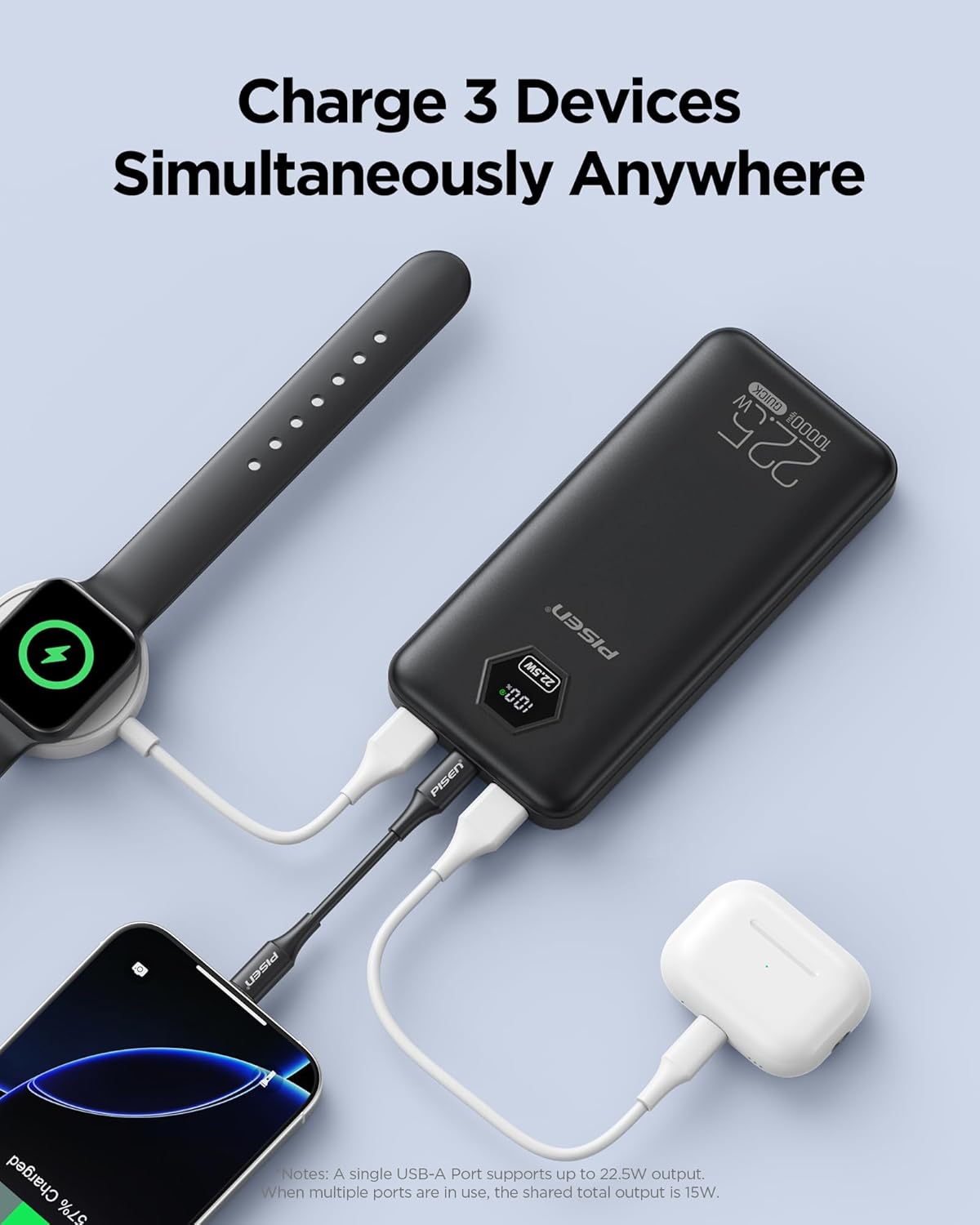
Image: The power bank connected to and charging three devices: a smartphone, a smartwatch, and wireless earbuds.
バッテリー残量の確認:
The intelligent LED display shows the remaining battery percentage of the power bank. This allows you to monitor the charge level accurately and plan your recharges.

画像: Examples of devices and the approximate number of charges provided by the 10000mAh power bank.

Image: The power bank's wide compatibility with a range of electronic devices.
6. メンテナンス
- パワーバンクは柔らかく乾いた布で拭いてください。刺激の強い化学薬品や研磨剤は使用しないでください。
- パワーバンクは、直射日光や極端な温度を避け、涼しく乾燥した場所に保管してください。
- 長期間使用しない場合は、バッテリーの状態を維持するために、少なくとも 3 か月に 1 回はパワーバンクを充電してください。
7。 トラブルシューティング
| 問題 | 考えられる原因 | 解決 |
|---|---|---|
| パワーバンクがデバイスを充電しません。 | Low battery on power bank; faulty cable; incompatible device. | Recharge the power bank. Try a different charging cable. Ensure your device is compatible. |
| パワーバンクが充電されません。 | Faulty charging cable or adapter; power bank internal issue. | Try a different USB-C cable and wall adapter. If the issue persists, contact customer support. |
| 充電が遅い。 | Cable not supporting fast charging; multiple devices charging; device not supporting fast charging. | Use a fast-charging compatible cable. Charge fewer devices simultaneously. Verify device fast charging compatibility. |
| LEDディスプレイが動作しません。 | パワーバンクの電源がオフです。内部故障です。 | Ensure the power bank is on. If it remains unresponsive, contact customer support. |
8. 仕様
| 特徴 | 詳細 |
|---|---|
| モデル番号 | TP-D183 |
| バッテリー容量 | 10000mAh |
| USB-C出力 | 20W(PD3.0) |
| USB-C入力 | 18W |
| USB-A出力(A1/A2) | 22.5W(QC3.0) |
| 寸法 | 5.8 x 2.7 x 0.67インチ |
| 重さ | 10.2オンス |
| 特集 | インテリジェントLEDデジタルディスプレイ |
| 認定資格 | 3C, CE, FCC, ROHS, UL2056 |
| 電池のタイプ | Internal Lithium-ion Battery |
9. 保証とサポート
PISEN offers the following support for your product:
- 30日間返金: 製品にご満足いただけなかった場合。
- 12ヶ月交換: 対象となる製品の問題の場合。
- 24時間年中無休のオンラインサポート: For assistance with product inquiries or troubleshooting.
For further assistance, please visit the official PISEN webサイトをご覧いただくか、カスタマー サービスに直接お問い合わせください。
10. 製品ビデオ終了view
ビデオ: 当局者がview of the PISEN 3C Certified 10000mAh 22.5W Power Bank, demonstrating its features and benefits.
Ask a question about this manual
Ask about setup, troubleshooting, compatibility, parts, safety, or missing instructions. Manuals+ will review the question and use this page’s manual context to help answer it.