
PHILIPS T7315
PHILIPS Android 15 タブレット T7315 ユーザーマニュアル
モデル: T7315
1. はじめに
This manual provides essential information for the safe and efficient use of your PHILIPS Android 15 Tablet T7315. Please read this manual thoroughly before operating the device and keep it for future reference.
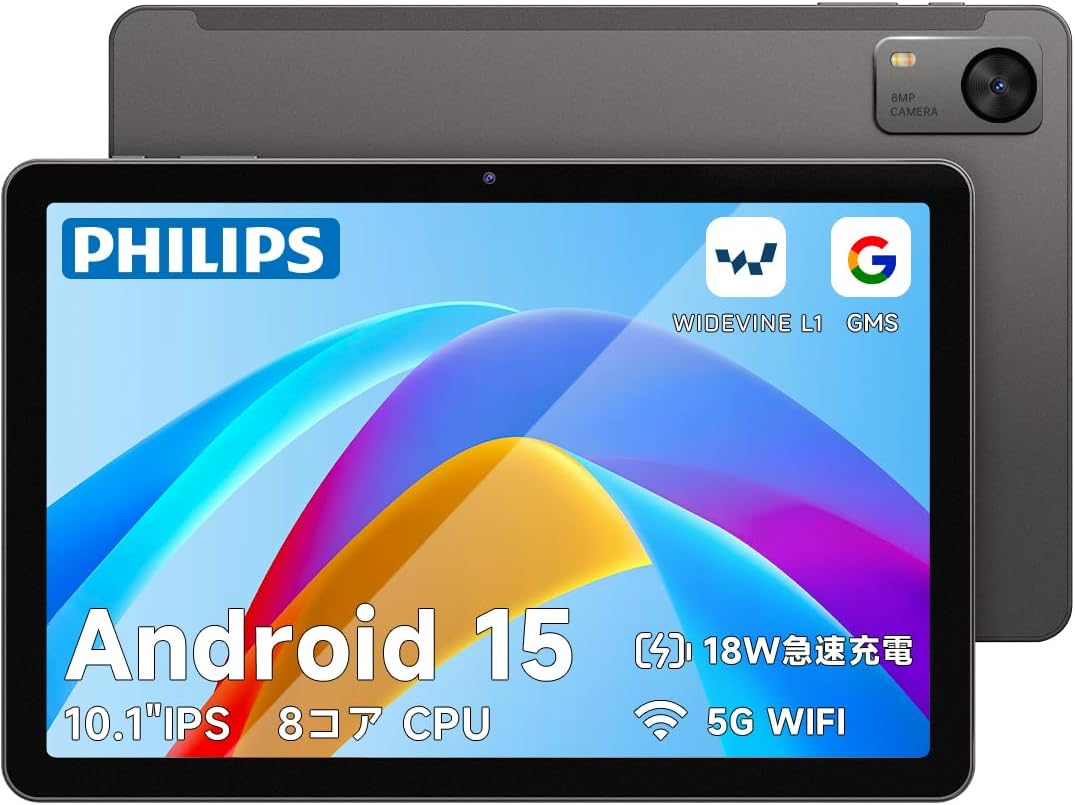
画像1: 前面と背面 view of the PHILIPS Android 15 Tablet T7315.
2. パッケージ内容
Upon opening the package, ensure all items listed below are present. If any items are missing or damaged, please contact customer support.
- PHILIPS Android 15 Tablet T7315
- USB Type-Cケーブル
- 充電アダプター(5V/2A)
- Memory Card Slot Pin
- 取扱説明書(日本語)

Image 2: The PHILIPS T7315 Tablet package contents, including the tablet, charger, Type-C cable, and instruction manual.
3. セットアップ
3.1. 初期充電
Before first use, fully charge your tablet using the provided Type-C cable and charging adapter. The tablet supports PD18W fast charging, though the included adapter is 5V/2A (10W). For faster charging, a compatible 18W charger (sold separately) can be used.
3.2. 電源のオン/オフ
- 電源を入れるには: Press and hold the power button located on the right side of the tablet until the PHILIPS logo appears.
- 電源を切るには: Press and hold the power button until the power options appear on the screen, then select "Power Off."
- 再起動します: Press and hold the power button until the power options appear on the screen, then select "Restart."
3.3. MicroSDカードの挿入
Locate the memory card slot on the top edge of the tablet. Use the provided memory card slot pin to open the tray. Insert your MicroSD card (up to 1TB) into the tray and gently push it back into the slot until it clicks into place.
4. 主な特徴
4.1. ディスプレイとビジュアル
- 10.1インチIPSディスプレイ: Enjoy vibrant colors and clear images with a 1280x800 resolution and a 16:10 aspect ratio. The 178-degree wide viewing angle and 330-nit brightness ensure visibility even outdoors.
- 90Hzリフレッシュレート: Experience smoother scrolling, gaming, and video playback with the high 90Hz refresh rate.
- Widevine L1 サポート: Stream high-definition content from platforms like Disney+, Amazon Prime Video, and Hulu.
- アイケアモード: Reduces blue light emission to minimize eye strain during prolonged use, making it comfortable for reading and online learning.

Image 3: The 10.1-inch IPS display with 90Hz refresh rate and 1280x800 resolution.

Image 4: Eye Care Mode for reduced blue light and comfortable viewing。
4.2. パフォーマンス
- Android 15 OS: The latest Android 15 operating system offers improved battery consumption and up to 30% faster app launch speeds through AI optimization. It also includes enhanced security features.
- Unisoc T615 オクタコア CPU: Equipped with a power-efficient Unisoc T615 processor (2x1.8GHz Cortex-A75 + 6x1.6GHz Cortex-A55), ensuring smooth operation for video editing, YouTube, gaming, online learning, web browsing, and office tasks.

Image 5: The Unisoc T615 Octa-core CPU for efficient performance.
4.3. メモリとストレージ
- 12GB RAM: Features 4GB physical RAM and 8GB virtual RAM for seamless multitasking, allowing multiple applications and games to run smoothly.
- 128GB Internal Storage + 1TB Expandable: Comes with 128GB of built-in storage, expandable up to 1TB via a MicroSD card. This provides ample space for comics, music libraries, videos, photos, and important work or study files.

Image 6: 12GB RAM and 1TB expandable storage capacity.
4.4. バッテリーと充電
- 6000mAh大容量バッテリー: Provides long-lasting power for daily use, outdoor activities, and travel. Enjoy approximately 9-12 hours of video playback, 10-12 hours of web browsing, up to 70 hours of music playback, and about 9 hours of gaming.
- PD18W急速充電: Supports 18W fast charging (charger sold separately) for quick power recovery, ensuring you can use the tablet for extended periods after a short charge.

Image 7: 6000mAh battery and 18W fast charging capabilities.
4.5. Cameras and Security
- 8MPメインカメラと5MPフロントカメラ: Capture clear photos and videos. The front camera is ideal for video calls and online meetings.
- 顔認識: Unlock your tablet quickly and securely with face recognition, eliminating the need for passwords.

Image 8: Face recognition and dual cameras (8MP rear, 5MP front).
4.6. 接続性とナビゲーション
- Bluetooth 5.0: Provides stable and power-efficient connections for accessories like headphones and keyboards.
- デュアルバンド Wi-Fi (2.4G & 5G): Supports 5GHz (up to 433Mbps) and 2.4GHz Wi-Fi for stable, high-speed communication, ideal for online meetings and 4K video streaming.
- GPS/Beidou/QZSS/GLONASS/Galileo Support: Accurate satellite positioning for reliable navigation during travel or in-car use.
4.7. ユーザーフレンドリーな機能
- 分割画面機能: Efficiently multitask by displaying two applications simultaneously on the screen.
- ワイヤレス投影: Easily connect your tablet to a TV or projector for a larger display without cumbersome cables.
- プライベートスペース: Protect confidential files with an additional authentication layer.
- ペアレンタルコントロール: Manage usage time and content filters for children.
5. 操作手順
5.1. 基本的なナビゲーション
The tablet uses a touch-sensitive screen. Tap to select, swipe to scroll, and pinch to zoom. Familiarize yourself with the Android interface for optimal use.
5.2. Using Split Screen
To activate split screen mode, open an application, then swipe up from the bottom of the screen to reveal the recent apps. Drag one app to the top or side of the screen, then select another app to fill the remaining space. You can adjust the division ratio between the two apps.
Video 1: This video demonstrates various functions of a PHILIPS tablet, including split-screen multitasking with Google Maps and YouTube, smooth web browsing, and camera functionality. While the video mentions model T8015, the features shown are generally applicable to the PHILIPS T7315 tablet.
5.3.ワイヤレスプロジェクション
To project your tablet's screen wirelessly to a compatible TV or projector, navigate to Settings > Connected devices > Connection preferences > Cast. Select your desired display device from the list to begin mirroring.
5.4. カメラの使用
Open the Camera app from your home screen or app drawer. Tap the shutter button to take a photo. Switch between front and rear cameras using the camera icon. Tap and hold to record a video.
5.5. GPSナビゲーション
Utilize pre-installed map applications or download your preferred navigation app from the Google Play Store. The tablet's multi-satellite GPS support ensures accurate positioning for reliable navigation.
6. メンテナンス
- 画面保護: The tablet comes with a pre-applied protective film. For enhanced protection, a stronger glass film (e.g., B0FG7Z433J) can be purchased and applied.
- クリーニング: タブレットの画面と本体を拭く際は、柔らかく糸くずの出ない布をご使用ください。刺激の強い化学薬品や研磨剤の使用は避けてください。
- バッテリーのケア: バッテリー寿命を延ばすには、タブレットを極端な温度にさらさないようにしてください。
7。 トラブルシューティング
7.1. Power Does Not Turn On
If the tablet does not power on, try the following steps:
- タブレットが完全に充電されていることを確認してください。充電器に少なくとも30分間接続してください。
- If still unresponsive, disconnect the charger, leave the tablet untouched for approximately one week (to allow for full discharge), then reconnect the charger and immediately press and hold the power button.
- 問題が解決しない場合は、カスタマー サポートにお問い合わせください。
7.2. Screen Refresh Rate Update
As of October 14, 2025, the tablet's refresh rate has been upgraded from 60Hz to 90Hz via an OTA update. To ensure your tablet has the latest update:
- Go to "Settings" (システム).
- Select "System" (システム).
- Select "System Update" (システムアップデート).
- Execute the update. (New system: Philips_T7315_2539_V10_JP)
8. 仕様
| 特徴 | 仕様 |
|---|---|
| ブランド | フィリップス |
| モデル名 | T7315 |
| オペレーティング·システム | アンドロイド15 |
| CPUブランド | Unisoc T615 オクタコア (1.8 GHz) |
| 表示サイズ | 10.1インチ |
| 解決 | 1280x800ピクセル |
| リフレッシュレート | 90Hz |
| ラム | 12GB(物理4GB + 仮想8GB) |
| ストレージ | 128GB(MicroSD経由で最大1TBまで拡張可能) |
| バッテリー容量 | 6000mAh |
| 充電 | Type-C, PD18W Fast Charging support |
| リアカメラ | 8MP |
| フロントカメラ | 5MP |
| 接続性 | Wi-Fi (802.11a/b/g/n/ac, 2.4G & 5G), Bluetooth 5.0 |
| ナビゲーション | GPS/Beidou/QZSS/GLONASS/Galileo |
| 重さ | 470グラム |
9. 保証とサポート
Your PHILIPS T7315 Tablet comes with a 1-year product warranty. PHILIPS offers 24-hour customer support in Japanese to assist with any inquiries or issues.
9.1. カスタマーサポートへのお問い合わせ
If you encounter any problems or have questions regarding your product, please contact us through Amazon:
- Amazonアカウントに移動します。
- 「注文履歴」に移動します。
- Select the relevant order for this product.
- Click on "Contact Seller" (出品者に連絡).
We are committed to ensuring customer satisfaction.