
1. はじめに
This manual provides essential information for the proper setup, operation, and maintenance of your UPERFECT Delta Pro Touch 16" 2K Portable Dual Monitor. This innovative device offers a pressure-sensitive touchscreen experience, enhancing productivity and versatility for various computing tasks. Please read this manual thoroughly before using the product.
2. パッケージ内容
以下にリストされているすべてのアイテムが製品パッケージに含まれていることを確認してください。
- UPERFECT Delta Pro Touch 16" 2K Portable Dual Monitor
- ユーザーマニュアル
- 電源アダプター
- HDMIケーブル
- USB-C - USB-C ケーブル 2 本
- Microsoft MPP-Certified Stylus
3.製品オーバーview
3.1物理的特徴
The UPERFECT Delta Pro Touch monitor features a sleek metal body with thin bezels, providing a modern and robust design. It weighs approximately 2.2 pounds (1 kg) and has dimensions of 0.39 x 12.64 x 8.27 inches when folded, making it highly portable.

Image: UPERFECT Delta Pro Touch Portable Dual Monitor in a folded position, showcasinコンパクトなデザイン。
3.2 一体型スタンド
The monitor includes an integrated, adjustable stand that folds out from the back. This stand is designed for stability and durability, featuring rubber stoppers to prevent slipping and surface damage. It also supports VESA mounting for alternative setup options.

画像: 背面 view of the UPERFECT Delta Pro Touch Portable Dual Monitor showing its integrated stand extended.
3.3 ポートとコントロール
The monitor is equipped with various ports for connectivity and control:
- USB-Cポート(x2): One port for audio/video signal transmission and another for power input.
- HDMIポート(x1): For video input from devices without USB-C display output.
- 3.5mmオーディオジャック(x1): ヘッドフォンまたは外部スピーカーへのオーディオ出力用。
- 電源ボタン: モニターのオン/オフを切り替えます。
- コントロールボタン: To switch display modes and adjust settings such as brightness.
4. セットアップ
- モニターの位置: Unfold the integrated stand and adjust it to your desired viewing angle. The monitor can be used in various orientations, including vertical.
- 電源接続: Connect the provided power adapter to a power outlet and then to one of the USB-C ports on the monitor (designated for power input).
- デバイス接続:
- USB-C接続: If your device supports USB-C display output, connect one of the provided USB-C to USB-C cables from your device to the monitor's USB-C audio/video port.
- HDMI接続: If your device uses HDMI, connect the provided HDMI cable from your device to the monitor's HDMI port. Note that an additional USB-C cable for power will still be required.
- 電源オン: Press the power button on the side of the monitor to turn it on.
5。 動作モード
The UPERFECT Delta Pro Touch monitor supports multiple display modes to suit your needs:
- Duplicate Mode (Mirroring): This mode mirrors the content of your primary device's screen onto the portable monitor. It is ideal for presentations or sharing content with others.
- 拡張モード: This mode expands your desktop across the portable monitor, providing additional screen real estate for multitasking. You can drag windows between your primary device and the portable monitor.
- 縦向き: The monitor can be physically rotated and configured in your operating system to display content vertically. This is beneficial for view長いドキュメント、コード、またはソーシャル メディア フィードを読む場合。
Use the control buttons on the side of the monitor or your device's display settings to switch between these modes and adjust display parameters.
6. 主な特徴
6.1 Pressure-Sensitive Touch Display
Experience the world’s first portable monitor featuring pressure-sensitive touch input. Write, sketch, and annotate naturally with 4096 levels of pen sensitivity, delivering precision for both professionals and creatives.

Image: Close-up of the UPERFECT Delta Pro Touch Portable Dual Monitor showing a hand interacting with the touchscreen using a stylus.
6.2 MPP-Certified Stylus
The included Microsoft MPP-certified stylus ensures ultra-smooth, virtually zero-latency input. From fine sketches to bold strokes, every line feels as natural as pen on paper, perfect for notes, design, and digital art.
Video: This video demonstrates the pressure-sensitive touch capabilities of the UPERFECT Delta Pro Touch monitor, highlighting its responsiveness and precision with the included stylus.
6.3 2.5K超クリア解像度
Unlike most portable monitors stuck at 1080P, our upgraded 2560×1600 2.5K panel delivers 78% more pixels, sharper text, and finer details for an enhanced visual experience.

Image: The UPERFECT Delta Pro Touch Portable Dual Monitor displaying a vibrant, high-resolution image, emphasizing its 2.5K clarity.
6.4 Dual-Screen Productivity Boost
Work smarter with an innovative vertical dual-screen design. Compare documents, code and debug, edit and preview, or multitask effortlessly without constant tab switching. Twice the screen means twice the efficiency.
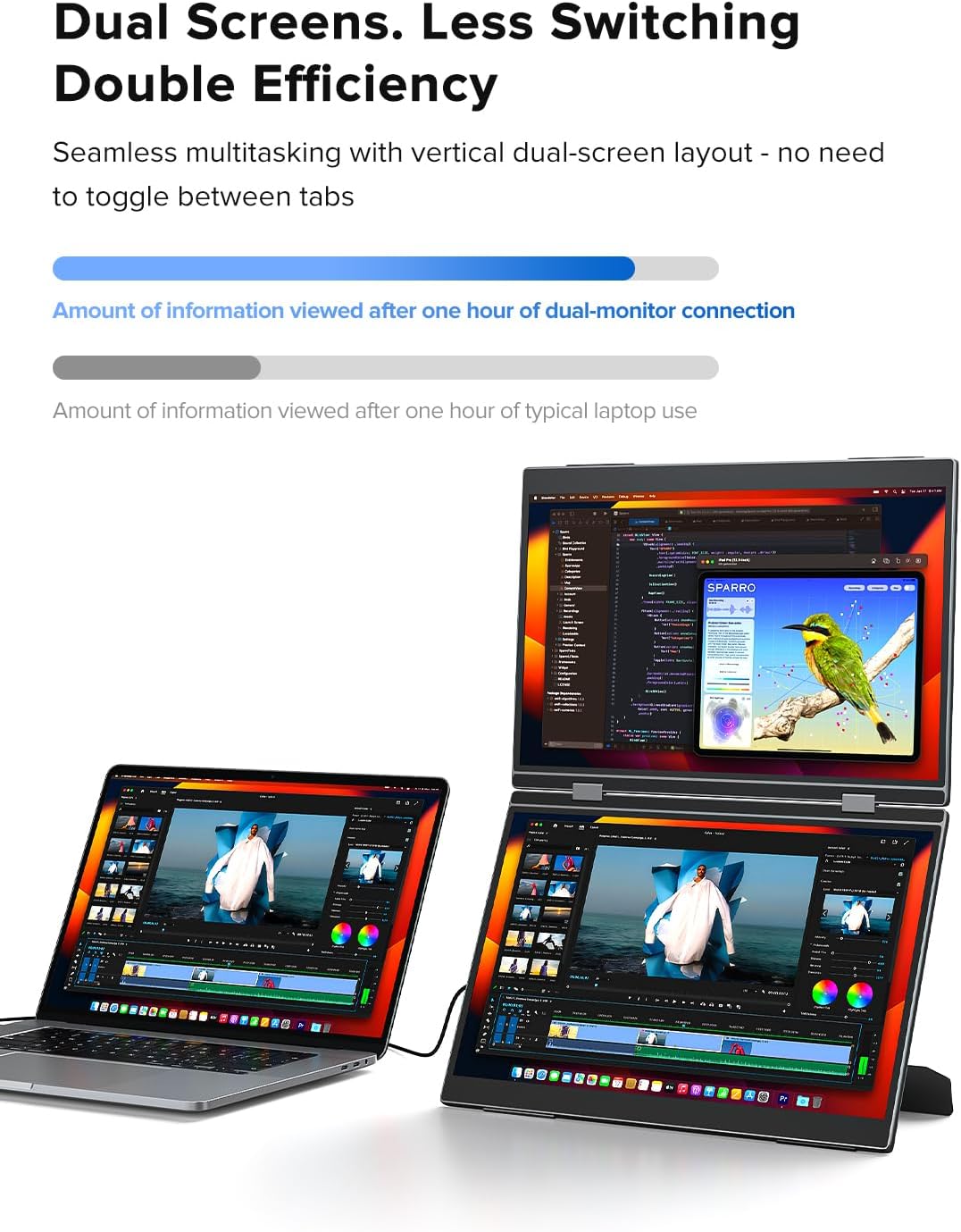
Image: A user working with a laptop and the UPERFECT Delta Pro Touch Portable Dual Monitor in a stacked vertical configuration, demonstrating enhanced productivity.
7. 仕様
| 特徴 | 詳細 |
|---|---|
| 製品寸法 | 0.39 x 12.64 x 8.27インチ |
| アイテム重量 | 2.2ポンド |
| メーカー | パーフェクト |
| 商品型番 | Delta Pro Touch |
| 立ち画面表示サイズ | 16インチ |
| アスペクト比 | 16:10 |
| 解決 | 2560 x 1600 Pixels (2.5K QXGA Wide) |
| 画像の明るさ | 400カンデラ(ニット) |
| スクリーン表面の説明 | マット |
8. メンテナンス
- 画面の掃除: 柔らかく糸くずの出ない布で軽く拭き取ってください。amp水またはスクリーン洗浄液で拭いてください。刺激の強い化学薬品や研磨剤は使用しないでください。
- 一般的な清掃: Wipe the exterior of the monitor with a soft, dry cloth.
- ストレージ: When not in use, fold the monitor to protect the screens and store it in a safe, dry place away from extreme temperatures.
- 取り扱い: Handle the monitor with care to avoid dropping or impacting it, which could damage the screens or internal components.
9。 トラブルシューティング
If you encounter issues with your UPERFECT Delta Pro Touch monitor, please refer to the following common solutions:
- 表示/信号なし:
- すべてのケーブル(電源とビデオ)がしっかりと接続されていることを確認します。
- モニターの電源がオンになっていることを確認します。
- Check your device's display settings to ensure the external monitor is detected and configured correctly (e.g., extended or duplicated).
- 別の USB-C または HDMI ケーブルを試してください。
- タッチスクリーンが反応しない:
- Ensure the USB-C cable used for video transmission also supports touch data (most modern USB-C cables do).
- モニターと接続されているデバイスの両方を再起動します。
- Check for any driver updates for your device's graphics or touch input.
- 電力の問題:
- Confirm the power adapter is correctly plugged into both the wall outlet and the monitor's power input USB-C port.
- If using a power bank, ensure it provides sufficient power output.
- 画質の問題(ちらつき、歪み):
- Adjust the display settings (resolution, refresh rate) on your connected device.
- ビデオ ケーブルが損傷していないことを確認してください。
10. 保証とサポート
UPERFECT offers a 100% money-back guarantee within 30 days and a 90-day replacement policy for product issues. A 12-month warranty is provided for any manufacturing defects. Professional technical support is available to ensure a worry-free experience.
For any queries, problems, or support needs, please contact UPERFECT customer service via support@uperfectmonitor.com.