
1. はじめに
This manual provides essential information for the proper setup, operation, and maintenance of your MINIX NUC150 Mini PC. Please read this guide thoroughly before using the device to ensure optimal performance and longevity.
パッケージ内容
以下にリストされているすべてのアイテムがパッケージに含まれていることを確認してください。
- MINIX NUC150 ミニPC x 1
- 19V/3.42A電源アダプター(米国/EU/英国プラグ付き)×1
- HDMIケーブル x 1
- VESAマウント×1
- ユーザーマニュアル (本書) x 1

Image: Contents of the MINIX NUC150 Mini PC package, including the mini PC, power adapter, HDMI cable, VESA mount, and user manual.
2.製品オーバーview
The MINIX NUC150 is a compact and powerful mini PC designed for various applications, from business and remote work to education and home entertainment. Its small form factor allows for flexible placement.
物理的な寸法と重量
- 寸法(長さx幅x高さ): 4.61 x 4.37 x 1.42 インチ (117 x 111 x 36 mm)
- 重さ: 13オンス(約0.37kg)
ポートレイアウト
The MINIX NUC150 features a comprehensive set of ports for connectivity. Familiarize yourself with the port locations for easy setup.
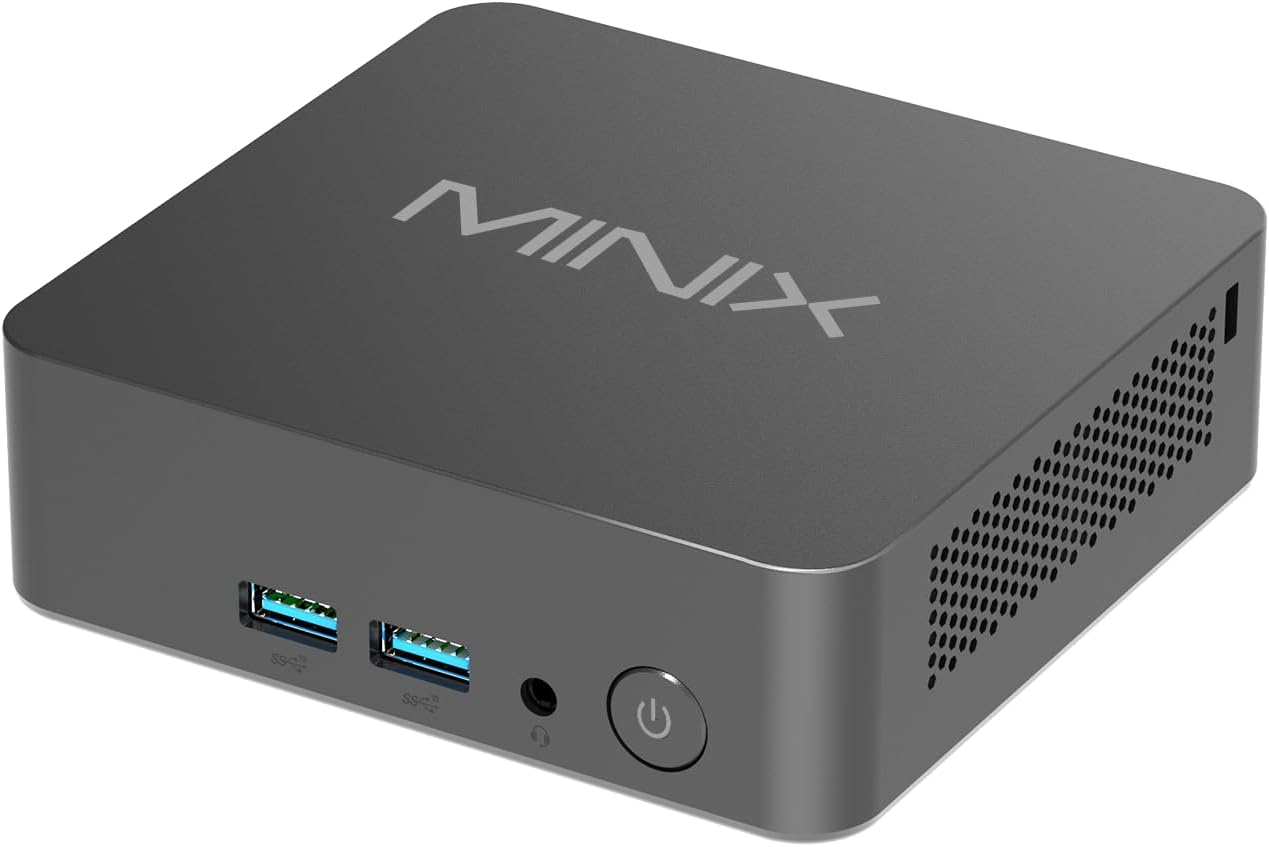
画像: 正面 view of the MINIX NUC150 Mini PC, showing two USB 3.0 ports, an audio jack, and the power button.

Image: Diagram illustrating all ports on the MINIX NUC150 Mini PC, including USB-A 2.0, USB-A 3.2, HDMI, DC Jack, Type-C (DP/PD/USB-C 3.2), RJ45 LAN, Kensington Lock, and Audio Jack.
3. セットアップ
Follow these steps to set up your MINIX NUC150 Mini PC.
ステップ 1: 周辺機器を接続する
- Connect your monitor(s) to the HDMI ports or the USB-C port using appropriate cables. The device supports up to three 4K@60Hz displays.
- キーボードとマウスを利用可能な USB-A ポートに接続します。
- If using a wired network, connect an Ethernet cable to one of the 2.5G Ethernet ports.
- Connect any other desired peripherals (e.g., external storage, speakers) to the appropriate ports.

Image: The MINIX NUC150 Mini PC connected to three 4K monitors, demonstrating its triple display capability.
ステップ2: 電源接続
- Connect the power adapter to the DC Jack on the mini PC.
- 電源アダプタを壁のコンセントに差し込みます。
ステップ3: 電源を入れる
- Press the power button located on the front of the mini PC. The power LED will illuminate.
- The system will boot into Windows 11 Pro. Follow the on-screen instructions for initial setup, including language, region, network connection, and user account creation.
4. 操作手順
The MINIX NUC150 Mini PC comes pre-installed with Windows 11 Pro and is ready for immediate use after initial setup. Below are key operational features.
プロセッサとパフォーマンス
The device is powered by an Intel N150 Processor, featuring 4 cores and 4 threads, with a max boost frequency of 3.6 GHz and 6MB total cache. This processor is designed for efficient daily tasks, video playback, and general productivity.

Image: A diagram highlighting the Intel N150 Processor with its specifications: 4 Cores, 4 Threads, 6M Total Cache, and Max Boost Frequency of 3.6 GHz.
メモリとストレージ
The NUC150 includes 16GB of DDR5-4800MHz RAM and a 512GB M.2 PCIe SSD. The system supports memory expansion up to 32GB and storage expansion up to 4TB via additional M.2 slots.

画像: 内部 view of the MINIX NUC150 Mini PC, showing the 16GB DDR5 RAM module and the 512GB M.2 PCIe 3.0 NVMe SSD.
ディスプレイ出力
The mini PC supports up to three 4K@60Hz displays simultaneously through its dual HDMI 2.1 ports and one USB-C port (DisplayPort 1.4 compatible). This configuration is suitable for multitasking and high-definition visual applications.
Network and Wireless Connectivity
このデバイスは強力な接続オプションを提供します。
- Wi-Fi 6(802.11ax): 高速ワイヤレスインターネットアクセス用。
- 2.5Gイーサネット: For fast and stable wired network connections.
- Bluetooth 5.2: キーボード、マウス、オーディオ デバイスなどのワイヤレス周辺機器を接続します。

Image: The MINIX NUC150 Mini PC connected via an Ethernet cable, with icons indicating Wi-Fi 6 and Bluetooth 5.2 capabilities.
USB-C Port Functionality
The USB-C port on the MINIX NUC150 supports multiple functions:
- データ転送: USB 3.2 Gen2 speeds.
- 表示出力: DisplayPort 1.4, supporting 4K@60Hz.
- 電力供給: 最大出力15W。

Image: Close-up of the MINIX NUC150 Mini PC's rear, highlighting the two USB-C 3.2 Gen2 ports and their data, display, and power output capabilities.
5. メンテナンス
Regular maintenance helps ensure the longevity and optimal performance of your MINIX NUC150 Mini PC.
クリーニング
- Gently wipe the exterior of the mini PC with a soft, dry, lint-free cloth.
- 液体クリーナーや研磨剤は、仕上げや内部コンポーネントを損傷する可能性があるため、使用しないでください。
- Ensure ventilation openings are clear of dust and debris to prevent overheating. Use compressed air if necessary, holding the can upright to prevent liquid discharge.
ソフトウェアアップデート
Keep your Windows 11 Pro operating system and drivers updated. Regular updates provide security enhancements, bug fixes, and performance improvements.
- へ移動 設定 > Windows Update 利用可能なアップデートを確認してインストールします。
- Allow the system to restart as required after updates.
ストレージ拡張
The MINIX NUC150 offers flexible storage expansion options:
- It includes one M.2 2280 PCIe SSD slot (occupied by the pre-installed 512GB SSD).
- An additional M.2 2242 PCIe SSD slot is available, which also supports SATA 3.0 SSDs, allowing for up to 4TB of total storage.
- デバイスの損傷を防ぐため、ハードウェアのアップグレードについては資格のある技術者に相談してください。
6。 トラブルシューティング
If you encounter issues with your MINIX NUC150 Mini PC, refer to the following common troubleshooting steps. If the problem persists, contact customer support.
電源なし / システムが起動しない
- 電源アダプタがミニ PC と正常な電源コンセントの両方にしっかりと接続されていることを確認します。
- 別のデバイスでテストして、電源コンセントが機能していることを確認します。
- Press the power button firmly. If the power LED does not light up, there may be an issue with the power supply or the unit itself.
ディスプレイ出力なし
- Check that the HDMI or USB-C cables are securely connected to both the mini PC and the monitor(s).
- モニターの電源がオンになっており、正しい入力ソース (HDMI 1、DisplayPort など) に設定されていることを確認します。
- Try connecting to a different monitor or using a different cable to rule out external display issues.
ネットワーク接続の問題
- 有線(イーサネット): Check if the Ethernet cable is properly connected to both the mini PC and your router/modem. Verify that your router/modem is working correctly.
- ワイヤレス(Wi-Fi): Windowsの設定でWi-Fiが有効になっていることを確認してください。正しいネットワークに接続していること、パスワードが正しく入力されていることを確認してください。ルーター/モデムを再起動してください。
システムパフォーマンスの問題
- バックグラウンドで実行されている不要なアプリケーションを閉じます。
- Windows とドライバーが最新であることを確認します。
- 信頼できるウイルス対策ソフトウェアを使用して、マルウェアやウイルスがないかチェックします。
- Monitor system temperatures to ensure the device is not overheating.
7. 仕様
Detailed technical specifications for the MINIX NUC150 Mini PC.
| 特徴 | 仕様 |
|---|---|
| ブランド | MINIX |
| モデル番号 | NUC150 |
| オペレーティング·システム | ウィンドウズ11プロ |
| プロセッサ | Intel N150 (3.6 GHz Celeron, 4 Cores, 4 Threads, 6MB Cache) |
| ラム | 16GB DDR5 (4800 MHz)、最大32GBまで拡張可能 |
| ハードドライブ | 512GB M.2 PCIe x4 SSD, expandable up to 4TB (via M.2 2280 PCIe and M.2 2242 PCIe/SATA slots) |
| グラフィックスコプロセッサ | Intel グラフィックス(統合) |
| 最大画面解像度 | 4K Pixels (3840 x 2160) |
| ディスプレイ出力 | 2x HDMI 2.1, 1x USB-C (DP 1.4) - Triple 4K@60Hz support |
| ワイヤレスタイプ | Wi-Fi 6(802.11ax)、Bluetooth 5.2 |
| イーサネット | 2.5Gイーサネット |
| USBポート | 3x USB 3.0, 1x USB 2.0, 1x USB-C (Data/DP 1.4/PD 15W) |
| オーディオ | オーディオジャック |
| アイテム重量 | 13オンス(0.37 kg) |
| 製品寸法(長さx幅x高さ) | 4.61 x 4.37 x 1.42 インチ (117 x 111 x 36 mm) |
8. 保証とサポート
MINIX is committed to providing reliable products and customer satisfaction.
保証情報
For specific warranty terms and conditions, please refer to the warranty card included with your product or visit the official MINIX website. Generally, MINIX products come with a limited warranty covering manufacturing defects.
カスタマーサポート
If you require technical assistance or have questions regarding your MINIX NUC150 Mini PC, please use the following methods:
- オンラインサポート: 公式MINIXをご覧ください webFAQ、ドライバーのダウンロード、サポート リソースのサイトです。
- アマゾンカスタマーサービス: If purchased via Amazon, you can contact support through your Amazon account:
"Login Amazon" > "Your Account" > "Your orders" > "Ask Product Question"


