
1. はじめに
This manual provides instructions for the safe and effective use of your Vivitar VES829 20MP 8X Optical Zoom Digital Camera. Please read this manual thoroughly before operating the camera and retain it for future reference. The Vivitar VES829 is designed to capture high-resolution photos and videos with ease, featuring a 20MP sensor, 8x optical zoom, and Wi-Fi connectivity.
2. パッケージ内容
Verify that all items listed below are present in your camera kit:
- Vivitar VES829 Digital Camera
- USBケーブル
- リストストラップ
- キャリングポーチ
- ユーザーマニュアル(このドキュメント)

Image: Included carrying pouch for the Vivitar VES829 camera.
3.カメラオーバーview
Familiarize yourself with the various parts of your Vivitar VES829 camera.
フロント View

画像: 正面 view of the Vivitar VES829 camera, highlighting the 8x optical zoom lens and built-in flash.
後方 View

画像: 背面 view of the Vivitar VES829 camera, displaying the 2.8-inch LCD screen and navigation controls.
側 View
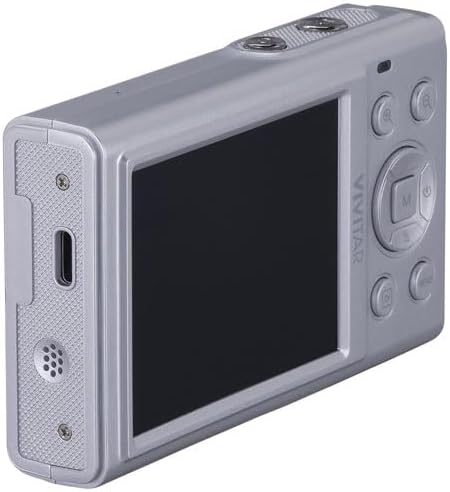
画像: サイド view of the Vivitar VES829 camera, illustrating the USB port for charging and data transfer, and the speaker.
4. はじめに(セットアップ)
4.1バッテリーの挿入
The Vivitar VES829 camera does not include batteries. You will need to purchase compatible batteries separately. Refer to the camera's battery compartment for the correct battery type and orientation. Ensure the camera is powered off before inserting or removing batteries.
4.2 メモリカードの挿入
A memory card (not included) is required to store photos and videos. Locate the memory card slot, typically near the battery compartment. Insert the memory card in the correct orientation until it clicks into place. To remove, press the card gently until it springs out.
4.3 カメラの充電
Connect the camera to a power source using the provided USB cable. The charging indicator light will illuminate. Once fully charged, the indicator light will change or turn off. Do not use unauthorized chargers.
4.4 電源のオン/オフ
Press and hold the Power button (usually marked with a power symbol) to turn the camera on or off. The LCD screen will activate upon power-on.
4.5 日付と時刻の設定
Upon first power-on or after battery replacement, you may be prompted to set the date and time. Use the navigation buttons to adjust the settings and confirm your selection. Correct date and time settings are important for organizing your photos and videos.
5. 基本操作
5.1 写真を撮る
- 電源オン: カメラをオンにします。
- ショットのフレーミング: Use the 2.8-inch full-color LCD display to compose your image.
- ズームを調整: Use the zoom controls (often marked 'W' for Wide and 'T' for Telephoto) to adjust the 8x optical zoom.
- 集中: The camera features autofocus. Half-press the shutter button to allow the camera to focus.
- 捕獲: Fully press the shutter button to take a 20MP photo.
- フラッシュ: The built-in flash has automatic and red-eye reduction modes. Adjust flash settings via the menu if needed.
5.2ビデオの録画
- ビデオモードに切り替える: Select video mode using the mode dial or menu.
- 録画を開始: Press the dedicated video record button or the shutter button to begin recording. The camera supports HD video and audio recording, with a maximum resolution of 4K at 30fps.
- 録画を停止: 停止するには、もう一度録画ボタンを押します。
5.3 レviewイングメディア
Press the Playback button (often marked with a play icon) to view your captured photos and videos on the LCD screen. Use the navigation buttons to scroll through your media. Press the Playback button again to exit playback mode.
5.4 Wi-Fiへの接続
The Vivitar VES829 features built-in Wi-Fi for seamless sharing. Access the Wi-Fi settings through the camera's menu. Follow the on-screen instructions to connect to a Wi-Fi network and transfer your media to compatible devices.
6. 高度な機能
6.1 撮影モード
The camera offers multiple shooting modes to enhance your creativity, including Antique, Gray, and Lomo. These modes can be selected via the camera's menu to apply unique effects to your photos.
6.2 顔検出
The precise face detection feature automatically identifies and sharpens facial features in your photos, ensuring clear and well-focused portraits.
7. メンテナンスとケア
7.1 クリーニング
- レンズ: カメラレンズ専用の柔らかく糸くずの出ない布を使用してください。指でレンズに触れないようにしてください。
- LCDスクリーン: Wipe gently with a soft, dry cloth. Do not use abrasive cleaners.
- カメラ本体: Use a soft, dry cloth to clean the camera body. Avoid moisture.
7.2 ストレージ
When not in use, store the camera in a cool, dry place, away from direct sunlight and extreme temperatures. Use the provided carrying pouch for protection.
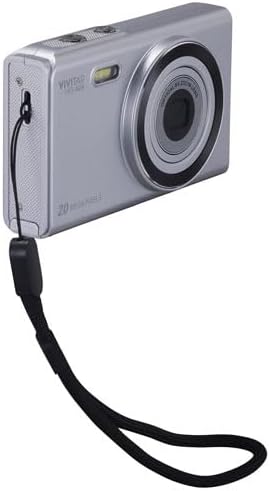
Image: Vivitar VES829 camera with an attached wrist strap for secure handling.
7.3バッテリーケア
Remove batteries if the camera will not be used for an extended period. Dispose of batteries according to local regulations.
8。 トラブルシューティング
カメラに問題が発生した場合は、次の一般的な問題と解決策を参照してください。
- カメラの電源が入らない: 電池が正しく挿入され、完全に充電されていることを確認してください。
- 写真がぼやけています: Check that the lens is clean. Ensure the camera has focused before fully pressing the shutter button. Image stabilization is digital; hold the camera steady.
- メモリカードエラー: メモリーカードが正しく挿入されていること、また容量がいっぱいまたは破損していないことを確認してください。カードを再フォーマットしてみてください(すべてのデータが消去されます)。
- Wi-Fi接続の問題: Verify that Wi-Fi is enabled on the camera and the receiving device. Ensure you are within range of the Wi-Fi network.
- フラッシュが点灯しない: Check flash settings in the menu to ensure it is not set to 'Off' or 'Red-Eye Reduction' in bright conditions.
問題が解決しない場合は、カスタマー サポートにお問い合わせください。
9. 仕様
| 特徴 | 仕様 |
|---|---|
| モデル番号 | ヴェス829 |
| フォトセンサー解像度 | 20 MP |
| 静止画総解像度 | 64 MP |
| 光学ズーム | 8x |
| 画像安定化 | デジタル |
| オートフォーカス | Yes (Phase Detection) |
| 最大ビデオ解像度 | 4K at 30fps (1080p listed in some specs) |
| 表示タイプ | 2.8インチフルカラーLCD |
| 接続性 | Wi-Fi、USB |
| フラッシュモード | Automatic, Red Eye Reduction |
| 撮影モード | Antique, Gray, Lomo, and more |
| フォトセンサー技術 | シーモス |
| サポート File 形式 | MP4(ビデオ) |
| 耐水性レベル | 耐水性はありません |
10. 保証情報
The Vivitar VES829 Digital Camera comes with a 30-day limited warranty from the date of purchase. This warranty covers manufacturing defects. Please retain your proof of purchase for warranty claims. The warranty does not cover damage caused by misuse, accidents, unauthorized repairs, or normal wear and tear.
11. カスタマーサポート
For further assistance, technical support, or warranty inquiries, please contact Vivitar customer service. Refer to the Vivitar official web最新の連絡先情報については、サイトまたは製品パッケージをご覧ください。