
導入
This manual provides instructions for the proper setup, operation, and maintenance of your SMALLRIG Push-Button Rotating Side Handle with NATO Clamp. This accessory is designed to enhance handheld camera operation by providing a comfortable and versatile grip solution for camera cages and mounting plates equipped with NATO rails.
箱の中身
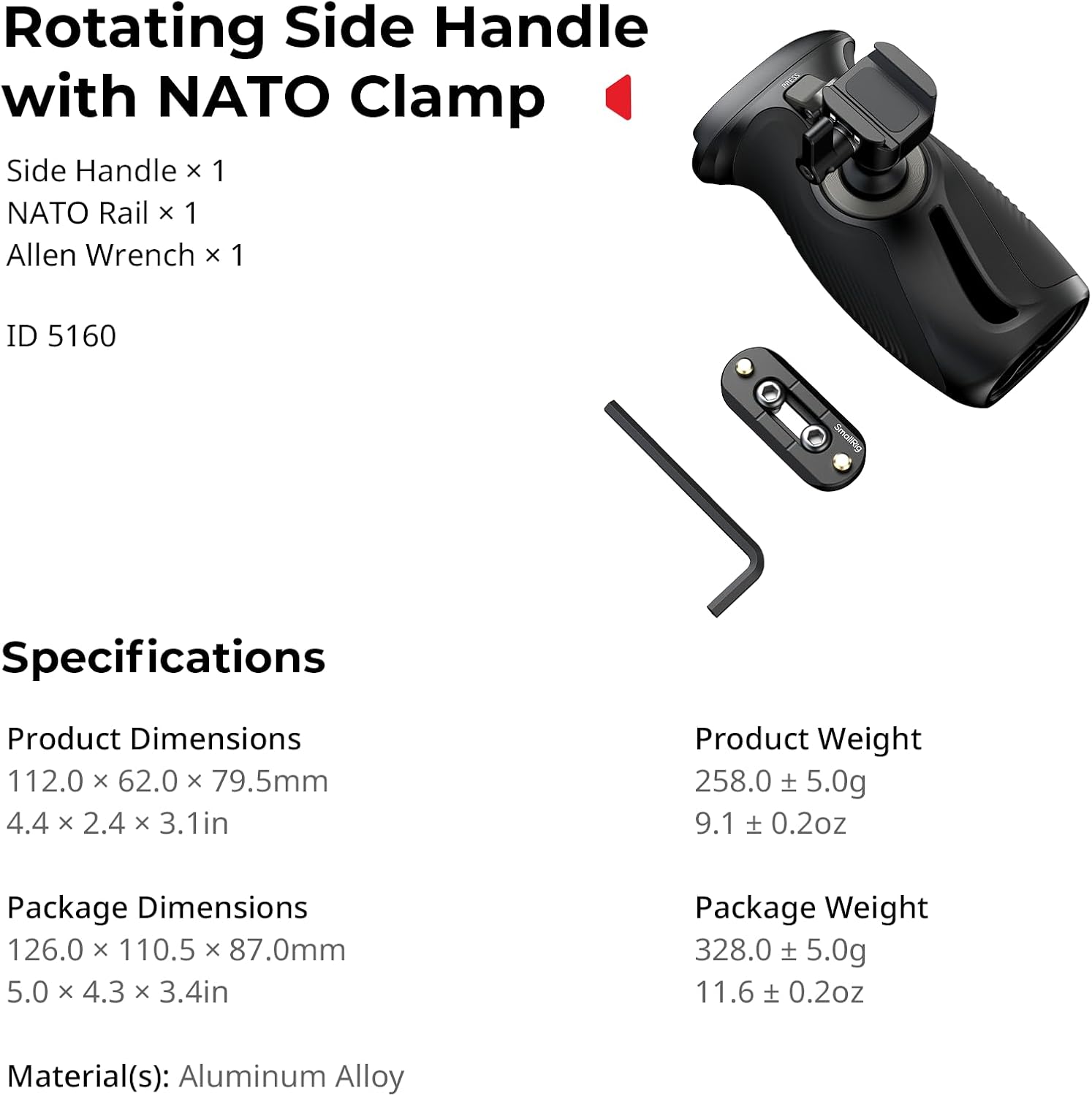
- サイドハンドル×1
- NATOレール×1
- 六角レンチ×1
主な特徴
- 回転可能なデザイン: Features a push-button mechanism for 360° rotation, allowing for quick and smooth angle adjustments.
- ユニバーサル互換性: Designed for both left and right-hand use, attaching to camera/monitor cages and mounting plates with NATO rails.
- 高耐荷重: Supports a maximum load of 15kg (33lb), ensuring stability for various camera setups.
- 人間工学に基づいたグリップ: Constructed with anti-slip silicone for a comfortable and secure hold, even in varying conditions.
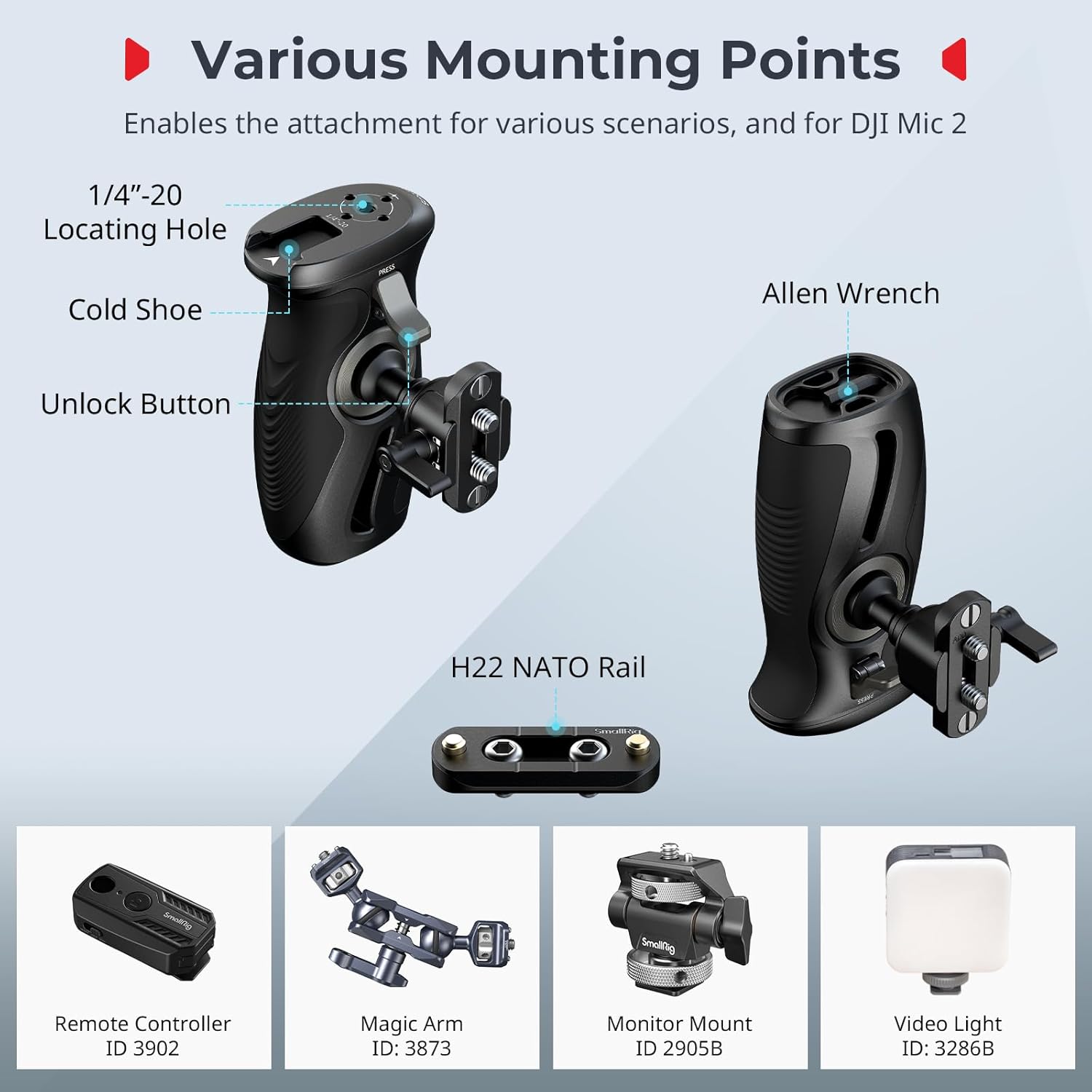
- 複数の取り付けポイント: Includes 1/4"-20 locating holes and a cold shoe mount for attaching accessories like remote controllers, magic arms, monitors, microphones, and video lights.
セットアップ手順
- Attach NATO Rail (if necessary): If your camera cage or mounting plate does not have a built-in NATO rail, use the included NATO rail and Allen wrench to securely attach it to your desired position on the cage. Ensure it is tightened firmly to prevent movement.
- Mount the Side Handle: NATOのclを合わせるamp on the side handle with the NATO rail on your camera setup. Slide the handle onto the rail.
- ハンドルを固定する: Tighten the locking knob on the NATO clamp to firmly secure the side handle in place. Verify that the handle is stable and does not wobble.

操作手順
360°回転
The side handle features a push-button mechanism for quick angle adjustments. To rotate the handle:
- Locate the unlock button on the handle.
- ロック解除ボタンを長押しします。
- While holding the button, rotate the handle to your desired angle (up to 360°).
- Release the button to lock the handle in the new position.
重要な安全上の注意: When adjusting the angle, always hold the camera or rig securely with your other hand to prevent accidental drops or damage.

アクセサリの取り付け
The handle provides various mounting points for additional accessories:
- 1/4"-20 位置決め穴: Use these threaded holes to attach remote controllers, magic arms, or other accessories with 1/4"-20 screws.
- コールドシューマウント: The integrated cold shoe mount allows for direct attachment of accessories such as monitor mounts, microphones, or video lights.
メンテナンス
- Regularly inspect all screws and connections to ensure they are tight. Use the included Allen wrench for tightening if necessary.
- Clean the handle and NATO rail with a soft, dry cloth. Avoid using harsh chemicals or abrasive materials that could damage the finish or silicone grip.
- Store the handle in a dry, dust-free environment when not in use.
トラブルシューティング
Handle is loose or wobbly after attachment
Ensure the locking knob on the NATO clamp is fully tightened. If the issue persists, check if the NATO rail itself is securely attached to your camera cage. Re-tighten any loose screws using the Allen wrench.
Rotation mechanism feels stiff or does not lock properly
Ensure the unlock button is fully depressed when attempting to rotate. If the mechanism feels stiff, check for any debris or obstructions around the rotating joint. Avoid forcing the rotation; if resistance is significant, contact customer support.
仕様
| 特徴 | 詳細 |
|---|---|
| モデル名 | 12669 |
| 製品寸法 | 112.0 x 62.0 x 79.5mm(4.41 x 2.44 x 3.15 inches) |
| 製品重量 | 0.26キログラム(9.1オンス) |
| 材料 | アルミニウム合金、シリコン |
| 最大 負荷容量 | 15キログラム(33ポンド) |
| 回転角度 | 360° |
| 取り付けタイプ | NATO Clamp (表面実装) |
| 対応デバイス | カメラ/モニターケージ、NATOレール付き取り付けプレート |

保証とサポート
保証情報
This SMALLRIG product is covered by a 2年間のメーカー保証 ご購入日から1年間有効です。本保証は、通常の使用における材料および製造上の欠陥を対象とします。誤用、事故、不正な改造、または不適切な取り付けによる損傷は保証の対象外となります。
カスタマーサポート
For technical assistance, warranty claims, or product inquiries, please contact SMALLRIG customer support through their official website or the retailer where the product was purchased. Please have your product model number (12669) and proof of purchase ready when contacting support.