
1.セットアップガイド
1.1 Choosing the Right Ring Size
For optimal performance and accurate data monitoring, selecting the correct ring size is crucial. The COLMI R02 Smart Ring should fit snugly but comfortably around your finger's base. We recommend wearing the ring on your index finger for best results. The middle and ring fingers can also work effectively. Avoid fingers where the base is narrower than the knuckle.
If you have purchased a COLMI Sizing Kit, use it to determine your ideal size. Alternatively, you can use the following methods:
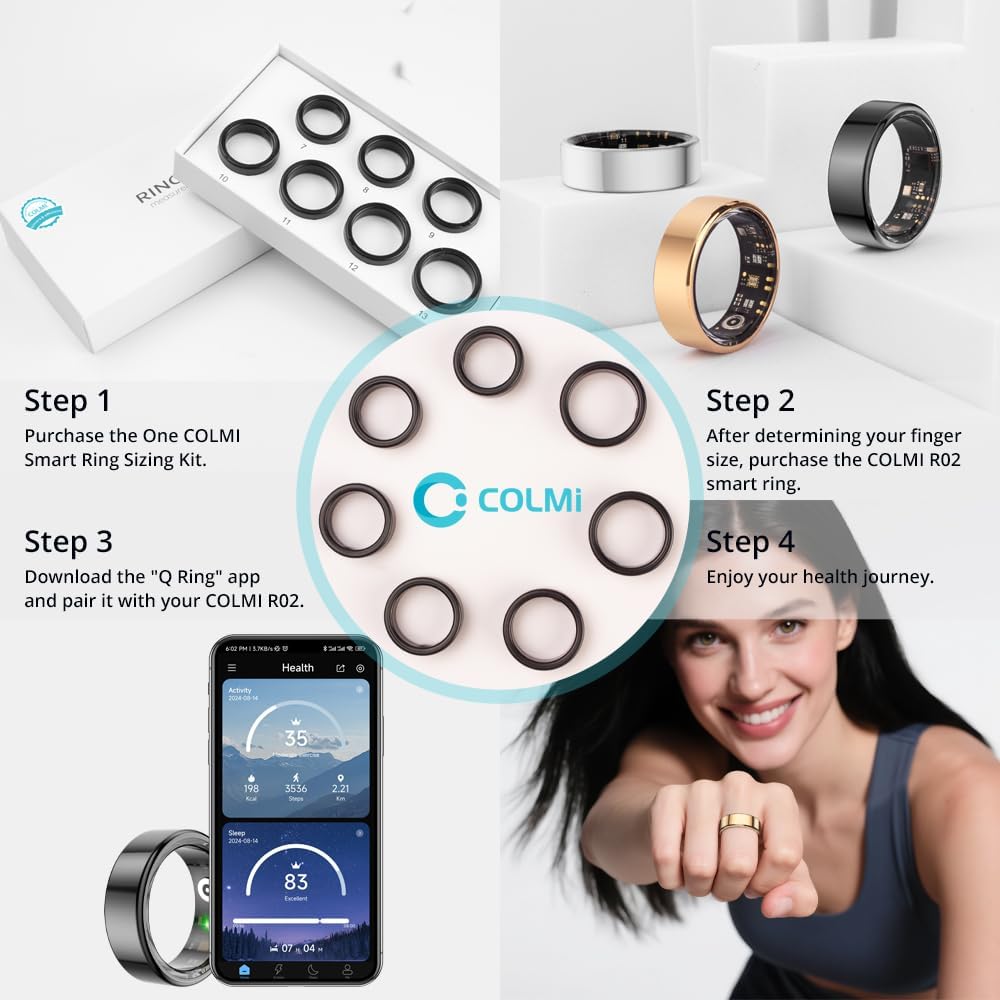
図1:以上view of the COLMI R02 Smart Ring setup process, starting with sizing and ending with app integration.

Figure 2: Detailed instructions for measuring ring size using both digital and manual methods, including a size chart for reference.
Method 1: Using a Phone App
Many smartphone applications offer a ring sizer feature. Place a standard ID or credit card vertically on your phone screen and adjust the slider until the blue box matches the card's width. If you don't have an existing ring, place your fingers flat on the screen and adjust the distance between them to find your ring size. If you have a ring you wear regularly, place it on the screen and adjust the circle to match the inside of your ring.
Video 1: Demonstrates how to use a smartphone app to measure your ring size, including both finger and existing ring measurement techniques.
Method 2: String Measurement
Wrap a thin, non-elastic string or paper strip around your finger once. Ensure it is not too tight or too loose, as this can lead to inaccurate measurements. Mark the position where the string overlaps with a pen. Straighten the string and measure its length with a ruler. Compare this measurement to the provided size chart to find your corresponding ring size.
Video 2: Illustrates the string measurement method for determining ring size, showing how to wrap, mark, and measure the string.
重要: The ring size refers to the inner diameter. Do not measure the outer diameter. If the ring is too loose, it will affect the accuracy of monitoring data.
After selecting a size, try wearing a sizing ring (if available) for at least 24 hours to confirm the best fit, as fingers can naturally expand and contract.
Video 3: Demonstrates how to test the fit of the ring and the importance of a snug fit for accurate data.
1.2 スマートリングの充電
The COLMI R02 Smart Ring comes with a portable charging box. Before initial use, ensure the ring is fully charged. Place the ring into the charging compartment. The indicator light will show charging status (red for charging, green for full charge).
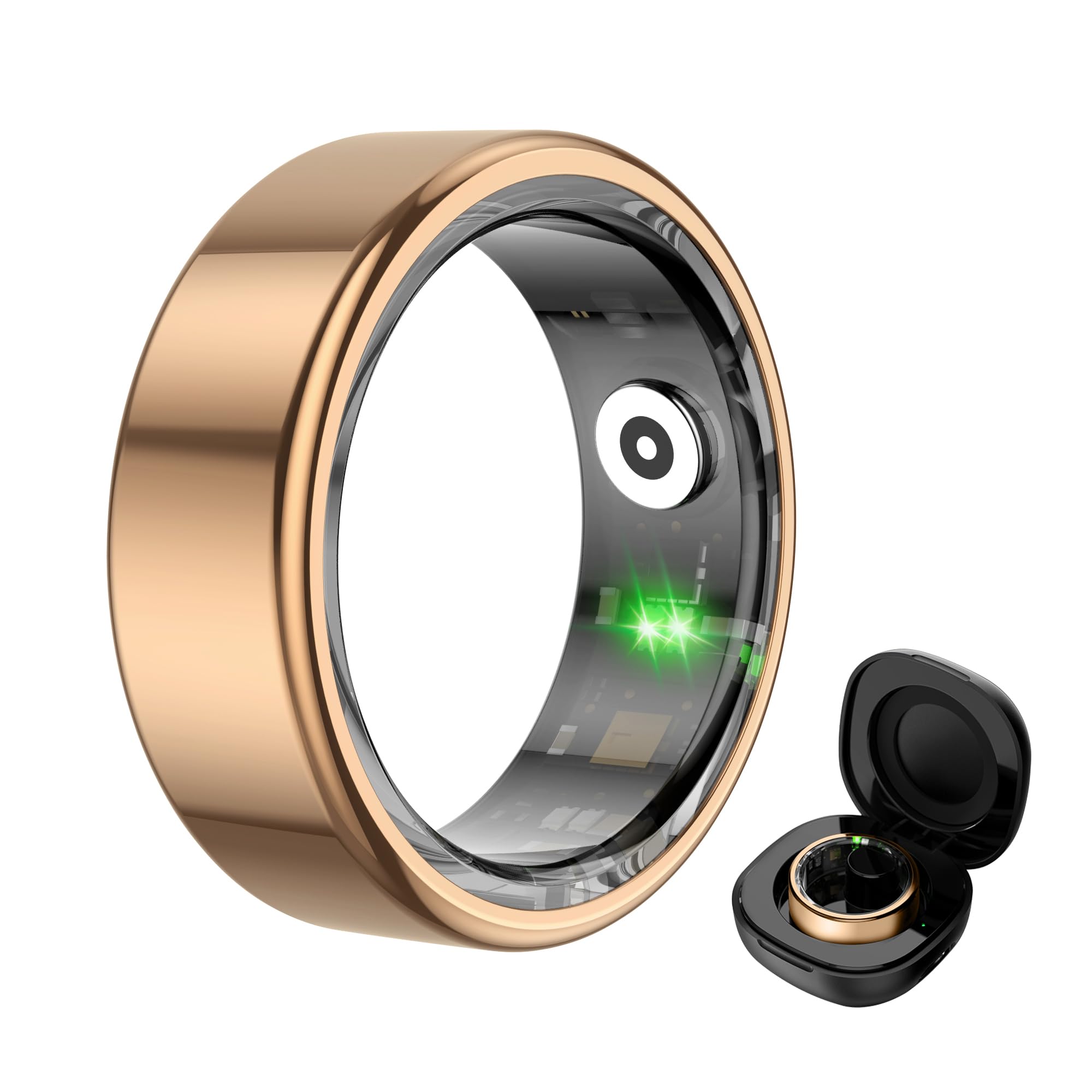
Figure 3: The COLMI R02 Smart Ring and its charging case. The image also illustrates the charging process and full charge indication.
Video 4: Shows the process of charging the COLMI R02 Smart Ring using its charging case and connecting it to the app.
1.3 アプリ接続
Download the "Q Ring" application on your smartphone (compatible with iOS and Android devices). Enable Bluetooth on your phone. Open the "Q Ring" app and follow the on-screen instructions to search for and bind your COLMI R02 Smart Ring. Once connected, you will be able to view your health and activity data.
Video 5: Demonstrates how to connect the COLMI R02 Smart Ring to the "Q Ring" app via Bluetooth and view initial data.
2. 操作
2.1 健康状態のモニタリング
The COLMI R02 Smart Ring continuously monitors various health metrics throughout the day and night. Access the "Health Monitoring" section in the "Q Ring" app to view あなたのデータ。
- 心拍数モニタリング: Supports 24-hour heart rate monitoring. You can adjust the monitoring frequency in the app settings.
- 血中酸素モニタリング: Records blood oxygen data, providing insights into your respiratory health.
- 睡眠モニタリング: Analyzes your sleep patterns, including light sleep, deep sleep, and REM duration, to help you understand and improve your sleep quality.

Figure 4: The smart ring actively tracking heart rate, displayed on a graph within the companion app.
Video 6: Guide on how to adjust heart rate measurement settings within the app for optimal data collection and battery life.

Figure 5: The smart ring monitoring blood oxygen levels, with data visualized on a graph in the app.

Figure 6: Detailed sleep analysis provided by the smart ring, showing different sleep stages and overall sleep quality.
2.2 スポーツモードとアクティビティトラッキング
The COLMI R02 Smart Ring supports multiple sports modes, such as running, to track your physical activity. It records exercise time, steps taken, calories burned, and distance covered, helping you monitor your fitness progress.

Figure 7: The smart ring tracking various sports activities and displaying real-time data in the app.
2.3 リモートカメラコントロール
After connecting the ring to your mobile phone via the "Q Ring" app, you can use the smart ring to remotely control your phone's camera. This allows you to take photos by simply waving your finger, making it convenient for group shots or selfies.
3. メンテナンス
COLMI R02 スマートリングの寿命を延ばし、最適なパフォーマンスを確保するには、次のメンテナンスガイドラインに従ってください。
- クリーニング: Regularly wipe the ring with a soft, dry cloth to remove any dirt or sweat. Avoid using harsh chemicals or abrasive materials that could damage the finish or sensors.
- 充電: Charge the ring using the provided charging compartment and cable. Avoid using third-party chargers that may not be compatible.
- 耐水性: The ring is water-resistant, but it is not recommended for prolonged submersion or high-pressure water activities. Avoid wearing it while swimming or showering to prevent potential damage.
- ストレージ: When not in use, store the ring in its charging compartment or a safe, dry place away from extreme temperatures and direct sunlight.
- ソフトウェアアップデート: Keep the "Q Ring" app updated to the latest version to ensure compatibility and access to new features or performance improvements.
4。 トラブルシューティング
If you encounter any issues with your COLMI R02 Smart Ring, please refer to the following common troubleshooting steps:
- リングがアプリに接続されない:
- スマートフォンでBluetoothが有効になっていることを確認します。
- リングが充電されていることを確認してください。
- Restart both your phone and the ring (by placing it in the charger and removing it).
- Ensure the "Q Ring" app is updated to the latest version.
- Try unbinding and re-binding the device in the app settings.
- 不正確なデータの読み取り:
- Verify that the ring is worn correctly and snugly on your finger, preferably the index finger.
- Ensure the sensor inside the ring is on the palm side of your finger.
- リングの内側にあるセンサーを清掃します。
- リングが完全に充電されていることを確認してください。
- バッテリー寿命が短い:
- Check the app settings for health monitoring frequency. More frequent monitoring (e.g., 5-minute heart rate intervals) will consume more battery. Adjust to a longer interval (e.g., 30 or 60 minutes) for extended battery life.
- 使用する前にリングが完全に充電されていることを確認してください。
これらの手順を実行しても問題が解決しない場合は、カスタマー サポートに問い合わせて、さらにサポートを受けてください。
5. 仕様
| 特徴 | 詳細 |
|---|---|
| モデル名 | コルミR02 |
| オペレーティングシステムの互換性 | アンドロイド、iOS |
| メモリストレージ容量 | 1MB |
| 特集 | Exercise data, Heart rate measurement, Sleep measurements, Sport mode |
| バッテリー容量 | 15ミリamp 営業時間 |
| 接続技術 | ブルートゥース |
| 無線通信規格 | ブルートゥース |
| バッテリーセルの構成 | リチウムポリマー |
| GPS | GPSなし |
| 形 | ラウンド |
| バンド素材タイプ | 金属 |
| 耐水性レベル | 耐水性 |
| ヒューマンインターフェイス入力 | ジェスチャー |
| サポートされているアプリケーション | Camera, Fitness Tracker, Heart Rate Monitor, Sleep Monitor |
| 測定された指標 | Heart Rate Monitor, Blood Oxygen Monitor, Sleep Duration |
| 閉鎖タイプ | スライド |
| スタイル名 | ミニマリスト |
| 年齢範囲の説明 | アダルト |
| 内蔵メディア | Charging Cable, Charging Case, User Manual |
| メーカー | 深センCOLMlテクノロジー株式会社 |
6.保証とサポート
The COLMI R02 Smart Ring comes with a 1年間保証. For any usage or quality problems, please contact customer support. The manufacturer, Shenzhen COLMl Technology Co., Ltd, is committed to providing professional after-sales service.
サポートへのお問い合わせ: Refer to the contact information provided with your product packaging or visit the official COLMI webサポート リソースのサイト。


