
1. はじめに
The Amazon Echo Dot Kids (5th Gen) is a smart speaker designed for children, offering a screen-free experience with Alexa. It provides access to kid-friendly audio content, educational skills, and interactive experiences, all managed through parental controls. This device is not a toy but a tool to support learning and entertainment in a safe environment.

Image: The Amazon Echo Dot Kids (5th Gen) in a vibrant Rainbow Swirl pattern, positioned on a stack of colorful books.
2. セットアップ
To set up your Echo Dot Kids, follow these steps:
- 電源オン: Connect the included glacier white power adapter (15W) to your Echo Dot Kids and plug it into a power outlet.
- Alexaアプリをダウンロードしてください: Install the Alexa app on a compatible Fire OS, Android, or iOS device. The app is also accessible via a web ブラウザ。
- Wi-Fiに接続します: Open the Alexa app and follow the on-screen instructions to connect your Echo Dot Kids to your dual-band Wi-Fi network (supports 802.11a/b/g/n/ac on 2.4 and 5 GHz). The device supports Amazon Wi-Fi simple setup for easy connection. Ad-hoc (peer-to-peer) Wi-Fi networks are not supported.
- Link Amazon Kids+ (Optional): Your device includes 1 year of Amazon Kids+. Follow the prompts in the Alexa app or Amazon Kids Parent Dashboard to activate and manage this subscription.
3. 操作手順
The Echo Dot Kids is primarily voice-controlled. Here are common operations:
- ウェイクワード: Say "Alexa" to activate the device. The light ring will illuminate to indicate it is listening.
- 音楽を再生する: Request songs from Amazon Music, Apple Music, Spotify, or Pandora. Explicit lyrics are filtered for age-appropriate listening. Example: "Alexa, play kids' music."
- Stories and Audiobooks: Access thousands of kid-friendly audiobooks and podcasts through Amazon Kids+. Example: "Alexa, tell me a story."
- 教育コンテンツ: Engage with interactive conversations, fun facts, and educational Alexa skills. Example: "Alexa, can you quiz me about dinosaurs?"

Image: A child with braided hair sits at a desk, with the Rainbow Swirl Echo Dot Kids nearby, illustrating interaction with Alexa for educational content.
- Creating Stories: Alexa+ allows kids to co-create unique stories by asking about characters and themes. Example: "Alexa, let's create a story together."

Image: A child lies in bed with a plush toy, looking towards an Owl-themed Echo Dot Kids, suggesting bedtime story interaction.
- Routines and Alarms: Set morning alarms and daily routines to support independence. Example: "Alexa, set an alarm for 7 AM."
- Bluetooth接続: Stream audio from your mobile device to the Echo Dot Kids (A2DP) or from the Echo Dot Kids to a Bluetooth speaker (AVRCP). Bluetooth speakers requiring PIN codes are not supported.
4. Parental Controls and Privacy
The Echo Dot Kids is designed with multiple layers of privacy and parental controls:
- マイクオフボタン: A physical button on the device allows you to instantly turn off the microphone.
- ストリーミングインジケーター: Visual indicators show when Alexa is listening or responding.
- Amazon Kids Parent Dashboard: Use the app to remotely monitor what kids are listening to and creating. You can view and delete voice recordings, manage content, and set daily screen time limits.
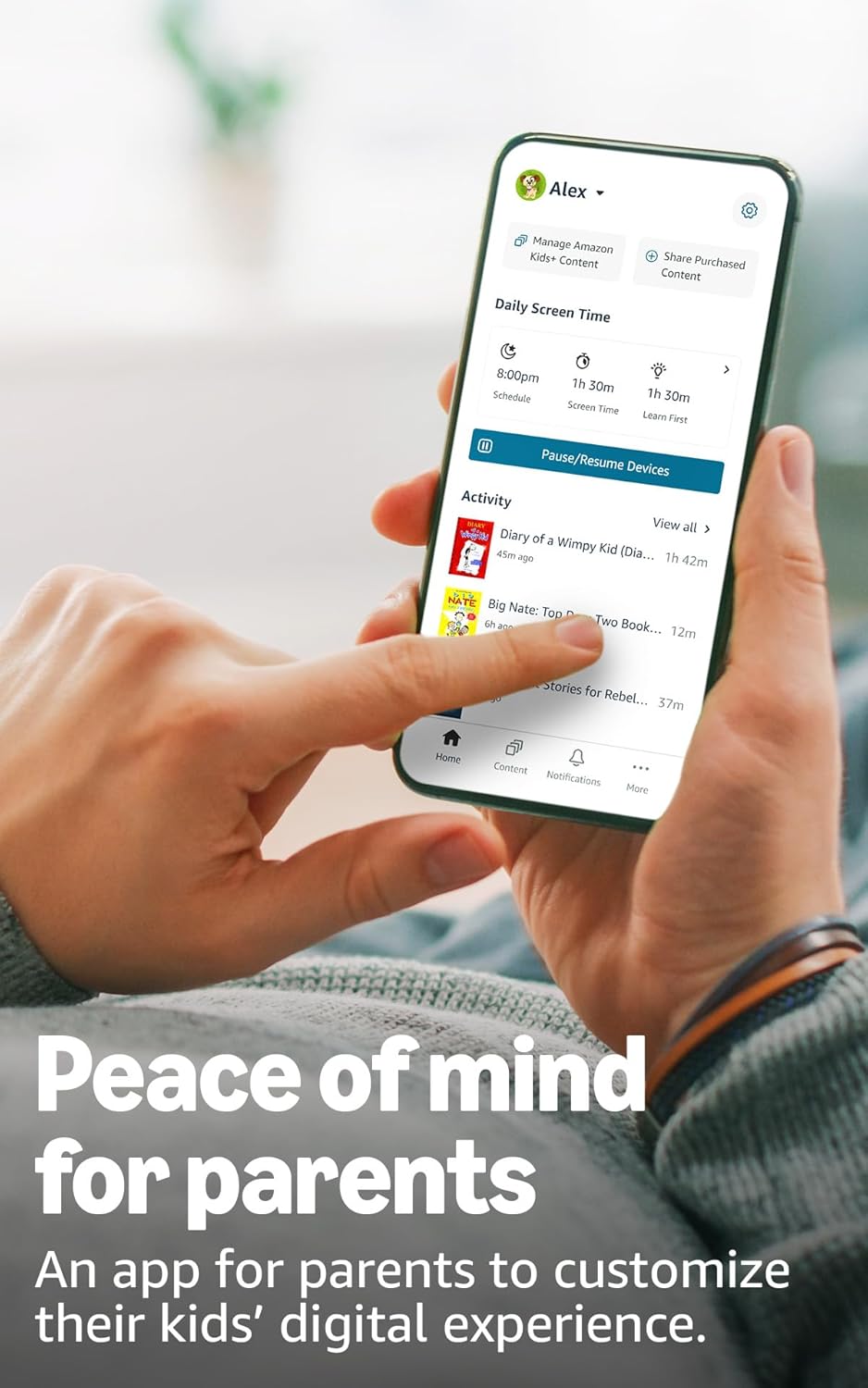
Image: A smartphone displaying the Amazon Kids Parent Dashboard app, showing options for managing content, daily screen time, and activity logs.
- Alexa プライバシーハブ: Visit the Alexa Privacy Hub for detailed information on how Alexa and Echo devices protect your privacy.
- アマゾンの歩道: This feature uses Echo and Ring devices to securely keep other devices connected. It is turned on by default but can be turned off at any time through the Alexa app.
5. Content and Features
Your Echo Dot Kids comes with a 1-year subscription to Amazon Kids+, offering a wealth of age-appropriate content:
- Audiobooks and Podcasts: Access popular books from Disney, fiction classics, and ad-free podcasts from Wondery Kids & Family.
- Interactive Games and Skills: Engage with educational Alexa skills and interactive games.
- Ad-Free Radio: Enjoy ad-free radio stations from iHeart Radio Family.

Image: A collage of book and podcast covers, including Disney, Barbie, Audible, and Marvel titles, illustrating the variety of kid-friendly content available through Amazon Kids+.
After the first year, the Amazon Kids+ subscription automatically renews monthly. You can cancel at any time via the Amazon Kids Parent Dashboard or by contacting Customer Service.
6. メンテナンス
To ensure the longevity and optimal performance of your Echo Dot Kids:
- クリーニング: Gently wipe the device with a soft, dry, lint-free cloth. Do not use abrasive cleaners or solvents.
- 配置: デバイスは、直射日光、熱源、湿気を避け、安定した平らな面に置いてください。
- 電源アダプター: デバイスに付属の純正電源アダプターのみを使用してください。
7。 トラブルシューティング
If you encounter issues with your Echo Dot Kids, consider the following:
- 電源なし: 電源アダプタがデバイスと正常な電源コンセントの両方にしっかりと接続されていることを確認します。
- Wi-Fi接続なし: Check your Wi-Fi router and ensure it is working correctly. Restart your router and the Echo Dot Kids. Verify Wi-Fi settings in the Alexa app.
- Alexaが応答しない: マイクがミュートされていないことを確認してください(ミュートされている場合はライトリングが赤く点灯します)。デバイスの通信範囲内で、はっきりと話してください。
- オーディオの問題: Check the volume level. If connected to a Bluetooth speaker, ensure the speaker is paired and powered on.
- ペアレンタルコントロールの問題: Review settings in the Amazon Kids Parent Dashboard to ensure content filters and time limits are configured as desired.
- デバイスを再起動します: Unplug the power adapter from the device for a few seconds, then plug it back in to restart.
8. 仕様
| 特徴 | 詳細 |
|---|---|
| サイズ | 3.9” x 3.9” x 3.5” (100 mm x 100mm x 89 mm) |
| 重さ | 10.7オンス(304g) |
| オーディオ | 1.73インチ(44 mm)の前面発射型スピーカー、ロスレス高解像度 |
| Wi-Fi接続 | Dual-band Wi-Fi (802.11a/b/g/n/ac, 2.4 and 5 GHz) |
| Bluetooth接続 | A2DP support for audio streaming, AVRCP for voice control |
| スマートホームプロトコル | Wi-Fi, Bluetooth Low Energy Mesh |
| システム要件 | Alexa app compatible with Fire OS, Android, iOS, web ブラウザ |
| ボックスに含まれるもの | Echo Dot (5th Gen) Kids, glacier white power adapter (15W), Quick Start Guide, Alexa Guide for kids |
| 世代 | Echo Dot (5th Gen) Kids - 2022 release |
| 言語 | Alexa speaks English and Spanish (Spanish not available in Amazon Kids) |
| 年齢範囲 | 対象年齢 3 歳以上 (警告: 窒息の危険 - 小さな部品が含まれています。3 歳未満のお子様には適していません。) |
9. 保証とサポート
Your Echo Dot Kids (5th Gen) is covered by a 2年間の安心保証. If it breaks, Amazon will replace it for free. For more details on this coverage, please refer to the terms provided at the time of purchase or contact Amazon Customer Service.
Use of Echo Dot Kids is subject to the terms found on the Amazon webサイト。
さらにサポートが必要な場合は、次のサイトを参照してください。 Amazon Help pages または、Amazon カスタマーサービスに直接お問い合わせください。


