
1. はじめに
The LILYGO T-Display S3 Pro LR1121 is an advanced development board built upon the T-Display S3 Pro External Expansion Module. It integrates the LR1121 chip, offering dual LoRa band capabilities (Sub-G band and 2.4G band). This board features a 2.33-inch touch IPS TFT SPI LCD for interactive applications.
Key integrated functions include motor vibration, Real-Time Clock (RTC), speaker, and microphone. It is powered by a built-in high-capacity 2000mAh Li-ion battery. The robust ABS+PC material shell is designed with two external LoRa antenna ports, ensuring optimal wireless performance without internal interference. A 1/4-inch screw mount at the bottom allows for attachment to outdoor fixtures like tripods.
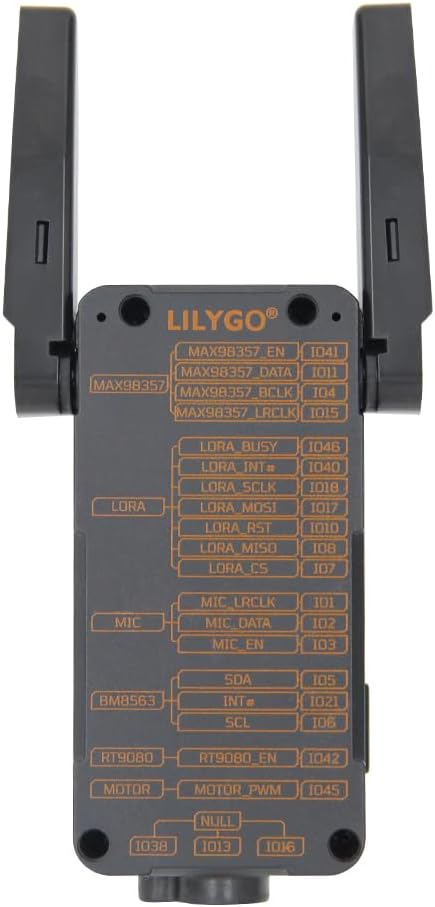
Figure 1.1: LILYGO T-Display S3 Pro LR1121 front view with antennas extended.

図1.2: 詳細view of LILYGO T-Display S3 Pro LR1121 features.
2. セットアップ
2.1 ハードウェアの初期設定
- アンテナの設置: Carefully connect the two LoRa external antennas to the designated ports on the side of the device. Ensure they are securely fastened. The LR1121 antenna can be rotated 180 degrees in the direction of the screen; avoid rotating it backward.
- 電源接続: Connect the LILYGO T-Display S3 Pro LR1121 to a power source using a standard USB-C cable. The device has a built-in 2000mAh Li-ion battery.

図2.1:戻る view with pinout diagram.

Figure 2.2: Detailed Pinmap Diagram.
2.2 ソフトウェア環境のセットアップ
For programming and development, refer to the official GitHub repository for detailed instructions on setting up your development environment, including Arduino-IDE or VS Code.
- GitHubリポジトリ: github.com/Xinyuan-LilyGO/T-Display-S3-Pro-MVSRLora
3. 操作手順
3.1 基本操作
- 電源オン/オフ: Use the designated power button (if available) or connect/disconnect USB power to turn the device on or off.
- ディスプレイインタラクション: The 2.33-inch touch IPS TFT SPI LCD supports touch input. Interact with on-screen elements as programmed.

Figure 3.1: Display showing touch information.
3.2無線通信
The board supports multiple wireless communication protocols:
- LoRa: Utilizes the LR1121 chip for Sub-G band and 2.4G band LoRa communication. Ensure antennas are properly connected for optimal range.
- Wi-Fi: Supports Wi-Fi 802.11 for network connectivity.
- ブルートゥース: Features BLE 5 and Bluetooth mesh for short-range communication.
3.3 Integrated Functions
The T-Display S3 Pro LR1121 includes several integrated peripherals:
- Motor Vibration: 触覚フィードバックを提供します。
- RTC (リアルタイムクロック): Maintains accurate timekeeping.
- スピーカー: オーディオ出力用。
- マイクロフォン: 音声入力用。
Video 3.1: Official video demonstrating the LILYGO T-Display S3 Pro LR1121 development board's features and functionality.
4. メンテナンス
4.1一般的なケア
- クリーニング: デバイスの清掃には、柔らかく乾いた布をご使用ください。液体クリーナーや溶剤の使用は避けてください。
- ストレージ: デバイスは直射日光や極端な温度を避け、涼しく乾燥した場所に保管してください。
- 物理的保護: The ABS+PC shell provides good protection, but avoid dropping the device or subjecting it to strong impacts.
4.2バッテリーケア
- 充電: Charge the built-in 2000mAh Li-ion battery using a compatible USB-C power adapter (5V, 500mA recommended).
- 長期保存庫: If storing the device for an extended period, charge the battery to approximately 50% to prolong its lifespan. Avoid fully discharging or fully charging the battery for long-term storage.
5。 トラブルシューティング
If you encounter issues with your LILYGO T-Display S3 Pro LR1121, consider the following steps:
- デバイスの電源が入っていない: Ensure the battery is charged or the device is connected to a stable USB power source. Check the USB-C cable and port for damage.
- 表示の問題: If the display is blank or unresponsive, try restarting the device. Verify that the software is correctly loaded and initialized the display.
- Connectivity Problems (LoRa, Wi-Fi, Bluetooth): Check antenna connections for LoRa. For Wi-Fi and Bluetooth, ensure your software configuration is correct and that the device is within range of the network/peer.
- ソフトウェア関連の問題: Refer to the official GitHub repository for common issues, firmware updates, and community support. Many problems can be resolved by ensuring you are running the latest stable firmware or by consulting the project's documentation.
- 応答しないデバイス: If the device becomes unresponsive, perform a hard reset by disconnecting and reconnecting the power source.
6. 仕様
| 特徴 | 詳細 |
|---|---|
| ブランド | リリゴ |
| モデル名 | LILYGO T-Display S3 Pro LR1121 |
| 接続技術 | Bluetooth, Wi-Fi, LoRa (Sub-G, 2.4G) |
| 含まれるコンポーネント | ユーザーマニュアル |
| オペレーティング·システム | フリーRTOS |
| プロセッサブランド | Espressif (ESP32-S3R8 Dual-core LX7 microprocessor) |
| RAMメモリ技術 | LPDDR4 |
| プロセッサ数 | 1 |
| USBポート合計 | 1 (USB-C) |
| 画面 | 2.33 inch Touch IPS TFT SPI LCD (Resolution: 222(H) RGB x 480(V), Drive Chip: ST7796) |
| LoRaトランシーバー | LR1121 (LoRa/(G)FSK half-duplex, 150-960MHz, 2.4GHz, 2GHz S-band, 1.55GHz L-band) |
| Voice Communication Kit | Microphone (MP34DT05-A), Speaker (MAX98357A) |
| Other Integrated Features | Vibration Motor (PWM Motor), RTC (BM8563) |
| バッテリー | 2000mAhリチウムイオンバッテリー内蔵 |
| 寸法(長さ×幅×高さ) | 111 x 36 x 52 ミリメートル |
| 欧州連合 | 717382831206 |
7. 保証とサポート
7.1 保証情報
This product is covered by the manufacturer's standard warranty. Please refer to the LILYGO official web具体的な保証条件については、サイトをご覧いただくか、カスタマー サービスにお問い合わせください。
7.2 テクニカルサポート
For technical assistance, documentation, and community support, please visit the official LILYGO GitHub repository:
If you have any questions or suggestions regarding the product, you may also contact LILYGO directly through their official channels.