1. はじめに
Thank you for choosing the Pro Breeze 40L Smart Dehumidifier. This manual provides important information regarding the safe operation, installation, use, and maintenance of your appliance. Please read this manual thoroughly before use and retain it for future reference.
This dehumidifier is designed to efficiently remove excess moisture from the air, helping to prevent mold, mildew, and condensation in spaces up to 50 m².
2. 重要な安全上の注意事項
火災、感電、怪我のリスクを減らすために、電気製品を使用するときは常に基本的な安全上の注意事項に従ってください。
- アプライアンスを操作する前に、すべての指示をよくお読みください。
- ボリュームを確保するtag定格ラベルに表示されているeはメインの容量と一致していますtage.
- 機器、電源コード、プラグを水やその他の液体に浸さないでください。
- Do not operate the appliance with a damaged cord or plug, or after it malfunctions or has been dropped or damaged in any manner.
- 本製品を子供やペットの手の届かない場所に保管してください。
- Always unplug the appliance when not in use, before cleaning, or before moving.
- アプライアンスが安定した平らな面に置かれていることを確認してください。
- 吸気口や排気口を塞がないでください。ユニットの周囲には少なくとも20cmのスペースを確保してください。
- この機器は屋内専用です。
- Do not use in bathrooms or other excessively humid environments where water may splash onto the unit.
3.製品オーバーview
3.1 コンポーネント
The Pro Breeze 40L Smart Dehumidifier features a compact design with integrated controls and a water tank. It includes a continuous drainage option and mobility wheels for easy placement.
画像: 正面 view of the Pro Breeze 40L Smart Dehumidifier, highlighting its dimensions (52cm height, 28cm depth, 35.5cm width) and key features like smart app control, laundry mode, 5.5L tank, and low energy consumption.
3.2コントロールパネルとディスプレイ
The dehumidifier is equipped with an intuitive touch control panel and an LED display for easy operation and monitoring of humidity levels.

Image: A hand interacting with the touch control panel of the dehumidifier, showing the digital display and various function buttons.
4. セットアップ
4.1 開梱
- 除湿機をパッケージから慎重に取り出します。
- 保護フィルムやテープなどの梱包材をすべて取り除きます。
- Inspect the appliance for any signs of damage. If damaged, do not operate and contact customer support.
4.2 配置
Place the dehumidifier on a firm, level surface in the desired room. Ensure there is at least 20 cm of clear space around all sides of the unit to allow for proper airflow.

Image: A person easily moving the dehumidifier across a wooden floor in a living room, demonstrating its portability with four swivel wheels.
4.3電源接続
Plug the power cord into a grounded electrical outlet. Ensure the outlet meets the power requirements specified in the 'Specifications' section.
4.4 連続排水(オプション)
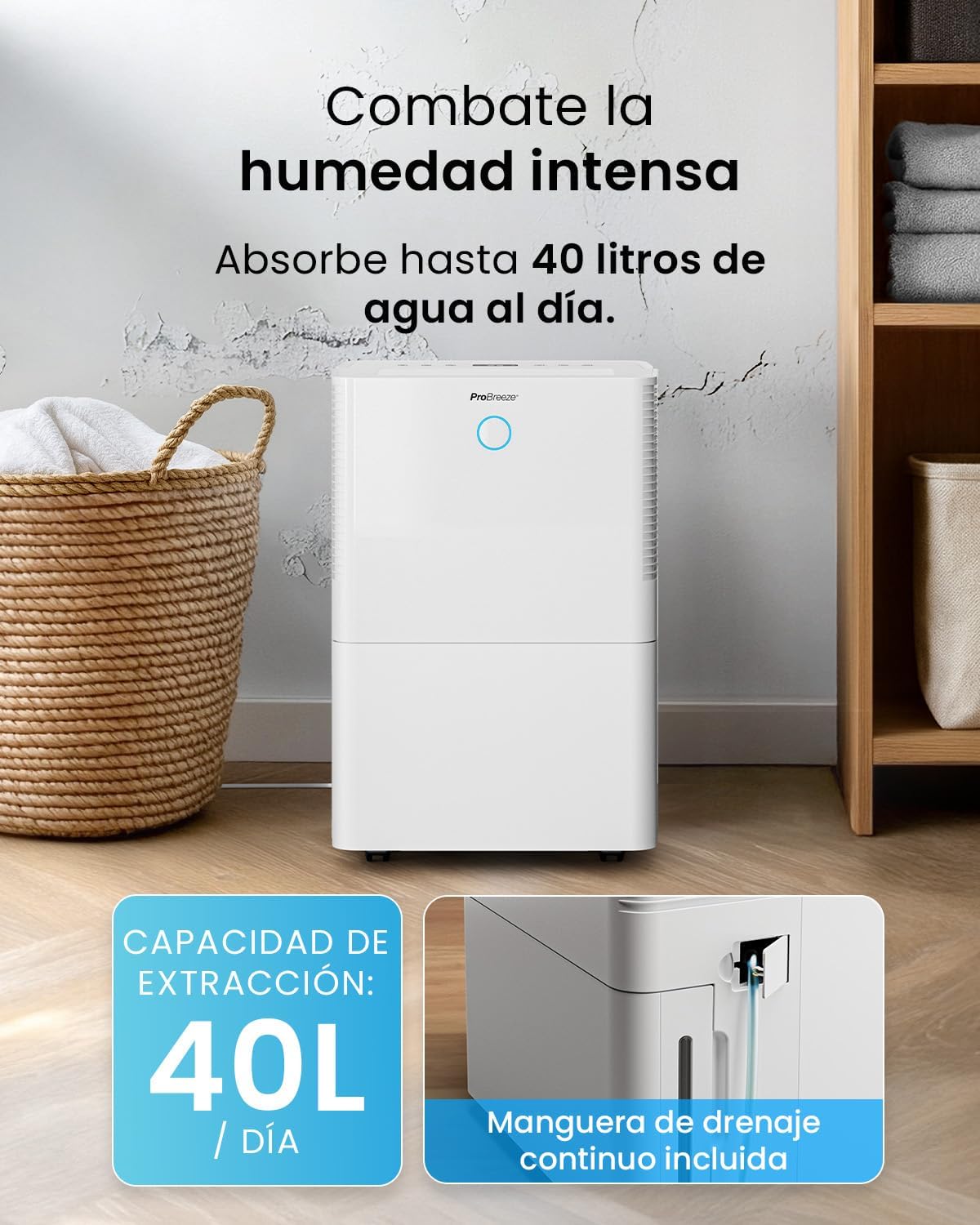
For continuous operation without needing to empty the water tank, attach the included drainage hose. Connect one end to the drainage port on the back of the unit and the other end to a suitable drain or container that is lower than the drainage port.

画像: クローズアップ view of the dehumidifier's side, showing the continuous drainage hose connected and leading to a floor drain.
5. 操作手順
5.1 電源オン/オフ
を押す 力 コントロール パネルのボタンを押して、ユニットの電源をオンまたはオフにします。
5.2 希望湿度の設定
The dehumidifier features an automatic sensor that continuously measures room humidity. Use the 湿度 ボタンを使って、30% ~ 80% の間で希望の湿度レベルを設定します。

Image: A family relaxing in a living room with the dehumidifier operating. An overlay illustrates the humidity indicator lights: Blue for >50% (Low), Green for 50-70% (Medium), and Red for <70% (High).
5.3動作モード
- 自動モード: The unit will automatically adjust its operation to maintain the set humidity level.
- 連続モード: The dehumidifier will operate continuously regardless of the humidity level, ideal for very damp 条件。
- 洗濯モード: This mode is designed to accelerate the drying of clothes indoors by running at maximum fan speed and continuous dehumidification.
- スリープモード: Reduces fan speed and dims the display for quiet operation during the night.

Image: A woman smiling while placing clothes on a drying rack next to the dehumidifier, illustrating the accelerated laundry drying feature.

Image: A family watching television in a dimly lit living room, with the dehumidifier operating quietly in the foreground, indicating its silent operation and night mode features.
5.4 タイマー機能
使用 タイマー button to set a 24-hour timer for automatic power on or off. This allows you to schedule operation according to your needs.

Image: A close-up of a smartphone screen displaying the Pro Breeze app's 24-hour timer function, allowing users to schedule the dehumidifier's operation.
6. Wi-Fi接続とアプリ制御
The Pro Breeze 40L Smart Dehumidifier can be controlled remotely via the free Pro Breeze app, compatible with both Alexa and Google Home.
6.1 アプリのインストールとペアリング
- Download the Pro Breeze app from your smartphone's app store.
- Follow the in-app instructions to create an account and pair your dehumidifier.
- Ensure your dehumidifier is powered on and your smartphone is connected to a 2.4GHz Wi-Fi network during the pairing process.
6.2 リモートコントロール機能
アプリを通じて、次のことができます。
- Turn the dehumidifier on/off.
- 湿度設定を調整します。
- Select operating modes (Auto, Continuous, Laundry, Sleep).
- Set and manage the 24-hour timer.
- Monitor current room humidity.

Image: A woman using a smartphone to control the dehumidifier, with icons for Amazon Alexa and Google Home indicating voice control compatibility.
7. メンテナンス
定期的なメンテナンスにより、除湿機の最適なパフォーマンスと寿命が確保されます。
7.1エアフィルターの清掃
エアフィルターは、使用状況と空気の質に応じて 2 週間ごと、またはより頻繁に清掃する必要があります。
- 除湿機の電源を切り、プラグを抜きます。
- ユニットの背面からエアフィルターを取り外します。
- フィルターを温かい石鹸水で洗い、よくすすいでから完全に自然乾燥させてから、再び取り付けてください。
- フィルターを取り付けない状態で除湿機を作動させないでください。
7.2 水タンクを空にして掃除する
When the water tank is full, the unit will automatically shut off and an indicator light will illuminate. Empty the tank and clean it regularly to prevent mold and bacteria growth.
- 水タンクを本体前面から慎重に引き出します。
- 溜まった水を捨てます。
- Clean the tank with mild detergent and water. Rinse thoroughly.
- Reinsert the dry tank firmly into the dehumidifier.

Image: The dehumidifier in operation, with an overlay indicating its 40L/day extraction capacity and the continuous drainage hose option.
7.3 外部洗浄
除湿機の外側を柔らかく拭きますdamp 布で拭いてください。研磨剤や溶剤は使用しないでください。
8。 トラブルシューティング
除湿機に問題が発生した場合は、カスタマー サポートに連絡する前に次の表を参照してください。
| 問題 | 考えられる原因 | 解決 |
|---|---|---|
| 除湿機が作動しません。 | 電源が入っていない、電源コードが差し込まれていない、水タンクが満杯か正しく挿入されていない。 | 電源を確認し、電源コードを差し込み、水タンクを空にして正しく再挿入します。 |
| 水は集められませんでした。 | Room humidity too low; Temperature too low; Air filter blocked; Continuous drainage hose connected. | Increase desired humidity setting; Ensure room temperature is above 5°C; Clean air filter; Disconnect continuous drainage hose if collecting water in tank. |
| ユニットがうるさいです。 | ユニットが水平面上にありません。エアフィルターが詰まっています。ファンが妨害されています。 | 平らで安定した面に置き、エアフィルターを清掃し、ファンエリアに障害物がないか確認します。 |
| Wi-Fi接続の問題。 | Wi-Fi パスワードが正しくありません。2.4GHz ネットワークに接続されていません。ルーターが遠すぎます。 | Verify password; Connect to 2.4GHz Wi-Fi; Move unit closer to router or use a Wi-Fi extender. |
9. 仕様
- ブランド: プロブリーズ
- モデル名: PB-D-32W-W
- Moisture Extraction: 1日最大40リットル
- 水タンク容量: 5.3リットル
- 推奨される部屋のサイズ: 最大50㎡(538平方フィート)
- 寸法(長さ×幅×高さ): 27.5 x 35.5 x 52.2 cm
- 重さ: 16.36キロ
- 速度数: 3
- 特別な機能: Smart App Control, Automatic Humidity Sensor, Automatic Shut-off, 24-hour Timer, Laundry Mode, Sleep Mode, Continuous Drainage
- 騒音レベル: <49dB
10. 保証とサポート
For warranty information and customer support, please refer to the documentation included with your purchase or visit the official Pro Breeze website. Ensure you have your model number (PB-D-32W-W) and proof of purchase available when contacting support.
メーカー: XNUMXつの小売グループ