
1. はじめに
Thank you for choosing the UGREEN 100W 5-Port GaN Charger. This manual provides essential information for the safe and efficient use of your new charging device. Please read these instructions carefully before use and retain them for future reference.
2.製品オーバーview
The UGREEN 100W 5-Port GaN Charger is a versatile and powerful charging solution designed to power multiple devices simultaneously. Featuring advanced GaN technology, a smart digital display with touch control, and comprehensive safety protections, it offers efficient and reliable charging for laptops, smartphones, tablets, and smartwatches.
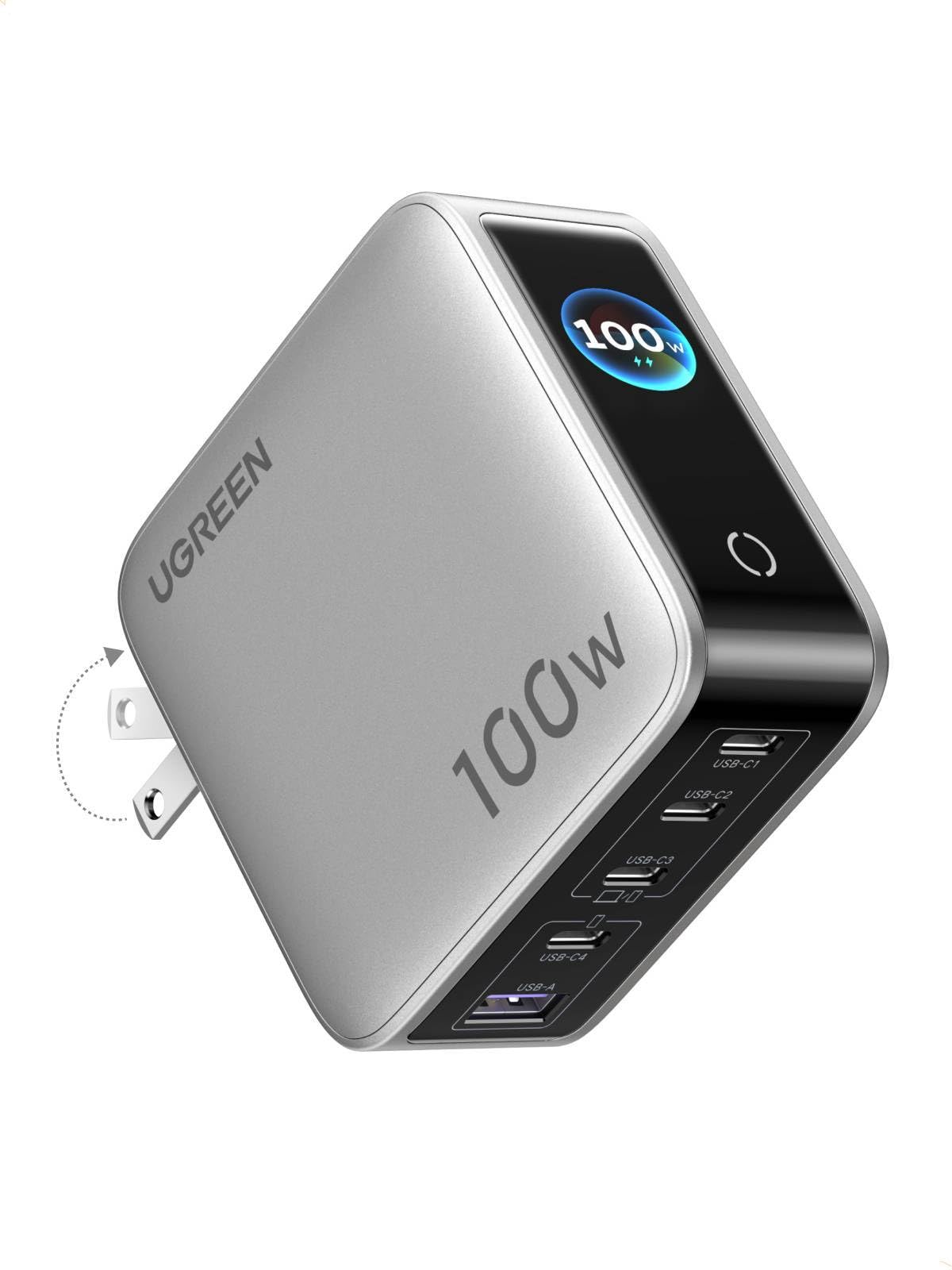
Image: UGREEN 100W 5-Port GaN Charger, showcasinコンパクトなデザインとデジタルディスプレイが特徴です。
主な特徴:
- Smart Digital Display with Touch Control: Monitor real-time charging data including total output power, individual port power, charging protocol (PD/QC), device battery level, and charger core temperature.
- 100W PD High-Speed Fast Charging: Delivers up to 100W max Power Delivery for rapid charging of laptops, smartphones, and tablets.
- 5-in-1 Multi-Port Charging: Equipped with 4 USB-C ports and 1 USB-A port for simultaneous charging of up to 5 devices.
- インテリジェントな電力配分: Automatically optimizes power delivery to connected devices, preventing power competition.
- Multi-Layer Safety Certified: Built-in protections against over-voltage, over-current, over-heat, short-circuit, and over-charge.
- Portable & Fire-Resistant Design: Features a foldable plug for easy travel and a 94-V0 fire-resistant PC material shell for durability.
3. セットアップ
3.1 開梱と初期検査
Upon opening the package, ensure all components are present and undamaged. The package typically includes the UGREEN 100W 5-Port GaN Charger and a user manual.
3.2 充電器の接続
- 充電器本体からACプラグを展開します。
- 充電器を標準の壁のコンセントにしっかりと差し込みます。
- The digital display will illuminate, indicating the charger is ready for use.

Image: The UGREEN charger with its foldable plug extended, ready to be plugged into an outlet.
4. 操作手順
4.1 デバイスの充電
- 適切な充電ケーブルを使用して、デバイスを利用可能な USB-C または USB-A ポートに接続します。
- The charger will automatically detect the connected devices and begin charging.
- The intelligent power distribution system will optimize charging speeds across all connected devices.

Image: The UGREEN charger simultaneously charging a laptop, smartphone, and smartwatch, demonstrating its 5-in-1 capability.
4.2 Using the Smart Digital Display
The integrated digital display provides real-time charging information. Use the touch control button to cycle through different display modes:
- 総出力電力: 合計ワット数を表示しますtag接続されているすべてのデバイスに配信されます。
- Individual Port Power: ワットを表示しますtage being delivered by each specific port (USB-C1, USB-C2, USB-C3, USB-A).
- 充電プロトコル: Indicates the active charging protocol (e.g., PD, QC) for each port.
- Real-time Device Battery Level: 現在のバッテリー残量を表示しますtage of connected devices (if supported).
- Charger Core Temperature: Monitors the internal temperature of the charger for safety.
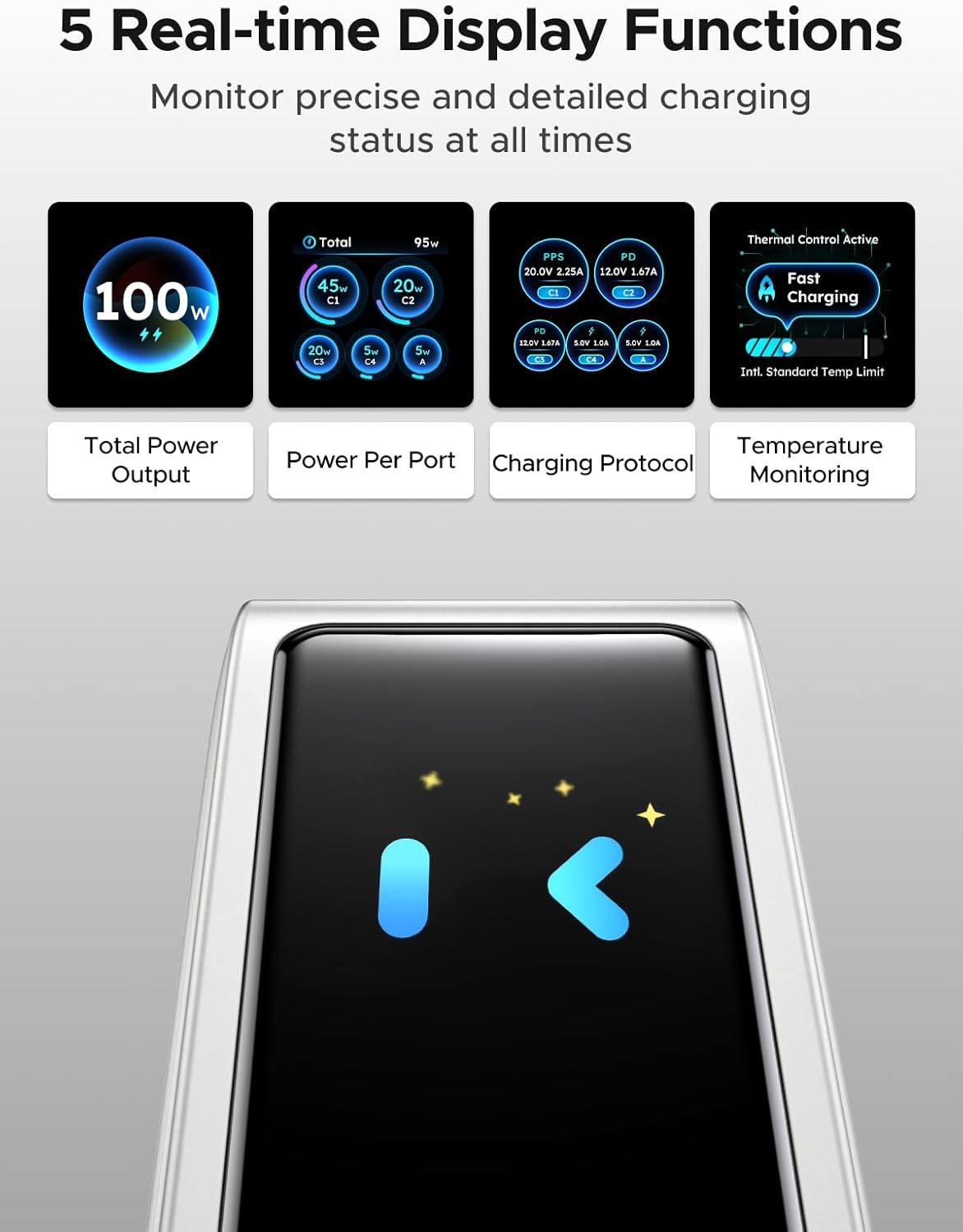
Image: The charger's digital display showing different real-time data points such as total power output, power per port, charging protocol, and temperature monitoring.
Note: The charger features an energy-saving function. The screen will automatically turn off after 2 minutes of inactivity.
5. 安全情報
The UGREEN 100W 5-Port GaN Charger is designed with multiple safety features to protect your devices and ensure safe operation:
- オーバーボリュームtag保護: 過度のボリュームによるダメージを防ぎますtage入力。
- 過電流保護: 過剰な電流の流れを防止します。
- 過熱保護: Intelligent temperature control system automatically adjusts power to prevent overheating.
- 短絡保護: Protects against short-circuit damage.
- 過充電保護: デバイスの過充電を防ぎます。
- Fire-Resistant Design: Constructed with 94-V0 fire-resistant PC material for enhanced safety.

Image: A visual representation of the charger's internal components and various safety features, including over-temperature, over-voltage、過電流、および短絡保護。
Always use the charger in a well-ventilated area and avoid covering it during operation.
6. メンテナンス
6.1 クリーニング
To clean the charger, unplug it from the power outlet and disconnect all devices. Use a soft, dry cloth to wipe the surface. Do not use liquid cleaners or abrasive materials.
6.2 ストレージ
When not in use, store the charger in a cool, dry place away from direct sunlight and extreme temperatures. Ensure the foldable plug is retracted to prevent damage.
7。 トラブルシューティング
7.1 Charger Not Powering On
- 充電器が機能する壁のコンセントにしっかりと差し込まれていることを確認してください。
- 別のデバイスでテストして、壁のコンセントに電力が供給されているかどうかを確認します。
7.2 Devices Not Charging or Charging Slowly
- Verify that the charging cables are properly connected to both the charger and your devices.
- Ensure your charging cables are in good condition and support fast charging if desired.
- Some devices may have specific charging requirements; refer to your device's manual.
- If multiple devices are connected, the charger intelligently distributes power. Charging speed may vary depending on the number and power requirements of connected devices.
7.3 デジタルディスプレイが機能しない
- The display has an energy-saving function and turns off after 2 minutes of inactivity. Tap the touch control button to reactivate it.
- 充電器に電力が供給されていることを確認してください。
8. 仕様
| 特徴 | 詳細 |
|---|---|
| ブランド | ユーグリーン |
| モデル | X773 |
| 部品番号 | 65619 |
| ワットtage | 100ワット |
| ポート数 | 5(USB-C 4個、USB-A 1個) |
| 特集 | Fast Charging, Multi Device Charging, Smart Digital Display, Touch Control, Travel |
| 対応デバイス | 携帯電話、ノートパソコン、スマートウォッチ、タブレット |
| 互換性のある電話モデル | Galaxy S25 Ultra, S24 Ultra, S24, S23 Ultra, S23+, S22, S22 Ultra, S22+, S21 Ultra, S21, S21 Plus, S20 Ultra, S10, S10 Plus, S10e, S9, S9 Plus, S8, S8 Plus; Galaxy Note 20, Note10, Note 9, Note 8; Pixel 10, 9, 8, 7, 6, 6 Pro, 5, 4A, 3a, 3XL, 3, 2 XL; MacBook Pro 16''/ 15'' / 13"; MacBook Air 13''(M2) / 13''; MacBook 12''; Dell XPS 15/ 13; Steam Deck; iPhone 17, 17 Pro, 17 Pro Max, 16, 16 Plus, 16 Pro, 16 Pro Max, 15, 15 Plus, 15 Pro, 15 Pro Max, 14, 14 Plus, 14 Pro, 14 Pro Max, 13 Pro, 13 Pro Max, 13 mini, 13, 12 Pro, 12 Pro Max, 12 mini, 12, 11 Pro, 11 Pro Max, 11, SE, XS, XS Max, XR, X, 8, 8 Plus |
| 区画寸法 | 11.6 x 11.5 x 4.6 cm; 440 g |
| メーカー | ユーグリーングループ株式会社 |
| 初回利用可能日 | 5年2026月XNUMX日 |
9. 保証とサポート
9.1 保証情報
UGREEN製品には通常、メーカーによる標準保証が付いています。製品パッケージまたはUGREEN公式ウェブサイトをご覧ください。 web具体的な保証条件については、サイトをご覧ください。
9.2 カスタマーサポート
技術サポート、トラブルシューティング支援、または保証請求については、UGREENの公式カスタマーサービスにお問い合わせください。 webサイトまたは製品パッケージに記載されている連絡先情報を参照してください。