
1. はじめに
This manual provides detailed instructions for the installation, operation, and maintenance of your GUTA GT80+GS02 RV Tire Pressure Monitoring System (TPMS). This system is designed to enhance driving safety by continuously monitoring tire pressure and temperature for RVs, trailers, pickup trucks, and 5th wheels.
The GUTA GT80+GS02 features a 4.3-inch full-color touchscreen display, 4 external cap sensors, and a signal booster to ensure reliable data transmission over long distances. It provides real-time data and alerts for various tire conditions, helping you maintain optimal tire performance and prevent potential hazards.
2. パッケージ内容
パッケージにすべてのアイテムが含まれていることを確認します。
- 1 x 4.3" Touchscreen Monitor
- スタイラスペン x 1
- 1 xサクションカップマウント
- USB充電ケーブル x 1
- 1 x Signal Booster
- 4 x Cap Sensors
- Accessories (security nuts, wrench, O-rings)

Image: The main components of the GUTA GT80+GS02 TPMS, including the monitor, signal booster, and four cap sensors.
3. セットアップとインストール
3.1 モニターの設置
- Attach the suction cup mount to the back of the 4.3-inch touchscreen monitor.
- Clean the desired mounting area on your vehicle's dashboard or windshield.
- Securely attach the suction cup mount to the cleaned surface. Adjust the monitor angle for optimal visibility.
- Connect the monitor to a power source using the provided USB cable.

Image: The GUTA TPMS monitor displayed on a vehicle dashboard, showing real-time tire data.
3.2センサーの設置
The sensors are pre-labeled and paired with the monitor at the factory. Ensure your vehicle has metal valve stems for optimal sensor performance and longevity.
- Identify the correct tire for each sensor using the labels.
- Remove the original valve cap from the tire valve stem.
- Screw on the anti-theft hexagonal nut (if using) onto the valve stem.
- Screw the cap sensor onto the valve stem until it is hand-tight.
- Tighten the anti-theft nut against the sensor using the provided wrench.

画像: クローズアップ view of a GUTA cap sensor being installed on a tire valve stem, demonstrating the ease of external sensor setup.
3.3 Signal Booster Installation
For longer trailers (total length ≥ 40ft), using the signal booster is highly recommended to ensure stable and reliable signal transmission.
- Install 3 AAA batteries (not included) into the signal booster.
- Mount the signal booster in a central location on your RV or trailer, ensuring it has a clear line of sight to both the sensors and the monitor.
- The booster extends the sensor signal transmission distance and enhances stability.
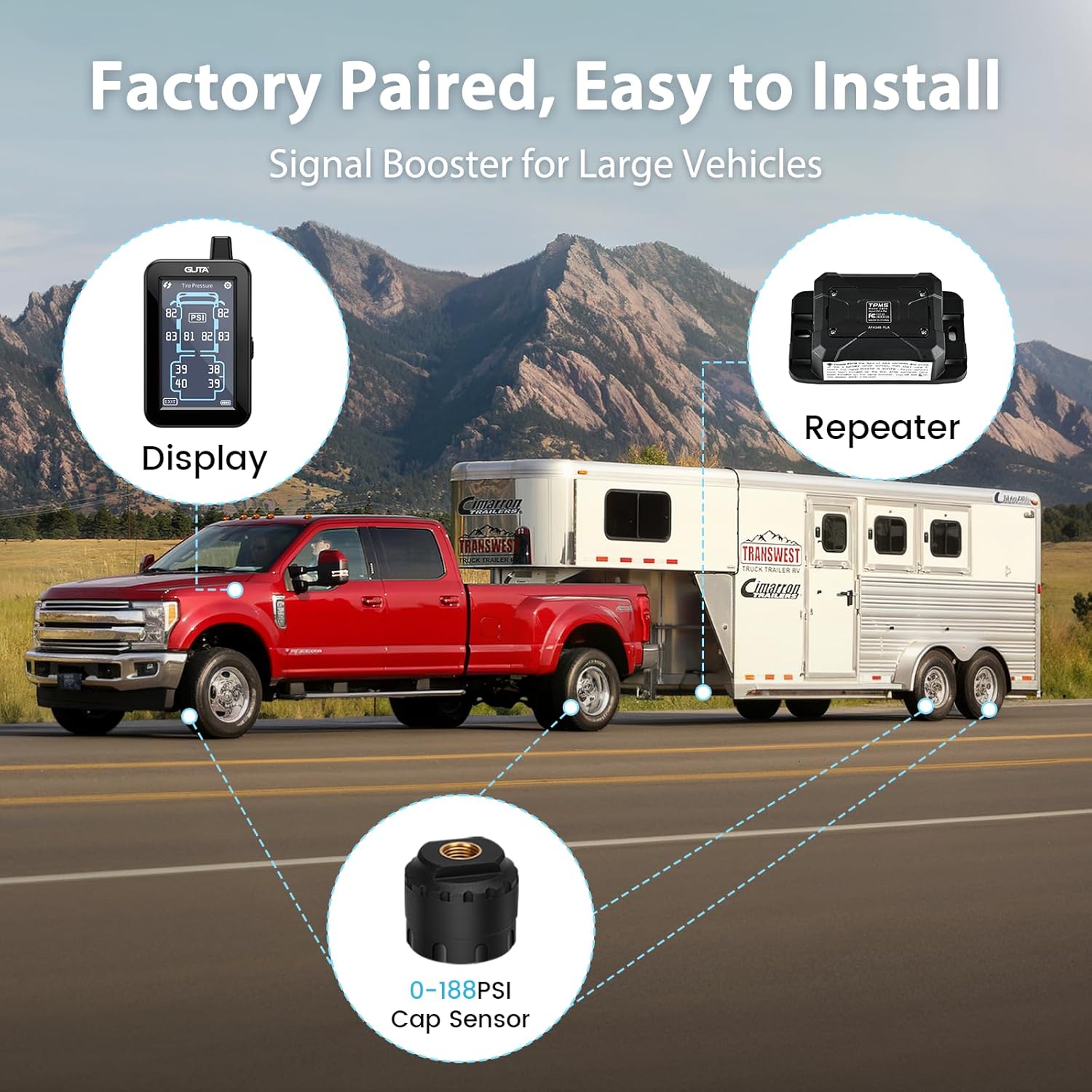
Image: A visual representation of the GUTA TPMS system components (display, repeater, cap sensor) in a truck and trailer configuration, illustrating signal flow.
4. 操作
4.1 電源のオン/オフとディスプレイ
- The monitor automatically powers on when vibration is detected (e.g., when you start driving).
- It enters power-saving sleep mode after 10 minutes of no motion or vibration.
- The 4.3-inch full-color touchscreen displays real-time tire pressure (0-188 PSI) and temperature (up to 185 ℉).

Image: A split image illustrating the monitor's intelligent sleep mode (after 10 minutes of no activity) and awake mode (triggered by vibration).
4.2 カスタマイズ可能な設定
The touchscreen interface allows for easy adjustment of settings:
- 単位切り替え: Easily switch between PSI and BAR for pressure units, and ℃ and ℉ for temperature units.
- アラームしきい値: After sensor installation, the system automatically sets the current pressure as the reference point. You can then set alarm thresholds within a range of +25% to -15% of this reference pressure.
- Vehicle Type Selection: Switch between 5 vehicle types (Truck, RV, Trailer, Camper, 5th Wheel) to match your setup.
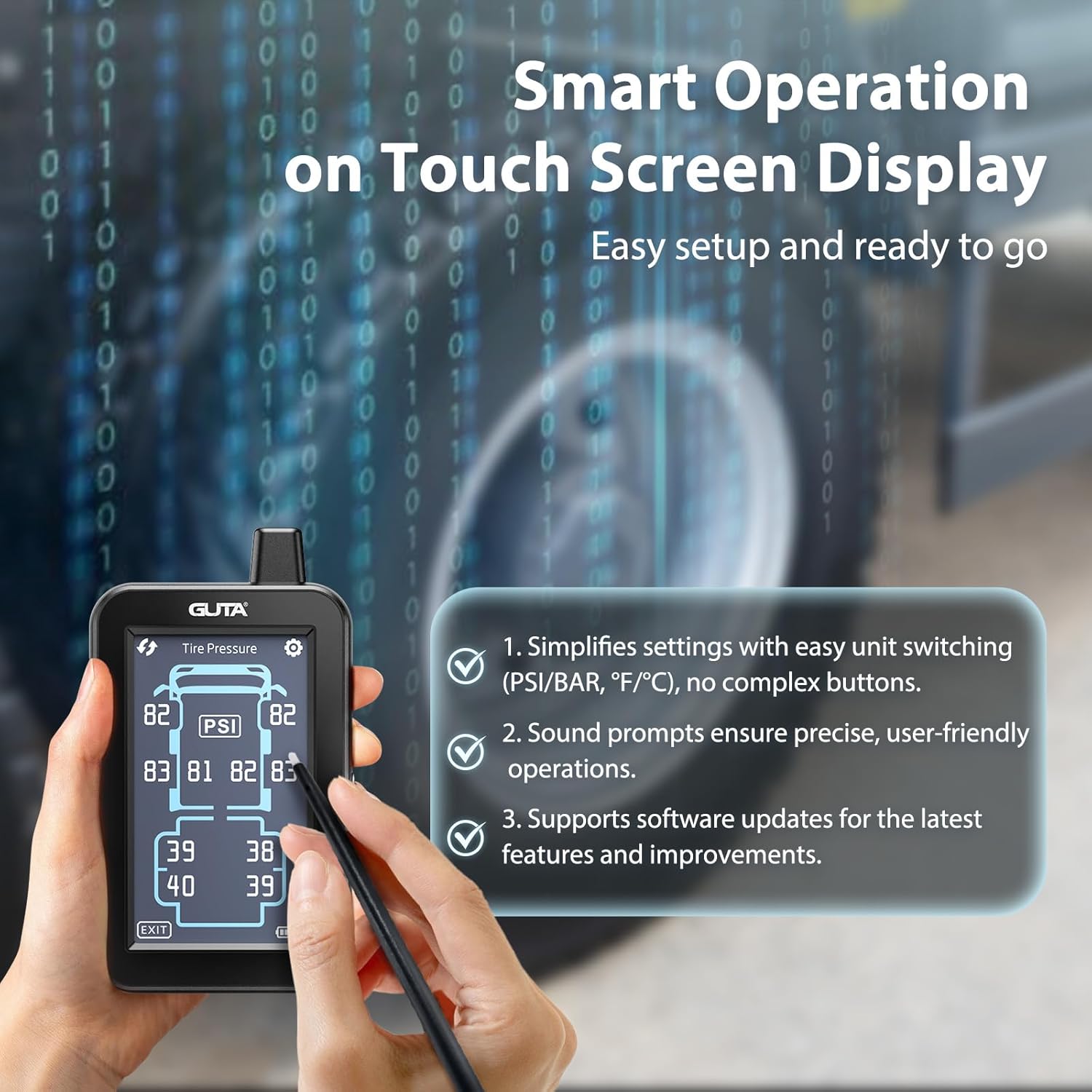
Image: A user interacting with the GUTA TPMS touchscreen using a stylus, demonstrating the intuitive interface for settings adjustments.

Image: The GUTA TPMS display showing the vehicle type selection menu, allowing users to choose the appropriate vehicle configuration.
4.3 Advanced Alert System
The system features 6 alarm modes to notify you of potential tire issues:
- Low Tire Pressure Alerts
- High Tire Pressure Alerts
- High-Temperature Alerts
- Fast Leak Alerts
- Missing Sensor Signal Alerts
- Low Sensor Battery Alerts
Visual and audio warnings are provided immediately when tire data deviates from preset safety parameters.

Image: A graphic illustrating the GUTA TPMS alert system, with alarm icons for low pressure, high pressure, high temperature, fast leaks, disconnected sensors, and low sensor battery.
5. メンテナンス
- ファームウェアの更新: Regular firmware updates are available via the GUTA website to enhance system longevity and performance. Check the official GUTA web最新のアップデートのサイト。
- センサーのバッテリー交換: The cap sensors feature replaceable batteries. Refer to the GUTA website or contact customer support for instructions on how to replace sensor batteries.
- クリーニング: Use a soft, dry cloth to clean the monitor and sensors. Avoid using harsh chemicals or abrasive materials.
6。 トラブルシューティング
よくある質問 6.1 件
- Why do I need a TPMS?
A TPMS monitors tire pressure and temperature in real-time, eliminating the need for manual checks. It alerts you to tire abnormalities during travel, helping to prevent dangers associated with under-inflated or over-inflated tires. - Why do I need a repeater?
A repeater extends the sensor signal transmission distance and enhances signal stability, especially crucial for longer vehicles like RVs and trailers (total length ≥ 40ft). - Can TPMS prevent puncture accidents?
TPMS monitors air pressure and temperature over time. It cannot prevent punctures caused by sharp objects or sudden tire damage, but it will alert you to the resulting pressure loss.
6.2 一般的な問題と解決策
- センサーからの信号なし:
- センサーが正しく取り付けられ、締め付けられていることを確認します。
- Verify the signal booster is powered on and positioned correctly, especially for long vehicles.
- センサーの電池を確認してください。
- If the issue persists, re-pair the sensors (refer to the GUTA website for detailed pairing instructions if needed, though they are factory-paired).
- 不正確な読み取り:
- Ensure sensors are securely attached and not leaking air.
- Calibrate the system by setting current pressure as the reference point in settings.
- Compare readings with a reliable manual gauge.
- モニターがオンにならない:
- Check if the monitor is properly connected to a power source.
- Ensure the vehicle is in motion to activate the awake mode, or manually power it on if applicable.
7. 仕様
| 特徴 | 仕様 |
|---|---|
| モデル番号 | GT80+GS02 |
| 表示タイプ | 4.3" Touchscreen Color LCD |
| 圧力範囲 | 0-188 PSI |
| 温度範囲 | Up to 185 ℉ (85 ℃) |
| センサーの数 | 4 Cap Sensors |
| 伝送距離 | Up to 164 feet (with signal booster) |
| 省電力モード | Automatic sleep after 10 minutes of inactivity |
| アイテム重量 | 1.94ポンド |
| パッケージ寸法 | 9.05 x 6.7 x 3.15インチ |
8.サポートと保証
For any issues, questions, or professional support regarding your GUTA TPMS, please visit the official GUTA website or contact their customer service. Regular firmware updates are also available on the GUTA website to ensure your system operates with the latest features and improvements.
GUTA is committed to the safety of automobile tire pressure and provides support for their products.