
1.製品オーバーview
The LongPlus 4K PoE Security Camera System, Model LP8MC84B2, provides advanced surveillance capabilities for both home and business environments. This system includes 4K (8MP) cameras, a Network Video Recorder (NVR) with a pre-installed 2TB Hard Disk Drive (HDD), and utilizes H.265+ video compression for efficient storage. Key features include 24/7 recording, spotlight color night vision, and clear video streaming. The Power over Ethernet (PoE) design simplifies installation by providing both power and data through a single Ethernet cable.

Image: LongPlus 4K PoE Security Camera System with NVR and four bullet cameras.
2. 箱の中身
以下にリストされているすべてのアイテムがパッケージに含まれていることを確認してください。
- 1 x 8CH NVR with 48/1.875V Adaptor
- 4 x 4K PoE Cameras
- 1 x USBマウス
- 1×1M Cat5ケーブル
- 1 x 1M HDMIケーブル
- 4×18M Cat5ケーブル
- 2 x Extra Connectors
- ネジおよびその他のアクセサリの 4 x パック
- クイックスタートガイド x 1
3. セットアップ手順
Follow these steps to set up your LongPlus 4K PoE Security Camera System:
- NVR をモニターに接続します。 Use the provided HDMI or VGA cable to connect the NVR to a compatible monitor.
- NVRの電源をオンにします。 Connect the NVR to a power source using the provided power adapter and turn on the NVR power switch.
- ネットワークに接続する: Connect an Ethernet cable from the NVR's LAN port to your router's LAN port for internet access.
- カメラを接続する: Connect each PoE camera to any available PoE camera port on the NVR using the provided Ethernet cables. The cameras will receive both power and data through these cables.
- USBマウスを接続します: システムナビゲーションのために、USB マウスを NVR の USB ポートに接続します。
- 初期設定: Follow the on-screen prompts on your monitor to complete the initial setup, including setting a password and configuring network settings.
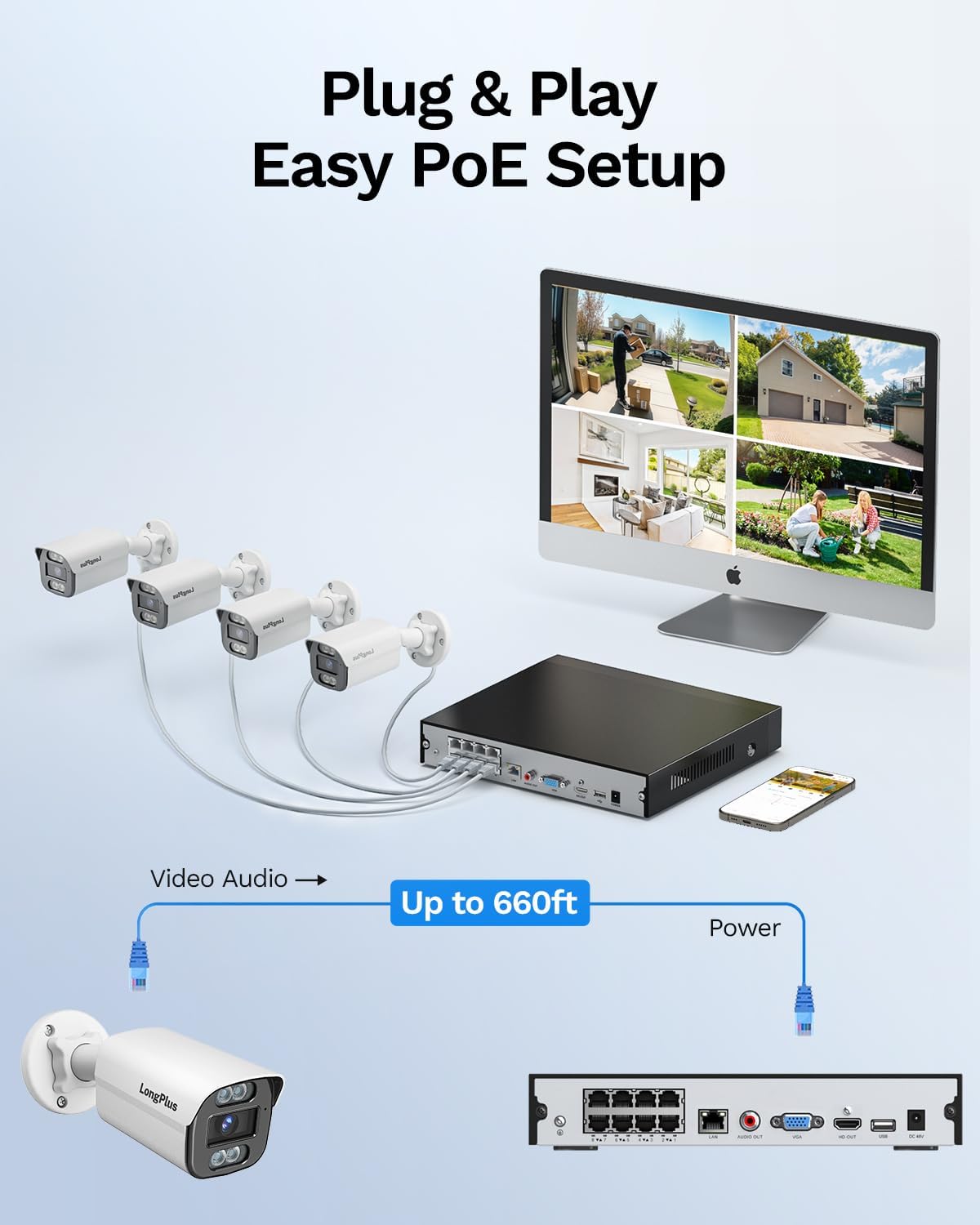
Image: Simplified PoE setup showing NVR, cameras, and monitor connections.
Video: LongPlus 8MP 16CH NVR Security System Unboxing & Setup Guide. This video demonstrates the unboxing process and step-by-step setup of the NVR and cameras.
4. 操作手順
4.1. 4K UHD and Wide View 角度
The system captures video in crystal-clear 4K (3840x2160) resolution, providing enhanced detail and clarity. The cameras feature a 132° wide view angle, offering broader coverage and minimizing blind spots in your surveillance area.

Image: Demonstration of 4K UHD video quality, highlighting clear details day and night.

Image: Comparison illustrating the 132° wide view angle of LongPlus cameras.
4.2. AI Motion Detection and Activity Zones
The smart PoE cameras utilize AI object detection to accurately identify humans and vehicles, reducing false alarms. You can define specific activity zones within the camera's field of view to focus detection on critical areas and ignore motion in irrelevant regions. Privacy masks can also be set to exclude certain areas from recording.

Image: Smart AI detection identifying persons and vehicles, triggering alerts.
4.3. Triple Night Vision Modes
The system offers three night vision modes to suit various lighting conditions:
- IRナイトビジョン: 標準的な白黒赤外線ビジョン。
- カラーナイトビジョン: Provides full-color footage in low-light conditions, allowing for better identification of details up to 100ft/30m.
- スマートナイトビジョン: Automatically switches between IR and color modes based on detected activity.
4.4. Audio and Strobe Light Alarm / Two-way Audio
When motion is detected, the cameras can automatically trigger an audio alarm and red & blue strobe lights to deter intruders. The built-in two-way audio feature allows for real-time communication through the camera, enabling you to speak to visitors or warn off unwanted individuals.

Image: Two-way audio functionality with integrated strobe light alarm.
4.5. Flexible Storage and Playback
The NVR includes a 2TB HDD for 24/7 continuous recording, expandable up to 10TB. H.265+ compression technology significantly reduces file sizes, saving storage space without compromising video quality. Bank-level encrypted cloud storage is also available as an option. The Longvision APP/Client allows for easy playback of recorded footage, with events highlighted on the timeline for quick review.

Image: Interface demonstrating 24/7 recording and smart playback features.

Image: Explanation of H.265+ compression for efficient storage.
4.6. リモートアクセスと共有
ライブfooにアクセスtage and recorded videos remotely via the Longvision app, compatible with iOS, Mac, Windows, and Android devices. The system supports up to 32 users, allowing you to share access with family members or colleagues.

Image: Remote access to live camera feeds via the Longvision app.
Video: LongPlus 4Channel PoE Security Camera System Overview. This video showcases the system's features including PoE setup, app monitoring, 4K UHD, night vision, motion detection, and alarm functions.
5. メンテナンス
To ensure optimal performance and longevity of your security system, regular maintenance is recommended:
- カメラレンズのクリーニング: カメラのレンズは定期的に柔らかくてきれいな布で拭いてください。amp 画像の鮮明さに影響を与える可能性のあるほこりや汚れを取り除くための布。
- 接続を確認してください: Ensure all cable connections (power, Ethernet, video) are secure and free from damage.
- ファームウェアの更新: Regularly check for and install firmware updates for the NVR and cameras to benefit from new features and security enhancements.
- Review 録音: 定期的に再view 記録されたfootagシステムが期待どおりにイベントをキャプチャしていることを確認します。
- NVRの配置: 過熱を防ぐために、NVR が換気の良い場所に設置されていることを確認してください。
6。 トラブルシューティング
If you encounter issues with your LongPlus security system, consider the following common troubleshooting steps:
- ビデオ表示なし:
- Verify all power and video cables are securely connected.
- モニターが正しい入力ソース (HDMI/VGA) に設定されていることを確認します。
- NVR を再起動します。
- 動き検出が機能しない:
- Check motion detection settings in the NVR interface or app.
- Ensure activity zones are correctly configured and not excluding desired areas.
- 感度設定を調整します。
- リモート アクセスの問題:
- NVR がインターネットに接続されていることを確認します。
- Check network settings on the NVR and your router.
- Ensure the Longvision app is updated to the latest version.
- 画質が悪い:
- カメラのレンズを掃除してください。
- カメラの視野内に障害物がないか確認する view.
- 最適な夜間視力性能を得るために十分な照明を確保してください。
7. 仕様
| 特徴 | 詳細 |
|---|---|
| ブランド | ロングプラス |
| 接続技術 | 有線 |
| ビデオキャプチャ解像度 | 3840x2160, 4K |
| 特集 | High Efficiency Video Coding, Red & Blue Flashing Lights, Easy to Install, Waterproof, Vehicle Detection, Adjustable, Motion Sensor, Siren Alarm/Flexible Storage (Local Storage/Cloud Storage), Smart Playback, Vehicle/Person/Animal Detection |
| チャンネル数 | 8 |
| メモリストレージ容量 | 2 TB(最大10TBまで拡張可能) |
| 色 | 白 |
| 電源 | コード式電気 |
| 商品の寸法(長さ x 幅 x 高さ) | 13.29 x 10.23 x 9.4インチ |
| オペレーティングシステムの互換性 | Android、Mac OS、Windows、iOS |
| 推奨用途 | Indoor, Outdoor, Surveillance |
| 対応デバイス | Cameras, Laptops, Personal Computers, Smartphones |
| その他のカメラ機能 | フロントリア |
| 低照度テクノロジー | ナイトビジョン |
| 暗視範囲 | 100フィート |
| フレームレート | 30 |
| 録画モード | モーショントリガー録画(デフォルト)、スケジュール録画、24時間7日録画 |
| USBポート合計 | 2 |
| ハードウェアインターフェイス | イーサネット、HDMI、USB、VGA |
| レンズタイプ | 広角 |
| ビデオ入力 | VGA、USB、イーサネット、HDMI |
| View角度 | 132度 |
| メーカー | LongPlus Direct |
| アイテム重量 | 13.26ポンド |
| 初回利用可能日 | 12年2025月XNUMX日 |
8. 保証とサポート
LongPlus provides a 2年間保証 for this product, ensuring coverage against manufacturing defects. Additionally, lifetime technical support is available to assist with any inquiries or operational issues you may encounter. For support, please contact LongPlus customer service.