
導入
Thank you for choosing the AOSU Solar Wall Light Camera System. This system integrates a security camera with a solar-powered wall light, offering comprehensive surveillance and illumination for your property. This manual provides detailed instructions for installation, operation, maintenance, and troubleshooting to ensure optimal performance of your device.
パッケージ内容
Please check the package for the following items. If any items are missing or damaged, please contact AOSU customer support.
- AOSU Solar Wall Light Camera Unit
- 取り外し可能なソーラーパネル
- 取り付けブラケット
- Mounting Screw Kit (screws, wall anchors)
- USB充電ケーブル
- クイックスタートガイド
- ドリルテンプレート
製品終了view
Familiarize yourself with the components of your AOSU Solar Wall Light Camera System.
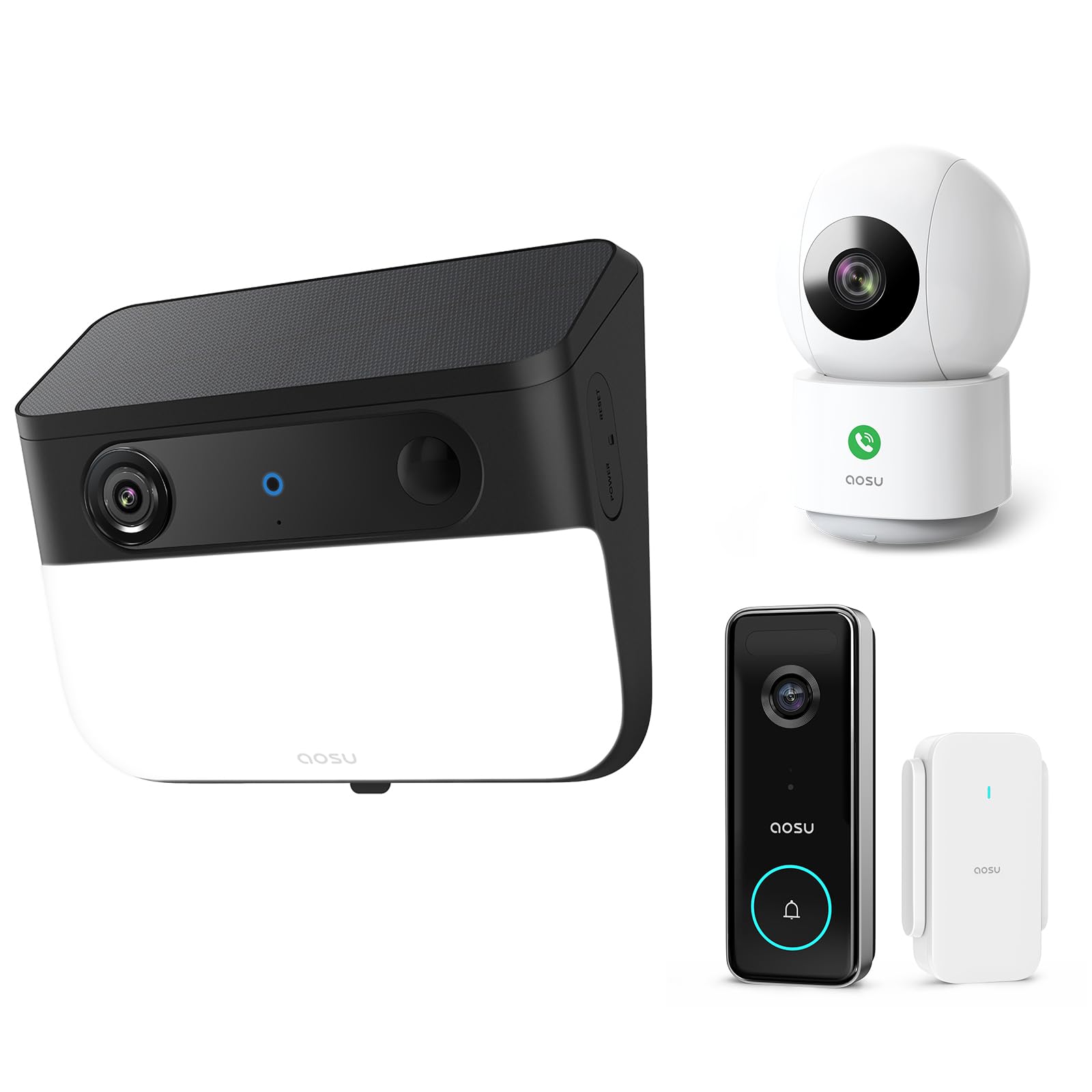
Image 1: AOSU Solar Wall Light Camera System. This image displays the main camera unit integrated with a wall light, alongside its detachable solar panel.
- カメラレンズ: ビデオ foo をキャプチャしますtage.
- LEDライトパネル: Provides 400-lumen illumination.
- PIRセンサー: Detects passive infrared motion.
- レーダーセンサー: Enhances motion detection accuracy.
- マイクロフォン: 音声を録音します。
- スピーカー: Enables two-way audio communication and siren.
- ソーラーパネルポート: Connects the detachable solar panel for charging.
- リセットボタン: Used for factory reset (typically located under a cover).
- ステータスインジケーターライト: Shows device status (e.g., charging, connected, recording).
設定
1. 初期充電
Before installation, fully charge the camera unit using the provided USB cable. Connect the USB cable to the charging port on the camera and a standard 5V/2A USB power adapter (not included). The status indicator light will show charging progress.
2. アプリのインストールとアカウント作成
- Download the "AOSU Security" app from the Apple App Store or Google Play Store.
- アプリを開いて新しいアカウントを作成するか、すでにアカウントをお持ちの場合はログインしてください。
3.デバイスのペアリング
- In the AOSU Security app, tap the "+" icon to add a new device.
- Select "Solar Wall Light Camera" from the list of devices.
- Follow the on-screen instructions to power on the camera and scan the QR code displayed in the app using the camera's lens.
- Connect the camera to your 2.4GHz Wi-Fi network. Ensure your Wi-Fi signal is strong at the installation location.
- Once connected, name your device and complete the pairing process.
4. カメラとソーラーパネルの取り付け
クリアな視界が得られる設置場所を選択してください view 監視したいエリアの ampソーラーパネルに直射日光を当てないでください。
- マーキング: Use the drill template to mark the screw positions on the wall.
- 掘削: Drill holes at the marked positions. Insert wall anchors if mounting on masonry or stucco.
- 取付けブラケット: 付属のネジを使用して取り付けブラケットを壁に固定します。
- カメラを取り付ける: Slide the camera unit onto the mounting bracket until it clicks into place. Adjust the camera angle as needed.
- ソーラーパネルの設置:
- Mount the detachable solar panel in a location that receives maximum direct sunlight throughout the day.
- Connect the solar panel cable to the solar panel port on the camera unit. Ensure a secure connection.
操作手順
ライブ View 録音
- Open the AOSU Security app and select your camera to access the live view.
- ライブから view, you can manually record video, take screenshots, and use two-way audio.
- Recorded events are stored in the cloud or on a local storage card (if installed).
動きの検出とアラート
- The camera utilizes advanced radar and PIR motion sensors for accurate detection.
- アプリ設定内でモーション検出の感度とアクティビティゾーンを設定します。
- プッシュ通知を有効にすると、動きが検出されたときにスマートフォンでアラートを受信できます。
- スマートモーショントラッキング: Activate this feature in the app to allow the camera to automatically follow detected objects within its field of view.
Wall Light Operation
- The 400-lumen wall light automatically activates at night when motion is detected.
- Adjust light duration and brightness settings via the AOSU Security app.
カラーナイトビジョン
The camera provides vivid, full-color images even in low-light conditions or complete darkness, thanks to its advanced color night vision technology. This feature activates automatically.
Doorbell Camera Functionality (if applicable)
If your model includes doorbell functionality, visitors can press the doorbell button. This will trigger a notification on your phone, allowing you to see and speak to the visitor via the app.
メンテナンス
- クリーニング: Regularly wipe the camera lens, light panel, and solar panel with a soft, damp 布で埃や汚れを拭き取ってください。刺激の強い化学薬品は使用しないでください。
- ソーラーパネルの効率: Ensure the solar panel remains free from obstructions (e.g., leaves, snow) to maximize charging efficiency.
- ファームウェアの更新: Periodically check the AOSU Security app for available firmware updates. Keeping your device's firmware up-to-date ensures optimal performance and security. Follow the in-app instructions for updates.
- バッテリーのケア: While solar-powered, extreme cold or prolonged periods without sunlight may reduce battery performance. Ensure the solar panel receives adequate sunlight.
トラブルシューティング
カメラがWi-Fiに接続できない
- Wi-Fiネットワークが2.4GHzであることを確認してください。カメラは5GHz Wi-Fiをサポートしていません。
- Check Wi-Fi signal strength at the camera's location. Move the router closer or use a Wi-Fi extender if necessary.
- アプリに入力した Wi-Fi パスワードが正しいことを確認します。
- Try resetting the camera by pressing the reset button for 5 seconds until you hear a prompt.
画質が悪い
- カメラのレンズを清掃して、汚れやほこりを取り除きます。
- Ensure there is adequate lighting in the monitored area, especially for color night vision.
- インターネット接続速度を確認してください。接続速度が遅いとライブ配信に影響が出る可能性があります。 view 品質。
Motion Detection Not Working or Too Many False Alerts
- アプリでモーション検出の感度設定を調整します。
- Define specific activity zones to focus detection on critical areas and ignore irrelevant movements.
- カメラの view 木の枝などの動く物体によって遮られません。
ソーラーパネルが充電されない
- ソーラーパネルケーブルがカメラにしっかりと接続されていることを確認します。
- Ensure the solar panel is positioned to receive direct sunlight for several hours daily, free from shade.
- ソーラーパネルの表面を清掃して、汚れやゴミを取り除きます。
仕様
| 解決 | 5MP Ultra HD (3K) |
| ナイトビジョン | 高度なカラーナイトビジョン |
| 光出力 | 400ルーメン |
| モーション検出 | Triple Motion Detection (Radar + PIR + Human Detection) |
| トラッキング | スマートモーショントラッキング |
| 接続性 | 2.4GHz Wi-Fi |
| 電源 | 充電式バッテリー、ソーラーパネル |
| 光学レンズ | 7-piece ultra-clear optical glass lens |
| ASIN | B0F7Y1PRVT |
| 最初に利用可能 | 25年2025月XNUMX日 |
保証とサポート
AOSU provides a limited warranty for this product. For detailed warranty information, please refer to the warranty card included in your package or visit the official AOSU website. For technical support, product inquiries, or warranty claims, please contact AOSU customer service through the contact information provided on the official website or within the AOSU Security app.
正式 Webサイト: www.aosu.com (注: これはプレースホルダーです URL, please refer to your product documentation for the correct webサイト。)