
導入
The NEEWER Basic Mini Desk Tripod TP02 is a compact and versatile support system designed for cameras, webcams, action cameras, and smartphones. Constructed from durable aluminum alloy, it offers stability and flexibility for various photography and videography needs, including vlogging, live streaming, and filmmaking. Its portable design makes it an ideal companion for on-the-go creators.
製品終了view
The TP02 Mini Desk Tripod features a 3-way pan tilt head for precise adjustments, a built-in handle for easy control, and 720° rotatable non-slip rubber feet for enhanced stability on diverse surfaces. Its 3-section legs and extendable center column allow for effortless height adjustments.

画像: Detailed diagram illustrating the components of the NEEWER Basic Mini Desk Tripod TP02, including the quick release lock knob, mounting screw, quick release plate, vertical tilt lock knob, handle, horizontal rotation lock knob, center column, center column adjustment handle, center column locking knob, hook, leg flip lock, and 720° rotatable non-slip rubber feet.
セットアップ手順
- 三脚を開梱する: Carefully remove the tripod and its carrying bag from the packaging.
- 足を伸ばす: Release the leg flip locks on each of the three sections. Extend the legs to your desired height and secure the flip locks.
- 脚の角度を調整: The legs can be independently adjusted to different angles for stability on uneven surfaces. Ensure all legs are firmly planted.
- 中央の列を拡張する(オプション): Loosen the center column locking knob. Gently pull up the center column adjustment handle to raise the center column. Tighten the knob to secure it at the desired height.
- カメラ/デバイスの接続:
- Locate the quick release plate on the 3-way pan tilt head.
- Press the quick release lock knob to detach the plate.
- Screw your camera or device (using appropriate adapters if necessary, not included) onto the mounting screw of the quick release plate. Ensure it is securely fastened.
- Slide the quick release plate with your device back into the tripod head until it clicks into place. Secure it by tightening the quick release lock knob.
ビデオ: This video demonstrates the unboxing and initial setup of the NEEWER Mini Desk Tripod, showing how to unpack the tripod and prepare it for use.
ビデオ: このビデオでは、view of the NEEWER Portable Desktop Mini Tripod, showcasing its features and basic setup procedures.
操作手順
- パンとチルトの調整: Use the handle on the 3-way pan tilt head to smoothly pan horizontally and tilt vertically. Loosen the horizontal rotation lock knob for horizontal movement and the vertical tilt lock knob for vertical movement. Tighten them to lock the position.
- Vertical/Horizontal Composition: The 3-way pan tilt head allows for seamless transitions between horizontal and vertical shooting compositions. Adjust the head as needed to achieve the desired orientation.
- レベル調整: Utilize the built-in bubble level to ensure your shots are perfectly aligned and level.
- 安定性: For added stability, especially with heavier equipment, use the hook located at the bottom of the center column to hang a counterweight (e.g., a bag of sand or your camera bag). The 720° rotatable non-slip rubber feet provide excellent grip on various surfaces.
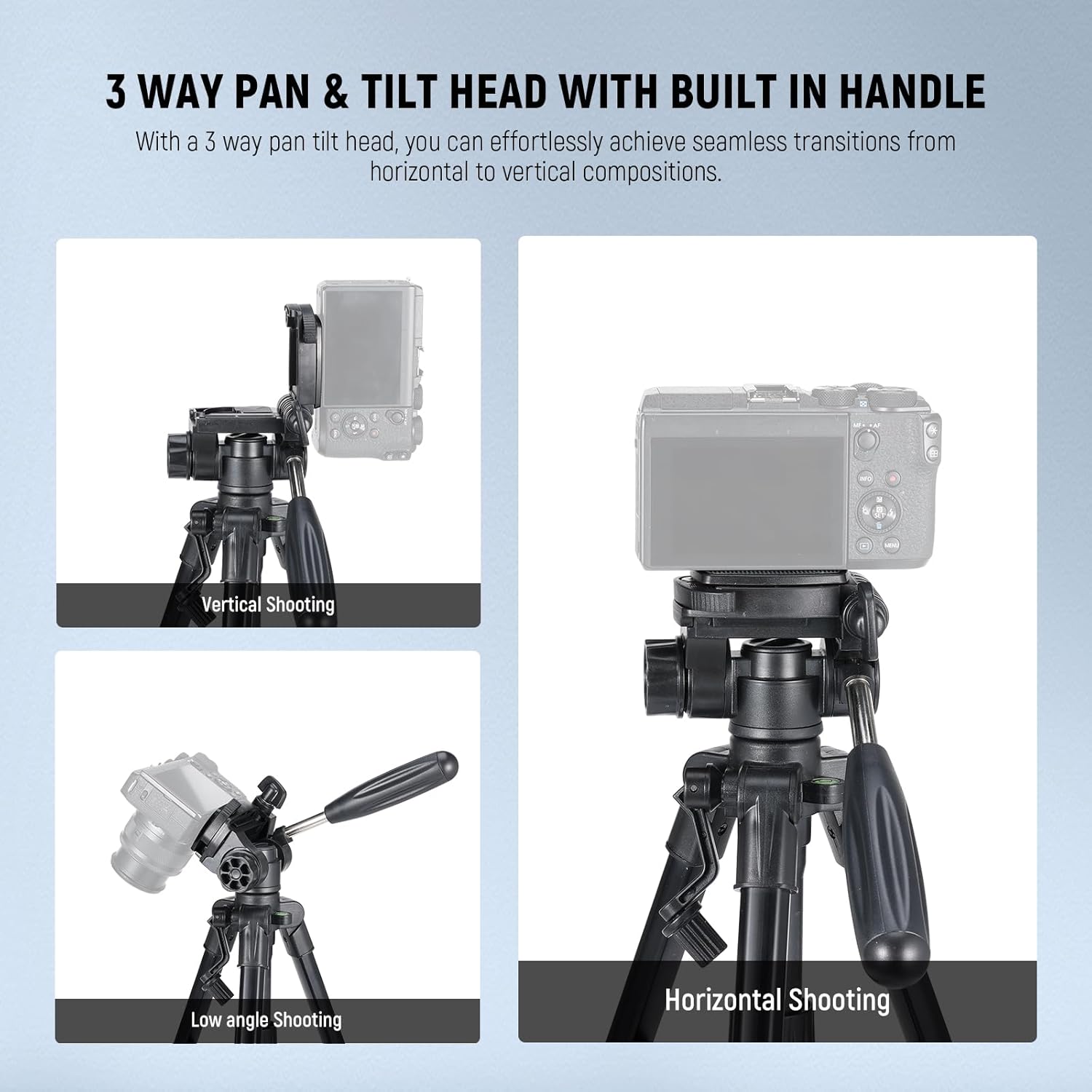
画像: This image illustrates the versatility of the 3-way pan tilt head, showing how to achieve vertical, low angle, and horizontal shooting compositions with the NEEWER Basic Mini Desk Tripod TP02.
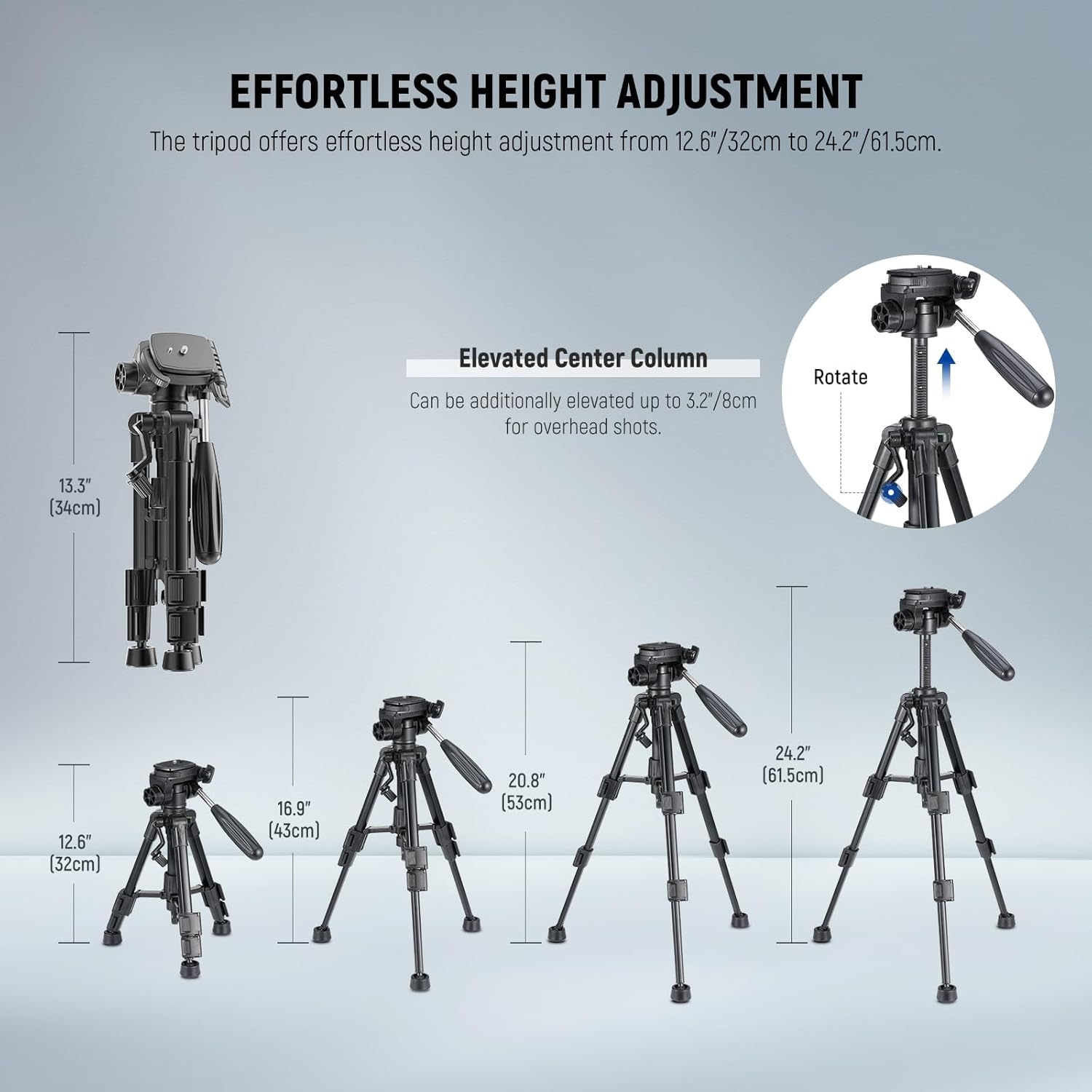
画像: This image demonstrates the effortless height adjustment capabilities of the tripod, ranging from 12.6 inches (32cm) to 24.2 inches (61.5cm), including the elevated center column for overhead shots.
メンテナンス
- クリーニング: 三脚は使用後、毎回柔らかく乾いた布で拭いてほこりやゴミを取り除いてください。頑固な汚れには、軽くこすった布で拭いてください。amp 布と中性洗剤で拭き、完全に乾かしてください。刺激の強い化学薬品は使用しないでください。
- 潤滑: Periodically check moving parts for smooth operation. If any parts feel stiff, apply a small amount of silicone-based lubricant. Avoid over-lubricating.
- ストレージ: Store the tripod in its carrying bag in a cool, dry place away from direct sunlight and extreme temperatures. Ensure all knobs are slightly loosened before storage to prevent stress on components.
- 検査: Regularly inspect all screws, knobs, and leg locks for tightness and wear. Tighten any loose components and replace worn parts as needed to maintain optimal performance and safety.
トラブルシューティング
- 三脚の不安定さ:
- Ensure all leg flip locks are fully engaged and tightened.
- Verify that the tripod legs are spread evenly and firmly on the surface.
- If using heavy equipment, consider hanging a counterweight from the hook on the center column.
- カメラは安全ではありません:
- Check that the quick release plate is correctly attached to your camera and the mounting screw is tight.
- Ensure the quick release plate is fully inserted into the tripod head and the quick release lock knob is securely tightened.
- Stiff Pan/Tilt Movement:
- Loosen the horizontal rotation lock knob and vertical tilt lock knob sufficiently.
- Clean any accumulated dust or debris from the pan/tilt mechanism. If necessary, apply a small amount of silicone lubricant.
仕様
| 特徴 | 詳細 |
|---|---|
| モデル名 | TP02 |
| ブランド | ニーワー |
| 材料 | アルミニウム合金、プラスチック |
| 色 | 黒 |
| 対応デバイス | DSLR Camera, Webcam, Action Camera, Smartphone (adapter/holder not included) |
| 最大積載量 | 4.4ポンド / 2kg |
| アイテム重量 | 1.6ポンド / 731グラム |
| 最小高さ | 12.6インチ / 32cm |
| 最大高さ | 24.2インチ / 61.5cm |
| 折りたたみサイズ | 13.4"x4.7"x3.9" / 34x12x10cm |
| 雲台タイプ | 3-Way Pan Tilt Head |
| 取り付けネジ | 1/4インチ |

画像: A visual representation of the NEEWER Basic Mini Desk Tripod TP02 alongside its key specifications, including model, item type, compatibility, application, main features, mounting points, material, load capacity, dimensions, folded size, and weight.
箱の中身
- 1 x Mini Tripod with 3-Way Head
- キャリーバッグ x 1。

画像: The NEEWER Basic Mini Desk Tripod TP02 shown folded and stored within its black carrying bag, highlighting its portability.
保証とサポート
This NEEWER product comes with a 1年間のメーカー保証. For any support inquiries or warranty claims, please contact NEEWER customer service directly or visit their official webサポートサイト。