
導入
The Homey Pro mini is a powerful smart home hub designed to unify and manage all your smart devices from a single platform. It allows you to control and automate your devices, monitor real-time and historical energy usage, and receive sensor alerts. With advanced features like Homey Flow, Energy, Dashboards, and Insights, the Homey Pro mini provides comprehensive control and automation for your smart home ecosystem.

Figure 1: The Homey Pro mini device, showcasing its compact design and front LED indicator.
主な特徴
- Effortless & Local Smart Home Control: Automate and manage all your smart devices from one place. Monitor energy usage, receive real-time alerts, and enjoy local data processing for enhanced privacy and reliability, even when the internet is down.
- Automate Your Life with Homey Flow: Create personalized routines. Turn off all devices with one tap, play music when you get home, or build advanced workflows with the Homey desktop app for full customization.
- Works with 1000+ Brands: Seamlessly integrates with popular smart home brands like Sonos, Philips Hue, Ecobee, LG, Yale, Govee, TP-Link, and more. Access an expanding library of official and community-developed Homey Apps.
- マルチプロトコルの互換性: Supports Zigbee, Matter, Thread, and Ethernet out of the box.
- サブスクリプションは不要です: Enjoy unlimited access to all Homey features, including cloud services like remote access and voice assistant integrations (Alexa, Google Assistant, Siri), without a monthly fee.
- Privacy First with Secure Backups: Back up your Homey locally or to the cloud to protect settings and automations, with easy restoration.

Figure 2: Homey's user-friendly interfaces across various devices, demonstrating control and automation capabilities.

Figure 3: Homey Pro mini's broad compatibility with over 1,000 smart home brands.

Figure 4: The Homey Energy feature, providing insights into energy consumption and potential savings.
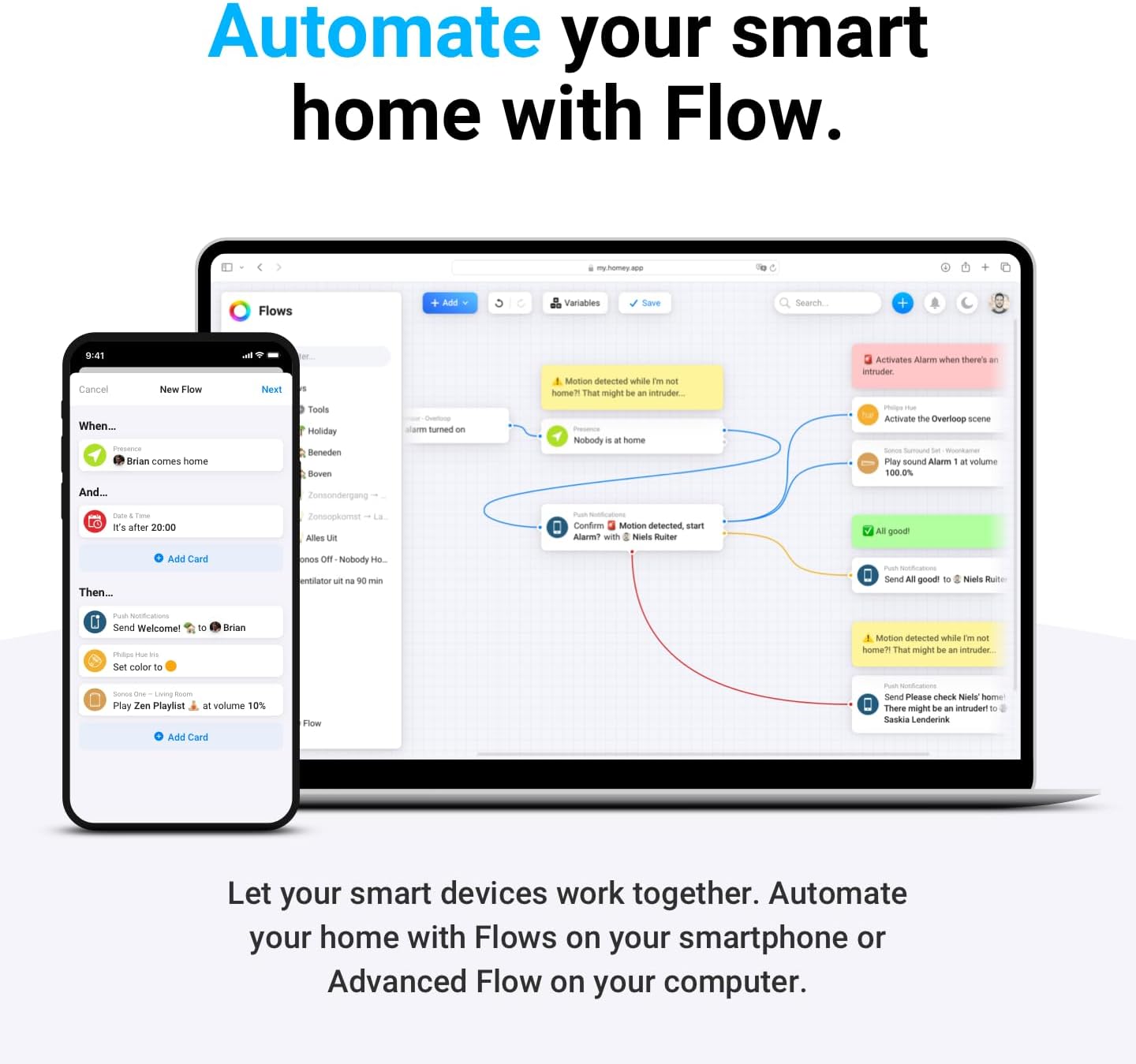
Figure 5: Automating smart home devices using Homey Flow on mobile and desktop applications.

Figure 6: Homey Pro mini's compatibility with popular voice assistants for hands-free control.
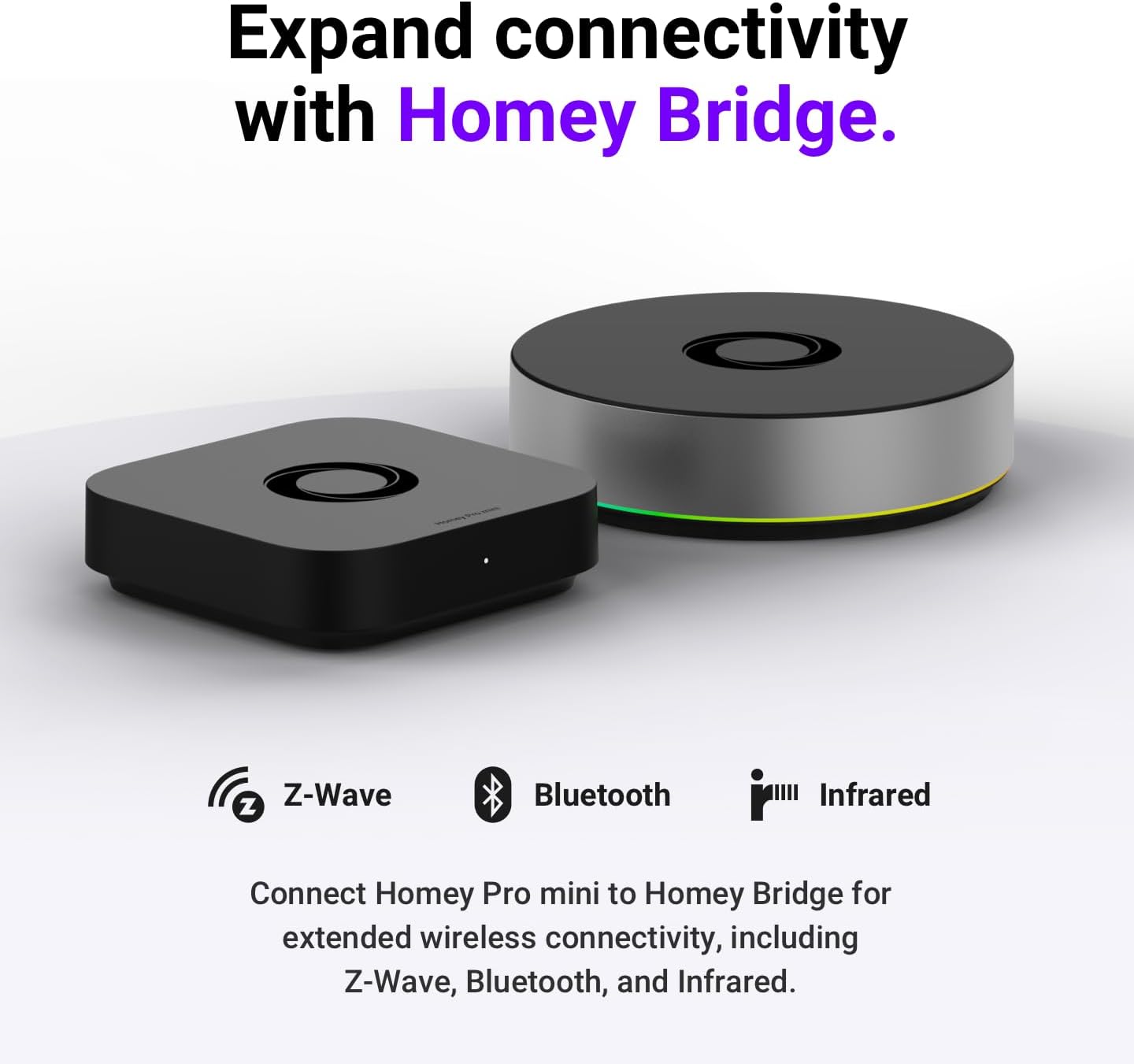
Figure 7: Expanding Homey Pro mini's connectivity with the Homey Bridge for Z-Wave, Bluetooth, and Infrared devices.
セットアップガイド
箱の中身
Upon opening your Homey Pro mini package, please ensure all the following components are present:
- Homey Pro mini device
- 電源アダプター
- USB-C-USB-Cケーブル
- イーサネットケーブル(Cat5e)
- ユーザーマニュアル(このドキュメント)
初期設定
- 電源接続: Connect the provided USB-C to USB-C cable to the Homey Pro mini and then connect it to the power adapter. Plug the power adapter into a wall outlet. The LED indicator on the Homey Pro mini will illuminate.
- ネットワーク接続: Connect one end of the Ethernet Cable (Cat5e) to the Ethernet port on the Homey Pro mini and the other end to an available LAN port on your internet router or network switch.
- Download Homey App: Download the official Homey app from your smartphone's app store (available for iOS and Android).
- アカウント作成/ログイン: Open the Homey app and follow the on-screen instructions to create a new Homey account or log in with an existing one.
- Pairing Homey Pro mini: The app will guide you through the process of discovering and pairing with your new Homey Pro mini. Ensure your smartphone is connected to the same local network as your Homey Pro mini during this step.
- 初期設定: Once paired, the app will prompt you to configure basic settings, such as your home's location and time zone.
- アプリをインストール: From the Homey app, navigate to the "Apps" section to install apps for the smart devices and brands you wish to connect (e.g., Philips Hue, Sonos, etc.).
操作手順
スマートデバイスの接続
After installing the relevant apps for your smart devices, follow the in-app instructions to add and pair each device with your Homey Pro mini. Homey supports various protocols including Zigbee, Matter, and Thread directly. For Z-Wave, Bluetooth, and Infrared devices, a Homey Bridge (sold separately) is required.
Using Homey Flow for Automation
Homey Flow allows you to create powerful automations. Access the "Flows" section in the Homey app or desktop application. Flows are built using "When," "And," and "Then" cards:
- いつ: Triggers for the flow (e.g., "Motion detected," "Time is 7 PM," "Door opens").
- そして: Conditions that must also be true for the flow to run (e.g., "It's dark outside," "Nobody is home").
- それから: Actions Homey performs when the trigger and conditions are met (e.g., "Turn on lights," "Play music," "Send notification").
You can create simple one-tap scenes or complex multi-device automations.
Monitoring Energy with Homey Energy
The Homey Energy feature provides detailed insights into your home's energy consumption and generation. Access it via the "Energy" tab in the Homey app. You can view real-time data, historical trends, and identify opportunities to save energy by integrating energy-monitoring devices and creating energy-aware Flows.
音声制御の統合
Homey Pro mini integrates with popular voice assistants like Amazon Alexa, Google Assistant, and Apple Siri. To enable voice control:
- Ensure your Homey Pro mini is connected to the internet.
- Open the Homey app and navigate to "Settings" > "Integrations."
- Select your preferred voice assistant and follow the instructions to link your Homey account.
- Once linked, you can use voice commands to control your devices and activate Homey Flows.
メンテナンス
ソフトウェアアップデート
Homey Pro mini receives regular software updates to improve performance, add new features, and enhance security. Ensure your device is connected to the internet to receive these updates automatically. You can check for updates manually in the Homey app under "Settings" > "System."
クリーニング
To clean your Homey Pro mini, gently wipe the exterior with a soft, dry, lint-free cloth. Do not use liquid cleaners, aerosols, or abrasive materials, as these can damage the device.
Secure Backups
Regularly back up your Homey configuration to protect your settings and automations. Homey offers both local and cloud backup options. Access backup settings in the Homey app to schedule or perform manual backups. This ensures you can easily restore your smart home setup in case of an issue.
トラブルシューティング
| 問題 | 考えられる原因 | 解決 |
|---|---|---|
| Homey Pro mini not powering on. | 電源アダプターが接続されていないか、コンセントに障害があります。 | 電源アダプターがデバイスにしっかりと接続され、電源コンセントが機能していることを確認してください。別のコンセントをお試しください。 |
| Cannot connect to Homey Pro mini via app. | Network issue, incorrect Wi-Fi/Ethernet connection, or app glitch. |
|
| Smart device not responding. | Device not paired, out of range, or app not installed. |
|
| Flows are not executing. | Incorrect Flow logic, device offline, or conflicting automations. |
|
仕様
| 属性 | 詳細 |
|---|---|
| モデル番号 | HOMEY-PRO-MINI-US-01 |
| メーカー | アトム B.V. |
| 寸法(長さ×幅×高さ) | 3.9 x 3.9 x 1インチ |
| アイテム重量 | 1.19ポンド |
| 色 | 黒 |
| 接続性 | Zigbee, Matter, Thread, Ethernet (Z-Wave, Bluetooth, Infrared via Homey Bridge) |
| 電源 | 電源アダプター(USB-C) |
| 含まれるコンポーネント | Homey Pro mini, Power Adapter, USB-C to USB-C cable, Ethernet Cable (Cat5e), User Manual |
| 電池が必要 | いいえ |
保証情報
The Homey Pro mini comes with a standard manufacturer's warranty. For detailed information regarding the warranty period, coverage, and terms and conditions, please refer to the warranty card included in your product packaging or visit the official Homey webサイトでご確認ください。保証請求の際に必要となりますので、購入証明書を保管してください。
サポート
For further assistance, technical support, or to explore additional features and integrations, please visit the official Homey support resources:
- Homey Official Webサイト: Visit the Homey Store on Amazon (for product information and links to official resources)
- オンライン ナレッジ ベース: Access FAQs, setup guides, and troubleshooting articles.
- コミュニティフォーラム: Connect with other Homey users and experts.
- 直接サポート: Contact Homey customer service for personalized assistance.
Always refer to the latest information available on the official Homey web最新のサポートと製品の詳細については、サイトをご覧ください。