
1. はじめに
This manual provides detailed instructions for the installation, operation, and maintenance of your ZOSI 4K PoE Security Camera System. This system is designed to provide comprehensive surveillance with high-resolution video, advanced detection features, and convenient remote access. Please read this manual thoroughly before installation and use to ensure proper functionality and safety.
ビデオ: 入門view of the ZOSI 4K PoE Security Camera System, highlighting its key features and benefits.

Image: The ZOSI 4K PoE Security Camera System, showcasing the NVR and four dome cameras, emphasizing person and vehicle detection capabilities.
2. パッケージ内容
下記のすべての品目がパッケージに含まれていることをご確認ください。不足品や破損品がある場合は、ZOSIカスタマーサポートまでご連絡ください。
- 1 x 8-Channel 4K 8MP NVR with 2TB Hard Drive
- 4K 4MP PoE CCTVカメラ 8台
- 4 x 60 フィートのイーサネット ケーブル
- 1 xNVR電源
- HDMIケーブル x 1
- イーサネットケーブル x 1 (NVR ネットワーク接続用)
- 1 x USBマウス
- 1 x取り付けネジバッグ
- クイックスタートガイド x 1
- Mounting Template(s)
- Warning Sticker(s)

Image: Visual representation of all components included in the ZOSI 4K PoE Security Camera System package, such as the NVR, cameras, cables, and accessories.
3.システムオーバーview
3.1 ネットワークビデオレコーダー(NVR)
NVRはビデオ映像を録画、保存、管理するための中心ユニットです。tage from your PoE cameras. It features 8 PoE ports for direct camera connection and is expandable to a 16-channel system with an additional PoE switch. A 2TB surveillance-grade HDD is pre-installed for local storage.
- ビデオ入力: 8 channels via RJ45 PoE ports, expandable to 16 channels.
- ビデオ出力: HDMI, VGA.
- ストレージ: 2TB pre-installed HDD, supports auto-overwrite.
- 圧縮: H.265+ for efficient storage.
- USB ポート: 2 (for mouse, USB backup).

Image: The ZOSI 4K NVR unit, highlighting its 2TB hard drive capacity and capability for continuous 24/7 recording.

Image: Comparison illustrating the efficiency of H.265+ video compression over H.264, showing reduced file ビデオ品質を維持しながらサイズを縮小します。
3.2 PoE IPカメラ
The system includes four 8MP (4K) PoE IP cameras designed for both indoor and outdoor use. These cameras receive power and data through a single Ethernet cable, simplifying installation.
- 解決: 4K (8MP) Ultra HD for clear imaging.
- レンズ: 4.0mm fixed lens with a 90-degree view角度。
- ナイトビジョン: Spotlight for color night vision, 4 IR-LEDs for up to 100ft B/W night vision.
- オーディオ: 双方向オーディオ用のマイクとスピーカーが内蔵されています。
- 検出: Person, vehicle, and face detection with AI-powered smart alerts.
- 耐候性: IP66 rated for outdoor durability, operating in temperatures from -10°C to 66°C (14°F to 151°F).

Image: A ZOSI PoE IP camera shown in various indoor and outdoor environments, emphasizing its IP66 weatherproof rating and suitability for diverse conditions.

Image: A close-up of a ZOSI PoE camera, highlighting its 4K resolution capabilities for clear and detailed surveillance.
4.セットアップガイド
4.1 システムの接続
- カメラをNVRに接続します。 Use the provided Ethernet cables to connect the PoE IP cameras to the PoE ports on the back of the NVR. The cameras will receive both power and video signal through these cables.
- NVR をモニターに接続します。 HDMI または VGA ケーブルを使用して NVR をモニターまたはテレビに接続します。
- NVR をネットワークに接続します。 Connect the NVR's NETWORK port to your router using an Ethernet cable for remote access and app functionality.
- USBマウスを接続します: システムナビゲーションのために、USB マウスを NVR の USB ポートの 1 つに接続します。
- 電源オン: Connect the NVR power supply to the NVR and then to a power outlet. The system will boot up automatically.

Image: A detailed diagram of the ZOSI NVR's back panel, illustrating all available ports and their respective connections for power, video input, audio, and network.

Image: A diagram demonstrating the simple plug-and-play PoE setup, showing how a single Ethernet cable connects the IP camera to the PoE NVR for both power and data.
4.2 拡張性
Your 8-channel NVR can be expanded to support up to 16 cameras by adding an external PoE switch. This allows for scalable surveillance coverage for larger properties.
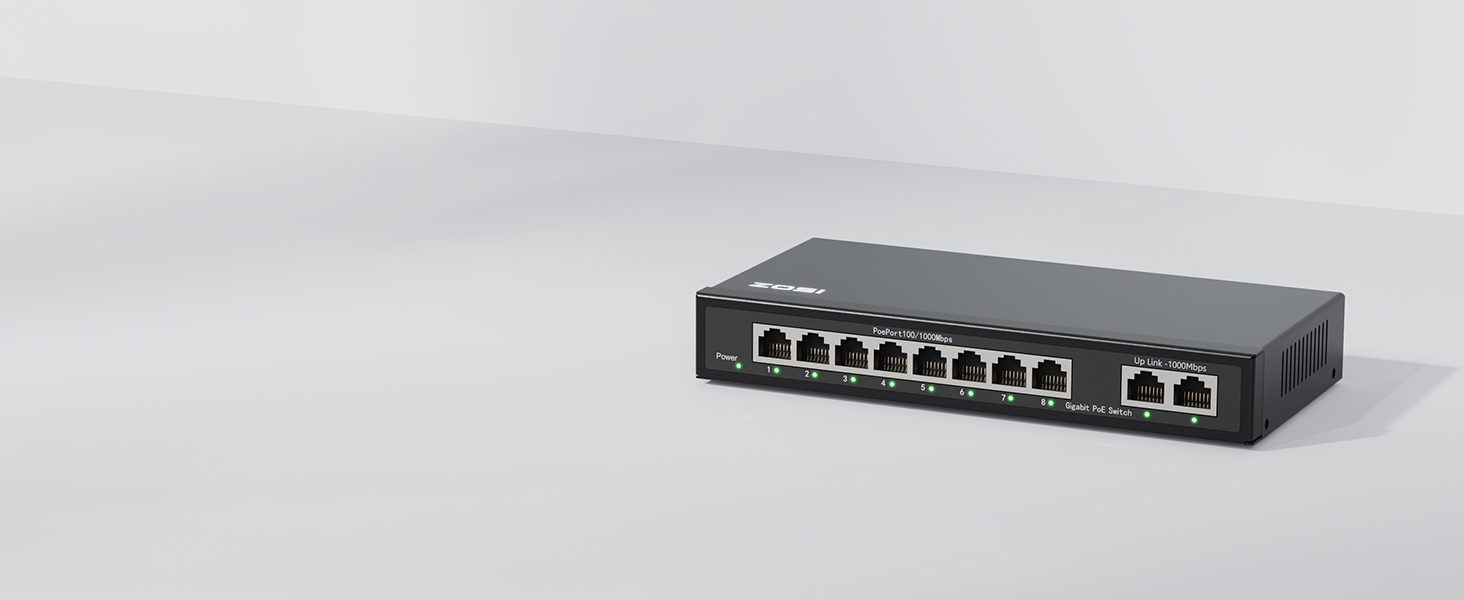
Image: An 8-port PoE switch, illustrating how it can be integrated to expand the camera capacity of the ZOSI NVR system.

Image: A visual representation of a fully expanded 16-channel PoE camera system, showing multiple camera feeds on a monitor, demonstrating the system's scalability.
5. 操作手順
5.1 初期設定とアプリのダウンロード
- 初回ログイン: Follow the on-screen prompts on your connected monitor to complete the initial NVR setup, including setting a password.
- Zosi Smartアプリをダウンロード: Scan the QR code provided in the Quick Start Guide or search for "Zosi Smart" in your mobile app store (iOS/Android).
- デバイスを追加: Open the app, create an account, and follow the instructions to add your NVR system by scanning the QR code on the NVR or manually entering its details.

Image: A QR code for easy download of the Zosi Smart mobile application, facilitating remote access and control of the security system.
5.2 リモートアクセスとライブ View
Once the NVR is connected to your network and added to the Zosi Smart App, you can view live camera feeds from anywhere using your smartphone, tablet, or computer.

Image: Various devices (smartphone, tablet, laptop, desktop) displaying live feeds from the ZOSI security camera system, illustrating remote access capabilities.
5.3 双方向オーディオ
Each camera is equipped with a built-in microphone and speaker, enabling two-way communication through the Zosi Smart App. This allows you to speak to individuals near the camera or deter intruders.

Image: A user interacting with the Zosi Smart App on a smartphone, demonstrating the two-way audio feature to communicate with someone near the camera.

Image: A person speaking into a ZOSI camera, with speech bubbles indicating real-time two-way communication, showing the interactive audio feature.
5.4 スマート検出とアラート
The system utilizes AI-powered detection to identify persons, vehicles, and faces, reducing false alarms from irrelevant movements. You can customize detection zones and sensitivity settings.
- 人物/車両検出: Receive alerts only when a human or vehicle is detected.
- カスタマイズ可能なゾーン: Define specific areas for detection to focus on critical points.
- アラート: Get real-time push notifications via the app and email alerts.

Image: A visual demonstrating the AI detection capabilities, highlighting detected faces, persons, and vehicles with corresponding app push notifications and email alerts.

Image: A scene showing a person and a vehicle, with bounding boxes indicating successful AI detection, demonstrating the system's ability to differentiate objects.

Image: A grid overlay on a surveillance scene, illustrating how users can define and customize specific detection zones to focus on areas of interest.
5.5 積極的抑止
When a person is detected, the cameras can activate a spotlight and siren alarm to deter potential intruders, providing an active layer of security.

Image: A security camera activating a spotlight and siren to deter an intruder, demonstrating the active deterrence feature of the system.

Image: A security camera's spotlight illuminating a person in the dark, illustrating the deterrence effect of the integrated spotlight.
5.6 ナイトビジョンモード
The cameras offer multiple night vision modes to ensure clear footage in low-light conditions:
- カラーナイトビジョン: Utilizes spotlights to capture full-color video in darkness.
- スターライトナイトビジョン: High-performance sensor captures more light for vibrant colors in low-light.
- B&W Night Vision: Infrared LEDs provide clear black and white footag最大100フィート。

Image: A split image showing the same outdoor scene in daylight with 4K Ultra HD clarity and at night with Starlight Night Vision, demonstrating superior low-light performance.

Image: An outdoor scene at night captured with full-color night vision, showcasing the camera's ability to render colors even in dark conditions.

Image: An outdoor scene at night captured with starlight night vision, demonstrating enhanced detail and color reproduction in very low ambient light.

Image: An outdoor scene at night captured in black and white night vision, showing clear visibility provided by infrared illumination.
5.7 録音と再生
The NVR records 24/7 to the pre-installed 2TB hard drive. You can review 記録されたfootage via the NVR interface or the Zosi Smart App.
- 24時間7日録画: Continuous recording ensures no moment is missed.
- イベント録画: Configure the system to record only when motion or specific events are detected.
- スマート再生: 記録されたfooを簡単にナビゲートtage using a timeline to find specific events.
- ローカルストレージ: すべてのフーtage is stored locally on the 2TB HDD, with no monthly fees.

Image: A monitor displaying multiple camera feeds, with a 24/7 clock icon, indicating continuous recording by the ZOSI NVR system.

Image: A timeline interface showing recorded events, with specific time markers for quick navigation and review of detected activities.

Image: A graphic emphasizing local storage with no monthly fees, represented by a large '0' icon, highlighting cost-effective data retention.
6. メンテナンス
定期的なメンテナンスにより、セキュリティ システムの最適なパフォーマンスと寿命が確保されます。
- カメラレンズのクリーニング: カメラのレンズは定期的に柔らかくてきれいな布で拭いてください。amp 画像の鮮明さに影響を与える可能性のあるほこりや汚れを取り除くための布。
- ケーブル接続を確認します。 Ensure all Ethernet cables are securely connected to both cameras and the NVR to prevent signal loss.
- ファームウェアの更新: Check the Zosi Smart App or ZOSI website for available firmware updates for your NVR and cameras. Updates can improve performance and add new features.
- ハードドライブの健全性: The NVR's 2TB HDD is designed for continuous recording. Monitor its health through the NVR settings periodically.
- 重要なFooのバックアップtage: 重要なビデオファイルを定期的にバックアップするtage to a USB drive or other storage solution as needed.
7。 トラブルシューティング
ZOSI セキュリティ システムで問題が発生した場合は、次の一般的なトラブルシューティング手順を参照してください。
| 問題 | 考えられる解決策 |
|---|---|
| カメラからの映像がありません | Check Ethernet cable connection. Ensure camera is powered (PoE). Restart NVR. |
| システムにリモートアクセスできません | Verify NVR is connected to the internet. Check router settings (firewall, port forwarding if necessary). Ensure Zosi Smart App is updated. |
| 画質が悪い | Clean camera lens. Check for obstructions. Ensure camera resolution settings are optimal. |
| 誤ったモーションアラート | Adjust detection sensitivity and customize detection zones in the NVR settings or Zosi Smart App. |
| Hard drive full / not recording | Check hard drive status in NVR settings. Ensure auto-overwrite is enabled. Format HDD if necessary (this will erase all data). |
さらにサポートが必要な場合は、ZOSI カスタマー サポートにお問い合わせください。
8. 仕様
Detailed technical specifications for the ZOSI 4K PoE Security Camera System.
| 特徴 | 詳細 |
|---|---|
| ブランド | ゾシ |
| モデル番号 | 88N2-2258B4-US-V2 |
| 接続技術 | 有線(PoE) |
| ビデオキャプチャ解像度 | 4K(8MP) |
| チャンネル数 | 8 (16 まで拡張可能) |
| メモリストレージ容量 | 2TB HDD |
| オペレーティング·システム | リナックス |
| 特集 | App Control, Audio Recording, Human Detection, Privacy Masking, Vehicle Detection, Spotlight, Color Night Vision |
| 暗視範囲 | 100 Feet (B/W IR) |
| フレームレート | 30fps |
| 録画モード | Event, Manual, Continuous |
| レンズタイプ | 修理済み |
| View角度 | 90度 |
| 耐候性評価 | IP66 |
| 色 | 黒 |
| アイテムの寸法 | 13 x 12 x 7インチ |
9. 保証とサポート
ZOSI は、信頼性の高い製品と優れた顧客サービスの提供に尽力しています。
9.1 保証情報
パッケージに同梱されている保証書を参照するか、ZOSIの公式ウェブサイトをご覧ください。 web保証条件の詳細については、ウェブサイトをご覧ください。保証請求の際は、購入証明としてレシートを保管してください。
9.2 カスタマーサポート
For technical assistance, troubleshooting, or any questions regarding your ZOSI product, please contact our customer support team. You can find contact information on our official webサイトまたは Zosi Smart アプリを通じて入手できます。
- オンラインサポート: 訪問する ZOSI Official Store on Amazon FAQ とサポート リソースについては、こちらをご覧ください。
- メールサポート: Refer to your Quick Start Guide for the support email address.
- 電話サポート: Refer to your Quick Start Guide for the support phone number.

Image: A graphic illustrating ZOSI's commitment to customer priority, including fast delivery, quick response, and lifetime customer support.

Image: A visual representing data privacy and security, with a house protected by a shield, emphasizing ZOSI's commitment to user privacy and secure data encryption.